- Top Pick: Metro DataVac ED500 Electric Duster
- Runner-up: Specs
- Also consider: Falcon Dust-Off DPSXL Compressed Gas Duster 10 oz
Dust is the slow enemy of every desktop, settling on fan blades, packing into heatsink fins, clogging case filters, and dulling screens until temperatures climb and fan noise rises. A proper cleaning kit turns that chore into a ten-minute routine, and the right kit depends on what you clean most: the inside of the case, the keyboard, or the screen.
- Quick Answer
- 1. Metro DataVac ED500 Electric Duster
- 2. Falcon Dust-Off DPSXL Compressed Gas Duster 10 oz
- 3. WHOOSH! Screen Shine Duo Screen Cleaner Kit
- 4. VICHYIE 20-in-1 Multifunctional Cleaner Kit
- 5. OXO Good Grips Sweep & Swipe Laptop Cleaner
- How to choose
- Who should skip
- Frequently Asked Questions
- Final verdict
This guide covers five kits for those jobs: a corded electric blower, a classic canned-air duster, a screen spray kit, a twenty-piece tool kit, and a compact brush-and-wipe tool. Every pick below carries a confirmed Amazon ASIN, and the notes flag exactly where that confirmation came from.
As an Amazon Associate, we earn from qualifying purchases.
Quick Answer
For a full interior clean, the Metro DataVac ED500 is the strongest pick, with a corded motor that never runs out of air. For occasional cleaning, the Falcon Dust-Off can is the simplest option. For screens, the WHOOSH! Duo covers monitors and laptops, while the VICHYIE twenty-piece kit handles keyboards and small parts.
1. Metro DataVac ED500 Electric Duster
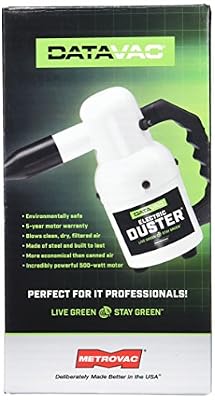
The Metro DataVac ED500 is the workhorse of this guide: a corded electric blower built for repeated use, replacing can after can of compressed air with one tool that runs as long as the job takes. The motor is listed in the 500-watt class at 0.75 horsepower on a 120-volt supply, and the unit ships with two nozzles and a four-piece micro cleaning tool kit for tight corners.
Airflow is the one figure to read with care: retail listings quote 70 CFM, while the maker’s own specification sheet lists 51 CFM for the same series, so neither figure is treated here as settled fact. The body is compact steel, with a 12-foot cord and a weight of about 2.75 pounds. It suits anyone who cleans more than one machine, or the same machine often, but it is loud, blows dust outward, and needs an outlet nearby. It has no stated anti-static protection, so handle exposed components with care. The ESD-safe version is a separate model with its own listing.
Specs
| Spec | Detail |
|---|---|
| Type | Corded electric blower |
| Motor | 500-watt class, 0.75 HP, 120 volt |
| Airflow | Disputed: 70 CFM retail, 51 CFM maker sheet |
| Cord length | 12 feet |
| Weight | About 2.75 pounds |
| Included | Concentrator nozzle, flare nozzle, 4-piece micro kit |
| Model | 117-117308 |
| UPC | 013039059857 |
| ASIN | B001J4ZOAW |

2. Falcon Dust-Off DPSXL Compressed Gas Duster 10 oz

The Falcon Dust-Off DPSXL is the classic canned-air duster, and it earns its place here because it is the simplest tool in the guide. There is nothing to charge or plug in: point the straw, press the trigger, and a directed blast pushes dust off fan blades, out of heatsink fins, and through case vents. The can holds 10 fluid ounces of 152a compressed gas, listed as 100 percent ozone safe with no CFCs, HCFCs, propane, or butane.
A bitterant is added to discourage inhalant abuse, worth knowing before storing the can within reach of children. The can is classed as a hazardous material for shipping, so it is non-returnable, and it should be kept upright and away from heat. Like every canned duster, it loses pressure as it empties and can spray cold liquid if tilted, so short upright bursts work better than one long blast. This is the right pick for occasional cleaning, but not the economical choice for frequent cleaning, since each can runs out and replacements add up. The DPSXL3 three-pack and DPSXL6 six-pack are separate listings, so confirm the single-can listing and its ASIN together.
Specs
| Spec | Detail |
|---|---|
| Type | Disposable compressed gas duster |
| Volume | 10 fluid ounces |
| Propellant | 152a compressed gas |
| Ozone safety | Ozone safe; no CFCs, HCFCs, propane, butane |
| Bitterant | Added to discourage inhalant abuse |
| Model | DPSXL |
| UPC | 086216118418 |
| Item weight | Excerpt lists 0.8 oz vs 10 oz volume |
| ASIN | B00RY43LQA |
3. WHOOSH! Screen Shine Duo Screen Cleaner Kit

The WHOOSH! Screen Shine Duo is the screen specialist in this guide. The kit pairs two bottles of screen cleaner spray, one 3.4-ounce bottle for the desk and one 0.3-ounce bottle for travel, with two 6-by-6-inch microfiber cloths. The formula is described as safe for every screen and coating, from glossy laptop panels to anti-glare monitors, and the cloths are the dense microfiber type that lifts fingerprints without leaving lint behind.
The two-bottle setup is the practical reason to pick the Duo: the small bottle travels in a laptop bag, the large bottle stays at the desk, and both use the same spray. Two things deserve a note before ordering. First, the Duo is a screen kit, not a case cleaner: it does nothing for dust inside the machine, so pair it with a blower or a canned duster. Second, the WHOOSH! line has several near-identical kits, including an older Duo under a different ASIN and the large Pro refill bottle, so confirm the two-bottle Duo and its ASIN together.
Specs
| Spec | Detail |
|---|---|
| Type | Screen cleaner spray kit |
| Contents | 3.4 oz and 0.3 oz bottles, 2 cloths (6 x 6 in) |
| Formula | Safe for all screens and coatings |
| Part number | 1FGAMZDOU |
| UPC | 837296002605 |
| ASIN | B07BVZ4TN7 |
4. VICHYIE 20-in-1 Multifunctional Cleaner Kit

The VICHYIE 20-in-1 kit is the most complete tool set in this guide, and it is the pick for keyboards and small parts. The compact case holds twenty tools, including a cleaning pen with a metal tip, a sponge brush, a mini soft brush, a round brush, a keyboard brush, a keycap puller, a switch puller, a spray bottle, a fiber fleece swipe, an air blower with long and short nozzles, a lens cleaning pen with a soft pad, hard and soft bristled brushes, and a card remover. That spread covers the jobs a blower alone cannot do, like lifting crumbs from between keys and wiping a camera lens.
The keycap and switch pullers need the most care: only parts the keyboard maker identifies as user-removable should come off, and the keyboard should be disconnected first. At 35 grams it fits easily in a desk drawer, though the small parts are easy to misplace if the case is left open. One listing trap matters: the black version is a separate listing under a different ASIN with model Q20, so confirm the color and the ASIN together. The kit also suits small electronics generally, from earbuds to cameras.
Specs
| Spec | Detail |
|---|---|
| Type | 20-piece multifunctional cleaning tool kit |
| Contents | Cleaning pen, brushes, keycap and switch pullers, spray bottle, air blower, lens pen, card remover |
| Weight | 35 grams |
| Color | White |
| GTIN | 06973337769428 |
| ASIN | B0CH9ZQ459 |
5. OXO Good Grips Sweep & Swipe Laptop Cleaner
The OXO Good Grips Sweep & Swipe Laptop Cleaner is the smallest tool in this guide, and it is the pick for daily tidying rather than deep cleaning. One end carries a retractable soft brush for keyboard debris, and the other a microfiber pad for screen fingerprints and smudges. The two tools store together in one compact unit that fits in a laptop bag or a desk drawer.
The appeal is simplicity: no spray to refill, no battery to charge, and no cord to find, so it is ready whenever a keyboard needs a quick sweep. The brush retracts for storage, and the microfiber pad handles everyday screen marks that a blower cannot touch. OXO lists laptops, phones, and tablets as intended uses, and the listing identifies it as a single white unit under model 12246100. The limits are plain: it will not clear dust from inside a case, reach under keycaps, or disinfect. The pad and bristles need occasional washing and air-drying to keep working well.
Specs
| Spec | Detail |
|---|---|
| Type | Retractable brush and microfiber pad cleaner |
| Tools | Retractable brush, microfiber pad |
| Intended use | Laptops, phones, tablets |
| Color | White |
| Model | 12246100 |
| Dimensions | Not stated |
| ASIN | B07W1L7TCF |
How to choose
Start with the job you do most often. If the inside of the case is the problem, an air tool is the answer: the corded DataVac suits frequent cleaning, while the Dust-Off can suits occasional cleaning with no setup. If the screen is the problem, the WHOOSH! Duo does the work, and the OXO tool handles the daily marks. If the keyboard is the problem, the VICHYIE kit reaches the places a blower cannot.
Match the tool to the machine. A desktop with removable side panels and washable filters benefits most from a blower, since the air has somewhere to go. A laptop benefits more from a brush and a spray kit, since the interior is harder to reach. Check what the kit includes before ordering, and confirm the exact model and ASIN together, since several picks have near-identical siblings under different codes.
Who should skip
Skip the corded blower if you clean one machine a few times a year, since a can of air or a brush kit covers that job for less money. Skip canned air if you clean often, since the cost of replacement cans adds up and the can runs out mid-job. Skip the screen spray if the monitor maker forbids liquid cleaners on its coating, and follow the display maker’s instructions before any spray touches the panel. Skip the twenty-piece kit if the small tools will sit unused, and skip the OXO tool if a deep clean is needed, since it will not clear a dusty interior.
Frequently Asked Questions
How often should a desktop PC be cleaned?
A desktop in a dusty room benefits from a light clean every one to two months, and a deeper clean of fans, heatsinks, and filters a few times a year. A machine in a clean room with filtered intake can go longer. Watch temperatures and fan noise: if either climbs without a change in workload, dust is a likely cause.
Is a corded electric blower safe for PC parts?
A blower is safe when used with care: hold fans still, keep the nozzle a short distance from parts, and work in short bursts. The standard DataVac model in this guide carries no stated anti-static protection, so careful handling around exposed components matters, and a grounded wrist strap is a sensible extra for expensive builds.
Can canned air damage a PC?
Canned air can spray cold liquid if the can is tilted or held upside down, and that liquid can harm components. Keep the can upright, use short bursts, and let the can warm up if it gets cold. Never spray into a running machine, and keep the can away from heat.
Does a screen spray work on every monitor?
No. Most modern monitors accept a gentle screen cleaner and a microfiber cloth, but some coatings forbid liquid cleaners, and the display maker’s instructions come first. Spray the cloth rather than the screen, wipe gently, and never use paper towels or glass cleaner on a coated panel.
Final verdict
The Metro DataVac ED500 is the best overall pick for anyone who cleans PCs often, because a corded blower never runs out of air. The Falcon Dust-Off can is best for occasional cleaning, the WHOOSH! Duo for screens, the VICHYIE kit for keyboards and small parts, and the OXO Sweep & Swipe for daily tidying. Start with the job you do most and add the rest as needed.