- Top Pick: Noctua NA-FC1 Manual PWM Fan Controller
- Runner-up: Corsair iCUE Commander CORE XT
- Also consider: ARCTIC Case Fan Hub
Most motherboards ship with only a few fan headers, and a case full of fans quickly runs past that limit. A fan controller adds the missing connections and a way to set speeds, whether by a physical dial, a motherboard curve, or software. The right choice depends on how many fans you run and whether they use four-pin PWM or three-pin connectors.
This roundup covers five real options, from a simple manual dial to a software hub that also handles lighting. The best pick is the one that matches your fan count, your connector types, and how much control you want over noise and airflow.
As an Amazon Associate, we earn from qualifying purchases.
Quick Answer
A fan controller adds fan headers and speed control when your motherboard runs short. The Noctua NA-FC1 suits a few PWM fans adjusted by hand, the ARCTIC Case Fan Hub covers up to ten fans from one header, and the Corsair Commander CORE XT adds software curves and RGB lighting. Mixed builds with older three-pin fans suit the Phanteks hub, which adjusts three-pin fan speeds too.
Noctua NA-FC1 Manual PWM Fan Controller
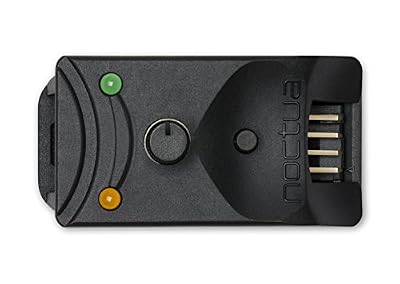
The Noctua NA-FC1 is the simplest controller in this roundup, and for many builds that is exactly the point. It is a compact manual dial that controls up to three four-pin PWM fans through the included three-way splitter cable.
Used on its own, the dial sets the duty cycle from 0 to 100 percent, so you can quiet the case fans by hand. Used with the motherboard, it works as a manual reduction on top of the automatic fan control, giving you a physical override for the curve the board already runs. A no-stop mode keeps connected fans above 300 rpm, which stops the BIOS from reporting a fan error when speeds drop low.
This budget pick suits a small build with one to three PWM case fans and an owner who prefers a physical control to another background program. It does not fit every build: it is built for four-pin PWM fans only, so three-pin fans are not a match, and it cannot set a different speed for each fan.
Specs
| Spec | Detail |
|---|---|
| Model | NA-FC1 |
| ASIN | B072M2HKSN |
| Fan ports | 3 via included splitter |
| Fan type | 4-pin PWM only |
| Control | Manual dial, 0 to 100 percent duty cycle |
| No-stop mode | Keeps fans above 300 rpm |
| Power input | SATA via included NA-AC4 adapter |
| Dimensions | 21 x 25 x 48 mm |
| Warranty | 6 years |
| Value group | Budget |
Corsair iCUE Commander CORE XT

The Corsair iCUE Commander CORE XT is the premium pick for builders who want software control and lighting in one box. It controls up to six PWM fans and up to six RGB devices with as many as 264 LEDs, and it adds two temperature sensors so curves can follow case air temperature rather than only processor temperature.
Everything runs through the iCUE software, which sets a separate curve for each fan channel and handles lighting effects across the connected RGB devices. The controller connects through an internal USB 2.0 header, so check that your board has a spare header before ordering.
This controller suits a Corsair RGB build with several fans, or any build where six fans and lighting should answer to one program. It does not fit builds without a spare internal USB 2.0 header, and it is built around four-pin PWM fans. It is also not compatible with CORSAIR SP RGB Series fans, so check your fan models against that limit first.
Specs
| Spec | Detail |
|---|---|
| Model | CL-9011112-WW |
| ASIN | B09GHTMJMY |
| Fan ports | 6 PWM |
| RGB channels | 6, up to 264 LEDs |
| Temperature sensors | 2 |
| Zero RPM mode | Yes |
| Connection | Internal USB 2.0 header |
| Control | iCUE software |
| First available | October 7, 2021 |
| Value group | Premium |
ARCTIC Case Fan Hub

The ARCTIC Case Fan Hub is a budget answer to the most common problem in this roundup: too many fans and too few headers. It is a ten-port PWM distributor that takes one PWM signal from a motherboard header and shares it across ten four-pin fans.
Each port carries up to 1 amp, with up to 4.5 amps total input, and all ten fans run at the same speed because they share one PWM signal. Only port 1 reports fan speed back to the motherboard, so the board sees one fan and the other nine follow. There is no dial and no software: your BIOS or board software sets the curve for every fan at once.
That single-curve behavior suits cases where every fan should ramp together. It does not fit builds that need a slow rear fan and a fast radiator fan on separate curves. It is also built for four-pin PWM fans, so three-pin fans are not a good match for speed control here.
Specs
| Spec | Detail |
|---|---|
| Model | ACFAN00175A |
| ASIN | B0887VG14J |
| Fan ports | 10, 4-pin PWM |
| Power input | SATA |
| Max per port | 1 amp |
| Max total input | 4.5 amps |
| RPM reporting | Port 1 only |
| Control | Shared motherboard PWM signal |
| First available | May 7, 2020 |
| Value group | Budget |
Phanteks Universal Fan Controller

The Phanteks Universal Fan Controller suits mixed builds with both four-pin PWM and older three-pin fans. It has eight ports, with four for four-pin PWM fans, three for three-pin fans, and port 1 auto-detecting either type. The controller converts the PWM signal to voltage control for the three-pin fans, so those older fans actually slow down instead of running at full speed.
A 30 watt total limit applies across all ports, and the unit ships with splitters for the fan connections. Only port 1 reports fan speed to the motherboard. All connected fans follow one signal, so there is no per-fan curve. Before ordering, confirm the listing shows model PH-PWHUB_02.
This controller suits a builder upgrading an older case full of three-pin fans, or anyone mixing new PWM fans with fans carried over from a previous build. It does not fit a build that needs separate speeds per fan, and high-draw fans need a check against the 30 watt total.
Specs
| Spec | Detail |
|---|---|
| Model | PH-PWHUB_02 |
| ASIN | B07NHQRCRM |
| Fan ports | 8 total: 4 PWM, 3 for 3-pin, port 1 auto-detect |
| Three-pin control | Yes, PWM signal converted to voltage control |
| Power input | SATA |
| Max total power | 30 watts |
| RPM reporting | Port 1 only |
| Control | Shared PWM signal |
| Splitters included | Yes |
| Value group | Mid-range |
Thermaltake Commander FP
The Thermaltake Commander FP is a second budget ten-port hub, and it suits builders who want the ARCTIC hub’s port count in a different brand with the same simple idea. Ten four-pin PWM ports run from one motherboard PWM signal, so a case full of fans needs only one header on the board.
All ten fans run in sync, since they share the single signal from the motherboard. There is no individual control, no dial, and no software. Three-pin fans connected to this hub run at full speed, because the hub passes a PWM signal and has no voltage conversion for older fans. Before ordering, confirm the listing names model AC-023-AN1NAN-A1.
This hub suits a large fan count on a tight budget where one curve for every fan is acceptable. It does not fit builds that need per-fan speeds, three-pin fan control, or any lighting control, since it handles fan power and speed only.
Specs
| Spec | Detail |
|---|---|
| Model | AC-023-AN1NAN-A1 |
| ASIN | |
| Fan ports | 10, 4-pin PWM |
| Power input | SATA |
| Control | Shared motherboard PWM signal |
| Individual control | No |
| Three-pin fans | Run at full speed |
| Lighting control | None |
| Value group | Budget |
How to choose
Four-pin PWM fans work with every controller here. Three-pin fans need voltage control, and only the Phanteks hub in this roundup converts a PWM signal to voltage for them. If your case mixes both types, that single detail decides the pick.
Next, decide whether your fans should share one speed or run on separate curves. Shared-signal hubs such as the ARCTIC hub, the Phanteks controller, and the Thermaltake Commander FP run every connected fan at the same speed. Only the Corsair Commander CORE XT sets a separate curve per fan, and only the Noctua NA-FC1 gives you a physical dial for manual adjustment.
Check the power limits before you connect a full set of fans. Each hub still has a ceiling: 1 amp per port and 4.5 amps total on the ARCTIC hub, and 30 watts total on the Phanteks controller. Software controllers need a spare internal USB 2.0 header, shared-signal hubs need one PWM header for the signal, and the NA-FC1 can run standalone on SATA power.
Who should skip
Skip a fan controller entirely if your motherboard already has a header for every fan and its BIOS curves do the job. A controller only earns its place when headers run short or when you want a dial, software curves, or lighting control in one place.
Skip the shared-signal hubs if you need a slow rear fan and a fast radiator fan on different curves, since those hubs run every fan at the same speed. Skip the software controller if you dislike background programs or have no spare internal USB 2.0 header. Skip every pick here if you want a front-panel bay unit, since all five mount inside the case.
Frequently Asked Questions
Do fan controllers work with three-pin fans?
Most PWM hubs do not slow three-pin fans. The Phanteks Universal Fan Controller converts the PWM signal to voltage control, so it can adjust three-pin fan speeds. On the ARCTIC hub or the Thermaltake Commander FP, three-pin fans run at full speed.
Can I control each fan at a different speed?
Only a per-channel controller does that. The Corsair Commander CORE XT sets a separate curve for each of its six fan channels through software. The shared-signal hubs run every connected fan at the same speed from one motherboard signal. If per-fan speeds matter, pick a per-channel controller.
How many fans can one hub power?
Check the per-port limit and the total limit, since both apply. The ARCTIC Case Fan Hub allows up to 1 amp per port and 4.5 amps total input, while the Phanteks controller allows 30 watts total across its ports. Add up your fans before connecting a full set to one hub.
Do I still need a motherboard fan header?
A shared-signal hub needs one PWM header to supply the speed signal, even though power comes from SATA. A software controller needs a spare internal USB 2.0 header instead. The Noctua NA-FC1 is the exception here: it can run standalone on SATA power, so it needs no header at all when used on its own.
Final verdict
The Noctua NA-FC1 is the pick for a few PWM fans adjusted by hand. The ARCTIC Case Fan Hub is the pick for ten fans on a budget with one shared curve. The Corsair Commander CORE XT is the pick for software curves and RGB lighting in one box. The Phanteks Universal Fan Controller is the pick for mixed builds with three-pin fans. The Thermaltake Commander FP is a second budget ten-port option for a large matching fan set.