A monitor only reaches its advertised refresh rate when the cable between the graphics card and the screen can carry the signal. Many high-refresh monitors ship with a short cable in the box, and that cable is often the first thing to replace when a 240Hz panel will only show 144Hz.
- Quick Answer
- 1. Cable Matters VESA Certified DisplayPort 1.4 Cable, 6 Feet
- 2. Amazon Basics DisplayPort 1.4 Cable, 6 Feet
- 3. Club3D CAC-2068 DisplayPort 1.4 HBR3 Cable, 2 Metres
- 4. StarTech DisplayPort 2.1 Cable, VESA Certified DP80, 3 Feet
- 5. Cable Matters VESA Certified DisplayPort 2.1 Cable, 6.6 Feet
- How to choose
- Who should skip it
- Frequently Asked Questions
- Final verdict
This guide covers five DisplayPort cables: three DP 1.4 cables for current high-refresh monitors, and two VESA-certified DP 2.1 DP80 cables for the newest graphics cards and displays. Every pick carries a confirmed Amazon ASIN, with the confirmation source noted for each.
As an Amazon Associate, we earn from qualifying purchases.
Quick Answer
For most gaming monitors, the Cable Matters VESA-certified DP 1.4 cable is the safe default: full 32.4 Gbps bandwidth, 8K at 60Hz support, and a 6-foot run that fits a standard desk. Buy a DP 2.1 DP80 cable only if the graphics card and monitor both support UHBR20.
1. Cable Matters VESA Certified DisplayPort 1.4 Cable, 6 Feet
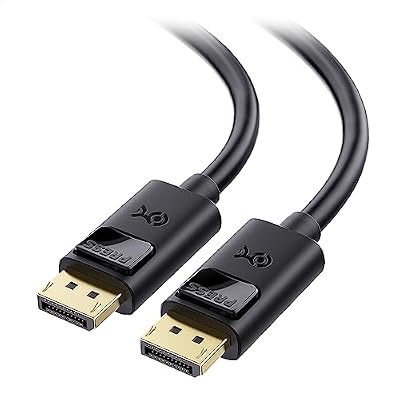
The Cable Matters DP 1.4 cable is the default pick for a gaming desk: full DisplayPort 1.4 specification in a standard 6-foot length, up to 32.4 Gbps of bandwidth, 8K at 60Hz and 4K at 240Hz with Display Stream Compression, VESA certified, with FreeSync, G-SYNC, and HDR support named on the listing.
Six feet fits most setups: long enough to route behind a desk from a tower on the floor to a monitor on a stand, without so much slack that it needs coiling. The latching connectors click into the port and need the release button pressed before they come out, which prevents the accidental tug that causes a black screen mid-game.
The confirmation for this listing is weaker than for the other picks here: the ASIN surfaced through the Amazon product page link rather than an explicit Product information excerpt, so API-check the code, and the page excerpt read was crawled about a year ago, so confirm a live offer. The braided version is a separate listing.
Specs
| Spec | Detail |
|---|---|
| Version | DisplayPort 1.4 |
| Bandwidth | Up to 32.4 Gbps |
| Max resolution | 8K@60Hz, 4K@240Hz |
| Length | 6 feet |
| Certification | VESA Certified |
| Adaptive sync | FreeSync, G-SYNC |
| HDR | Supported |
| Model | Not stated in the sources read |
| ASIN | B079736Z53 |
2. Amazon Basics DisplayPort 1.4 Cable, 6 Feet

The Amazon Basics DP 1.4 cable does the same core job as the Cable Matters pick at the budget end of the guide: a 6-foot DisplayPort 1.4 cable rated for 32.4 Gbps, 8K at 60Hz, and 4K at 120Hz, with Dynamic HDR and 3D support. The plugs are gold-plated, and the listing names model DP1.4-6FT with UPC 840095862165, confirmed from an explicit amazon.com Product information excerpt.
This is the pick for a second monitor, a spare cable, or a build where the cable budget needs to stay low. It covers the resolutions most gaming monitors actually run: 1440p at high refresh rates and 4K at 120Hz uncompressed. Higher refresh rates at 4K rely on Display Stream Compression, visually lossless in practice for nearly all users.
The excerpt read was crawled about ten months ago, so the stock signal is stale and the listing should be confirmed live. The cable is a plain PVC cord without braiding, so route it once and leave it alone rather than plugging and unplugging it often.
Specs
| Spec | Detail |
|---|---|
| Version | DisplayPort 1.4 |
| Bandwidth | 32.4 Gbps |
| Max resolution | 8K@60Hz, 4K@120Hz |
| Length | 6 feet |
| Dynamic HDR | Supported |
| 3D | Supported |
| Plugs | Gold-plated |
| Model | DP1.4-6FT |
| UPC | 840095862165 |
| Date first available | April 20, 2021 |
| ASIN | B08FBJYWTJ |
3. Club3D CAC-2068 DisplayPort 1.4 HBR3 Cable, 2 Metres

The Club3D CAC-2068 is the enthusiast pick among the DP 1.4 cables: a VESA-certified HBR3 cable in a 2-metre run on 28 AWG conductors, known in enthusiast cable measurement for clean signal integrity at the top of the DP 1.4 link rate. It supports 8K at 60Hz and is backward compatible with DisplayPort 1.3, 1.2, and 1.1, and its connectors carry a lock switch that holds the plug firmly in the port.
Two warnings apply. The ASIN surfaced through an Amazon product page link in forum coverage, not an explicit Product information excerpt, so API-check it before posting. Fake Club3D cables have also been reported, so check the listing against model CAC-2068 and EAN 8719214470821 and buy from a reputable seller. Full HBR3 bandwidth is hardest to hold over longer runs, so a 3-foot run is safer.
Specs
| Spec | Detail |
|---|---|
| Version | DisplayPort 1.4 HBR3 |
| Bandwidth | Up to 32.4 Gbps |
| Max resolution | 8K@60Hz |
| Length | 2 metres (6.56 feet) |
| Wire gauge | 28 AWG |
| Certification | VESA Certified |
| Connectors | Latching, with lock switch |
| Backward compatible | DisplayPort 1.3, 1.2, 1.1 |
| EAN | 8719214470821 |
| UPC | 0841615101016 |
| Model | CAC-2068 |
| ASIN | B0767F5DNR |
4. StarTech DisplayPort 2.1 Cable, VESA Certified DP80, 3 Feet

The StarTech DP 2.1 cable is the short-run premium pick: VESA certified to the DP80 standard, rated for the full 80 Gbps UHBR20 link rate, with support for 16K at 60Hz and 8K at 60Hz, plus DSC 1.2a and HDCP 2.2. The listing carries an explicit amazon.com Product information excerpt naming model DP21-3F-DP80-CABLE and UPC 065030900843.
Three feet suits a tower on the desk beside the monitor: short copper runs hold the highest link rates most reliably. The cable is backward compatible with DisplayPort 2.0, 1.4, and 1.2, though on a DP 1.4 monitor it behaves like a DP 1.4 cable and the extra bandwidth goes unused. A DP80 cable only matters when both ends support UHBR20, so buy it only for a DP 2.1 setup or a build moving to DP 2.1 hardware soon, and measure first, since 3 feet cannot reach a floor-standing tower.
Specs
| Spec | Detail |
|---|---|
| Version | DisplayPort 2.1, DP80 |
| Bandwidth | Up to 80 Gbps (UHBR20) |
| Max resolution | 16K@60Hz, 8K@60Hz |
| Length | 3 feet |
| Certification | VESA Certified DP80 |
| DSC | DSC 1.2a |
| HDCP | HDCP 2.2 |
| Backward compatible | DisplayPort 2.0, 1.4, 1.2 |
| Model | DP21-3F-DP80-CABLE |
| UPC | 065030900843 |
| ASIN | B0CZ9Q21FD |
5. Cable Matters VESA Certified DisplayPort 2.1 Cable, 6.6 Feet

The Cable Matters DP 2.1 cable is the long-run premium pick: a VESA-certified DP80 cable in a 6.6-foot run, rated for 80 Gbps with support for 16K at 60Hz, 8K at 240Hz, and 4K at 240Hz. The listing carries an explicit amazon.com Product information excerpt naming model 102095-2m and UPC 810115187356, and shows it shipping from Amazon and sold by Cable Matters. Shorter lengths of 3.3 and 4.9 feet exist in the same model family.
Six and a half feet is the practical length for a tower on the floor feeding a monitor on a desk, where a 3-foot cable cannot reach. FreeSync, G-SYNC, and HDR are named on the listing, and the cable is backward compatible with DisplayPort 2.0, 1.4, and 1.2.
Two flags need stating. A mirror listing showed only one unit left in stock shortly before writing, so confirm a live offer before ordering. Some independent coverage also questions whether a 2-metre copper cable can hold full DP80 certification, since VESA’s directory has certified the highest bandwidth mainly on shorter cables, so confirm the certification on the listing and in VESA’s directory before relying on the 80 Gbps figure at this length.
Specs
| Spec | Detail |
|---|---|
| Version | DisplayPort 2.1, DP80 |
| Bandwidth | Up to 80 Gbps (UHBR20) |
| Max resolution | 16K@60Hz, 8K@240Hz, 4K@240Hz |
| Length | 6.6 feet (2 metres) |
| Certification | VESA Certified DP80 |
| Adaptive sync | FreeSync, G-SYNC |
| HDR | Supported |
| Backward compatible | DisplayPort 2.0, 1.4, 1.2 |
| Model | 102095-2m |
| UPC | 810115187356 |
| Date first available | October 16, 2024 |
| ASIN | B0DK5WYV8X |
How to choose
Start with the version the hardware supports. A monitor and graphics card that top out at DisplayPort 1.4 need a good DP 1.4 cable rated for the full 32.4 Gbps HBR3 link rate; a DP 2.1 cable adds nothing there. A setup with DP 2.1 UHBR20 on both ends needs a DP80 cable to reach the highest refresh rates without compression, and the cable should carry VESA certification for the DP80 standard, not just a printed claim.
Match the length to the desk. Measure from the graphics card to the monitor along the route the cable will take, then add slack for bends. For the highest link rates the shortest run that reaches is the safest choice, because signal integrity falls off with length.
Who should skip it
Skip a DisplayPort cable entirely if the monitor or laptop only has HDMI ports, since a DisplayPort plug will not fit an HDMI socket. Console players should also skip this guide: current consoles do not have DisplayPort output, so an HDMI cable is the right connection for them. Anyone whose monitor already runs at its full refresh rate on the cable in the box has nothing to gain.
Frequently Asked Questions
Do I need a DisplayPort 2.1 cable for a 240Hz monitor?
Only if the monitor and graphics card both support DisplayPort 2.1 UHBR20. A 240Hz monitor at 1440p or 4K usually reaches its full refresh rate over a good VESA-certified DP 1.4 cable, since 32.4 Gbps covers those modes with compression. The DP 2.1 cable matters for the newest modes, such as 4K at 240Hz without compression.
What does VESA certification mean for a DisplayPort cable?
VESA certification means the cable passed the standards body’s checks at its rated bandwidth and link rate, such as HBR3 for DP 1.4 or DP80 for DP 2.1. Certified cables are listed in VESA’s directory, so the claim can be checked.
Can I use a DisplayPort 2.1 cable with a DisplayPort 1.4 monitor?
Yes. DisplayPort is backward compatible, so a DP 2.1 cable works with DP 1.4 and older hardware. The connection runs at the lower of the two ends’ capabilities, so a DP 2.1 cable on a DP 1.4 monitor behaves like a DP 1.4 cable. There is no speed gain today, though the newer cable is fine for a future upgrade.
Why does my monitor only show 144Hz when it supports 240Hz?
The cable is the first thing to check. A cable rated below HBR3, a damaged cable, or a cable too long for its rated bandwidth can all cap the refresh rate. Check that the monitor is connected over DisplayPort rather than HDMI, and confirm the cable’s version and certification.
Final verdict
For most gaming setups, the Cable Matters VESA-certified DP 1.4 cable is the right buy: full HBR3 bandwidth, a 6-foot run, and certification that backs the headline numbers. The Amazon Basics cable covers the same resolutions at the budget end, and the Club3D CAC-2068 is the enthusiast alternative. Step up to a DP80 cable only for a DP 2.1 setup: the StarTech 3-foot cable for a desk-side tower, or the Cable Matters 6.6-foot cable when the tower sits on the floor. Confirm the exact model and ASIN before ordering.