A budget of under 250 dollars for an AM5 board sounds generous until you notice how the market splits it. One camp spends it on a mature B650 board with a heavy feature list. Another goes to a newer B850 board with PCIe 5.0 storage and faster wireless. A third picks Micro-ATX and puts the savings toward the processor or graphics card.
This guide is for builders pairing a Ryzen 7000, 8000 or 9000 processor with DDR5 in 2026 and wanting a board that will not need replacing at the next upgrade. Every pick sits under the cap, so the real comparison is slots, power delivery, connectivity and form factor. Skim the table, then use the checks in How to Choose to rule boards out.
Quick Picks

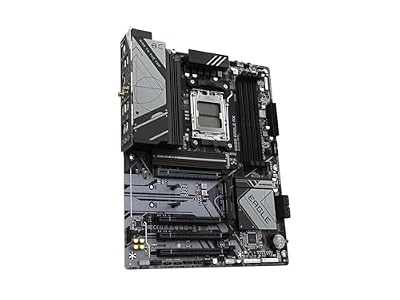
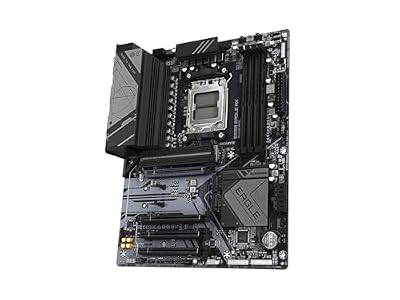
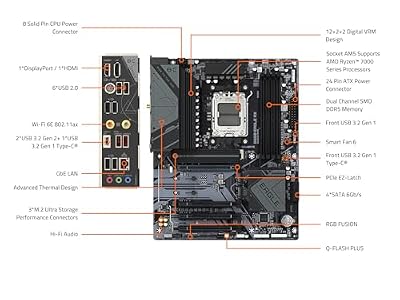
GIGABYTE B650 Eagle AX AM5 LGA 1718 ATX Motherboard, DDR5, Triple M.2 Slots (1x PCIe 5.0, 2X PCIe 4.0), USB 3.2 Gen2x2 Type-C, WiFi 6E, Realtek GbE LAN



As an Amazon Associate we earn from qualifying purchases. Product prices and availability are accurate as of the date/time indicated.

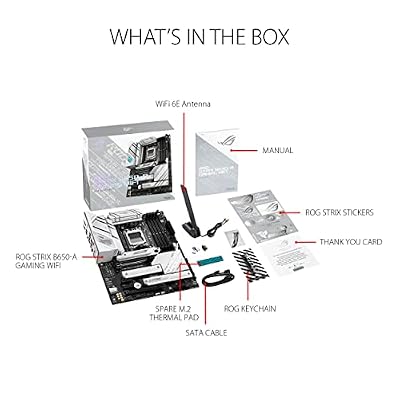
ASUS ROG Strix B650-A Gaming WiFi AMD B650 AM5 Ryzen™ Desktop 9000 8000 & 7000 ATX motherboard, 12 + 2 power stages, DDR5, 3x M.2 slot, PCIe® 4.0, 2.5G LAN, WiFi 6E, USB 3.2 Gen 2x2 Type-C®, Aura Sync



As an Amazon Associate we earn from qualifying purchases. Product prices and availability are accurate as of the date/time indicated.

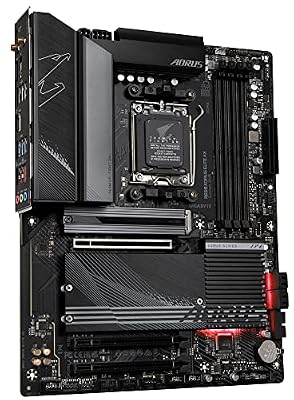
GIGABYTE B650 AORUS Elite AX AMD AM5 ATX Motherboard, Support Ryzen 9000/8000/7000 Series, DDR5, 14+2+1 Power Phase, PCIe 5.0 M.2, USB-C 3.2 Gen 2, WIFI6E, 2.5GbE, EZ-Latch, Q-Flash, RGB Fusion



As an Amazon Associate we earn from qualifying purchases. Product prices and availability are accurate as of the date/time indicated.

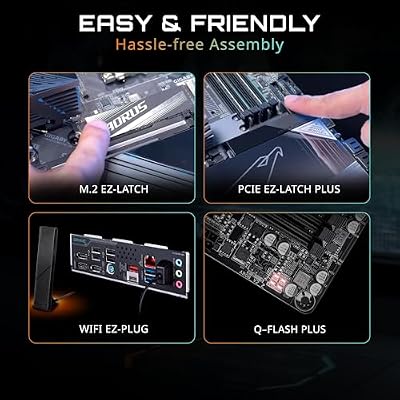
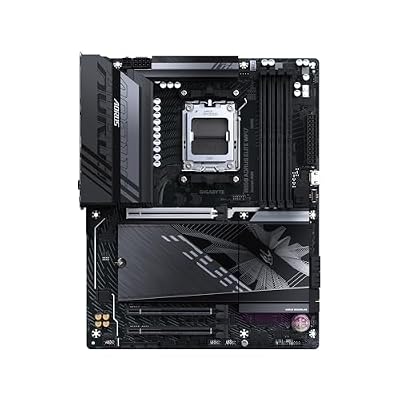
GIGABYTE B850 AORUS Elite WIFI7 AMD AM5 ATX Motherboard, Support AMD Ryzen 9000/8000/7000 Series, DDR5, 14+2+2 Power Phase, 3X M.2, PCIe 5.0, USB-C, WIFI7, 2.5GbE LAN, EZ-Latch, 5-Year Warranty




As an Amazon Associate we earn from qualifying purchases. Product prices and availability are accurate as of the date/time indicated.

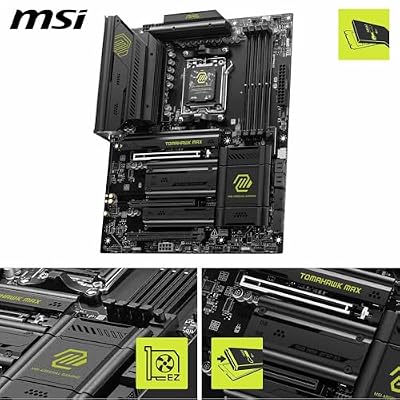
MSI MAG B850 Tomahawk MAX WiFi Motherboard, ATX - Supports AMD Ryzen 9000/8000 / 7000 Processors, AM5-80A SPS VRM, DDR5 Memory Boost 8400+ MT/s (OC), PCIe 5.0 x16, M.2 Gen5, Wi-Fi 7, 5G LAN



As an Amazon Associate we earn from qualifying purchases. Product prices and availability are accurate as of the date/time indicated.

MSI B650 Gaming Plus WiFi Gaming Motherboard (AMD Ryzen 9000/8000/7000 Series Processors, AM5, DDR5, PCIe 4.0, M.2, SATA 6Gb/s, USB 3.2 Gen 2, HDMI/DP, Wi-Fi 6E, Bluetooth 5.3, 2.5Gbps LAN, ATX)


As an Amazon Associate we earn from qualifying purchases. Product prices and availability are accurate as of the date/time indicated.

ASRock B650M-HDV M.2 White Micro-ATX AM5 Motherboard, AMD Ryzen 9000/8000/7000, PCIe 5.0 x16, DDR5 8200+(OC), Dual M.2 (Gen5/Gen4), USB 3.2 Type-C, 2.5G LAN


As an Amazon Associate we earn from qualifying purchases. Product prices and availability are accurate as of the date/time indicated.

GIGABYTE B850M Eagle WIFI6E AMD AM5 mATX Motherboard, Support AMD Ryzen 9000/8000/7000 Series, DDR5, 8+2+2 Power Phase, 2X M.2, PCIe 5.0, USB-C, WIFI6E, 2.5GbE LAN, EZ-Latch, 3-Year Warranty


As an Amazon Associate we earn from qualifying purchases. Product prices and availability are accurate as of the date/time indicated.

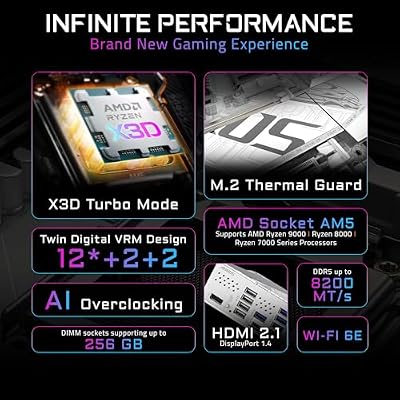
GIGABYTE B850M AORUS Elite WIFI6E ICE AMD AM5 mATX Motherboard, Support AMD Ryzen 9000/8000/7000 Series, DDR5, 12+2+2 Power Phase, 2X M.2, PCIe 5.0, USB-C, WIFI6E, 2.5GbE, EZ-Latch, 5-Year Warranty


As an Amazon Associate we earn from qualifying purchases. Product prices and availability are accurate as of the date/time indicated.
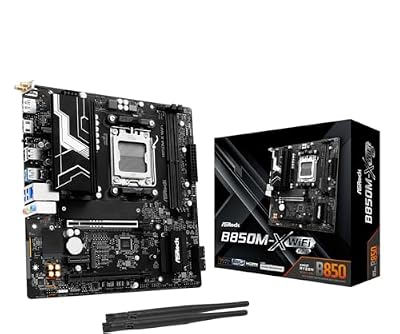
ASRock B850M-X WiFi R2.0 AM5 Micro-ATX Motherboard: Supports AMD Ryzen 9000/8000/7000 CPUs, DDR5 8200+ (OC), PCIe 5.0, Wi-Fi 6E, 2.5G LAN, USB-C, BIOS Flashback


As an Amazon Associate we earn from qualifying purchases. Product prices and availability are accurate as of the date/time indicated.
| Product | Best for | Key spec from the title |
|---|---|---|
| Gigabyte B650 Eagle AX | Value ATX build | Triple M.2, one PCIe 5.0 slot |
| ASUS ROG Strix B650-A Gaming WiFi | Gaming ATX build | 12+2 power stages |
| Gigabyte B650 Aorus Elite AX | Heavier CPUs | 14+2+1 power phase |
| Gigabyte B850 Aorus Elite WiFi7 | Newer platform, ATX | 14+2+2 power phase, 3x M.2 |
| MSI MAG B850 Tomahawk MAX WiFi | Memory tuners | 80A SPS VRM, DDR5 8400+ MT/s |
| MSI B650 Gaming Plus WiFi | Plain, dependable build | HDMI and DisplayPort outputs |
| ASRock B650M-HDV M.2 | Compact budget build | Micro-ATX, PCIe 5.0 x16 |
| Gigabyte B850M Eagle WiFi6E | Small-case B850 | 8+2+2 power phase, 2x M.2 |
| Gigabyte B850M Aorus Elite WiFi6E Ice | Small case, stronger power | 12+2+2 power phase |
| ASRock B850M-X WiFi R2.0 | Lowest-cost B850 | 2.5G LAN, Wi-Fi 6E |
How to Choose
Pick the chipset by storage needs
B650 and B850 share the socket and DDR5 memory. The practical difference is PCIe 5.0: the listed B850 boards advertise Gen5 M.2 and graphics lanes, while B650 boards vary, some offering Gen5 on one M.2 slot only. Buying a Gen5 SSD means confirming which slot runs at Gen5. With a Gen4 drive, B650 loses nothing you will notice.
Match form factor to the case
ATX boards give more M.2 and expansion slots, which matters for a capture card or a third drive. Micro-ATX boards fit smaller cases and cost less but often stop at two M.2 sockets. Count your add-in cards before choosing.
Read power delivery as a ceiling
Phase counts such as 8+2+2 or 14+2+2 show how much sustained load a board is built for. A Ryzen 5 or Ryzen 7 runs happily on the lower counts. Save 14-phase boards for 12 or 16-core chips or manual overclocking.
Where budget boards cut corners
Expect fewer rear USB ports, thin M.2 heatsinks, basic audio and Wi-Fi 6E in place of Wi-Fi 7. Ignore RGB headers. Check the BIOS update path, since older firmware may not recognize a Ryzen 9000 chip out of the box.
The 10 Best Options
Gigabyte B650 Eagle AX
This board suits a builder who wants an ATX layout and plenty of storage without paying for a premium badge. The title lists triple M.2 slots, one at PCIe 5.0 and two at PCIe 4.0, plus a USB 3.2 Gen2x2 Type-C port and Wi-Fi 6E. It is a sensible base for a mid-range Ryzen gaming tower.
- Strength: three M.2 slots on an ATX board leave room for a boot drive and two game libraries.
- Strength: Wi-Fi 6E is included, so no add-in card is needed.
- Trade-off: only one M.2 slot is listed at Gen5, so a second fast drive runs at Gen4.
Skip it if you want the most power phases for a high-core processor or plan to overclock heavily.
ASUS ROG Strix B650-A Gaming WiFi
A gaming-oriented ATX board for a builder who values the Strix design and ASUS firmware. The listing mentions 12+2 power stages, DDR5, three M.2 slots and PCIe 4.0, with support for Ryzen 9000, 8000 and 7000 processors. It is aimed at someone building around a mid to upper mid-range chip who also wants a recognizable brand name on the case window and a firmware menu they already know how to navigate.
- Strength: 12+2 power stages handle mid-range and upper mid-range Ryzen chips comfortably.
- Strength: three M.2 slots and built-in Wi-Fi cover most builds.
- Trade-off: the listed PCIe 4.0 means no Gen5 headline feature.
Skip it if you plan to run a Gen5 SSD at full speed, since the listing names only PCIe 4.0 for storage.
Gigabyte B650 Aorus Elite AX
The step up from the Eagle for buyers pairing a stronger processor with an ATX case. The title shows a 14+2+1 power phase design, PCIe 5.0 M.2, USB-C at 3.2 Gen 2 and Wi-Fi, with Ryzen 9000, 8000 and 7000 support. That mix makes it a natural fit for a long-lived workstation or gaming build, especially when the processor is likely to be swapped for a faster one within a few years.
- Strength: 14+2+1 power phases give more headroom for a 12-core part.
- Strength: PCIe 5.0 M.2 is listed, which keeps a Gen5 SSD upgrade open.
- Trade-off: it sits on the older B650 chipset, so newer B850 features are absent.
Skip it if a Ryzen 5 build is the plan, since the extra phases would go unused.
Gigabyte B850 Aorus Elite WiFi7
For builders who want the newer B850 platform in an ATX footprint. The listing includes a 14+2+2 power phase design, three M.2 slots, PCIe 5.0, USB-C and Wi-Fi 7 branding in the model name. It is the most future-minded ATX choice in this group for someone who upgrades parts one at a time and would rather not touch the motherboard again for several years.
- Strength: Wi-Fi 7 naming and PCIe 5.0 point to a longer useful life.
- Strength: 14+2+2 power phases and three M.2 slots suit a loaded build.
- Trade-off: you pay for features a Gen4 SSD and Wi-Fi 6 router will not use.
Skip it if your router and storage are older, because the platform advantages would sit idle.
MSI MAG B850 Tomahawk MAX WiFi
The pick for a builder who cares about memory tuning. The title advertises an 80A SPS VRM and DDR5 Memory Boost up to 8400+ MT/s as an overclock, alongside ATX size and Ryzen 9000, 8000 and 7000 support. Anyone shopping a fast memory kit will find the headline specs reassuring, though results always depend on the kit, the processor and the BIOS release in use.
- Strength: an 80A SPS VRM is aimed at sustained loads on demanding chips.
- Strength: the listed DDR5 speeds suit a builder who wants to tune fast kits.
- Trade-off: the overclocked memory figure is not guaranteed on every kit or processor.
Skip it if you will run standard memory at default speeds and want to spend less.
MSI B650 Gaming Plus WiFi
A plain, practical board for a first AM5 build. The listing covers DDR5, PCIe 4.0, M.2, SATA 6Gb/s, USB 3.2 Gen 2 and both HDMI and DisplayPort video outputs, with Ryzen 9000, 8000 and 7000 support. Nothing about it is flashy, which is the appeal for a builder who just wants a stable foundation and a short list of parts to worry about during assembly.
- Strength: rear video outputs help if you start with a processor that has integrated graphics.
- Strength: Wi-Fi is included and SATA support is listed for older drives.
- Trade-off: PCIe 4.0 only, so it is not the board for a Gen5 SSD.
Skip it if you want the highest phase count, Gen5 storage, or a board with a long list of extras to grow into.
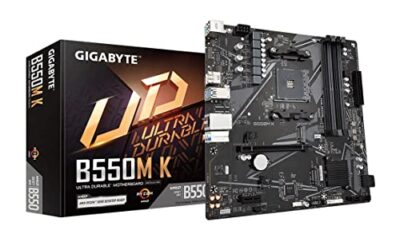
ASRock B650M-HDV M.2
This Micro-ATX board is for a small, inexpensive build in a compact case. The title lists PCIe 5.0 x16, DDR5 8200+ (OC), dual M.2 slots (one Gen5, one Gen4) and a USB 3.2 Type-C port, in a white finish that suits a light-themed system. For a family desktop or a living-room media PC, that spec mix covers what most people actually use, without extras that raise the cost.
- Strength: a Gen5 x16 slot and a Gen5 M.2 slot appear on a compact board.
- Strength: Micro-ATX fits smaller cases and keeps the build cost down.
- Trade-off: only two M.2 slots, and Wi-Fi is not mentioned in the title.
Skip it if you need built-in wireless, more than two drives, or a clearly documented high-end power design.
Gigabyte B850M Eagle WiFi6E
A Micro-ATX entry into the B850 family for small-case builders. The listing shows an 8+2+2 power phase design, two M.2 slots, PCIe 5.0, USB-C and Wi-Fi 6E, with support for Ryzen 9000, 8000 and 7000 processors. It is a tidy choice when the goal is a modern platform at the lowest practical outlay, and it leaves more of the budget for the graphics card, which usually moves frame rates more than any motherboard feature does.
- Strength: it brings the B850 platform to a compact, lower-cost board.
- Strength: Wi-Fi 6E is built in.
- Trade-off: 8+2+2 phases are modest, so pair it with a mid-range processor.
Skip it if you plan a 16-core chip under sustained load, or if you expect to need three M.2 drives later.
Gigabyte B850M Aorus Elite WiFi6E Ice
The upgrade within the same Micro-ATX size, for buyers who want a compact system without giving up too much power delivery. The title states a 12+2+2 power phase design, two M.2 slots, PCIe 5.0, USB-C and Wi-Fi 6E, and the Ice name signals a lighter styling option for a themed build. Buyers who plan a mid-range or upper mid-range Ryzen chip in a compact case will find this the more comfortable of the two Gigabyte Micro-ATX boards.
- Strength: 12+2+2 power phases give more headroom than the Eagle in the same footprint.
- Strength: it suits a compact build where looks matter.
- Trade-off: just two M.2 slots, which limits large storage plans.
Skip it if you need three M.2 slots in this size.
ASRock B850M-X WiFi R2.0
The lowest-cost route onto B850 in this group, aimed at buyers who want the newer chipset and little else. It is Micro-ATX, and the listing mentions DDR5 8200+ (OC), PCIe 5.0, Wi-Fi 6E, 2.5G LAN and USB-C. That is enough for a clean, modest gaming or office system, and the wired networking is a real advantage for a desk that sits next to the router.
- Strength: it pairs B850 with Wi-Fi 6E and 2.5G wired networking.
- Strength: Micro-ATX keeps the board affordable and case-friendly.
- Trade-off: the title gives no power phase count, so heavy processors are a guess.
Skip it if you want a documented high-end power delivery design, a third M.2 slot, or a platform for a flagship processor.
Which One Fits Your Situation
You are building a first AM5 gaming PC
The MSI B650 Gaming Plus WiFi covers the basics, while the Gigabyte B650 Eagle AX adds a third M.2 slot for a library that will grow.
You want a processor upgrade path
Take the Gigabyte B650 Aorus Elite AX or the Gigabyte B850 Aorus Elite WiFi7. Both list strong power phase counts that leave room for a higher-core chip later.
You are tuning fast memory
The MSI MAG B850 Tomahawk MAX WiFi is the board whose title leads with memory overclocking and a heavy VRM.
Your case is small
Choose the Gigabyte B850M Aorus Elite WiFi6E Ice for more power delivery, or the ASRock B850M-X WiFi R2.0 if saving money matters more.
Common Mistakes
- Paying for 14-phase power delivery and then installing an entry-level Ryzen 5.
- Assuming every M.2 slot runs at Gen5 speed when often only one does.
- Ignoring the BIOS version, then finding a Ryzen 9000 chip will not boot.
- Buying Micro-ATX and later needing a third drive slot or a capture card.
- Choosing a board for its Wi-Fi 7 name while keeping an older router.
Related guides
- Usb C Kvm Switch For Two Laptops And Two Monitors
- Vertical Laptop Stand For Dual Laptop Desk Setup
- Nvme Enclosure With Active Cooling For Mac Mini
Frequently Asked Questions
Is B850 worth it over B650 for this budget?
Only if you want PCIe 5.0 storage or faster wireless. For a Gen4 SSD and a standard gaming setup, B650 delivers the same everyday experience for less.
Do I need Wi-Fi on an AM5 board?
If your PC sits near the router, wired 2.5G LAN is better. Built-in Wi-Fi matters when running a cable is not an option.
Will these boards work with Ryzen 9000?
The listings name Ryzen 9000 support, but older firmware can require an update before first boot. Check the manufacturer support page for the minimum BIOS version.
How many M.2 slots do I really need?
Two covers most builds: one for the operating system and one for games. Pick three if you edit video or keep large project files.