Vram how long it actually takes reflects a familiar frustration: a render stalls or an AI job finishes slowly, and the memory specification offers no clear explanation. More VRAM can prevent capacity-related delays, but it cannot promise a completion time. Identify the bottleneck before buying hardware to shorten your wait.
How to Choose a Graphics Card
This guide interprets vram how long it actually takes as a question about completing GPU workloads, not memory installation or hardware lifespan. Four graphics cards illustrate the differences between capacity, processing capability, software support, and power requirements. There is no universal conversion from gigabytes to minutes.
Capacity for Your Largest Working Set
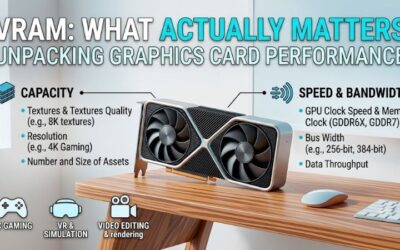
Working-set capacity covers everything your task needs simultaneously, not merely the project file stored on disk. Textures, geometry, temporary buffers, and model context can increase requirements during execution. When capacity becomes insufficient, supported software may transfer data through system memory, introducing additional overhead.
For vram how long it actually takes, capacity matters most when insufficient memory interrupts execution or triggers slower processing paths. Measure peak requirements using representative work rather than desktop allocation readings. If projects genuinely exceed 16GB, choose the NVIDIA GeForce RTX 5090 for its larger 32GB memory pool.
Processing Capability and Memory Bandwidth
A workload fitting comfortably inside memory can remain limited by computation or memory throughput. Additional unused capacity cannot eliminate those constraints. Compare application-specific benchmarks with matching quality settings, rather than assuming equal memory capacity means equal completion times across graphics processors.
The NVIDIA GeForce RTX 5070 Ti and NVIDIA GeForce RTX 5060 Ti 16GB both provide 16GB GDDR7, but use 256-bit and 128-bit interfaces respectively. Their processing tiers also differ. When your projects already fit within 16GB, investigate the RTX 5070 Ti for greater processing capability instead of purchasing capacity alone.
Application and Backend Compatibility
Software compatibility decides whether an application can access the acceleration you purchased. Rendering engines and AI runtimes use specific backends, with support varying across operating systems and versions. Check your required configuration before comparing hardware, particularly when a workflow depends specifically on CUDA.
A practical answer to vram how long it actually takes requires compatible software, not just an impressive specification. Radeon hardware cannot replace CUDA in applications that require that backend. For gaming and creative workloads explicitly supporting Radeon acceleration, consider the AMD Radeon RX 9070 XT as a compatible alternative.
Power Requirements and Upgrade Cost
Total upgrade cost includes power supply capacity, case clearance, and cooling requirements. Follow graphics card and power supply manufacturers’ installation instructions rather than improvising cable arrangements. A powerful GPU makes little purchasing sense when essential system changes consume funds needed to address another bottleneck.
Reference graphics power ranges from 180W for the RTX 5060 Ti to 575W for the RTX 5090. Retail boards differ in dimensions and requirements, making inspection of the exact listing essential. For projects fitting within 16GB, prioritize the NVIDIA GeForce RTX 5060 Ti 16GB when restrained system demands outweigh maximum throughput.
Top Picks
The picks below address vram how long it actually takes through distinct workload needs instead of invented render-time promises. These are GPU models; cooling, dimensions, and warranties vary by retail board. Best Overall describes the balanced recommendation here, while Best Value prioritizes useful capacity and modest power requirements.
| Product | Best For | Key Spec | Watch Out For |
|---|---|---|---|
| NVIDIA GeForce RTX 5070 Ti | Best Overall | 16GB GDDR7; 256-bit | Cannot fit workloads exceeding its capacity |
| NVIDIA GeForce RTX 5060 Ti 16GB | Best Value | 16GB GDDR7; 180W reference power | Lower processing tier; separate 8GB model |
| AMD Radeon RX 9070 XT | Best For Radeon-Compatible Workloads | 16GB GDDR6; 256-bit | CUDA-dependent software compatibility |
| NVIDIA GeForce RTX 5090 | Best For Large Local Projects | 32GB GDDR7; 575W reference power | Substantial purchase and system costs |
NVIDIA GeForce RTX 5070 Ti: Best Overall
The RTX 5070 Ti combines 16GB GDDR7, a 256-bit memory interface, and 300W reference graphics power. It suits buyers combining demanding gaming with supported GPU-accelerated creative workloads. Its advantage is higher-tier processing capability without the substantial reference power commitment associated with NVIDIA’s flagship.
Its limitation is capacity: paying for this tier still leaves you with 16GB, exactly like two other recommendations. A project exceeding that pool may need optimization or another memory strategy. Choose it when compatible benchmarks identify processing speed as your constraint; it does not automatically solve capacity-related failures.
NVIDIA GeForce RTX 5060 Ti 16GB: Best Value
The RTX 5060 Ti 16GB provides GDDR7 memory with 180W reference graphics power, making it the restrained upgrade here. It suits buyers prioritizing project capacity over higher-tier processing capability. Its advantage is obtaining 16GB without the larger GPUs’ associated power demands, leaving more budget available for other system upgrades.
For vram how long it actually takes, its drawback is that fitting a project does not mean completing it rapidly. The 128-bit interface and lower processing tier still matter in demanding applications. Confirm the 16GB version before ordering, because an 8GB configuration shares the RTX 5060 Ti name but provides less working room.
AMD Radeon RX 9070 XT: Best For Radeon-Compatible Workloads
The RX 9070 XT offers 16GB GDDR6, a 256-bit interface, and memory bandwidth up to 640GB/s. It suits buyers wanting a Radeon gaming system that also runs explicitly supported creative applications. Its benefit is substantial capacity within the Radeon ecosystem, allowing a different purchasing route when your required software supports it.
The drawback is workflows requiring CUDA, where the memory specification cannot overcome backend incompatibility. AMD lists 304W reference board power, so this is also a larger system commitment than the RTX 5060 Ti. Verify acceleration in the exact application version before expecting faster exports, renders, or model processing.
NVIDIA GeForce RTX 5090: Best For Large Local Projects
The RTX 5090 supplies 32GB GDDR7, giving compatible applications twice the memory capacity of the other picks. It suits large scenes and local AI tasks whose working sets exceed 16GB. Its advantage is keeping more project data within one GPU’s memory, potentially avoiding capacity-related workarounds when your software supports the card.
The downside is substantial purchase expense and power demand: NVIDIA specifies 575W graphics power and a 1000W system power recommendation for its reference configuration. System configuration determines power requirements. Even 32GB remains finite, so verify actual workload requirements before assuming universal improvements in execution speed.
Frequently Asked Questions
These answers clarify vram how long it actually takes without assigning fictional minutes to memory capacities. Completion time depends on workload settings and the complete execution path. Separating initialization, active processing, and output handling makes hardware comparisons more useful than timing an entire session without context.
How Much Faster Will More VRAM Make a Render?
There is no fixed speed increase from additional VRAM. If the scene already fits, extra unused capacity may change little; if memory pressure forces slower execution, additional capacity can help substantially. Blender documents system-memory fallback for supported GPU backends, with a performance cost compared with local GPU memory.
Investigate application-reported memory errors or fallback before shopping. A faster processor with unchanged capacity addresses a different constraint from insufficient memory. When rendering involves lengthy computation without capacity pressure, compare processor benchmarks using identical sample counts, output settings, and quality targets.
How Can I Measure a GPU Job Fairly?
Measure the same representative workload under unchanged settings, recording initialization and active processing separately. Run it more than once because compilation, loading, or cached resources can alter the first result. Record the application version and GPU backend so another benchmark measures the same process rather than a different setup.
Preserve comparable output quality when assessing results. Reduced samples, resolution, or numerical precision can shorten execution while changing the workload itself. Useful comparisons hold those settings constant, then establish whether improved elapsed time justifies purchase costs alongside any required power supply or cooling upgrades.
Will More VRAM Shorten Game Loading Times?
Not reliably, because game loading also depends on storage access, CPU work, decompression, and shader preparation. VRAM capacity primarily determines available graphics workspace rather than acting as a universal loading accelerator. Investigate which stage causes the delay before purchasing a graphics card specifically to reduce loading screens.
During gameplay, memory pressure can create symptoms distinct from lengthy startup screens, including texture problems or inconsistent frame times. Avoid combining these into one diagnosis. When loading is the sole complaint and gameplay remains smooth, investigate storage performance and game-specific behavior before purchasing another GPU.
Can I Estimate AI Completion Time From VRAM?
No, capacity alone cannot predict AI completion time. For vram how long it actually takes, model architecture, precision, context, batch size, and runtime influence execution. Memory determines which configurations fit; computation and data movement influence speed. A 32GB specification cannot establish your particular task’s duration.
Some runtimes offload processing to system memory, sacrificing execution speed to accommodate larger models. Others fail when capacity becomes insufficient. Verify runtime behavior and compare benchmarks matching your configuration; different models or context lengths prevent meaningful estimates for your particular workload and quality targets.
Final Thoughts
Treat vram how long it actually takes as a bottleneck question. Choose the RTX 5070 Ti for balanced capability, RTX 5060 Ti 16GB for restrained requirements, or RX 9070 XT for Radeon-compatible work. The RTX 5090 earns consideration when 16GB is a measured limit; verify application benchmarks before paying for shorter completion times.