VRAM for first time PC builders gets confusing when equal-memory graphics cards deliver different results. You need enough capacity for your games without sacrificing GPU speed or overspending. These four recommendations explain dedicated memory’s benefits, which compromises matter, and how to choose for your first build.
How to Choose a Graphics Card by VRAM
This guide breaks down vram for first time pc builders through four GPUs for mainstream gaming, tighter budgets, creative software, and demanding displays. Recommendations reflect published specifications and practical buying priorities, without detailed research. Each choice connects memory capacity to a specific workload.
Memory Capacity and Gaming Settings
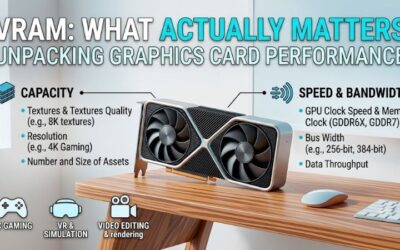
VRAM holds graphics data close to the GPU, including textures and rendering buffers. Capacity matters when workload requirements exceed available storage, but unused memory cannot automatically increase performance. Choose a target resolution and typical settings before deciding how much capacity deserves a share of your budget.
For first-build gaming, 12GB is a reasonable starting point to investigate, while 16GB accommodates demanding textures and larger workloads. These are planning targets, not universal requirements. Choose AMD Radeon RX 9060 XT 16GB when you want extra memory headroom without moving directly into a higher-power graphics tier.
GPU Performance and Memory Bandwidth
GPU processing performance and memory bandwidth influence data-handling efficiency. Capacity describes available storage; bandwidth describes transfer throughput. Comparing vram for first time pc builders requires examining more than gigabytes. Different architectures can deliver very different frame rates with identical memory capacities.
Investigate benchmarks at your intended settings, with generated frames identified separately from directly rendered performance. A wider memory interface is useful context, but cache and architecture also matter. Choose AMD Radeon RX 9070 for higher-tier gaming alongside 16GB, rather than buying a slower card solely for its memory total.
Creative Software and Compute Compatibility
Software compatibility becomes a buying criterion for rendering, video editing, or local AI experimentation. Applications may favor specific compute platforms, and supported acceleration varies by version. A card with generous memory can still disappoint when software cannot utilize its preferred processing backend effectively.
For creative work, vram for first time pc builders starts with specific application requirements and realistic project complexity. NVIDIA’s CUDA ecosystem is relevant for supported software, but compatibility still needs checking. Choose NVIDIA GeForce RTX 5060 Ti 16GB for CUDA-compatible applications and appropriately sized projects.
Motherboard, Power Supply, and Installation
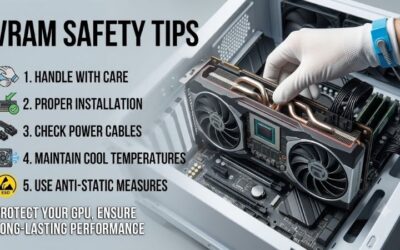
Platform compatibility includes motherboard firmware, power-supply capacity, and physical clearance. Dimensions and connectors vary among board partners, within individual GPU families. Follow model-specific installation and PSU guidance, switch off and unplug the system before installation, and use only power cables approved for your specific PSU.
Intel Arc needs Resizable BAR enabled for optimal performance, making motherboard compatibility essential. This setting allows broader CPU access to graphics memory; it does not add VRAM. Choose Intel Arc B580 when its 12GB capacity fits your budget and your platform meets configuration requirements, rather than treating every older PC as suitable.
Top Picks
These choices approach vram for first time pc builders within a complete graphics purchase. The RX 9060 XT balances capacity and mainstream requirements, B580 targets value, RTX 5060 Ti suits compatible creative tools, and RX 9070 targets heavier gaming. Compare current prices, exact board specifications, and workload results before purchasing.
| Product | Best For | Key Spec | Watch Out For |
|---|---|---|---|
| AMD Radeon RX 9060 XT 16GB | Best Overall: Mainstream first builds | 16GB GDDR6, 128-bit interface, 160W typical board power | Memory capacity cannot overcome processing limits |
| Intel Arc B580 | Best Value: Compatible budget builds | 12GB GDDR6, 192-bit interface, 456GB/s bandwidth | Resizable BAR configuration and platform support |
| NVIDIA GeForce RTX 5060 Ti 16GB | Best For Creative Applications | 16GB GDDR7, CUDA support, 180W graphics power | Similar listings also offer an 8GB version |
| AMD Radeon RX 9070 | Best For Demanding Gaming | 16GB GDDR6, 256-bit interface, 220W typical board power | Greater power and budget commitment |
AMD Radeon RX 9060 XT 16GB: Best Overall
AMD Radeon RX 9060 XT 16GB is the overall recommendation for mainstream first-build gaming with memory headroom. AMD specifies 16GB GDDR6, a 128-bit interface, and 160W typical board power. The appealing combination is substantial capacity without the increased power requirements of the RX 9070, simplifying build planning.
Its limitation is that 16GB cannot transform mainstream graphics into high-end processing. Heavy effects and demanding resolution targets can require settings compromises despite available memory. For vram for first time pc builders, choose this Radeon for balanced capacity planning, then verify performance in the games you actually play.
Intel Arc B580: Best Value
Intel Arc B580 is the value recommendation with competitive current retail pricing and a fully compatible motherboard configuration. It provides 12GB GDDR6 on a 192-bit interface, with 456GB/s specified memory bandwidth. That capacity makes it worth considering against similarly priced alternatives with less graphics memory.
The disadvantage is increased configuration scrutiny: Resizable BAR support is essential to its intended performance. Intel also specifies 190W board power and a 600W minimum PSU for its reference card. Buy B580 after checking your games, motherboard, and exact board requirements; a discounted price alone cannot resolve compatibility problems.
NVIDIA GeForce RTX 5060 Ti 16GB: Best For Creative Applications
NVIDIA GeForce RTX 5060 Ti 16GB is recommended for first-build creative applications specifically supporting CUDA. NVIDIA lists 16GB GDDR7 and 180W total graphics power for this configuration. Its advantage is combining substantial memory with access to supported NVIDIA acceleration, beyond simply maximizing gaming specifications.
Verify the advertised memory configuration because the RTX 5060 Ti also exists with 8GB. The main buying drawback is purchasing software capabilities irrelevant to gaming-only workloads. Large projects can still exceed 16GB, so evaluate application requirements and project benchmarks instead of assuming unrestricted creative performance.
AMD Radeon RX 9070: Best For Demanding Gaming
AMD Radeon RX 9070 is recommended for more demanding first-build gaming, including higher-resolution ambitions. AMD specifies 16GB GDDR6, a 256-bit memory interface, and 220W typical board power. Its wider interface and higher GPU tier distinguish it from the RX 9060 XT despite their identical advertised memory capacity.
The tradeoff is a larger power and budget commitment, with AMD recommending a minimum 650W PSU for the standard specification. Choose this tier when additional performance addresses gaming requirements, rather than merely chasing 16GB. Partner-card dimensions and power requirements need checking before finalizing your component selection.
Frequently Asked Questions
These answers address vram for first time pc builders where memory specifications create misleading expectations. Capacity, system RAM, and graphics performance are separate considerations, while game requirements depend on settings. These questions help prevent unsuitable purchases and misplaced expectations about component compatibility.
Is 8GB VRAM Enough for a First Gaming PC?
No, 8GB is not automatically unusable for a first gaming PC. It accommodates lighter games and restrained settings, particularly at 1080p. However, demanding textures and certain rendering effects can create memory pressure. The decision depends on your games and purchase price, rather than categorizing every 8GB card as sufficient or obsolete.
A discounted 8GB card can make sense with suitable workloads and meaningful overall budget savings. For a new system intended for more demanding games, compare 12GB and 16GB alternatives before purchasing. Avoid assuming an expensive 8GB model provides the same memory headroom as the higher-capacity picks discussed here.
Does More VRAM Always Improve Frame Rates?
No, additional VRAM does not automatically produce higher frame rates. It addresses memory-capacity constraints, but GPU processing speed, CPU limits, and game behavior still determine performance. When a workload already fits in memory, faster graphics with less VRAM can outperform slower higher-capacity alternatives.
Compare results for the complete card rather than extrapolating from memory specifications. The RX 9060 XT and RX 9070 illustrate why equal capacity cannot guarantee equivalent performance. Examine frame-time consistency and test settings, because average frame rates alone can conceal interruptions during demanding gameplay sequences.
Can System RAM Replace Dedicated VRAM?
No, adding system RAM cannot increase a discrete graphics card’s physical VRAM. System memory serves the CPU and broader operating environment, while dedicated graphics memory sits on the GPU board. A computer with 32GB RAM and a 12GB graphics card therefore cannot provide an equivalent 44GB of dedicated graphics memory.
Shared-memory figures in system utilities can be misleading when planning vram for first time pc builders. They describe potentially available system memory, not an equivalent replacement for dedicated graphics storage. Treat system RAM and VRAM as separate purchases, selecting capacity independently for application and gaming requirements.
Can I Upgrade VRAM Without Replacing My Graphics Card?
No, graphics-card VRAM is not normally upgradeable by the buyer. Memory chips are attached to the board, usually requiring card replacement for additional capacity. Choose the correct memory version before purchasing, especially when one GPU name covers multiple configurations, as with the 8GB and 16GB versions of NVIDIA’s RTX 5060 Ti.
Allow some headroom for reasonably anticipated workloads, but avoid paying for speculative needs that compromise today’s build. A balanced CPU, SSD, and dependable power supply remain relevant. If your future plans involve much larger creative projects, evaluate their memory requirements separately rather than assuming universal 16GB compatibility.
Final Thoughts
Choosing vram for first time pc builders means matching memory to a capable, compatible GPU. Start with RX 9060 XT 16GB for mainstream gaming, B580 for suitable budget builds, RTX 5060 Ti 16GB for CUDA-focused tools, or RX 9070 for heavier gaming. Verify the exact memory version and board requirements before finalizing your component budget.