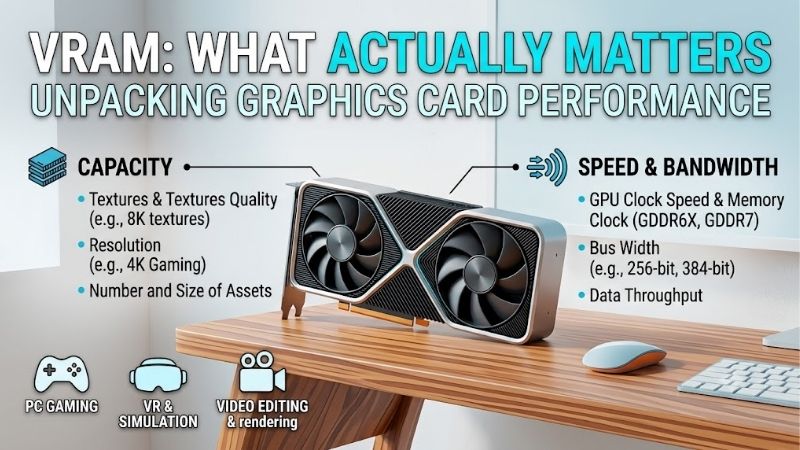
Vram what actually matters is not simply the biggest memory number. The useful question is how capacity, bandwidth, and graphics-processing speed fit your workload. For gaming, 4K, AI, and creation, a balanced memory system can outperform a larger but poorly matched VRAM pool, while also avoiding needless spending.
How to Choose a Graphics Card
Buyers often see 16GB, 20GB, or 32GB and assume more VRAM means a faster graphics card. In practice, capacity matters when a game or application needs it, while graphics-processing speed affects how quickly that memory feeds the workload. This is where vram what actually matters should directly guide the purchase comparison.
VRAM Capacity
VRAM capacity is the local graphics memory available for textures, frame-buffers, geometry, AI data, rendered assets, and other working-content. It becomes a hard limit when a workload needs more than the card can hold, because data may move into slower system memory and trigger stutter or serious performance-loss in heavy-scenes.
For mainstream 1440p gaming, 16GB is a comfortable target on current cards, while 4K, heavy texture packs, modded games, and some creator or AI workloads can justify more. The GeForce RTX 5070 Ti and Radeon RX 9070 XT show why balanced 16GB designs can still be strong for demanding-buyers at sustained-loads and higher settings.
Memory Bandwidth
Memory bandwidth describes how much data can move between the GPU and VRAM each second. It depends on memory speed and interface width, so two cards with the same capacity can behave differently under demanding-workloads. Higher bandwidth can help high-resolution rendering and data-heavy effects when the GPU can actually exploit it.
Bandwidth is not a standalone speed-rating, because cache design, compression, and the GPU itself also matter. Still, it explains why the RTX 5080 has 16GB yet higher bandwidth than many older 16GB cards, while the RX 9070 XT reaches 640GB/s through a 256-bit GDDR6 design in its reference specification listed by AMD for this GPU.
Memory Generation
Memory generation affects transfer rates, efficiency, and how a GPU is designed around its memory-system. GDDR7 can deliver more bandwidth per pin than GDDR6, but that does not make every GDDR7 card better. The complete GPU platform still determines real performance at a given resolution, especially in demanding games.
Look at memory type alongside bandwidth instead of treating the generation label as a quality score. The RTX 5070 Ti uses 16GB of GDDR7 at 896GB/s, while the RX 9070 XT uses 16GB of GDDR6 at up to 640GB/s. Both have 16GB, but their memory systems target different real-world performance-efficiency envelopes for demanding buyers.
Resolution And Workload
Resolution and workload decide how quickly VRAM demand rises. Higher resolutions increase framebuffer needs, ultra textures consume more memory, and ray tracing can add data pressure. AI models and professional applications can be even more memory-hungry, so the same capacity may feel generous in one task and limiting in another.
That is why the RTX 5080 suits high-end 4K gaming where GPU throughput and 16GB of fast GDDR7 matter, while the RTX 5090 is the logical step when large datasets or heavier creative workloads make 32GB useful. The difference is workload headroom, not a universal frame-rate multiplier in real workloads or every game consistently.
Top Picks
The four picks below show vram what actually matters without pretending capacity tells the whole story. The RTX 5070 Ti emphasizes balanced 16GB GDDR7 performance, the RX 9070 XT brings 16GB with broad bandwidth, the RTX 5080 pushes 16GB further, and the RTX 5090 doubles capacity for memory-heavy-production and gaming-tasks.
| Product | Best For | Key Spec | Watch Out For |
|---|---|---|---|
| GeForce RTX 5070 Ti | Best Overall | 16GB GDDR7, 256-bit, 896GB/s (NVIDIA) | 16GB ceiling |
| Radeon RX 9070 XT | Best Value | 16GB GDDR6, 256-bit, up to 640GB/s (AMD) | Lower bandwidth |
| GeForce RTX 5080 | Best For 4K Gaming | 16GB GDDR7, 256-bit, 960GB/s (NVIDIA) | 16GB ceiling |
| GeForce RTX 5090 | Best For AI And Creator Work | 32GB GDDR7, 512-bit, 1,792GB/s (NVIDIA) | High power requirement (NVIDIA) |
GeForce RTX 5070 Ti
Best Overall: The GeForce RTX 5070 Ti is the easiest all-around choice for buyers who want modern memory without extreme hardware. It has 16GB of GDDR7 on a 256-bit interface with 896GB/s of bandwidth, showing vram what actually matters in practice: capacity and speed must work together for balanced real-world performance.
Its strengths are fast GDDR7, strong 1440p and 4K capability, and current Blackwell architecture with feature support. The trade-off is that 16GB is not a guarantee for every ultra-heavy workload, and it is less suited to memory-intensive AI work than a 32GB flagship when larger models or complex scenes need to stay local.
Radeon RX 9070 XT
Best Value: The Radeon RX 9070 XT fits buyers who want 16GB without a flagship-memory package. It uses 16GB of GDDR6, a 256-bit interface, and up to 640GB/s of bandwidth, so vram what actually matters here is practical headroom paired with a straightforward high-capacity memory design for high-resolution gaming at demanding settings.
Its main advantage is 16GB paired with AMD’s 64MB Infinity Cache, plus modern-display outputs and RDNA 4 features. Its limitation is lower memory bandwidth than the RTX 5070 Ti or RTX 5080, which can matter in bandwidth-heavy workloads even when capacity is identical under sustained-data demand at high settings and 4K resolution.
GeForce RTX 5080
Best For 4K Gaming: The GeForce RTX 5080 fits buyers who prioritize high-resolution gaming and want fast memory around a powerful GPU. It has 16GB of GDDR7 on a 256-bit interface with 960GB/s bandwidth, showing vram what actually matters beyond capacity when rendering at demanding settings, high textures, and 4K resolution.
It pairs that memory with 10,752 CUDA cores, Blackwell architecture, and current ray-tracing and DLSS features, making it a premium 4K choice. The catch is the 16GB ceiling, so demanding creator or AI workloads that exceed that footprint may benefit from the larger memory pool of the RTX 5090 for larger local datasets.
GeForce RTX 5090
Best For AI And Creator Work: The GeForce RTX 5090 is the clear flagship pick when a workload can genuinely use more memory. Its 32GB of GDDR7, 512-bit interface, and 1,792GB/s bandwidth give vram what actually matters maximum scale, with room for unusually large, complex working-sets and models, plus more headroom for local-processing.
That huge memory pool suits large AI models, complex scenes, high-resolution workflows, and tasks where keeping more data local can prevent memory constraints. The downside is its 575W Total Graphics Power and 1000W required system power, plus wasted capacity for ordinary gaming where 16GB is already enough for many mainstream-configurations.
Frequently Asked Questions
These questions get at the practical meaning behind vram what actually matters. The goal is not to memorize every memory number, but to know when capacity becomes a limit, when bandwidth becomes the bottleneck, and when a faster GPU matters more than adding another few gigabytes. That distinction keeps spec-sheets useful for buyers.
How Much VRAM Do I Actually Need For Gaming?
How much VRAM do I actually need for gaming? For most modern 1440p builds, 16GB is a sensible target because it leaves room for demanding textures and large-assets. At 4K, 16GB can still be enough, but the GPU must be fast enough to drive your chosen settings consistently. Capacity alone does not directly set frame-rate.
The exception is unusually heavy texture packs, mods, simulation titles, or long-upgrade cycles. In those cases, 20GB or 24GB can offer breathing room, but only when the GPU has enough processing power to use it. Otherwise, extra VRAM can sit idle while the cores remain the real limit, so capacity should not decide alone.
Is More VRAM Always Better?
Is more VRAM always better? No. Extra capacity helps only when the workload needs it, and it cannot replace shader performance, ray-tracing ability, memory bandwidth, or a capable CPU. A balanced 16GB card can outperform a slower card with more memory if the application never approaches that larger capacity during normal-use.
The practical test is whether games or applications run into memory pressure. Stutter, texture-streaming problems, or warnings that coincide with high VRAM usage matter more than a bigger number on the box. That is when the complete memory system matters more than capacity alone, including bandwidth and GPU performance.
Does Memory Bandwidth Matter As Much As VRAM Capacity?
Does memory bandwidth matter as much as VRAM capacity? It can. Capacity determines how much data fits locally, while bandwidth influences access speed. A card with ample VRAM but limited bandwidth may struggle in high-resolution or compute-heavy workloads even though it never runs out of memory during the task in practice.
Bandwidth should be judged with memory type, interface width, cache, and GPU architecture. The RTX 5080 is a useful example because its 16GB capacity matches the 5070 Ti, yet its 960GB/s bandwidth gives it a faster memory-pipeline for workloads that can exploit that memory speed at demanding resolutions and settings in practice.
Is GDDR7 Worth Prioritizing When Choosing A GPU?
Is GDDR7 worth prioritizing when choosing a GPU? It is a useful advantage, but not a buying rule by itself. GDDR7 enables higher transfer rates, which can raise bandwidth without making the memory pool larger. The benefit appears when the GPU architecture can turn that bandwidth into better workload-performance under sustained demand.
For that reason, compare the complete memory subsystem rather than the generation label. The RX 9070 XT’s GDDR6 and 640GB/s can be entirely appropriate when its overall performance matches your workload, while GDDR7 cards gain more from a faster memory-path in demanding scenarios. The generation-label alone is not enough.
Final Thoughts
The simplest answer to vram what actually matters is balance. Capacity sets the ceiling, bandwidth controls data movement, and the GPU decides how effectively that memory is used. For most buyers, the RTX 5070 Ti and RX 9070 XT are sensible 16GB choices, while the RTX 5080 and RTX 5090 make more sense as workload-demands rise over time.
Nếu cần chỉnh tiếp, mình sẽ ưu tiên giữ nguyên bộ 4 pick này và chỉ thay đổi tone sang thiên về Amazon conversion hơn hoặc thiên về SEO informational hơn.