Gaming monitor specs that actually matter are easy to lose beneath response-time badges, contrast claims, and oversized refresh numbers. Your challenge is identifying which features improve the games you play on your existing hardware. A sharper display, smoother motion, and useful connections require different priorities for different setups.
Quick answer: Our top pick in 2026 is the ASUS ROG Strix XG27ACS — our #1 rated choice. See the full ranked comparison, alternatives and buying advice below.
How to Choose a Gaming Monitor
This roundup explains gaming monitor specs that actually matter through four different monitors. You will see where resolution changes hardware demands, when refresh headroom is useful, why panel technology affects contrast, and which connections unlock advertised features. The aim is a purchase based on benefits rather than badges.
Resolution, Pixel Density, and GPU Demands
Resolution counts the pixels composing an image; screen size determines pixel density. Higher density improves small text and scenery, but additional pixels increase graphics demands. For mixed desktop use, 27-inch 1440p offers a sensible compromise. Choose the ASUS ROG Strix XG27ACS for clarity and manageable performance.
Before considering 4K, check benchmarks for your graphics card at your resolution in your favorite games. Upscaling can help performance, but image quality depends on rendering mode. Modest hardware benefits from lighter workloads. Choose the AOC 24G4 when affordable high-frame-rate gaming outweighs desktop definition.
Refresh Rate and Motion Performance
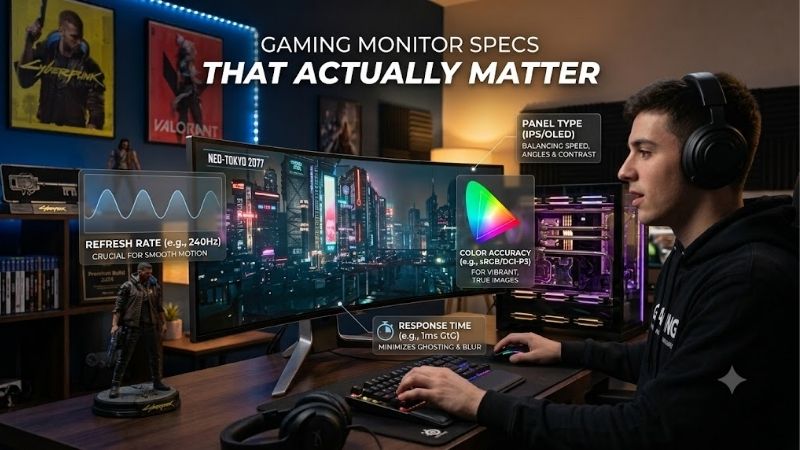
Refresh rate describes display updates per second, while pixel response describes transitions between colors. Both affect clarity, but a maximum refresh number cannot guarantee clean transitions. Compare motion testing at relevant refresh rates instead of a response claim. For 1440p refresh headroom, choose the ASUS ROG Strix XG27ACS.
At 180Hz, each refresh lasts about 5.56 milliseconds; at 360Hz, that falls to 2.78 milliseconds. The difference matters most when your system delivers high frame rates. Extra headroom for slower games offers diminishing returns. Choose the Alienware AW2725DF when competitive PC play can exploit its higher refresh ceiling.
Panel Technology and Real Contrast
Panel technology determines illumination and contrast performance. IPS monitors suit everyday desktop tasks, while OLED pixels emit their own light and switch off completely for black. That difference matters in dark scenes, with bright objects in the frame. Choose the Alienware AW2725DF when contrast deserves premium spending.
OLED carries burn-in considerations with prolonged static content, so daily ownership habits matter. Keep automatic maintenance features enabled and follow manufacturer guidance. IPS avoids that OLED concern, although dark-room blacks are less convincing. Choose the ASUS ROG Strix XG27ACS for predominantly static work.
Input Capabilities and Useful Connectivity
Connection names are less useful than supported resolution and refresh combinations. Check the specification for your intended connection; the maximum rate may require DisplayPort. HDMI branding alone does not establish capabilities. Choose the Gigabyte M28U when confirmed 4K console support is part of the requirement.
A KVM switch routes shared keyboard and mouse connections between computers, reducing peripheral cable changes at a shared desk. It needs USB connections and setup, and adds little for single-computer use. Consider convenience separately from image quality. Choose the Gigabyte M28U when you regularly switch between two machines.
Top Picks
These selections demonstrate gaming monitor specs that actually matter through distinct priorities. The ASUS balances detail and refresh, the AOC reduces GPU demands, the Alienware prioritizes motion and contrast, and the Gigabyte combines 4K definition with peripheral sharing. Use each model’s strengths enough to justify its compromises.
| Product | Best For | Key Spec | Watch Out For |
|---|---|---|---|
| ASUS ROG Strix XG27ACS | Best Overall | 27-inch 1440p Fast IPS, 180Hz | HDMI 144Hz; USB-C 7.5W |
| AOC 24G4 | Best Value | 23.8-inch 1080p IPS, 180Hz | Less desktop space; no USB hub |
| Alienware AW2725DF | Premium PC Gaming | 26.7-inch 1440p QD-OLED, 360Hz via DP | HDMI 144Hz; OLED burn-in considerations |
| Gigabyte M28U | Work and 4K Gaming | 28-inch 4K IPS, 144Hz, KVM | No swivel; console 4K/120Hz uses 4:2:0 |
ASUS ROG Strix XG27ACS: Best Overall
The ASUS ROG Strix XG27ACS is my best overall recommendation for mainstream PC gaming. Its 27-inch Fast IPS panel provides 2560 x 1440 resolution and up to 180Hz over DisplayPort or USB-C video. That combination gives competitive games refresh headroom while preserving desktop clarity for documents and strategy interfaces.
For gaming monitor specs that actually matter, this model emphasizes resolution and refresh over luxury features. Its drawback is connection flexibility: HDMI reaches 144Hz, and USB-C delivers only 7.5W. A compatible laptop can send video, but still needs its charger. Buy it for balanced PC use rather than docking functionality.
AOC 24G4: Best Value
The AOC 24G4 is my best value choice when its current selling price sits below the 1440p ASUS. Its 23.8-inch IPS display combines 1920 x 1080 resolution with 180Hz operation. That lower pixel workload suits modest graphics hardware and gives budget buyers a route toward smoother play without immediate computer replacement.
This pick highlights gaming monitor specs that actually matter for budget gaming: manageable resolution and refresh headroom. The tradeoff is reduced desktop space and image detail compared with 1440p. It lacks a USB hub, limiting peripheral convenience. Choose it for focused budget gaming rather than expansive document layouts or 4K imagery.
Alienware AW2725DF: Best for Premium PC Gaming
The Alienware AW2725DF is best for competitive PC gaming and premium contrast. Its 26.7-inch QD-OLED panel combines 2560 x 1440 resolution with up to 360Hz through compatible DisplayPort connections. Self-emissive pixels give dark imagery a different character from IPS. It suits buyers who value responsive gameplay and dark-room contrast.
It illustrates gaming monitor specs that actually matter for specialized performance. HDMI tops out at 144Hz, so the headline refresh requires DisplayPort. OLED also brings burn-in considerations for static content. Dell lists three-year coverage including OLED burn-in, but maintenance still matters; this is a gaming-first purchase.
Gigabyte M28U: Best for Work and 4K Gaming
The Gigabyte M28U is best for a shared work and 4K gaming setup. Its 28-inch IPS panel offers 3840 x 2160 resolution, up to 144Hz, and a built-in KVM switch. Fine desktop detail benefits productivity, while shared peripherals simplify multicomputer setups. Its appeal is combining productive workspace with high-resolution entertainment.
It prioritizes gaming monitor specs that actually matter for mixed use: density, supported signals, and connectivity. The compromises include heavier 4K graphics demands and a stand without swivel. Console 4K at 120Hz uses 4:2:0 chroma, reducing color detail. Choose the sharp desktop and KVM for practical requirements rather than marketing.
Frequently Asked Questions
Questions about gaming monitor specs that actually matter concern numbers that describe different things. Response time does not equal input lag, wide color coverage does not prove accuracy, and an HDR label does not explain contrast. These answers identify the distinctions that change purchases rather than decorate listings.
Does a 1ms Response Time Guarantee Clear Motion?
No, an advertised 1ms response time does not prove a monitor has clear motion. Manufacturers may quote transitions or aggressive overdrive settings instead of typical behavior. Excessive overdrive can create bright trails around moving objects. Compare measured transitions and overshoot across the refresh range you expect to use.
Treat MPRT and gray-to-gray figures as different measurements. MPRT concerns motion persistence, often involving backlight strobing; gray-to-gray concerns pixel transitions. Strobing can introduce brightness or support tradeoffs. Neither label independently confirms low input lag, the delay before a response becomes visible.
Is 4K Always Better Than 1440p?
No, 4K is not automatically better than 1440p for gaming. Additional detail comes with graphics demands, which may force lower settings or reduce frame rates. At desk distances, a 27-inch 1440p screen provides useful definition with lower processing demands. Choose according to graphics capability and the games you actually run.
For document work or slower games favoring detail, 4K may deserve priority over additional refresh. Screen size and viewing distance affect perceived detail. A smaller 4K display can also require interface scaling for readability. Consider the whole desktop experience instead of treating resolution as an isolated ranking.
Does an HDR Badge Guarantee Better Picture Quality?
No, an HDR badge alone is insufficient evidence of good HDR. Convincing presentation requires contrast alongside brightness and color reproduction. A monitor can accept an HDR signal without reproducing highlights and shadows effectively together. Examine panel technology and measured HDR behavior before paying for the label.
The Alienware’s OLED panel makes contrast a stronger argument than the basic HDR capability of these IPS alternatives. However, peak brightness numbers still depend on highlight size and duration. Do not interpret a small-highlight maximum as sustained full-screen brightness. Judge the content and lighting you normally use.
Does Adaptive Sync Matter More Than Maximum Refresh?
Yes, adaptive sync matters when game frame rates fluctuate and your hardware supports the connection. It aligns display timing with incoming frames to reduce tearing within range. Check compatibility and range alongside maximum refresh. A stable experience at varying frame rates can outweigh a higher ceiling you seldom reach.
After connecting the monitor, verify native resolution and refresh rate in system settings, then confirm variable-refresh settings. A capable screen can remain at 60Hz until configured. On desktops, connect through the dedicated graphics card when appropriate. Check input limits before blaming the monitor for unavailable modes.
Final Thoughts
Prioritize gaming monitor specs that actually matter to your equipment and use. Choose ASUS for balanced 1440p gaming, AOC for modest hardware, Alienware for premium PC motion and contrast, or Gigabyte for a shared 4K workspace. Compare prices and return terms, then pay for usable capabilities rather than numbers alone.
Ready to decide? Our #1 pick for 2026 is the ASUS ROG Strix XG27ACS.
Live price & availability on Amazon.