Best budget external ssd shoppers usually face a tradeoff: the cheapest drives can sacrifice speed, capacity, or useful protection. This guide narrows the field to four real models that keep modern USB 10Gbps performance while targeting practical prices, so you can match storage to your workload instead of paying for features you will not use.
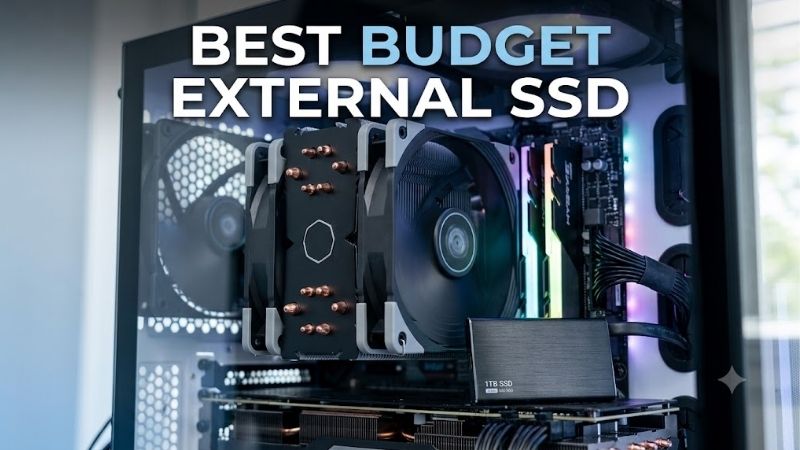
Quick answer: For most people in 2026, the best budget external ssd is the Samsung T7 — our #1 rated choice. See the full ranked comparison, alternatives and buying advice below.
How to Choose a Budget External SSD
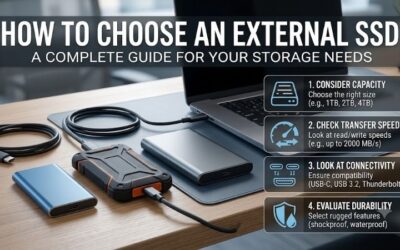
The best budget external SSD is not simply the lowest-priced drive. The useful choice depends on four things that affect daily ownership: connection speed, capacity, physical protection, and portability. These picks cover different priorities while staying focused on fast, bus-powered storage for laptops, desktops, consoles, and mobile devices.
Speed and USB Compatibility
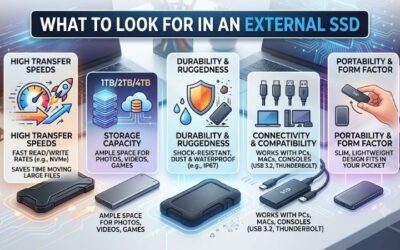
Interface speed sets the ceiling for file transfers, so check the host port before paying extra for a faster drive. USB 3.2 Gen 2 at 10Gbps is the practical target because it supports sequential reads around 1,050MB/s on several affordable models without requiring a premium 20Gbps setup or newer USB4 hardware for routine work.
Headline numbers still depend on the computer, cable, workload, and thermal conditions, so sustained transfers can finish below the advertised peak. For normal backups, game libraries, photo folders, and media work, the 10Gbps class is a useful balance. That makes Samsung T7 and Kingston XS1000 strong fits for speed-first buyers.
Capacity and Headroom
Capacity should follow the size of the files you actually keep on the drive, not just the lowest upfront cost. A 500GB model can handle documents and a modest photo library, while 1TB is a more comfortable baseline for mixed files, applications, and game installs. Larger media libraries usually benefit from 2TB or more.
Also leave room for growth because an SSD becomes inconvenient when nearly full, and performance can vary by workload as free space shrinks. Samsung T7 tops out at 2TB, Kingston XS1000 reaches 2TB, while Crucial X9 and SanDisk Extreme offer larger options, making those two better fits for bigger libraries for future growth.
Durability and Protection
Durability matters most when the drive travels in a backpack, camera bag, or work case. Look for explicit drop and water or dust resistance when exposure is realistic, rather than assuming every portable SSD is rugged. The distinction is useful because a compact everyday drive and a field-ready drive serve different buyers.
For routine indoor use, a protective sleeve and careful handling may be enough, while outdoor workflows justify stronger enclosure protection. Crucial X9 offers drop protection up to 2 meters, while SanDisk Extreme adds IP65 water and dust resistance plus up to 3-meter drop protection, making both logical field-use choices.
Portability and Size
Portability is more than dimensions: weight, cable choice, and how easily the drive fits beside a laptop all affect whether you actually carry it. Tiny drives are convenient, but very small housings can make cables easier to lose and may provide less room for heat to spread during long transfers, especially in warm bags.
A light drive is useful for students, travelers, and users moving between computers every day, while a slightly larger enclosure can feel easier to grip. Kingston XS1000 weighs 28.7g, Crucial X9 is about 32g, and Samsung T7 is 58g, so the Kingston is the clearest fit for minimum carry weight and pocket-friendly travel.
Top Picks
These four picks cover the main ways people shop for the best budget external ssd: balanced everyday use, lowest-cost value, rugged field work, and minimum size. All use USB 3.2 Gen 2-class connectivity, but their capacities, protection, and physical designs differ enough to justify distinct roles for different buyers.
| Product | Best For | Key Spec | Watch Out For |
|---|---|---|---|
| Samsung T7 | Best Overall | Up to 1,050/1,000MB/s; 500GB–2TB; AES-256 hardware encryption. | No IP-rated water or dust protection |
| Crucial X9 | Best Value | Up to 1,050MB/s read; 1TB–4TB; up to 2m drop protection. | No IP rating; USB-C-to-C focused setup |
| SanDisk Extreme Portable SSD | Best For Outdoor Work | Up to 1,050/1,000MB/s; 500GB–4TB; IP65; up to 3m drop protection. | Bulkier rugged enclosure |
| Kingston XS1000 | Best For Ultra-Light Carry | Up to 1,050/1,000MB/s; 1TB–2TB; 28.7g. | No IP-rated water or dust protection |
Samsung T7: Best Overall
Samsung T7 is the Best Overall for buyers who want a proven mix of speed, compact size, security, and broad device support. In this best budget external ssd roundup, it reaches up to 1,050MB/s read and 1,000MB/s write over USB 3.2 Gen 2, with AES 256-bit hardware encryption across 500GB, 1TB, and 2TB options for laptops.
Its compact body and two included cables make it easy to move between machines, while password protection adds useful privacy. The tradeoff is the lack of IP-rated water and dust protection, so outdoor users should choose a rugged model. That makes T7 a better fit for desks, bags, and commutes during daily travel safely.
Crucial X9: Best Value
Crucial X9 is the Best Value for buyers who want 10Gbps-class performance without moving into premium-priced rugged models. In this best budget external ssd roundup, the 1TB version reaches 1,050MB/s reads, weighs about 32g, and uses a compact portable enclosure. Its 2-meter drop rating adds useful resilience for daily backups.
The broad capacity range, including models up to 4TB, is valuable for large photo, video, and game libraries, but the casing is more utilitarian than heavier rubberized designs. Crucial does not list hardware encryption for X9, unlike Samsung T7, so buyers prioritizing built-in drive security may prefer Samsung for sensitive work files.
SanDisk Extreme Portable SSD: Best For Outdoor Work
SanDisk Extreme Portable SSD is the Best For Outdoor Work when dust, rain, and drops are realistic risks. In this best budget external ssd lineup, it offers up to 1,050MB/s read and 1,000MB/s write, uses USB 3.2 Gen 2, and carries IP65 protection with up to 3-meter drop resistance. Its carabiner loop helps secure a bag.
That rugged design makes it a practical companion for photographers, travelers, and field creators, but the protective shell is bulkier than ultra-compact alternatives. The silicone shell and carabiner-oriented design occupy bag space, while indoor users may not need the added protection. Its value rises when travel conditions are unpredictable.
Kingston XS1000: Best For Ultra-Light Carry
Kingston XS1000 is the Best For Ultra-Light Carry because it delivers 1,050MB/s reads and 1,000MB/s writes while weighing only 28.7g. In this best budget external ssd lineup, it supports 1TB and 2TB capacities, uses USB 3.2 Gen 2, and includes both a USB-C-to-A cable and an adapter, which helps when moving between ports.
Its metal-and-plastic enclosure slips easily into a pocket or laptop sleeve, and Kingston backs it with a limited five-year warranty. The tradeoff is the lack of an IP water or dust rating, so it suits office, school, travel, and backup duties better than exposed outdoor work. That keeps the design focused on portability.
Frequently Asked Questions
The best budget external ssd questions usually come down to capacity, speed, compatibility, and backup habits. The answers below focus on practical ownership rather than lab-only numbers, including what changes when you connect a drive to an older port, a phone, or a console, and how to protect important files without overbuying.
What Capacity Should I Buy?
A 1TB external SSD is the sensible starting point for most buyers because it leaves useful room for photos, documents, applications, and several large games without jumping straight to higher-capacity pricing. It also keeps the drive compact and easy to manage. That capacity fits this roundup well for mixed everyday storage.
Move to 2TB when your library includes large video projects, RAW photo archives, or modern games, and choose 4TB only when that capacity will be used regularly. Crucial X9 and SanDisk Extreme provide larger headroom, while Samsung T7 and Kingston XS1000 stop at 2TB. Larger drives make more sense for frequent transfers, not occasional backups.
Is 1,050MB/s Fast Enough?
Yes, 1,050MB/s-class external SSDs are fast enough for most everyday storage work, including backups, large file transfers, photo editing, and moving game installations. The benefit is especially clear when the computer has a USB 3.2 Gen 2 port that can actually provide the needed 10Gbps link, rather than an older connection.
Do not expect the same speed on every machine: USB 2.0, older USB 3.x ports, weak cables, and thermal limits can reduce throughput substantially. For sustained professional workloads or newer high-end systems, 20Gbps or USB4 drives can be justified, but they sit outside this budget-focused group and may cost more than needed.
Will These SSDs Work With Mac, PC, and Consoles?
Yes, these drives can work across Windows, macOS, and many modern phones or consoles, provided the host supports the needed USB connection and the drive’s file-system format is appropriate. Samsung T7 and Kingston XS1000 explicitly support broad operating-system compatibility in their specifications for current devices.
For a console or phone, check the device’s storage rules and connector requirements before buying, because a compatible cable does not guarantee every feature works. Reformatting for a platform can also erase existing data, so back up files before changing the file system, particularly when switching between console and computer use.
Are Budget External SSDs Reliable For Backups?
Yes, they are reliable for active storage, but an SSD should not be treated as the only copy of irreplaceable data. Flash storage has no moving parts, yet any drive can fail from electronics, connectors, file-system errors, loss, or accidental damage, so backups should use a separate destination for anything important.
For irreplaceable photos, documents, and projects, keep at least one additional copy somewhere else rather than trusting a single portable drive. A second SSD or a properly managed backup system covers risks that enclosure ratings cannot solve. That principle matters more than small differences in advertised transfer speed.
Final Thoughts
The right best budget external SSD depends on what you value after price: Samsung T7 balances speed and security, Crucial X9 emphasizes value and capacity, SanDisk Extreme targets rugged travel, and Kingston XS1000 minimizes weight. All four deliver fast 10Gbps-class storage, but their tradeoffs point to different everyday uses.
Ready to decide? Our #1 pick for 2026 is the Samsung T7.
Live price & availability on Amazon.