What to look for in an external ssd becomes confusing when similar drives advertise very different speeds. A faster model can cost more yet offer little benefit through your laptop port. Start with enough capacity, a matching USB standard, and the protection your routine needs, rather than the biggest number on the box.
Quick answer: Our top pick in 2026 is the Samsung T7 — our #1 rated choice. See the full ranked comparison, alternatives and buying advice below.
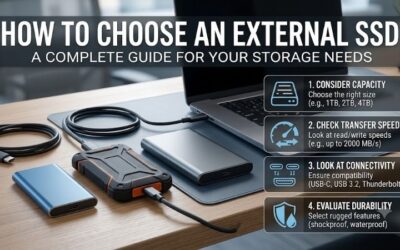
How to Choose an External SSD
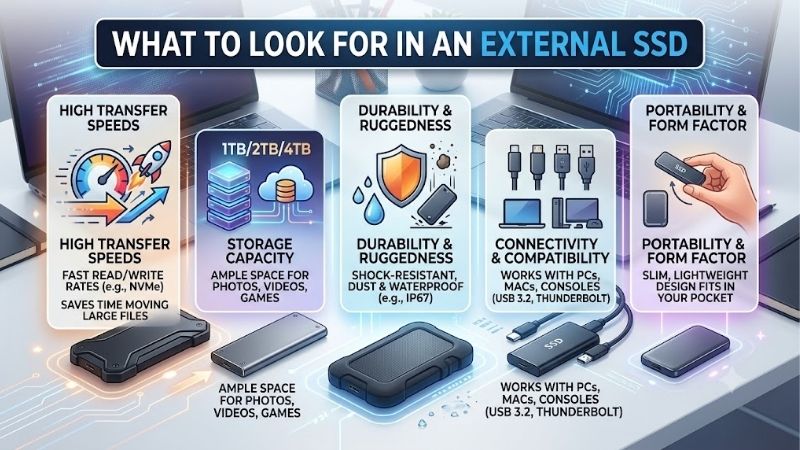
This guide explains what to look for in an external ssd through capacity, USB compatibility, durability, and purchase value. Four specific SSD models show how those priorities change the right choice. For most everyday buyers, a complete 1TB or 2TB USB 10Gbps drive is a practical starting point without enclosure assembly.
Capacity and Future Storage Needs
Capacity should cover the files you own and the ones you expect to add. A 1TB drive works well for documents, photographs, and modest game collections. Choose 2TB when videos or full computer backups dominate. Compare prices at equal capacities, since a smaller drive can appear cheaper while giving you much less useful space.
Backup history consumes capacity beyond the original folders, particularly when photographs and videos accumulate regularly. A nearly full laptop therefore needs proportionately larger backup storage. Choose Kingston XS1000 in 1TB for manageable collections, or Kingston XS2000 in 4TB for substantial multimedia archives.
USB Compatibility and Useful Speed
USB-C identifies connector shape rather than transfer performance. Check computer specifications for 10Gbps USB or 20Gbps USB 3.2 Gen 2×2 before comparing drive labels. Backward compatibility permits slower connections without delivering advertised maximums. Additional speed is worthwhile only when your existing hardware supports it.
For buyers asking what to look for in an external ssd, the host connection matters more than a headline speed benchmark. USB4 or Thunderbolt branding alone does not confirm Gen 2×2 support. Choose Samsung T7 for an ordinary 10Gbps setup, or Kingston XS2000 when a verified Gen 2×2 port supports its higher transfer ceiling.
Physical Protection and Portability
Physical protection matters when storage accompanies commutes, outdoor photography, or crowded work bags. Dust and water certifications describe specific enclosure tests rather than immunity to accidents. Protective construction also increases carrying weight. Samsung T7 Shield offers IP65 protection, while Samsung T7 favors slimmer dimensions.
Keep connectors clean and dry, and treat water resistance as extra protection rather than permission to immerse the drive. Drop ratings describe controlled tests, not guaranteed survival on every surface. For frequent outdoor use, choose Samsung T7 Shield; for mostly indoor transfers, Samsung T7 avoids the heavier travel enclosure.
Accessories, Warranty, and Value
Purchase value includes supplied accessories and warranty terms alongside advertised performance. Inexpensive storage loses appeal when compatibility requires another cable. Examine connector types, cable length, and seller credentials before ordering. Compact cables suit laptop workstations, while desktop towers may require longer replacements.
Optional security tools and supplied accessories affect convenience beyond benchmark results. Samsung T7 includes USB-C-to-C and USB-C-to-A cables, while Kingston XS1000 carries a five-year limited warranty. For shoppers comparing what to look for in an external ssd, choose T7 for cable convenience or XS1000 for competitive basic storage.
Top Picks
These picks demonstrate what to look for in an external ssd across four distinct priorities: balanced daily use, budget value, physical protection, and compatible high-speed transfers. Speeds in the comparison are manufacturer maximums, not results from our own testing. Each recommendation includes a reason to consider alternatives.
| Product | Best For | Key Spec | Watch Out For |
|---|---|---|---|
| Samsung T7 | Best Overall | Up to 1,050MB/s read; approximately 58g | No dust or water rating |
| Kingston XS1000 | Best Value | 1TB or 2TB; five-year limited warranty | No 4TB option or ingress protection rating |
| Samsung T7 Shield | Best for Travel | IP65; tested drops up to three meters | Heavier enclosure; 10Gbps interface |
| Kingston XS2000 | Best for Compatible High-Speed Transfers | Up to 2,000MB/s read and write | Maximum speed requires USB Gen 2×2 |
Samsung T7: Best Overall
Samsung T7 suits home users who move photographs, coursework, and office files between computers. Its USB 3.2 Gen 2 interface is rated up to 1,050MB/s read and 1,000MB/s write. At approximately 58 grams, the metal enclosure travels easily, and the supplied USB-C-to-C and USB-C-to-A cables cover two common computer connections.
The overall recommendation reflects its balanced accessory package and pocket-friendly dimensions rather than guaranteed benchmark superiority. The substantive limitation is absent dust and water certification, reducing suitability for demanding travel. Choose this model for coursework, household photo collections, and routine office transfers.
Kingston XS1000: Best Value
Kingston XS1000 illustrates what to look for in an external ssd for economical everyday storage. Its 1TB and 2TB capacities accommodate documents and photographs, while the 28.7-gram enclosure minimizes carrying weight. Advertised speeds reach 1,050MB/s read and 1,000MB/s write through a familiar USB 3.2 Gen 2 connection.
Its strongest advantages are the tiny enclosure and five-year limited warranty, especially when the same-capacity price is competitive. The compromises are no rated dust or water protection and no 4TB option. Current kits include a USB-A cable and USB-C adapter; confirm the actual bundle if a seller carries older stock.
Samsung T7 Shield: Best for Travel
Samsung T7 Shield fits travelers and photographers whose storage regularly leaves a clean desk. Samsung specifies IP65 dust and water resistance and drop resistance up to three meters in controlled testing. Sequential speeds are rated up to 1,050MB/s read and 1,000MB/s write, so the protective shell retains familiar 10Gbps connectivity.
The Shield weighs approximately 98 grams, making it heavier and thicker than the standard T7. You gain enclosure protection rather than a higher peak speed, and the 10Gbps interface cannot exploit Gen 2×2 bandwidth. Choose it when carrying conditions justify the bulk; household file transfers alone rarely require this tougher shell.
Kingston XS2000: Best for Compatible High-Speed Transfers
Kingston XS2000 serves new video editors and media collectors with a confirmed USB 3.2 Gen 2×2 connection. Its advertised sequential read and write speeds both reach 2,000MB/s. Capacities span 500GB to 4TB, and the included rubber sleeve adds practical carrying protection without requiring you to assemble a separate SSD enclosure.
Maximum performance requires a compatible 20Gbps Gen 2×2 connection, making computer compatibility the principal purchasing constraint. Slower interfaces diminish its speed advantage without reducing the purchase price. Choose it for supported multimedia workflows or appropriately priced 4TB storage, rather than routine document transfers.
Frequently Asked Questions
Understanding what to look for in an external ssd also requires realistic expectations after purchase. Formatting affects compatibility, backup habits determine recoverability, and transfer workloads influence speed. These questions cover the decisions that specifications alone cannot settle before your first large copy or backup.
How Much External SSD Storage Do I Need?
For general storage, 1TB is a sensible starting capacity; 2TB better accommodates substantial video collections, games, and backup history. Measure existing folders before purchasing rather than relying on file counts. A handful of high-resolution video projects can occupy more capacity than years of documents and compressed photographs.
Reserve capacity for future additions rather than purchasing storage that begins almost full. Usable space differs from packaging because formatting and measurement conventions affect the display. Frequent deletion or reshuffling interrupts work, making additional capacity more valuable than higher transfer specifications for growing collections.
Do I Need an External SSD Rated at 2,000MB/s?
No, 2,000MB/s is not necessary for routine documents, photo transfers, or occasional backups. A compatible 10Gbps SSD offers ample performance for those tasks. Higher bandwidth becomes useful when you regularly move substantial media projects and the computer, cable, and source drive all support the required transfer conditions.
When deciding what to look for in an external ssd for editing, consider the workflow rather than speed alone. Small files add overhead, and sustained writes may differ from short peak benchmarks. Examine independent tests for your chosen capacity if uninterrupted long transfers matter, instead of treating every advertised maximum as sustained.
Can One External SSD Work With Windows and Mac?
Yes, Windows and Mac computers can share external storage through a mutually writable filesystem such as exFAT. This arrangement accommodates cross-platform coursework and household photography transfers. Operating-system-specific formats may instead permit reading without modification, despite physically compatible connectors and cables.
Check the existing format before changing it, because reformatting erases stored contents. Copy anything important elsewhere first, then choose a filesystem suited to the intended computers and backup software. Dedicated Mac workflows may favor APFS, while mixed-system transfers typically benefit from a mutually writable format such as exFAT.
Does a Rugged External SSD Replace a Backup?
No, rugged construction does not replace a backup. A drive containing your only copy is primary storage, regardless of its drop rating or enclosure material. Keep important files in independent locations, and consider an off-site copy for irreplaceable photographs. Hardware protection cannot prevent theft, accidental deletion, or every failure.
Backup frequency should reflect how regularly important documents change. Verify saved copies by opening sample files rather than assuming every transfer succeeded. Manufacturer warranties generally address hardware replacement, not document recovery. Retain purchase records, but prioritize recoverable duplicates over warranty duration alone.
Final Thoughts
Knowing what to look for in an external ssd means matching capacity, connection, and protection to actual use. Samsung T7 balances daily convenience, Kingston XS1000 favors value, T7 Shield suits travel, and XS2000 rewards verified Gen 2×2 support. Compare equal capacities and keep separate copies of files you cannot replace
Ready to decide? Our #1 pick for 2026 is the Samsung T7.
Live price & availability on Amazon.