Best am5 motherboard for a budget build starts with compatibility, not the cheapest price tag. You need the correct socket, power delivery, DDR5 support, storage options, networking, and case size for the rest of the PC. This guide compares four actual AM5 boards so you can match features to the processor and upgrade plan.
How to Choose AM5 Motherboards
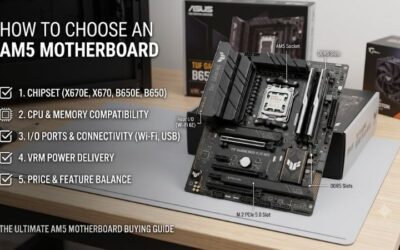
The best AM5 motherboard for a budget build depends on the processor, case, storage plan, and networking needs. The practical way to evaluate what to look for in an AM5 motherboard is to check four practical criteria: power delivery, memory and storage, connectivity, and physical expansion room before comparing motherboards beforehand.
Power Delivery And VRM
Power delivery covers VRM phases, power stages, heatsinks, and CPU power connectors. Mainstream Ryzen CPUs can run well on modest B650 designs, while higher-power chips benefit from stronger hardware and cooling. MSI PRO B650M-A WIFI and ASUS TUF B650-PLUS WIFI both provide practical headroom for demanding AM5 processors.
Phase count alone is not a performance guarantee. Heatsink coverage, airflow, and the actual power-stage rating matter under sustained loads. ASUS TUF B650-PLUS WIFI uses 12(60A)+2(60A)+2 stages, while MSI uses an 8+2+1 design. Both fit buyers who want a more robust power foundation without moving to a flagship chipset.
Memory Capacity And DIMM Slots
Memory support includes DIMM count, capacity, and rated DDR5 speeds. Four slots enable future expansion, while two slots suit a focused build that will stay at one matched kit. Gigabyte B650M DS3H has four DDR5 slots and lists speeds up to DDR5-8000 overclocked, making it useful when future memory expansion matters.
Two slots are not automatically a flaw when the plan is 32GB or 64GB and no later expansion is planned. ASRock B650M-HDV/M.2 uses two DDR5 slots and supports EXPO and XMP profiles. That keeps the board simple, but the limited slot count should be understood before purchase rather than discovered during a later upgrade.
M.2 Storage And PCIe
Storage support should be judged by both slot count and PCIe generation. ASRock B650M-HDV/M.2 provides two M.2 storage sockets, with one PCIe 5.0 x4 and one PCIe 4.0 x4. That gives a cost-conscious system a fast primary-SSD position without requiring a higher-tier board, while leaving a second NVMe slot for expansion.
More M.2 slots matter when multiple NVMe drives are preplanned for use. MSI PRO B650M-A WIFI has two PCIe 4.0 x4 M.2 connectors, while ASUS TUF B650-PLUS WIFI has three, including PCIe 5.0 x4. Choose by drive count and SSD generation rather than paying for unused storage capacity, and either layout can work effectively.
Networking And Connectivity
Connectivity becomes an actual budget factor when a board can replace add-in cards. MSI PRO B650M-A WIFI combines 2.5G Ethernet with Wi-Fi 6E, while Gigabyte B650M DS3H offers 2.5GbE for wired systems. The key question is whether your desk can use Ethernet consistently or needs built-in integrated-wireless from the motherboard.
Case size and rear I/O should be checked together because compact boards save space but can reduce expansion flexibility. Gigabyte B650M DS3H and ASRock B650M-HDV/M.2 use micro-ATX layouts, while ASUS TUF B650-PLUS WIFI is full-size ATX. For compact cases choose mATX; for more cards or connectors, ASUS offers more room.
Top Picks
The four picks target distinct budget-build priorities instead of duplicating a feature mix. ASRock keeps features focused, Gigabyte favors a compact wired layout, MSI adds Wi-Fi 6E, and ASUS provides a larger ATX platform. That makes the best am5 motherboard for a budget build a system-matching choice, not simply the board with the longest feature list.
| Product | Best For | Key Spec | Watch Out For |
|---|---|---|---|
| ASRock B650M-HDV/M.2 | Best Value | 8+2+1 DrMOS, 2 DDR5 slots, 2 M.2, 1 PCIe 5.0 x4, 2.5GbE | No onboard Wi-Fi; only 2 DIMM slots |
| Gigabyte B650M DS3H | Best For Compact Wired Builds | 6+2+1 VRM, 4 DDR5 slots, 2 PCIe 4.0 x4 M.2, 2.5GbE | No onboard Wi-Fi |
| MSI PRO B650M-A WIFI | Best Overall | 8+2+1 power design, 4 DDR5 slots, Wi-Fi 6E, 2.5G LAN, 2 M.2 | No PCIe 5.0 M.2 slot |
| ASUS TUF GAMING B650-PLUS WIFI | Best For Full-Size Upgrade Builds | 12(60A)+2(60A)+2 stages, 3 M.2, 1 PCIe 5.0 x4 M.2, Wi-Fi 6 | Requires ATX case |
ASRock B650M-HDV/M.2 — Best Value
ASRock B650M-HDV/M.2 is Best Value for a streamlined AM5 system targeted at essential hardware. It supports Ryzen 7000, 8000, and 9000 processors, uses 8+2+1 DrMOS, two DDR5 slots, 2.5GbE, and two M.2 sockets: one PCIe 5.0 x4 and one PCIe 4.0 x4. It complements the best am5 motherboard for a budget build.
Its main limitation is clear: just two DDR5 DIMM slots are available and Wi-Fi is not built in. That can limit later memory upgrades or require a separate wireless networking adapter. For a 32GB or 64GB wired desktop build, however, the 24.4 x 22.6cm micro-ATX motherboard avoids paying for features that will stay unused today.
Gigabyte B650M DS3H — Best For Compact Wired Builds
Gigabyte B650M DS3H is Best For Compact Wired Builds requiring four DDR5 slots without ATX. Revision 1.3 supports Ryzen 7000, 8000, and 9000 processors, two PCIe 4.0 x4 M.2 positions, four SATA ports, and 2.5GbE. Its four-DIMM layout suits the best am5 motherboard for a budget build when future memory expansion matters.
The limitation is wired networking, so a wireless buyer needs an adapter or another board. Gigabyte uses a 6+2+1 digital VRM design with 60A Smart Power Stage on the CPU side. That makes the board a practical compact-system choice when four DIMMs, dual NVMe storage, and Ethernet matter more than built-in Wi-Fi.
MSI PRO B650M-A WIFI — Best Overall
MSI PRO B650M-A WIFI is Best Overall for a mainstream AM5 PC requiring wireless networking. It supports Ryzen 7000, 8000, and 9000 processors, four DDR5 slots up to 7200+ overclocked, two PCIe 4.0 x4 M.2 slots, 2.5G LAN, and Wi-Fi 6E. Its micro-ATX format makes the best am5 motherboard for a budget build easy to fit.
The compromise is storage generation: both M.2 sockets are PCIe 4.0 x4, so buyers planning several next-generation SSDs may want more. Its 8+2+1 Duet Rail design is aimed at mainstream desktop systems rather than extreme builds. For budget PCs, integrated Wi-Fi 6E, four DIMM slots, and dual M.2 support form a well-balanced feature set.
ASUS TUF GAMING B650-PLUS WIFI — Best For Full-Size Upgrade Builds
ASUS TUF GAMING B650-PLUS WIFI is Best For Full-Size Upgrade Builds with an ATX case. ASUS lists 12(60A)+2(60A)+2 power stages, three M.2 slots including one PCIe 5.0 x4 position, 2.5Gb Ethernet, and Wi-Fi 6. That expansion mix makes it a practical best am5 motherboard for a budget build when several drives or cards are planned.
The limitation is overall dimensions: the board measures 30.5 x 24.4cm, so the case must explicitly support ATX. Its Wi-Fi 6 is also less recent than MSI’s Wi-Fi 6E. Still, three M.2 slots and the roomier expansion area suit buyers planning multiple NVMe drives or add-in cards over the system’s expected operating life.
Frequently Asked Questions
Budget motherboard buying questions center on whether B650 is enough, VRM requirements, onboard Wi-Fi, and M.2 capacity. The practical answer is to match the best am5 motherboard for a budget build to processor power, case dimensions, storage needs, and upgrade plans before paying for premium wireless connectivity alone.
Is B650 Enough For A Budget AM5 Build?
Yes, B650 is enough for many cost-conscious AM5 builds because these boards support Ryzen 7000, 8000, and 9000 processors while providing DDR5 and modern PCIe connectivity. ASRock B650M-HDV/M.2 shows how much can fit into a compact design, so a mainstream gaming processor does not require a flagship board today.
An exception is a build with several NVMe drives, expansion cards, built-in wireless, or an unusually demanding processor. Those needs can justify a richer board instead of the cheapest option. ASUS TUF B650-PLUS WIFI and MSI PRO B650M-A WIFI cover broader expansion and connectivity needs than a stripped-down budget motherboard.
Do Budget AM5 Builds Need Strong VRMs?
No, not every Ryzen CPU requires high-end VRM hardware. A genuinely sensible B650 board can handle a mainstream processor, while stronger power delivery matters more for sustained power and all-core workloads. Gigabyte B650M DS3H uses a 6+2+1 design, while ASUS TUF B650-PLUS WIFI uses 12(60A)+2(60A)+2 stages for added headroom.
Do not treat phase count as a performance score. Heatsinks, airflow, firmware, and CPU power limits affect behavior. Spend more on VRM hardware when the processor justifies it rather than buying phases for display alone. MSI PRO B650M-A WIFI remains a practical middle ground for an AM5 system with substantial thermal hardware.
Is Built-In Wi-Fi Worth Paying For?
Built-in Wi-Fi is worth paying for when Ethernet is inconvenient or you want to avoid a separate networking adapter. MSI PRO B650M-A WIFI includes Wi-Fi 6E and 2.5G LAN, while ASUS TUF B650-PLUS WIFI provides Wi-Fi 6 and 2.5G Ethernet. Both eliminate an extra card, but the wireless generation differs.
For a PC beside a router or switch, wired Ethernet may be simpler. Gigabyte B650M DS3H and ASRock B650M-HDV/M.2 provide 2.5GbE without onboard Wi-Fi. That makes them useful when a wired network cable connection already exists and the saved motherboard space or budget matters more than wireless convenience for the build.
How Many M.2 Slots Do I Need?
Two M.2 slots are enough for many PCs because one drive can hold Windows and applications while another stores games or projects. ASRock B650M-HDV/M.2 and MSI PRO B650M-A WIFI both provide two sockets. The important check is each slot’s PCIe generation and whether your SSD configuration plan needs more than Gen4 today.
Choose three M.2 slots when several NVMe drives are already included in the upgrade plan. ASUS TUF B650-PLUS WIFI provides three, including one PCIe 5.0 x4 slot, while Gigabyte B650M DS3H provides two PCIe 4.0 x4 positions. For a simple single-drive desktop, extra M.2 storage capacity may add cost without changing everyday use.
Final Thoughts
Choose the motherboard whose compromises fit the PC. For this category, the best am5 motherboard for a budget build means checking processor power demands, DDR5 expansion, M.2 count, networking, and chassis dimensions. ASRock, Gigabyte, MSI, and ASUS differentiate those priorities, so match features to your intended system.