Best am5 motherboard for a high end build purchases become confusing when specifications conceal shared lanes or unused features. Start with your CPU, storage plan, network, and case size. A costly board cannot compensate for the wrong layout. Prioritize compatibility over branding and follow manufacturer assembly instructions.
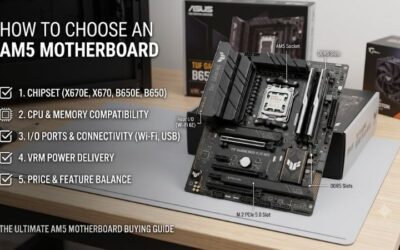
How to Choose an AM5 Motherboard
This guide compares the best am5 motherboard for a high end build through four distinct choices for balanced expansion, value, gaming-focused connectivity, and creator networking. The criteria explain specifications affecting daily use, then connect each recommendation to its advantages and restrictions without assuming newer chipsets are superior.
Verify CPU and Memory Support
CPU support depends on processor and BIOS compatibility, while memory behavior depends on both motherboard and processor. Check the support list for your chosen chip and memory kit before purchasing. A high advertised DDR5 overclock is a conditional capability, not a guarantee of stable four-module operation across every configuration.
Phase counts cannot establish performance superiority; heatsink design, firmware, and measured power-delivery temperatures matter too. Avoid paying extra for a theoretical advantage without processor-relevant evidence. For an older-chipset option with substantial power-delivery hardware, consider ASRock B650E Taichi Lite when competitively priced.
Plan Storage and Expansion
An M.2 socket count doesn’t guarantee equivalent bandwidth. Some connections originate at the CPU, others pass through the chipset, and certain combinations disable expansion slots or reduce bandwidth. Map your planned drives and add-in cards against documented restrictions, to avoid post-assembly configuration surprises.
The best am5 motherboard for a high end build should accommodate your storage layout without unexpected restrictions. ASRock’s Nova provides five M.2 sockets, but the fifth provides lower bandwidth than its faster storage connections. For a build prioritizing internal storage, choose ASRock X870E Nova WiFi after checking each slot’s specifications.
Match Network and USB Connections
Network specifications deserve attention only alongside compatible equipment. A 10Gb Ethernet port cannot accelerate 1Gb equipment, and Wi-Fi 7 benefits require compatible wireless equipment and software support. Match the board to your NAS, router, and actual transfer workload instead of expecting automatic network-performance improvements.
USB4 can benefit fast external storage or compatible docks, while additional Type-A connections accommodate peripheral-heavy desks. Account for concurrent connections, not just peak advertised throughput. For a creator workstation accessing compatible network storage, choose ASUS ProArt X870E-CREATOR WIFI for its integrated 10Gb Ethernet.
Check Physical Fit and Diagnostics
Form factor changes physical compatibility and access to connectors. An EATX board can obstruct cable openings in cases that comfortably accept ordinary ATX, and a large graphics card may obstruct expansion positions. Compare actual board dimensions with the chassis specification rather than assuming full-size compatibility.
Diagnostic displays and firmware-recovery controls are useful during memory troubleshooting and firmware updates. They don’t increase gaming performance, but they can reduce uncertainty during setup. For an ATX gaming system prioritizing networking and diagnostic feedback, choose MSI MAG X870 TOMAHAWK WIFI for its digital diagnostic display.
Top Picks
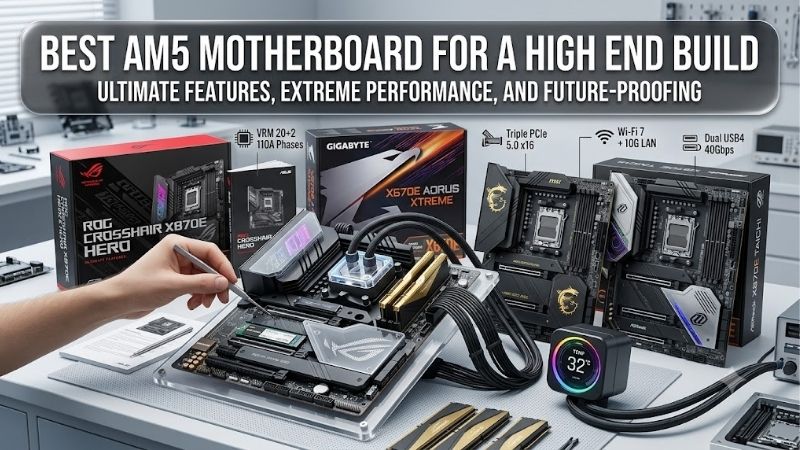
The best am5 motherboard for a high end build depends on planned peripherals, so these selections prioritize practical roles over branding. Nova balances storage and networking, Taichi Lite emphasizes conditional value, Tomahawk suits a connected gaming desk, and ProArt serves creators who can use its faster wired network.
| Product | Best For | Key Spec | Watch Out For |
|---|---|---|---|
| ASRock X870E Nova WiFi | Best Overall | ATX; five M.2 sockets; two rear USB4 ports; 5Gb Ethernet; Wi-Fi 7 | M2_5 supports PCIe 3.0 x2 or SATA and disables PCIE3 when occupied. |
| ASRock B650E Taichi Lite | Best Value when competitively discounted | EATX; three M.2 sockets; PCIe 5.0 graphics; rear USB4 | Wider 305 × 267mm footprint; M2_3 disables PCIE2. |
| MSI MAG X870 TOMAHAWK WIFI | Best For Connected Gaming Builds | ATX; four M.2 sockets; 5Gb Ethernet; Wi-Fi 7; digital debug display | M2_2 shares connectivity with the rear USB4 controller. |
| ASUS ProArt X870E-CREATOR WIFI | Best For Networked Creator Workstations | ATX; 10Gb plus 2.5Gb Ethernet; four M.2 sockets; two rear USB4 ports | Enabling M.2_2 changes GPU-slot bandwidth with supported Ryzen 7000/9000 CPUs. |
ASRock X870E Nova WiFi: Best Overall
ASRock X870E Nova WiFi earns Best Overall for a high-end desktop combining gaming with substantial local storage. This ATX board provides five M.2 sockets, two rear USB4 Type-C ports, 5Gb Ethernet, and Wi-Fi 7. Its mix of connections makes a strong starting point for multiple-drive builds avoiding wider EATX dimensions.
The limitation is uneven expansion capability: M2_5 supports PCIe 3.0 x2 or SATA, and populating it disables PCIE3. That lower expansion slot also provides PCIe 3.0 x2 bandwidth when available for another device. For the best am5 motherboard for a high end build, Nova favors drive-heavy use over high-bandwidth multi-card expansion.
ASRock B650E Taichi Lite: Best Value
ASRock B650E Taichi Lite earns Best Value when competitively discounted. It combines PCIe 5.0 graphics support with one Gen5 and two Gen4 M.2 positions, plus a rear 40Gbps USB4 port. Its 24+2+1 power-phase design provides substantial hardware, subject to relevant thermal validation under your intended processor’s sustained workload.
The drawbacks are meaningful: its 305 by 267mm EATX footprint needs clearance, while 2.5Gb Ethernet and Wi-Fi 6E trail the newer connectivity available elsewhere. Installing a drive in M2_3 disables PCIE2. Choose it when the actual savings and connection requirements justify those limits, without assuming older stock guarantees savings.
MSI MAG X870 TOMAHAWK WIFI: Best For Connected Gaming Builds
MSI MAG X870 TOMAHAWK WIFI is Best For Connected Gaming Builds needing 5Gb Ethernet, Wi-Fi 7, and two rear 40Gbps Type-C ports. Its ATX layout includes four onboard M.2 sockets and a digital debug display. Those features support peripheral-heavy gaming and diagnostic feedback without promising additional gaming performance.
The compromise is lane sharing: M2_2 and the rear USB4 controller share a CPU connection, while M2_3 also affects the lower expansion slot. Selecting x4 operation for M2_2 disables the rear 40Gbps ports. When choosing the best am5 motherboard for a high end build, Tomahawk suits storage configurations planned around these documented limitations.
ASUS ProArt X870E-CREATOR WIFI: Best For Networked Creator Workstations
ASUS ProArt X870E-CREATOR WIFI is Best For Networked Creator Workstations. Its ATX design includes both 10Gb and 2.5Gb Ethernet, two rear USB4 ports, and four M.2 positions. The integrated faster network interface is a practical advantage when your NAS and switch support it, preserving expansion capacity otherwise needed for a network adapter.
The drawback is expansion sharing: with supported Ryzen 7000 or 9000 processors, enabling M.2_2 reduces the primary graphics slot to x8 and the second Gen5 slot to x4. That is a configuration tradeoff to evaluate, without implying a fixed gaming penalty. Its networking premium also delivers limited value with exclusively 1Gb equipment.
Frequently Asked Questions
Questions about the best am5 motherboard for a high end build usually concern chipset choice, CPU compatibility, memory speed, and graphics bandwidth. These answers explain where extra spending helps and specifications require context. Resolve those points before purchase so your board supports the intended system without speculative purchases.
Do High-End Builds Need X870E?
No, a high-end AM5 build doesn’t automatically require X870E. A suitable B650E or X870 board can support a powerful processor and graphics card with suitable power delivery, firmware, and connectivity. Higher-tier chipsets primarily affect connectivity resources; the label alone cannot establish gaming superiority under similar conditions.
The Taichi Lite illustrates why an older chipset can remain relevant, while Nova and ProArt illustrate broader-connectivity advantages. Compare the complete slot and port arrangement beyond chipset branding. If additional connections remain unused, put the saved money toward quieter cooling, increased storage, or performance improvements.
Will Every AM5 CPU Work Immediately?
No, sharing the AM5 socket doesn’t guarantee immediate processor compatibility. A motherboard may require a BIOS revision for newer processors introduced after its release. The CPU support list identifies the relevant firmware requirement, while a flashback feature can help update compatible boards without a compatible processor installed.
Before assembly, confirm the retailer’s stock revision where available and prepare any necessary firmware update. Use the exact model’s firmware, maintain stable power, and avoid interrupting the update. Processor choice also changes available PCIe resources, particularly with certain Ryzen 8000 chips versus Ryzen 7000 or 9000.
Should You Buy the Fastest DDR5?
No, the highest printed DDR5 speed isn’t automatically the appropriate target. Advertised overclocking limits depend on processor generation, module organization, installed capacity, and firmware. A validated two-module kit generally simplifies configuration versus four DIMMs, but even a listed EXPO profile requires stability verification.
When evaluating the best am5 motherboard for a high end build, select memory capacity for your workload before chasing transfer rates. Check the compatibility list for the kit and configuration, then verify stability following profile activation. If errors appear, restore defaults and investigate instead of applying arbitrary voltage increases.
Can M.2 Drives Reduce GPU Bandwidth?
Sometimes, installing an M.2 drive reduces graphics bandwidth, depending on motherboard routing. ProArt’s M.2_2 is one primary-slot-width example. Other sharing arrangements affect a secondary slot or USB4 instead, so universal assumptions about SSDs consuming graphics lanes are misleading across boards with different internal connection layouts.
Assign each planned drive to a named socket before purchasing, including realistic expansion requirements. Keep the manual’s bandwidth table alongside your processor-specific configuration. Losing lanes doesn’t establish fixed frame-rate losses; the outcome also depends on the graphics card, PCIe generation, and workload.
Final Thoughts
The best am5 motherboard for a high end build matches your actual connection plan. Choose Nova for balanced storage, Taichi Lite for conditional value, Tomahawk for gaming connectivity, or ProArt for 10Gb networking. Confirm BIOS support, case dimensions, and lane sharing, then compare current prices without paying for unused features.