Best am5 motherboard for beginners searches produce confusing specifications, particularly when similar boards advertise different chipset generations. Your first build needs confirmed processor compatibility, manageable troubleshooting, and connections that suit your equipment. Spending more on unused features leaves less for graphics and storage.
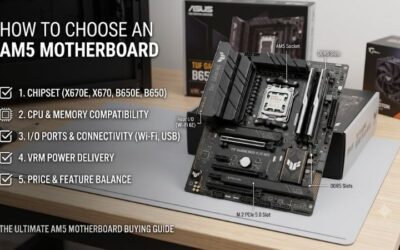
How to Choose an AM5 Motherboard
This guide compares the best am5 motherboard for beginners through four priorities: firmware compatibility, physical dimensions, storage bandwidth, and everyday connectivity. Four recommendations cover different configurations, with specific limitations explained alongside their advantages. Start with compatibility before comparing extras.
CPU Support and BIOS Recovery
Processor compatibility depends on firmware, not merely the AM5 socket. Older inventory can require an update before recognizing newer Ryzen processors. Compare the exact processor against the manufacturer’s compatibility list and minimum BIOS version. USB firmware recovery is valuable when another compatible processor is unavailable.
When selecting the best am5 motherboard for beginners, firmware recovery deserves more attention than upgrade promises. Preparation still requires the manufacturer’s instructions and the correct firmware. MSI B650 GAMING PLUS WIFI provides a Flash BIOS Button supporting updates with a connected power supply, without installed processors or memory.
Board Size and Case Compatibility
Motherboard dimensions determine enclosure compatibility rather than gaming performance. ATX accommodates more expansion space; micro ATX supports smaller enclosures. Confirm the case specification, then examine graphics-card clearance around additional slots. Large GPU coolers can obstruct expansion even when the motherboard technically fits.
Install components with the computer unplugged, using standoffs only beneath matching mounting holes. Physical compatibility helps determine the best am5 motherboard for beginners before optional features matter. ASRock B650M Pro RS WiFi measures 24.4 by 24.4 centimeters, providing a foundation for enclosures supporting micro ATX motherboards.
SSD Slots and Usable Bandwidth
Storage specifications deserve inspection beyond the advertised M.2 connector count. Connectors can provide different PCIe generations and bandwidth, while processor selection changes capabilities. Consult the processor-specific storage table before planning upgrades. More connectors offer flexibility without guaranteeing identical performance.
Prioritize storage capacity before paying exclusively for a faster interface. GIGABYTE B650 EAGLE AX provides three M.2 connectors for expanding a game library. With Ryzen 7000 or 9000 processors, its primary connector supports PCIe 5.0 x4, although another provides PCIe 4.0 x2. Choose it when connector quantity outweighs uniform bandwidth.
Networking and Everyday Connections
Networking specifications matter when your surrounding equipment supports them. Faster Ethernet benefits transfers between compatible computers and network storage; it does not automatically improve gaming latency. Examine rear USB connections and front-panel headers simultaneously. A case’s USB-C connector requires a compatible motherboard header.
Wireless upgrades depend on router capabilities and software support, making premium networking unnecessary for some households. Wi-Fi 6E remains a practical alternative when additional capabilities would go unused. Choose MSI MAG B850 TOMAHAWK MAX WIFI when its Wi-Fi 7 and 5Gb Ethernet suit planned network upgrades or local transfers.
Top Picks
These recommendations approach the best am5 motherboard for beginners through different priorities. MSI covers balanced connectivity, GIGABYTE emphasizes value, ASRock accommodates smaller enclosures, and the B850 Tomahawk targets faster networks. Recommendations reflect documented specifications rather than detailed research.
| Product | Best For | Key Spec | Watch Out For |
|---|---|---|---|
| MSI B650 GAMING PLUS WIFI | Best Overall | 2.5Gb Ethernet; two PCIe 4.0 M.2 slots | No PCIe 5.0 storage slot |
| GIGABYTE B650 EAGLE AX | Best Value | Three M.2 slots; Wi-Fi 6E | 1Gb Ethernet; one M.2 slot runs at x2 |
| ASRock B650M Pro RS WiFi | Best For Smaller Cases | Micro ATX; 2.5Gb Ethernet | Less space for expansion cards |
| MSI MAG B850 TOMAHAWK MAX WIFI | Best For Faster Home Networks | Wi-Fi 7; 5Gb Ethernet; four M.2 slots | Storage and expansion lane sharing |
MSI B650 GAMING PLUS WIFI: Best Overall
MSI B650 GAMING PLUS WIFI suits a standard ATX gaming build with one graphics card and two internal NVMe drives. Integrated Wi-Fi 6E and 2.5Gb Ethernet accommodate wireless access and faster wired networks. Its rear 20Gbps USB-C connection is particularly useful for external storage without requiring an additional expansion card.
Troubleshooting LEDs identify component categories when startup fails, while MSI’s M.2 clip simplifies drive installation. The main limitation is storage expansion: both M.2 connectors support PCIe 4.0, with no third connector or PCIe 5.0 storage option. Choose this balanced configuration when two NVMe drives satisfy your expansion requirements.
GIGABYTE B650 EAGLE AX: Best Value
GIGABYTE B650 EAGLE AX becomes the value recommendation when its delivered price undercuts the MSI overall selection. Its ATX layout combines Wi-Fi 6E with three M.2 connectors. Buyers seeking the best am5 motherboard for beginners can preserve storage flexibility while allocating more of the system budget toward graphics or a larger primary SSD.
Its 1Gb Ethernet connection limits transfers compared with faster network interfaces, particularly when accessing home servers. The M2P_CPU connector also provides PCIe 4.0 x2 bandwidth. Confirm the printed revision when selecting wireless drivers: revisions 1.0 and 1.1 use different modules. These compromises matter more than appearance.
ASRock B650M Pro RS WiFi: Best For Smaller Cases
ASRock B650M Pro RS WiFi accommodates micro ATX configurations while retaining Wi-Fi 6E and 2.5Gb Ethernet. Four DDR5 connectors support multiple memory configurations, and the preinstalled rear I/O shield eliminates a separate assembly step. A rear 10Gbps USB-C connection accommodates external storage without occupying an expansion slot.
Expansion remains the main compromise. A large graphics cooler can obstruct additional cards within this smaller layout, so examine photographs and enclosure clearance before purchasing. The front USB-C header also provides 5Gbps rather than the rear connector’s 10Gbps. Choose ASRock for compactness rather than multiple expansion cards.
MSI MAG B850 TOMAHAWK MAX WIFI: Best For Faster Home Networks
MSI MAG B850 TOMAHAWK MAX WIFI targets configurations benefiting from Wi-Fi 7, 5Gb Ethernet, and additional storage connections. Four M.2 connectors include two supporting PCIe 5.0 x4 with Ryzen 7000 or 9000 processors. These capabilities suit local transfers and storage expansion rather than a basic desktop with limited networking equipment.
Bandwidth sharing requires attention: populating M2_3 reduces PCI_E3 to x2; selecting x4 for that expansion slot disables M2_3. Consequently, it is the best am5 motherboard for beginners only when its features justify the premium. Compare expansion requirements before purchase, particularly when combining several SSDs with an additional card.
Frequently Asked Questions
Questions about the best am5 motherboard for beginners usually concern compatibility rather than maximum specifications. The answers below address chipset selection, memory capacity, firmware preparation, and graphics interfaces. Exact processor models, memory configurations, and motherboard revisions remain important when confirming compatibility.
Is B650 Still a Good Choice for a First AM5 Build?
Yes, B650 remains a sensible foundation when processor compatibility and connectivity meet your requirements. A newer chipset designation does not independently increase gaming performance. The B650 recommendations provide DDR5, NVMe storage, and wireless connectivity, although their Ethernet bandwidth and storage arrangements differ.
Consider B850 when a particular motherboard supplies capabilities your build requires, such as the Tomahawk’s networking and storage connections. Avoid assuming unlimited processor upgrades from a chipset designation. Future compatibility requires processor support and firmware, making documented requirements more useful than speculation.
How Much RAM Should a Beginner Buy?
A matched 32GB DDR5 kit containing two 16GB modules provides a practical starting capacity for gaming and everyday multitasking. DDR4 modules from older computers are incompatible with these boards. Consult the motherboard’s memory compatibility list for the complete kit identifier; matching the brand alone does not establish tested compatibility.
Install modules in the manual’s recommended connectors, commonly A2 and B2, then establish stability before enabling EXPO. This memory overclocking profile does not guarantee advertised performance across every configuration. For workloads requiring 64GB, purchasing a matched kit avoids compatibility variables associated with combining separate kits.
Do I Need to Update the BIOS Before Building?
Update the BIOS when the installed version cannot support your exact processor; a newly purchased motherboard does not require flashing automatically. Ask about shipped firmware or compatibility labeling, then compare the manufacturer’s support requirements. Older inventory can need preparation despite compatibility on the product page.
Follow the exact motherboard and revision instructions, including the specified firmware filename and USB connector. Maintain uninterrupted power until completion; firmware updating requires electricity, unlike component installation. Prepare the necessary download beforehand, particularly when your computer will be unavailable during assembly.
Does a Beginner Need PCIe 5.0 for the Graphics Card?
No, PCIe 5.0 is not mandatory for a beginner’s gaming build. Newer-generation graphics cards generally support operation through older interfaces, subject to available bandwidth and card requirements. Evaluate the specific graphics card’s lane configuration rather than dismissing an otherwise suitable motherboard because it advertises PCIe 4.0.
Processor selection also affects graphics bandwidth: some Ryzen 8000 models provide fewer graphics lanes than Ryzen 7000 or 9000 processors on these boards. Consult the processor-specific expansion table before purchasing. PSU capacity, graphics power connections, and enclosure clearance require confirmation alongside motherboard compatibility.
Final Thoughts
Choose the best am5 motherboard for beginners around compatibility. MSI B650 GAMING PLUS WIFI balances everyday connections; GIGABYTE B650 EAGLE AX prioritizes value. ASRock B650M Pro RS WiFi suits smaller enclosures, while MSI MAG B850 TOMAHAWK MAX WIFI supports faster networking. Check BIOS support before ordering and start with stock settings.