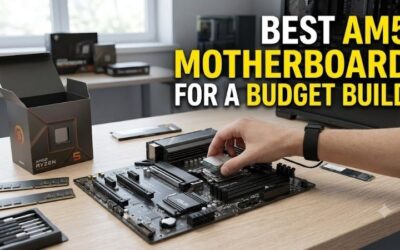
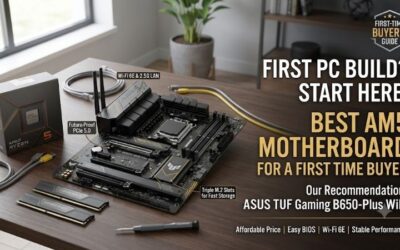
How to choose an am5 motherboard starts with matching the board to your CPU, case, storage plan, and network needs instead of chasing the priciest model. B650 covers many gaming-builds, but VRM quality, M.2 layout, BIOS tools, and rear-I/O can determine how easy the finished PC is to assemble and upgrade.
How to Choose AM5 Motherboards
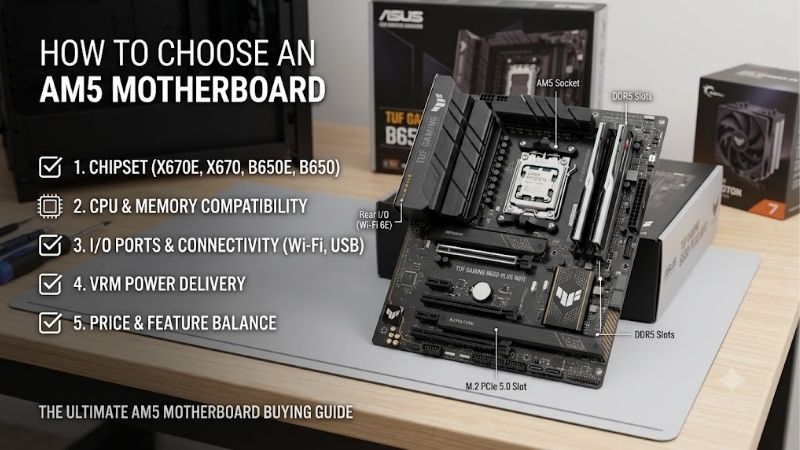
The best AM5 motherboard is the one whose features you will actually use. This guide to how to choose an AM5 motherboard compares four B650 boards across four buying criteria, then maps each model to a clear use case. The aim is a sensible first-purchase that supports Ryzen processors without paying for unused expansion or connectivity.
VRM And CPU Support
Start with power-delivery because it affects sustained CPU operation and upgrade-flexibility. MSI MAG B650 TOMAHAWK WIFI uses a 14+2+1 system with 80A core stages, while ASUS TUF Gaming B650-PLUS WIFI uses a substantial heatsinked VRM design. Both are sensible choices for mainstream-or-higher-power Ryzen processors under sustained-workloads.
VRM strength matters more during rendering, compilation, or sustained high-power loads than during light desktop use. Gigabyte B650 AORUS ELITE AX uses a heatsinked digital power design, while ASRock B650M Pro RS WiFi uses 8+2+1 50A Dr.MOS stages. For demanding CPUs, MSI or Gigabyte provides useful power-delivery headroom.
Memory And BIOS Support
AM5 uses DDR5, and four DIMM slots leave room for later-capacity upgrades. ASUS and Gigabyte support up to 256GB, while MSI and ASRock also provide four slots with EXPO support. For a straightforward upgrade-path, all four boards are more flexible than two-slot designs and let you start with a smaller matched memory-kit.
Do not buy memory from the motherboard’s maximum rating alone because CPU generation, DIMM count, and the exact kit affect achievable speed. DDR5-6000 is a sensible target for many AM5 systems, while faster profiles depend more on platform tuning. MSI, ASUS, Gigabyte, and ASRock support AMD EXPO for compatible memory-kits.
Storage Expansion
Storage planning should start with the number of NVMe drives you expect, then the PCIe-generation you can use. MSI MAG B650 TOMAHAWK WIFI, ASUS TUF Gaming B650-PLUS WIFI, and Gigabyte B650 AORUS ELITE AX each provide three M.2 slots, giving room for multiple NVMe drives without an add-in card or storage-controller.
ASRock B650M Pro RS WiFi offers three M.2 positions, including one PCIe Gen5 x4 slot, plus four SATA connectors. That suits compact-builds needing several drives. The trade-off is that one M.2 position runs at PCIe 4.0 x2, so check slot bandwidth before installing your fastest-SSD in a secondary-position during setup.
Networking And I/O
Before choosing a board, count rear-panel devices and the internal-headers your case needs. MSI provides 2.5Gb LAN, Wi-Fi 6E, fast USB, a rear 20Gbps USB-C port, and a Flash BIOS button. That makes it useful for buyers who want modern-connectivity without moving to an enthusiast chipset or adding expansion cards later.
Network-features should match your existing setup. Gigabyte B650 AORUS ELITE AX provides Wi-Fi 6E and 2.5GbE, ASUS TUF Gaming B650-PLUS WIFI provides Wi-Fi 6 and 2.5GbE, while ASRock B650M Pro RS WiFi provides Wi-Fi 6E and 2.5GbE. For a first-build, each avoids an extra network-card in a new build.
Top Picks
The best AM5 motherboard shortlist works best when each model has a clear role, which matters when learning how to choose an AM5 motherboard. MSI is the balanced ATX option, ASRock targets compact value, ASUS emphasizes easy first-build features, and Gigabyte combines ATX expansion with wireless and storage support for practical first-build decisions.
| Product | Best For | Key Spec | Watch Out For |
|---|---|---|---|
| MSI MAG B650 TOMAHAWK WIFI | Best Overall | ATX; 4 DDR5 DIMMs; 3 M.2; Wi-Fi 6E; 2.5GbE; 14+2+1, 80A core stages | Larger ATX footprint and higher feature set |
| ASRock B650M Pro RS WiFi | Best Value | MicroATX; 4 DDR5 DIMMs; 3 M.2; Gen5 x4; Wi-Fi 6E; 2.5GbE | One M.2 slot is PCIe 4.0 x2; ALC897 audio |
| ASUS TUF Gaming B650-PLUS WIFI | Best For Easy Setup | ATX; 4 DDR5 DIMMs; 3 M.2; PCIe 5.0 M.2; 2.5GbE; Wi-Fi 6 | Wi-Fi 6 rather than Wi-Fi 6E |
| Gigabyte B650 AORUS ELITE AX | Best For Expandability | ATX; 4 DDR5 DIMMs; 3 M.2; PCIe 5.0 x4; Wi-Fi 6E; 2.5GbE | Larger footprint and simpler rear audio |
Best Overall: MSI MAG B650 TOMAHAWK WIFI
For a balanced gaming or productivity PC, MSI MAG B650 TOMAHAWK WIFI is the Best Overall choice for how to choose an AM5 motherboard. It supports Ryzen 7000, 8000, and 9000 processors, four DDR5 DIMMs to 256GB, three PCIe 4.0 M.2 slots, Wi-Fi 6E, and 2.5Gb LAN, making its feature set easy to build-around.
The standout is its broad I/O and power-design: MSI specifies a 14+2+1 system with 80A core stages, six SATA ports, a rear 20Gbps USB-C port, and Flash BIOS. The drawback is the larger ATX-footprint, so compact-case builders should choose a microATX alternative rather than forcing this board into limited space.
Best Value: ASRock B650M Pro RS WiFi
For compact value, ASRock B650M Pro RS WiFi is the Best Value choice when learning how to choose an AM5 motherboard for a small case. It supports Ryzen 7000, 8000, and 9000 processors, four DDR5 slots up to 256GB, three M.2 positions, Wi-Fi 6E, 2.5Gb LAN, and a 9.6-by-9.6-inch microATX footprint.
Its pre-installed I/O shield and BIOS Flashback simplify first-time assembly, while storage includes PCIe Gen5 x4, Gen4 x4, and Gen4 x2 M.2-positions. The limitation is tighter expansion and Realtek ALC897 audio. For compact-builds, storage and networking can matter more than additional full-size-PCIe space or premium audio-hardware in everyday use.
Best For Easy Setup: ASUS TUF Gaming B650-PLUS WIFI
For first-time builders, ASUS TUF Gaming B650-PLUS WIFI is Best For Easy Setup when learning how to choose an AM5 motherboard for a conventional ATX gaming-system. It supports Ryzen 7000, 8000, and 9000 processors, four DDR5-slots up to 256GB, three M.2-slots, EXPO, 2.5Gb Ethernet, and PCIe 5.0 M.2.
The practical advantage is BIOS FlashBack and a pre-installed I/O shield, two features that can reduce friction during assembly or troubleshooting. Its main compromise is Wi-Fi 6 rather than Wi-Fi 6E, so wireless-first-buyers may prefer Gigabyte or MSI. On wired Ethernet, that distinction is less important for normal-gaming or desktop-use.
Best For Expandability: Gigabyte B650 AORUS ELITE AX
For storage and wireless flexibility, Gigabyte B650 AORUS ELITE AX is Best For Expandability when learning how to choose an AM5 motherboard for several drives. It combines three M.2 slots, four DDR5 DIMMs to 256GB, Wi-Fi 6E, 2.5GbE, and an ATX layout. Its primary M.2 supports PCIe 5.0 x4 with Ryzen 7000 or 9000 processors.
Q-Flash Plus provides a rear-firmware-update route, while four SATA connectors add another storage option. The drawback is the simpler three-jack rear audio arrangement and larger ATX-footprint. Builders expecting several SSDs, wireless-networking, and future add-in hardware may value those features more than premium onboard-audio during daily use.
Frequently Asked Questions
Frequently Asked Questions about how to choose an AM5 motherboard usually come down to chipset, memory, storage, and firmware. The right answer is rarely the board with the longest specification sheet; it is the one that matches your actual-system-plan. These questions cover decisions that can otherwise cause expensive mismatches during assembly.
Do I Need A B650E Motherboard?
Do I Need A B650E Motherboard? Usually, no. A standard B650 board already provides AM5 CPU-support, DDR5-memory, and modern NVMe connectivity. B650E becomes useful when you specifically need additional-PCIe 5.0 connectivity. For a normal-gaming-PC, the four B650 picks here provide the core platform features without requiring the higher-tier.
Choose B650E only when its additional-PCIe-connectivity solves a requirement you actually have. A fast graphics card does not automatically require B650E because current B650 boards can provide a full CPU-connected graphics-slot. Storage-expansion is the more useful reason to compare the tiers, especially when planning several-future NVMe drives.
Should I Use Four RAM Sticks On AM5?
Should I Use Four RAM Sticks On AM5? Two sticks are usually the easier starting point. Four DIMMs can increase memory-controller load and may require lower speeds or additional tuning. All four picks use four DDR5-slots, so beginning with two matched modules preserves a simple upgrade-path while leaving two sockets open for later-capacity.
If you need more capacity, four modules can still work when the CPU and memory-kit support the configuration. Check the motherboard-memory support list instead of assuming its maximum advertised-speed applies to every setup. A stable 64GB configuration is more useful than a faster profile that needs repeated troubleshooting or manual adjustment.
How Many M.2 Slots Should A Gaming PC Have?
How Many M.2 Slots Should A Gaming PC Have? Two is enough for many systems, but three gives room for an OS drive, game library, and future project or scratch storage. MSI, ASUS, Gigabyte, and ASRock all provide three M.2-positions, although PCIe-generation and bandwidth vary by slot.
Check which slot connects directly to the CPU and whether another device shares bandwidth. ASRock’s third position is PCIe 4.0 x2, while MSI’s three positions are PCIe 4.0 x4. That difference may not matter for a secondary-drive, but it matters when deciding where to install your fastest-SSD during the initial-build.
Do I Need Built-In Wi-Fi?
Do I Need Built-In Wi-Fi? No. Wi-Fi is optional when Ethernet is available, but built-in-wireless can save an expansion slot and simplify a clean desktop setup. MSI and Gigabyte provide Wi-Fi 6E, ASRock also provides Wi-Fi 6E, while ASUS TUF Gaming B650-PLUS WIFI uses Wi-Fi 6. Match it to your router and network for most homes.
Wi-Fi 6E only helps when your router, operating system, and local rules support the 6GHz band. Otherwise, the practical difference can be small. A board with 2.5Gb Ethernet may matter more when your PC sits near a fast router or switch, making MSI, ASUS, Gigabyte, and ASRock easy wired-network choices for most homes and gaming setups.
Final Thoughts
The safest way to choose an AM5 board is to start with the CPU, case, storage count, memory plan, and network needs, then filter the specifications. The best am5 motherboard is not necessarily the most expensive one; understanding how to choose an AM5 motherboard means selecting useful headroom without paying for unused features.