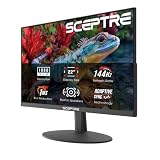
- Top Pick: Sceptre New 22-Inch Gaming Monitor, FHD 1080p, Up to 144Hz, HDMI, DisplayPort, Built-in Speakers, Machine Black (E225W-FW144 Series, 2026)
- Best Value: LG 24G411A-B 24-inch Ultragear Full HD (1920 x 1080) IPS Gaming Monitor, 144Hz (O/C), 1ms MBR, NVIDIA G-Sync Compatible, AMD FreeSync, HDR10, HDMI, DisplayPort, Slim Stand, Black
- Premium Choice: msi PRO MP243L E14 24-inch IPS 1920 x 1080 (FHD) Gaming Office Monitor, 144Hz, Free-Synch, HDR Ready, HDMI, VGA Port,VESA Mountable, Tilt, 4-Side Slim Bezel,1ms, Black
Shopping for a gaming monitor under $300 sounds simple until you actually start looking. The market is flooded with panels advertising 144Hz, “1ms” response times, and HDR support, but the specs on the box rarely tell you how a display actually behaves during a fast-paced match. Cheap TN panels wash out the moment you shift in your chair, some budget screens overshoot their overdrive settings badly enough to leave visible ghosting trails, and plenty of “HDR Ready” monitors can’t get bright enough to make the feature meaningful.
This guide cuts through that noise. We’ve focused on displays that deliver genuinely competitive refresh rates, adaptive sync that works with both NVIDIA and AMD hardware, and panel quality that holds up outside of gaming too. Every pick below sits comfortably under the $300 ceiling — most well under it — so you can put the savings toward a better GPU, a mechanical keyboard, or a decent headset. Here’s what’s worth buying in 2026.
As an Amazon Associate we earn from qualifying purchases at no extra cost to you. Product prices and availability are accurate as of the date shown and are subject to change.






⚡ Save on Your Next PC — Amazon Prime
Prime members get fast free shipping on the systems above, plus early access to Prime Day & Black Friday PC deals. New members get a 30-day free trial.
Watch: Best Gaming Monitor Under $300 — Video Review
How to Choose Gaming Monitor Under $300
- Refresh rate over resolution: At this budget, a 1080p panel at 144Hz will feel dramatically smoother than a 1440p panel struggling at 60Hz. Prioritize frame rate first — you can always upgrade resolution later, and mid-range GPUs push high frames far more comfortably at Full HD.
- Panel type matters more than marketing: IPS panels deliver noticeably better color accuracy and viewing angles than budget TN alternatives, and modern IPS displays have closed most of the response-time gap. Unless you’re an extremely competitive player chasing the absolute lowest latency, IPS is the smarter choice.
- Verify adaptive sync compatibility: FreeSync and G-Sync Compatible certification eliminate screen tearing without the input lag of traditional V-Sync. Check that the monitor’s variable refresh range is wide enough to actually cover the frame rates your system produces, not just a narrow 48–144Hz window.
- Screen size against viewing distance: A 27-inch 1080p display works well at typical desk distances but will show visible pixel structure if you sit close. If your desk is shallow or you sit within arm’s reach, 22 to 24 inches keeps the image sharp and reduces the head movement needed to track the full screen.
- Check the stand and connectivity before you buy: Many budget monitors ship with tilt-only stands, which means an awkward viewing angle unless you add a VESA mount or monitor arm. Confirm there’s a DisplayPort connection too — some cheaper models cap their refresh rate over HDMI.
The Best Picks Reviewed
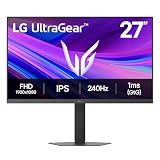
LG 27G414B-B UltraGear 27-Inch
This is the most complete package on the list, pairing a 27-inch IPS panel with a genuine 144Hz refresh rate, G-Sync Compatible and FreeSync support, and — crucially at this price — a height-adjustable stand rather than the usual tilt-only afterthought. The built-in speakers won’t replace a headset, but the color reproduction and generous screen real estate make this an easy recommendation for anyone with desk space to spare.
ASUS TUF Gaming VG249QE5A 24-Inch
ASUS has built a strong reputation in budget gaming displays, and this 23.8-inch IPS model earns it with a 144Hz refresh rate that overclocks to 146Hz, Extreme Low Motion Blur Sync for cleaner fast motion, and variable overdrive that adjusts response times across the refresh range instead of forcing a single compromised setting. The three-year warranty is unusually generous in this segment and speaks to real confidence in the panel.
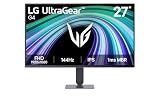
LG 24G411A-B UltraGear 24-Inch
Essentially the compact sibling to LG’s 27-inch model, this display delivers the same IPS color quality and dual adaptive sync support in a size that suits smaller desks and closer seating positions. The 1ms MBR mode does a respectable job cleaning up motion blur in competitive shooters, though the slim stand is tilt-only, so budget for a VESA mount if ergonomics matter to you.
MSI PRO MP243L E14 24-Inch
MSI positions this as a hybrid gaming and office monitor, and that dual focus shows in the four-side slim bezel and VGA port for older work machines alongside a 144Hz IPS panel with FreeSync. It’s the sensible pick if your monitor pulls double duty across gaming sessions and long workdays, offering solid all-round performance without specializing heavily in either direction.
Sceptre E225W-FW144 22-Inch
At 22 inches with a 144Hz ceiling, DisplayPort, HDMI, and built-in speakers, this Sceptre is the entry point for anyone building a first gaming setup or a secondary battlestation on a tight budget. Color performance won’t match the IPS options above, but for pure frame rate per dollar in a compact footprint, it’s difficult to argue with the value.
Frequently Asked Questions
Is 1080p still worth buying in 2026?
Absolutely, particularly under $300. Full HD lets mid-range graphics cards sustain high frame rates that actually take advantage of a 144Hz panel, whereas 1440p at this price typically means sacrificing refresh rate, panel quality, or both. For competitive gaming especially, high frames at 1080p remain the sensible priority.
Do I need G-Sync or is FreeSync enough?
FreeSync is enough for most players. NVIDIA’s G-Sync Compatible certification simply confirms a FreeSync monitor has been validated to work properly with GeForce cards, so displays carrying both badges — like LG’s UltraGear models here — work smoothly regardless of which GPU brand you own.
Are “1ms” response time claims accurate?
Treat them as marketing rather than measurement. Manufacturers typically quote grey-to-grey figures under ideal conditions or with aggressive overdrive that introduces its own artifacts. Real-world performance is generally slower, which is why features like variable overdrive and motion blur reduction matter more than the headline number.
Should I choose 24 inches or 27 inches?
It depends on your desk depth. At 1080p, a 27-inch panel spreads the same pixel count over more area, so sitting close reveals slightly softer detail. If you sit roughly two feet from your screen, 24 inches keeps the image crisp; with more distance available, 27 inches delivers a more immersive experience.
Final Thoughts
For most buyers, the LG 27G414B-B is the standout choice — a 27-inch IPS panel with 144Hz, dual adaptive sync, and a height-adjustable stand represents genuine value well under the $300 mark. If you prefer a smaller screen or want ASUS’s excellent motion handling and three-year warranty, the TUF Gaming VG249QE5A is equally deserving of your money. And for anyone building on the tightest possible budget, the Sceptre E225W-FW144 proves you don’t need to spend much at all to get a proper 144Hz gaming experience.