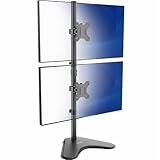
- Top Pick: Dual Monitor Stand – Vertical Stack Screen Free-Standing Monitor Riser Fits Two 13 to 34 Inch Screen with Swivel, Tilt, Height Adjustable, Holds One (1) Screen Up to 44Lbs
- Best Value: HUANUO Vertical Dual Monitor Mount, Stacked Monitor Stand for 2 Monitors with Height Adjustment Computer Monitor Arm Supports Two 17 to 32 Inch with C Clamp Each Desk Mount Hold up to 17.6lbs
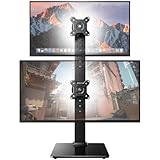
- Premium Choice: Dual Monitor Stand for 2 Screens up to 32 inch, Vertical Stacked Dual Monitor Mount, Full Motion Adjustable Tall Double Monitor Desk Mount, Each Arm Holds 4.4-22lbs, VESA 75/100mm, Black, Freelift
A dual stacked monitor stand takes two displays and lines them up vertically, one above the other, instead of the usual left-right arrangement. For anyone short on desk width or tired of swiveling their head between side-by-side panels, stacking is a smart reorganization that keeps both screens directly in front of you and reclaims valuable surface area.
The choices split between clamp-mounted arms, freestanding weighted stands, and specialized ultrawide holders. Weight rating, reach, and desk compatibility drive the decision. This review walks through the top stacked stands and how to pick the right one for your setup.
As an Amazon Associate we earn from qualifying purchases at no extra cost to you.






🎮 Get More From Your Setup — Free
Prime Gaming gives you free PC games every month, in-game loot, and a free Twitch channel sub — plus fast free shipping on all the gear above. New members get a 30-day free trial.
Watch: Dual Stacked Monitor Stand — Video Review
Design & Build
The lineup covers three distinct approaches. Clamp arms like the HUANUO models and ErGear bolt to the desk edge with a C-clamp and integrated cable management, offering a small footprint and solid stability. The freestanding Vertical Stack Riser skips clamping entirely with a weighted base rated to 44 lbs, perfect for glass desks or renters. And the VIVO STAND-V002L is purpose-built for stacking two ultrawide screens up to 34 inches, a niche the smaller arms don’t cover. All use steel construction and standard VESA plates.
Performance
Adjustment range separates the good from the great. The ErGear and HUANUO 17-32-inch arms handle tilt, swivel, and rotation with per-arm ratings up to about 19.8 lbs, letting you angle the top screen down and pivot to portrait. The Freelift-style full-motion arm’s wide 4.4-to-22-lb window adds flexibility for mixed panel sizes. For ultrawides, the VIVO stand trades articulation for the sheer capacity to hold two large 34-inch curved panels vertically, something few other stands manage. VESA 75x75mm and 100x100mm support is universal, so compatibility is rarely an issue.
Pros & Cons
- Vertical layout keeps both screens in your natural sightline.
- Reclaims desk width compared with side-by-side stands.
- Options for every desk, from clamp to freestanding to ultrawide.
- Integrated cable management on the better arms keeps things tidy.
- Weight limits on standard arms exclude the heaviest panels.
- Ultrawide stacking needs a specialized stand like the VIVO.
- Tall stacks require adequate vertical clearance.
Alternatives to Consider
If you run two large ultrawides, the dedicated VIVO stand is really the only comfortable option on this list; standard arms will struggle with the weight and width. For lighter standard monitors, any of the clamp arms works well. And if you can’t clamp, the freestanding riser is your friend. Match the hardware to your panel type first.
Related Guides
- 720p Monitor (2026)
- 200hz Monitor 4K (2026)
- Black Friday 4K Monitor (2026)
- Best Multiple Monitor Setup (2026)
Frequently Asked Questions
Can I stack two ultrawide monitors?
Yes, but you’ll want a purpose-built stand like the VIVO STAND-V002L, which is rated to hold two 34-inch ultrawides vertically. Standard arms aren’t designed for that width and weight.
Clamp or freestanding?
Clamps offer better stability and a smaller footprint but need a suitable desk edge. Freestanding stands work on any surface, including glass, at the cost of some desk space.
What’s the weight limit per arm?
Most clamp arms here top out around 19.8 lbs per arm. The freestanding riser handles up to 44 lbs on a single screen. Always check your panel’s weight first.
Do all monitors work with these stands?
Any monitor with a 75mm or 100mm VESA mount will fit the arm-based stands. Non-VESA panels would need an adapter or a tiered riser instead.
Verdict
A dual stacked monitor stand is a space-saving upgrade that improves posture and focus. The ErGear leads for its reinforced clamp and cable management, the HUANUO arms are dependable value picks, and the VIVO stand is the clear choice for stacking ultrawides. Identify your panel type and weight, and the right stand will transform a cramped desk into an efficient vertical workspace.