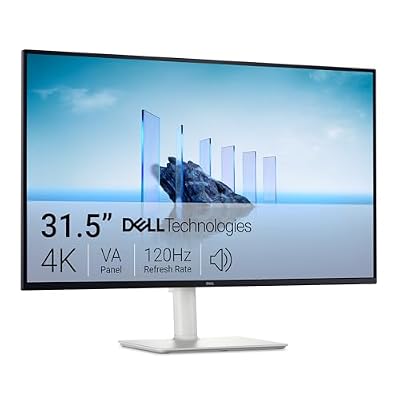
- Top Pick: Dell 27 Monitor S2725QS, 4K UHD IPS, 120Hz, 5ms, FreeSync Premium
- Best Value: Gawfolk 34 Inch Ultrawide Curved 200Hz Gaming Computer Monitor,1500R PC Screen 21:9 UWQHD (3440×1440),120% sRGB,Adaptive Sync,Built-in Speaker,Display Port、HDMI,Compatible with Wall mounting -Black
- Premium Choice: KOORUI 27" 4K Gaming Monitor – Dual Mode UHD 160Hz or FHD 320Hz, Fast IPS 1ms, FreeSync Premium & G-SYNC Compatible, HDMI 2.1/DP 1.4, HDR400, Height/Pivot/Tilt Adjustable, PC & Console Ready, G2741L
Chasing a “200Hz monitor 4K” reveals a tension at the heart of gaming displays: true 4K resolution and ultra-high refresh rates have historically been an either/or choice. The newest dual-mode panels are starting to bridge that gap, letting you switch between sharp 4K at high refresh and lower resolutions at blistering speeds, but the market is a mix of genuine 4K screens, 200Hz QHD and ultrawide options, and clever hybrids.
This review clears up the confusion, evaluating a range of monitors so you understand exactly what “200Hz” and “4K” mean together, and which panel actually delivers the balance of clarity and speed you’re after.
As an Amazon Associate we earn from qualifying purchases at no extra cost to you.



🎮 Get More From Your Setup — Free
Prime Gaming gives you free PC games every month, in-game loot, and a free Twitch channel sub — plus fast free shipping on all the gear above. New members get a 30-day free trial.
Watch: 200hz Monitor 4K — Video Review
Design & Build
The standouts here vary in ambition. The KOORUI 27″ dual-mode 4K is the clever one, running UHD at 160Hz or dropping to FHD at a searing 320Hz, with a fast IPS panel, HDMI 2.1, and full ergonomic adjustment. Dell’s S2725QS and S3225QS bring clean, understated 4K builds with eye-comfort features aimed at productivity as much as play. On the pure-speed side, the Gawfolk 34″ ultrawide and KTC 27″ QHD hit native 200Hz-plus, and the Amzfast 27″ curved offers a budget 200Hz FHD experience. Build quality tracks price, with Dell and KOORUI feeling the most premium.
Performance
Here’s the honest breakdown: if you want literal 4K at 200Hz, the dual-mode KOORUI is the closest path, delivering crisp UHD at 160Hz for immersive single-player games and switching to 320Hz FHD for competitive shooters. The Dell 4K panels are gorgeous at 120Hz and ideal for mixed work-and-play, but they aren’t high-refresh esports screens. If 200Hz is non-negotiable and you can accept QHD or ultrawide resolution, the KTC 27″ QHD 200Hz and Gawfolk 34″ ultrawide deliver buttery motion with strong color. Match the panel to whether resolution or raw refresh matters more to you.
Pros & Cons
- Dual-mode panels offer 4K clarity and high-refresh speed in one screen.
- Fast IPS options combine wide viewing angles with 1ms response.
- HDMI 2.1 and DisplayPort 1.4 support modern GPUs and consoles.
- Adaptive sync (FreeSync/G-SYNC) reduces tearing across the field.
- True 4K at a full 200Hz remains rare and expensive.
- Driving 4K at high refresh demands a powerful GPU.
- Budget 200Hz models are FHD, not 4K.
Alternatives to Consider
If pixel sharpness for work matters most, a straightforward 4K 120Hz panel like the Dell S3225QS serves better than chasing refresh you can’t feed. Competitive players who prize speed over resolution should embrace a native QHD 200Hz screen like the KTC. And immersion-seekers might prefer the Gawfolk 34″ ultrawide, whose extra width often does more for the experience than raw refresh numbers.
Related Guides
- Best Aoc Gaming Monitor Best Settings (2026)
- 720p Monitor (2026)
- Dual Monitor Monitor (2026)
- Best Multiple Monitor Setup (2026)
Frequently Asked Questions
Can you really get 4K at 200Hz?
Not commonly as a native mode yet. Dual-mode panels like the KOORUI get closest, offering 4K at 160Hz and FHD at 320Hz on the same screen.
What GPU do I need for high-refresh 4K?
A high-end card, think RTX 4080/5080 class or better, to push demanding games at 4K and high frame rates. DLSS helps significantly.
Is IPS or VA better here?
IPS gives faster response and wider angles for gaming; VA like the Dell S3225QS offers deeper contrast for media and mixed use.
Does HDMI 2.1 matter?
Yes, for 4K high-refresh and modern consoles, HDMI 2.1 provides the bandwidth that older HDMI can’t.
Verdict
The realistic “200Hz 4K” answer is a dual-mode display: the KOORUI 27″ is our top pick for blending true 4K clarity with genuinely high refresh. If you value resolution and eye comfort for work-and-play, the Dell 4K panels are excellent at 120Hz. And if you simply want the fastest motion, embrace a native QHD or ultrawide 200Hz screen instead of stretching for 4K.