
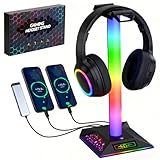
- Top Pick: VCOM Headphone Stand with 17 Light Modes, Gaming Controller Holder with Remote Control, PC Gaming Accessories for Desk, Universal Organizer Headpsets/Xbox/PS5 Headset Stand Gamer Gifts
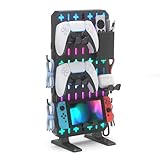
- Best Value: ALACOO Multi-Function Desk Headphone Hanger Hook Gaming Office
- Premium Choice: DS Smart LED Light Bars, Gaming Lights, Ambient Light, RGB TV Backlights with Scene Modes and Music Modes for Gaming, Computer Case, PC Monitor, TV, Laptop (Z Series)
Two hundred dollars of accessory budget can transform a gaming setup — a 1440p monitor for $160, a wireless headset for $60, a Hall Effect keyboard for $40. Below we round up the best gaming PC accessories under $200 for 2026, sorted by category, so you can pour your money into the upgrades that move the needle most.
As an Amazon Associate we earn from qualifying purchases at no extra cost to you.





🛒 Best Price Today on Amazon
Prime members get fast, free shipping on everything above, plus member-only deals. New members get a 30-day free trial — cancel anytime.
Start 30-Day Prime Free Trial →See Today’s Amazon DealsPriority 1: Monitor — The Biggest Visual Upgrade
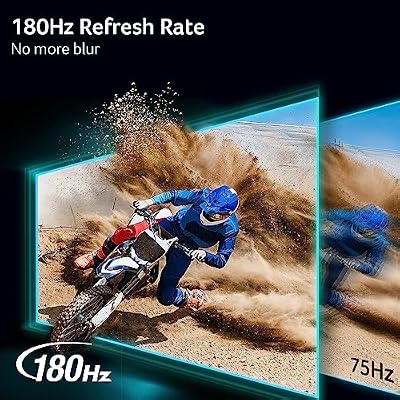
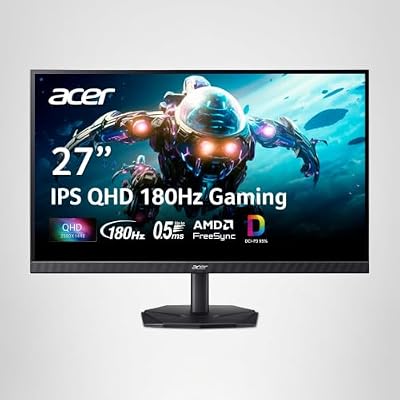
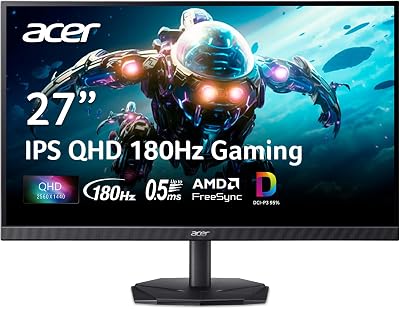
Gaming on a TV or a bare-bones 60Hz/1080p panel? A 1440p/165Hz gaming monitor is the upgrade that delivers the most obvious improvement per dollar you spend on accessories. We’d point you at the Acer Nitro 27″ 1440P 165Hz IPS at around $160 — under $160 nets you 1440p resolution, IPS color, and a 165Hz refresh, lifting both the picture and the responsiveness in one shot.

Acer Nitro 27in QHD 2560x1440 IPS 180Hz Gaming Monitor KG271U N3bmiipx | 0.5ms, AMD FreeSync, DCI-P3 95%, 2xHDMI, DisplayPort, Speaker, VESA Mountable, Bluelight Filter, Flickerless Technology




As an Amazon Associate we earn from qualifying purchases. Product prices and availability are accurate as of the date/time indicated.
Priority 2: Keyboard — Switch to Mechanical
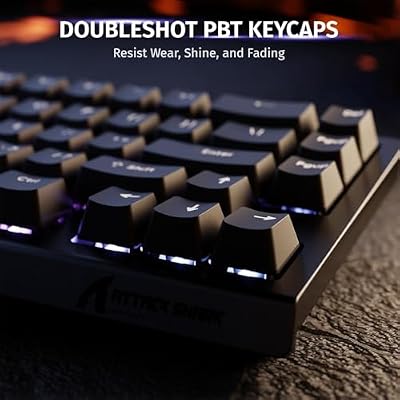
Coming off a membrane board, the move to mechanical is one you’ll feel in every keystroke. The Attack Shark X68 HE at around $39 packs Hall Effect magnetic switches — adjustable actuation, zero contact wear — in a gaming-friendly 65% layout that keeps the arrow keys. For $40 it’s the best mechanical-upgrade value going. If you want smaller, the Aula WIN60 HE at around $33 gives you a 60% layout.

ATTACK SHARK X68 HE RT Mechanical Gaming Keyboard 60% Wired TKL-Black | Adjustable Actuation,Hall Effect Magnetic Switch,8KHz Polling Rate,RGB Backlit,Top Mount, Web Driver for PC Mac Esport Gamer



As an Amazon Associate we earn from qualifying purchases. Product prices and availability are accurate as of the date/time indicated.
Priority 3: Wireless Mouse
The Logitech G305 Lightspeed at around $30 is our go-to budget wireless gaming mouse — HERO 12K sensor, 1ms Lightspeed wireless, and 250-hour battery life off a single AA. Losing the cable means no drag dragging your aim around and a tidier desk. At $31, the G305 is the cheapest route to genuinely pro-grade wireless mouse performance.

Logitech G305 Lightspeed Wireless Gaming Mouse - Black | 12,000 DPI, Lightweight, 6 Programmable Buttons, 250h Battery, On-Board Memory, Compatible with PC and Mac


As an Amazon Associate we earn from qualifying purchases. Product prices and availability are accurate as of the date/time indicated.
Priority 4: Gaming Headset
The HyperX Cloud III Wireless at around $99 buys you cable-free audio plus 120-hour battery and a Discord-certified mic. On a tighter budget, the wired HyperX Cloud II at around $41 still nails comfort and sound. Moving from generic multimedia cans or your monitor’s built-in speakers to a real gaming headset gets you both better immersion and clearer team comms.
Complete Accessories Package Under $200
With $200 total to spend, the smart split is keyboard + mouse + headset — a full input-and-audio overhaul that leaves your monitor budget intact. The Attack Shark X68 HE keyboard (around $39) + Logitech G305 wireless mouse (around $30) + Razer BlackShark V2 X headset (around $34) comes to around $110 — a complete peripheral set for under $110. That leaves $90+ for a monitor or to stash toward a future GPU.

Frequently Asked Questions
Which accessories give the biggest improvement under $200?
A high-refresh monitor upgrade, a quality mechanical keyboard, and a lightweight precise gaming mouse deliver the most noticeable improvement to how gaming feels. Together within a $200 budget you can meaningfully upgrade responsiveness and comfort, which impacts daily enjoyment more than small internal tweaks.
Should I prioritize a monitor or peripherals?
If you still game on a slow display, a high-refresh monitor transforms the experience more than any peripheral. If you already have a good screen, upgrading the keyboard, mouse, and headset refines control and comfort. Address your weakest link first for the best value.
Are mechanical keyboards worth it?
For many gamers, yes. Mechanical switches offer crisper feedback, faster actuation, and greater durability than membrane boards. The tactile feel improves both typing and gaming. Affordable models now deliver excellent quality, so a mechanical keyboard is a worthwhile upgrade well within this budget.
What is a good budget for a gaming mouse?
You can get an excellent lightweight gaming mouse with a precise modern sensor for a modest price, leaving plenty of the $200 for other upgrades. Prioritize comfort in your grip style and low weight over flashy features, since fit matters most for control.
Do I need a dedicated microphone or headset?
A good headset with a clear boom microphone covers both audio and voice chat affordably and is the simplest choice for most gamers. A standalone microphone offers superior voice quality for streaming, but for pure gaming a solid headset is usually sufficient.
Top picks from this guide
Logitech GLogitech G305 Lightspeed Wireless Gaming Mouse - Black | 12,000…$30 \xc2\xb7 98/100ATTACK SHARKATTACK SHARK X68 HE RT Mechanical Gaming Keyboard 60% Wired…$40 \xc2\xb7 97/100AcerAcer Nitro 27in QHD 2560x1440 IPS 180Hz Gaming Monitor KG271U…$160 \xc2\xb7 96/100 CyberpowerPCCyberPowerPC Gaming PC, Intel Core i5-14400F, GeForce RTX 5060 8GB…$1,289 \xc2\xb7 95/100








