
A white high-refresh display can complete a clean PC build, but color alone is not a useful buying criterion. The best 240hz white gaming monitor depends on whether you want competitive 1080p speed, sharp 4K OLED detail, a curved ultrawide view, or connectivity for both a gaming PC and a work laptop. The shortlist below prioritizes exact white or white-accented models with a verified 240Hz specification, then separates them by actual use case. Retail prices and stock change, so treat the model number—not an old sale banner—as the starting point for a purchase.
- Quick verdict: choose the right 240hz white gaming monitor by screen type
- How we selected these 240Hz white gaming monitor options
- MSI MPG 321URXW QD-OLED: best overall premium monitor
- Alienware AW3225QF Lunar Light: best curved 4K OLED
- HP OMEN Transcend 32: best for a combined gaming and work desk
- LG 34GS95QE-W: best for dedicated ultrawide gaming
- LG 34GX90SA-W: best smart ultrawide
- LG 39GX90SA-W: best for a bigger ultrawide view
- Z-EDGE UG24PJ-White: best compact 1080p esports pick
- How to choose a 240hz white gaming monitor without overbuying
- Set up the display to actually reach 240Hz
- Frequently asked questions
- Final verdict
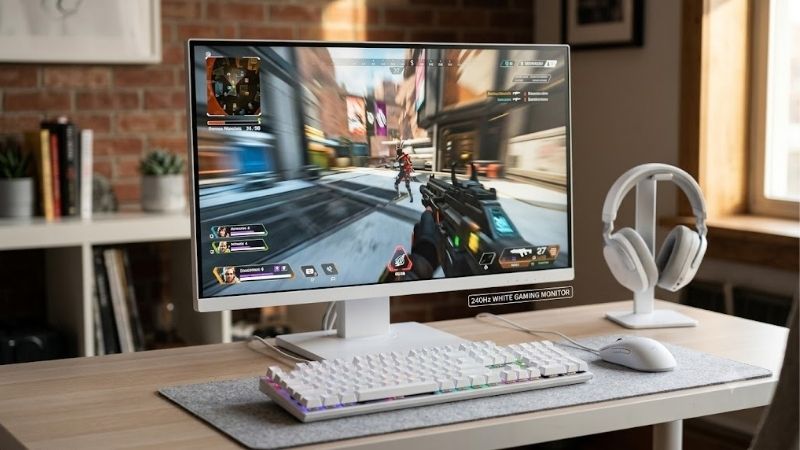
Quick verdict: choose the right 240hz white gaming monitor by screen type
The MSI MPG 321URXW QD-OLED is the most balanced premium pick, pairing a flat 31.5-inch 4K QD-OLED panel with 240Hz, USB-C power delivery, and a KVM switch. Choose the Alienware AW3225QF for curved 4K, the HP OMEN Transcend 32 for laptop charging, or an LG ultrawide for a more immersive PC-first setup. The Z-EDGE UG24PJ-White is the straightforward compact 1080p choice.
| Model | Best fit | Deciding strengths | Main compromise |
|---|---|---|---|
| MSI MPG 321URXW QD-OLED | Best overall premium pick | 31.5-inch 4K, 240Hz, USB-C 90W, KVM | OLED care and bright-room black-level trade-offs |
| Alienware AW3225QF Lunar Light | Best curved 4K option | 31.6-inch 4K QD-OLED, 240Hz, Dolby Vision | Curve and possible VRR flicker |
| HP OMEN Transcend 32 | Best work-and-play hub | 4K QD-OLED, 240Hz, USB-C up to 140W | Work features may be unnecessary for gaming-only use |
| LG 34GS95QE-W | Best dedicated ultrawide | 34-inch 3440 × 1440 OLED, 800R curve | Aggressive curve; not 4K |
| LG 34GX90SA-W | Best smart ultrawide | 34-inch OLED, 240Hz, webOS, USB-C | Smart features may go unused |
| LG 39GX90SA-W | Best large ultrawide | 39-inch OLED, 240Hz, webOS | Lower pixel density than 34-inch at same resolution |
| Z-EDGE UG24PJ-White | Best compact FHD esports pick | 24-inch 1080p IPS, 240Hz | LCD contrast and simpler feature set |
White does not always mean every visible surface is white. Alienware’s Lunar Light and HP’s Black/White finish use contrasting colors, while several LG models use a white stand or rear housing around a dark screen. Check photos of the exact suffix if you want the bezel, stand, and back panel to match.
How we selected these 240Hz white gaming monitor options
The eligibility rule was a confirmed 240Hz mode plus a model sold in a white finish or documented white-accented colorway. That excludes black-only options and models whose top refresh rate could not be matched to an exact variant. The market is narrower than “all white gaming monitors,” so the goal is a useful shortlist rather than a padded list of nearly identical displays.
Manufacturer pages establish screen size, native resolution, panel type, refresh rate, ports, and model suffix. Independent testing from RTINGS provides performance context for the MSI MPG 321URX, Alienware AW3225QF, and LG 34GS95QE family. The LG test reference is for the closely related black 34GS95QE-B, not a direct test of every white-finish unit. For the HP and LG webOS models, recommendations rely on published specifications rather than invented lab results; the Z-EDGE is also assessed from its specifications.
No made-up FPS results, brightness measurements, owner consensus, or universal value claims are used. Prices and stock change, so verify the US seller, return terms, exact SKU, and warranty before ordering.
MSI MPG 321URXW QD-OLED: best overall premium monitor
The MSI MPG 321URXW is the most balanced premium white pick. Its 31.5-inch flat QD-OLED panel runs at 3840 × 2160 and 240Hz, with a manufacturer-rated 0.03ms gray-to-gray response time. OLED delivers deep blacks and vivid color, while 4K keeps text, maps, and interface details sharp on a desktop-sized screen.
MSI lists DisplayPort 1.4a, two HDMI 2.1 ports, and USB-C with DisplayPort Alt Mode and up to 90W power delivery. A KVM switch lets one keyboard and mouse control two connected systems, useful for alternating between a gaming PC and laptop. MSI specifies a three-year warranty that includes panel burn-in coverage; confirm the terms for the US unit.
RTINGS tested the black MPG 321URX and identifies the white MPG 321URXW as its white-bodied counterpart with the same core display characteristics. Its review found fast motion response, low input lag, and high contrast, while noting QD-OLED blacks can look slightly purple in bright ambient light. OLED still requires sensible panel-care settings for long periods of static desktop content.
Buy if: you want 4K sharpness, 240Hz, laptop charging, and a white finish in one monitor.
Skip if: your room is very bright, you do not want OLED maintenance, or you prefer a compact esports screen.
Alienware AW3225QF Lunar Light: best curved 4K OLED
The Alienware AW3225QF is the choice for buyers who want an enveloping 32-inch image. Dell lists a 31.6-inch 3840 × 2160 QD-OLED panel with a 240Hz maximum refresh rate and 0.03ms gray-to-gray response time. The Lunar Light colorway gives it a white-accented look in US retail listings, although the front still contrasts with the pale outer housing.
RTINGS testing found near-instantaneous pixel response, low input lag, deep blacks in dark rooms, and broad, vivid color. The important caveats are visible VRR flicker when frame rates change and raised black levels in bright ambient light. These are not automatic deal-breakers, but they matter in sunny rooms or games with unstable frame pacing.
HDMI 2.1 and Dolby Vision help the monitor serve as a shared PC-and-console display. A console usually tops out at 120Hz output, even though the screen can run at 240Hz with a suitable PC. To exploit 4K at very high frame rates, the graphics card and game settings need to be capable of delivering that performance.
Buy if: you prefer a curved 32-inch screen and want OLED contrast for cinematic games and competitive play.
Skip if: you dislike curves, play in a bright room, or need USB-C laptop-docking features.
HP OMEN Transcend 32: best for a combined gaming and work desk
The OMEN Transcend 32 is aimed at a desktop that serves both gaming and work. HP lists a 31.5-inch 4K UHD QD-OLED panel at 240Hz and 0.03ms response time. Its Black/White finish is two-tone rather than all-white, but it suits many white builds while emphasizing functionality over a minimalist shell.
The standout feature is USB-C with up to 140W power delivery, paired with HP’s OMEN Gear Switch device-switching feature. A compatible laptop can use one cable for video, data, and charging, and the monitor can make it easier to switch between work and gaming systems. Check the laptop’s charging needs and cable rating instead of assuming every USB-C device can use the full 140W.
The published specifications establish its feature set, but they do not prove its real-world HDR brightness, color accuracy, or input lag against every alternative here. This recommendation is based on connectivity and the stated panel specifications, not an invented side-by-side test. As with any OLED used for office work, use the screen-protection features and avoid leaving static interface elements at maximum brightness for long periods.
Buy if: laptop charging and switching between two computers would simplify your desk.
Skip if: you connect only one gaming PC and do not need workstation features.
LG 34GS95QE-W: best for dedicated ultrawide gaming
The 34GS95QE-W suits PC players who want a wide field of view without moving to a 39-inch screen. LG specifies a 34-inch 3440 × 1440 OLED panel with an 800R curve, up to 240Hz, and 0.03ms response time. The 21:9 layout adds horizontal room for racing games, RPGs, simulations, and side-by-side windows while retaining 1440 vertical pixels.
RTINGS’ review of the 34GS95QE-B found very fast response, low input lag, strong dark-room contrast, and variable refresh support. It also reported noticeable VRR flicker in dark scenes when frame rates change. Those results refer to the closely related 34GS95QE display family rather than a direct measurement of every white unit. LG lists G-SYNC compatibility and FreeSync Premium Pro, but adaptive sync cannot eliminate every OLED flicker artifact.
The 800R curve is a key preference decision: it wraps the image around the viewer, but is not subtle for spreadsheets or shared viewing. Also, 3440 × 1440 is ultrawide QHD, not 4K. Consoles generally output a 16:9 image with side bars, so this screen is most compelling for PC-first gaming.
Buy if: immersion and fast OLED motion matter more than 4K resolution or a flat workspace.
Skip if: you mainly use a console, want a gentle curve, or need high-density 4K text.
LG 34GX90SA-W: best smart ultrawide
The 34GX90SA-W shares the 34-inch WQHD OLED, 240Hz, 0.03ms, and 800R-curved fundamentals, but adds webOS smart functions. It fits a desk where you stream video or want some apps available without booting the PC. LG lists HDMI 2.1, DisplayPort 1.4, USB Type-C, G-SYNC compatibility, and FreeSync support.
This remains a gaming monitor rather than a full television replacement. The 21:9 panel is wider than most video formats, and the very tight curve works best when the viewer sits near the center. webOS is useful if you actually use the apps; if every session starts with the PC, you may be paying for capabilities that rarely matter. The official specification page does not establish that this model performs better than the similar 34GS95QE-W in motion or HDR, so the distinction here is convenience rather than measured image quality.
Choose the exact 34GX90SA-W suffix rather than assuming every 34-inch LG UltraGear listing has the same smart features or finish. Check seller photos and the included stand if the precise white look matters to your setup.
Buy if: you want a 34-inch OLED ultrawide with streaming features built in.
Skip if: smart functions are irrelevant or you would rather save with a more conventional monitor.
LG 39GX90SA-W: best for a bigger ultrawide view
The 39GX90SA-W stretches LG’s 21:9 format to 39 inches but retains 3440 × 1440 resolution, 240Hz, OLED, an 800R curve, and webOS. Its extra physical size can make racing games, flight simulations, open-world titles, and long productivity timelines feel roomier. For a white gaming room built around one large display, it is the most expansive option in this list.
The trade-off is pixel density: the same total number of pixels is spread over a larger panel than on the 34-inch model. Small text and fine interface elements therefore look less crisp at the same viewing distance. The curve and screen width also demand desk depth and a sensible seating position, so measure the usable desk surface and monitor-arm reach before buying. In competitive games, the wider image can also require more eye movement to check the edges.
LG’s US page confirms the core OLED, 240Hz, and webOS specifications, but I did not find an independent lab comparison that justifies ranking its measured performance above the 34-inch alternatives. Decide based on physical size, viewing distance, and whether the extra screen area is worth reduced sharpness.
Buy if: a large curved display matters most for immersive games and multitasking.
Skip if: you sit close, prioritize crisp text, or want a compact esports setup.
Z-EDGE UG24PJ-White: best compact 1080p esports pick
Not every 240Hz buyer needs OLED or 4K. The Z-EDGE UG24PJ-White offers a 24-inch 1920 × 1080 IPS panel with a 240Hz refresh rate and a stated 1ms MPRT mode. It is a straightforward option for a compact esports desk or secondary PC. Full HD is also a lighter workload for the GPU than 4K, making high frame rates easier to reach in competitive titles.
This IPS LCD should be judged as a speed-focused monitor, not as an OLED competitor for black levels or HDR. Z-EDGE advertises 350 cd/m² brightness, wide viewing angles, AMD FreeSync, and HDMI/DisplayPort inputs. Treat 1ms MPRT as a manufacturer mode claim, not a guarantee that every pixel transition completes in one millisecond; MPRT and gray-to-gray figures are different measurements.
Verify the current US listing before purchase. Manufacturer pages are regional, and port counts differ between some descriptions. Confirm the exact UG24PJ-White SKU, seller, warranty, return window, and input details on the page you actually order from. Without a current directly confirmed price, this guide does not claim it is the cheapest 240Hz monitor in the US.
Buy if: you want compact white 1080p speed and do not need OLED contrast.
Skip if: you want 1440p or 4K detail, high-end HDR, USB-C docking, or independent lab results.
How to choose a 240hz white gaming monitor without overbuying
Start with resolution and games. Full HD at 24 inches makes sense for esports when maximizing frame rate matters most. At 27 to 32 inches, 4K gives sharper text and more desktop space but asks far more from the graphics card. A 240Hz label does not mean the PC will always render 240 FPS at native resolution and high settings. If the GPU usually delivers 100–160 FPS, variable refresh still helps, but the full frame-rate ceiling will not be reached all the time.
Choose aspect ratio next. A 16:9 display is straightforward for games, video, and consoles. A 21:9 ultrawide is rewarding in supported PC titles, but support varies and some cutscenes use a narrower format. Competitive players should ask whether the wider view helps or simply puts targets farther apart. An 800R curve can feel extreme for spreadsheets or shared viewing.
Then weigh LCD versus OLED. OLED’s per-pixel light control creates deep blacks without LCD backlight blooming, and fast transitions keep motion clear. Trade-offs include possible image retention, maintenance routines, and blacks that can look raised in bright rooms on some QD-OLED screens. OLED can work for productivity, but panel care matters with static interfaces. IPS remains sensible for static work and buyers who do not need premium contrast.
Finally, check the connections. For 4K at 240Hz, the GPU, input, and cable must support the required signal mode. USB-C can carry video without charging a laptop, so check power delivery. KVM helps only with multiple computers; webOS matters only if you use smart apps. Let these practical details outweigh broad marketing labels.
Set up the display to actually reach 240Hz
A monitor may default to 60Hz until you configure the operating system. Use the supplied or suitably rated cable, connect to the correct GPU output, and select the maximum refresh rate in Windows’ advanced display settings or your graphics control panel. Then confirm that the resolution remains native and that your preferred bit depth, HDR mode, and variable-refresh settings can coexist. Some combinations of resolution, color depth, chroma format, and interface bandwidth have different limits.
For 4K OLED models, use HDMI 2.1 or the manufacturer-specified DisplayPort connection that supports 4K at 240Hz. If only 120Hz appears, check the port, cable, firmware, driver, and monitor input mode before assuming the panel is defective. For the Z-EDGE 1080p LCD, use the input specified in the exact manual or listing for its top refresh rate. Do not rely on cable marketing alone; confirm the supported mode in the monitor documentation.
Enable G-SYNC Compatible, FreeSync, or Adaptive-Sync after confirming the intended refresh rate and GPU support. VRR reduces tearing when frame rates fluctuate, but cannot substitute for GPU performance or eliminate every OLED flicker issue. If dark scenes flicker, compare a stable frame-rate cap and recommended settings before changing several variables at once.
OLED users should leave panel-care functions enabled and follow the manufacturer’s cleaning instructions. Avoid pressure on the screen, use a soft microfiber cloth, and do not spray liquid directly on the panel. Clean white plastic gently rather than using abrasive solvents that could damage the coating or housing.
Frequently asked questions
Is 240Hz worth it for gaming?
It can be, especially in competitive games when the PC produces high frame rates. The benefit is less obvious if the GPU rarely exceeds 80–100 FPS or most games are cinematic single-player titles. A good 144Hz or 165Hz display may be smarter if the price difference is large or the GPU is the real limit.
Is 4K at 240Hz better than 1440p at 240Hz?
Neither is universally better. 4K is sharper at 27–32 inches, while 1440p is easier to drive at high frame rates. Ultrawide 3440 × 1440 adds horizontal space, but support varies by game and video format.
Do white gaming monitors perform differently from black models?
Color does not inherently make a panel faster or slower. Check whether the white variant shares the tested model’s panel and specifications. Confirm the full suffix: MSI MPG 321URXW is the white-bodied counterpart to MPG 321URX, while other suffixes can indicate different features.
Can a console use a 240Hz monitor at 240Hz?
A console can connect to many of these screens, but current consoles commonly top out at 120Hz output. The monitor can still run at 240Hz from a suitable PC. Ultrawides generally show consoles with side bars because console output is 16:9.
Is OLED suitable for everyday work?
Yes, with care. Static interface elements can contribute to uneven wear over time, so keep panel-care features enabled and use reasonable brightness. Consider IPS if spreadsheets or dashboards dominate each workday, and read the warranty rather than assuming burn-in is always covered.
Final verdict
For a premium white setup, the MSI MPG 321URXW QD-OLED is the best all-round choice for 4K detail, 240Hz speed, and connectivity. Pick the Alienware AW3225QF for a curved cinematic display, or the HP OMEN Transcend 32 when laptop charging and device switching are essential. LG’s 34-inch ultrawides fit PC-first gaming; the 39-inch option favors scale over text sharpness. The Z-EDGE UG24PJ-White is the compact 1080p alternative. Before checkout, confirm the exact model suffix, finish, connection limits, warranty, seller, and current US stock.









