
A white monitor can pull an all-white PC setup together, but color alone is not enough reason to buy a display. The best white monitor 24 inch shoppers should shortlist depends on whether they need USB-C laptop charging, built-in speakers, a comfortable home-office screen, or a high refresh rate for gaming. These six models have documented white finishes and display sizes in or near the 24-inch class. The recommendations use verified specifications and current US-market listings, not claimed detailed research; exact prices and stock can change.
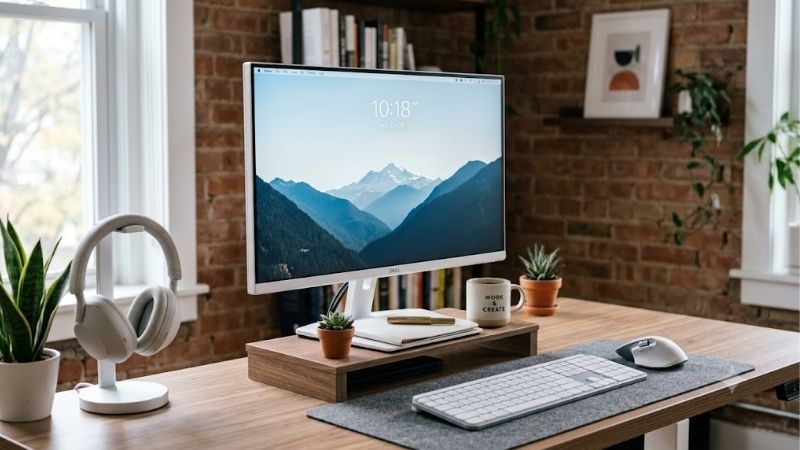
Quick verdict for shoppers searching “white monitor 24 inch”
For an everyday desk shared by work, school, video, and casual games, the Dell S2425H is a strong starting point because it combines a white finish, a 100Hz IPS panel, and integrated 5W speakers. Choose the BenQ GW2486TC instead when USB-C with up to 65W power delivery and a fully adjustable stand matter more. For gaming, the MSI PRO MP243W E14 balances a white design with 144Hz, while the Pixio PX248 Wave steps up to 200Hz. The HP 524sw is the simple, understated office choice, and the Arozzi Nova 24 is an alternative for a more visibly gaming-oriented setup.
| Monitor | Best fit | Key specifications | Main trade-off |
|---|---|---|---|
| Dell S2425H | Everyday work and entertainment | 23.8-inch IPS, 1080p, 100Hz, two 5W speakers | Two HDMI inputs; tilt-only stand |
| BenQ GW2486TC | Laptop-based productivity | 23.8-inch IPS, 1080p, 100Hz, USB-C with 65W PD | 250-nit typical brightness; no KVM |
| HP Series 5 524sw | Minimal home-office setup | 23.8-inch IPS, 1080p, 100Hz, 300 nits | Basic tilt stand and no USB-C |
| MSI PRO MP243W E14 | Mixed work and gaming | 23.8-inch IPS, 1080p, 144Hz, Adaptive-Sync | Full HD resolution and basic stand adjustment |
| Pixio PX248 Wave | High-refresh competitive gaming | 23.8-inch Fast IPS, 1080p, 200Hz | Limited ergonomics; 1080p only |
| Arozzi Nova 24 | Gaming-focused white aesthetic | 24-inch IPS, 1080p, 200Hz, 2 x 3W speakers | Limited stand adjustment and modest brightness |
How we selected these white monitors
The shortlist prioritizes confirmed white finishes, screens around 24 inches, specifications that can be cross-checked, and a distinct reason to choose each model. Most are 23.8-inch panels commonly sold as 24-inch monitors; the Arozzi is marketed at 24 inches. The MSI MP243W E14 is a 23.8-inch monitor, while a product marketed as 24 inches can have a slightly different viewable diagonal.
No independent lab measurements were available for every exact model, so this roundup does not invent contrast, input-lag, color-accuracy, or response results. Published refresh rates, brightness, gamut, and response figures are manufacturer specifications unless a test is identified. TechRadar has independently reviewed the BenQ GW2486TC, praising its ergonomics and USB-C features while noting modest brightness and the lack of KVM and cable management. The other picks are assessed from specifications and US retailer listings.
One visual caveat: “white” often describes the rear shell, stand, or casing, not necessarily the bezel around the active screen. Check front-facing photos if a white bezel is important to your setup.
The best white 24-inch monitors
Dell S2425H — best for everyday use and built-in audio
The Dell S2425H is a sensible choice for a shared home desk. Its 23.8-inch IPS panel runs at 1920 x 1080 and 100Hz, so scrolling and window movement feel smoother than on a traditional 60Hz office screen. The Ash White finish suits light-colored desks and white PC builds.
Its strongest convenience is sound: Dell includes two 5W speakers and several audio presets, letting you watch videos or hear system alerts without immediately buying desktop speakers. Two HDMI ports are useful for connecting a PC and another HDMI device. The matte anti-glare surface and IPS viewing angles work well for everyday productivity and media.
There are clear limits. The S2425H has no DisplayPort or USB-C, so it is not ideal for a one-cable laptop setup. Its stand only tilts; it lacks height, swivel, and pivot adjustments. Full HD is practical at this size but does not offer the extra workspace of a higher-resolution monitor.
Buy it if you want an attractive, uncomplicated screen with capable built-in audio. Skip it if you need USB-C charging, more input types, or a fully adjustable stand.
BenQ GW2486TC — best for USB-C laptop desks
The BenQ GW2486TC is best for a workspace centered on a compatible laptop. It pairs a 23.8-inch IPS panel, 1920 x 1080 resolution, 100Hz refresh rate, and stated 99% sRGB coverage with a white finish and office-oriented design.
USB-C with up to 65W power delivery is its main advantage. With a compatible laptop and cable, one connection can carry video, data, and power. It also includes HDMI, DisplayPort, two downstream USB-A ports, and 2W speakers. Its stand supports height adjustment, pivot, swivel, and tilt, making it substantially easier to position than a tilt-only base. DisplayPort daisy chaining is available for compatible multi-monitor configurations.
The specified brightness is 250 nits, which is adequate for many indoor rooms but not ideal in very bright spaces. TechRadar’s review also notes that the monitor lacks a KVM switch and proper cable management; the USB hub does not make it a full docking station. At 100Hz, it favors productivity and casual gaming over high-refresh competitive play.
Buy it if you want a tidier laptop desk and flexible ergonomics. Skip it if you need higher brightness, KVM switching, or refresh rates above 100Hz. Check that 65W is sufficient for your laptop, especially if it is a powerful gaming model.
HP Series 5 524sw — best for a minimalist home office
The HP Series 5 524sw suits shoppers who want a restrained design and straightforward office features. HP lists a 23.8-inch IPS display with Full HD resolution, 100Hz refresh, up to 300 nits of brightness, a 1500:1 contrast ratio, and 99% sRGB coverage. Its white styling and thin three-sided design sit naturally beside a white case, keyboard, or desk.
For email, schoolwork, spreadsheets, research, and streaming, the specs are sensible. The stated 300-nit brightness is higher than the BenQ’s 250-nit rating, though reflections and room lighting still affect visibility. HDMI 1.4 and VGA give it a path to both modern and older systems. HP’s Eye Ease and flicker-free features are useful considerations for office use, but they are not a guarantee that every user will avoid eye fatigue.
The stand only tilts, so a riser may be necessary to bring the top edge to a comfortable height. There is no USB-C laptop dock or integrated camera, and it is not a gaming-first product.
Buy it for a clean, simple study or office station. Skip it if you need an adjustable stand, USB-C charging, or advanced gaming features.
MSI PRO MP243W E14 — best white 144Hz all-rounder
The MSI PRO MP243W E14 bridges office and gaming use. It has a matte-white finish, a 23.8-inch IPS panel, Full HD resolution, 144Hz refresh, Adaptive-Sync, and stated 300-nit brightness. It is a useful step up from a 100Hz office monitor for action games without taking up much desk space.
MSI lists 1ms MPRT and 4ms gray-to-gray response figures. These are different measurement methods, so the 1ms number should not be treated as proof every pixel transition completes in one millisecond. Other listed features include 1500:1 typical contrast, wide viewing angles, a matte surface, two 2W speakers, HDMI 1.4b, DisplayPort 1.2a, headphone output, and 100 x 100mm VESA mounting. Both video inputs support 1080p at up to 144Hz according to MSI’s specifications.
There is no USB-C charging, and the stand’s adjustment is limited to tilt. Full HD is adequate for general work but is not as detailed as 1440p or 4K. “HDR Ready” should not be taken as a promise of a premium HDR experience; this is primarily a conventional SDR display.
Buy it if you want one white monitor for everyday tasks and gaming at 144Hz. Skip it if you need a highly adjustable stand, higher resolution, or advanced HDR.
Pixio PX248 Wave — best for high-refresh competitive gaming
For fast games in a white setup, the Pixio PX248 Wave makes a clear case. Its 23.8-inch Fast IPS panel runs at 1920 x 1080 and 200Hz, with 300-nit maximum specified brightness, Adaptive Sync, and a listed 1ms GtG response. Pixio offers the Wave series in several colors, including white.
A 200Hz screen can show up to 200 refreshes each second, compared with 100Hz or 144Hz alternatives, provided your PC can render the necessary frames and the connection is configured correctly. That can make competitive motion appear smoother, but it cannot increase a game’s actual frame rate. The stated response time also does not establish measured ghosting, overshoot, or input lag.
Pixio lists DisplayPort 1.4, HDMI 2.0, stereo 3W speakers, a headphone output, and VESA support using a 75 x 75mm pattern with a 100 x 100mm adapter. The stand tilts but does not support height, pivot, or swivel adjustment. Full HD favors mainstream gaming rather than workflows that need a large, high-resolution canvas.
Buy it if refresh rate is the priority and you want a color-matched screen. Skip it if you need USB-C docking, higher resolution, or a fully adjustable stand.
Arozzi Nova 24 — best for a gaming-focused white setup
The Arozzi Nova 24 is another white 200Hz option, with an aesthetic aimed more directly at gaming. It has a 24-inch IPS panel at 1920 x 1080 and a listed 1ms MPRT response time, alongside adaptive sync. Its specification card lists 99% sRGB, 77% DCI-P3, 300 cd/m² brightness, two 3W speakers, and a rear RGB ring.
DisplayPort 1.4 and HDMI 2.0 let you keep a PC and another device connected. It also has a 3.5mm audio output and VESA support listed for 75 x 75mm and 100 x 100mm mounts. The built-in speakers are convenient for system sounds and casual videos, but buyers who care about music or immersive game audio should plan for external speakers or a headset.
The 200Hz and 1ms MPRT figures are manufacturer specifications, not measured evidence of input lag or pixel transitions. Brightness is standard for this class, and stand ergonomics are more limited than on the BenQ. The Arozzi and Pixio occupy similar gaming territory, so choose based on the look, ports, mounting setup, and independently reviewed motion performance rather than the refresh-rate figure alone.
Buy it if the white gaming design and RGB accent suit your setup. Skip it if you prioritize ergonomic adjustment, USB-C, or extensive independent testing.
How to choose a “white monitor 24 inch” model
Check what “white” means in product photos
White may describe the rear housing and stand while the front bezel remains dark. Check front-facing photos, not just the rear view, if a fully white border is essential. The base and included cables can also affect how coordinated the setup looks.
Match resolution and screen size to the work
At 23.8 to 24 inches, 1920 x 1080 is a practical default for browsing, documents, streaming, and gaming. It is less spacious than 1440p or 4K, so photo editing, dense spreadsheets, and large timelines may benefit from a higher-resolution 27-inch display instead.
Check the actual diagonal, too. Many “24-inch” monitors have a 23.8-inch viewable area, while models such as MSI’s PRO MP251W E2 are 24.5 inches. The difference is small, but it matters for very tight desk layouts or side-by-side monitors.
Choose refresh rate based on the PC and games
For office work and casual gaming, 100Hz already feels smoother than 60Hz. A 144Hz model is a useful mixed-use choice; 200Hz is most worthwhile when you play competitive games and the PC can sustain high frame rates. Refresh rate does not compensate for an underpowered CPU or GPU.
Treat response-time specs carefully. MPRT and gray-to-gray are different methods, and an advertised 1ms figure alone does not prove a screen has no blur or overshoot. Seek independent measurements if motion clarity is critical.
Make sure the ports match your computer
USB-C can simplify a laptop desk, but video and charging support must both be present. The BenQ GW2486TC lists up to 65W power delivery; confirm that is sufficient for your laptop. For gaming, check that the chosen HDMI or DisplayPort connection supports the monitor’s maximum refresh rate.
VGA on the HP and some MSI models can help with older PCs, but a modern desktop should generally use a digital connection. Integrated speakers are convenient but rarely replace dedicated speakers or a headset for high-quality audio.
Budget for ergonomics and mounting
A tilt-only stand may force you to add a riser to bring the screen to eye level. A height-adjustable, swivel, and pivot stand is easier to position for a shared desk or portrait documents. The BenQ is the most flexible stand in this selection. Several models support VESA mounting, but confirm the exact pattern and whether an adapter is required.
If the monitor will sit against a wall or on an arm, check port direction, cable clearance, desk-clamp fit, and monitor weight. These details, along with the stand color and cables, can matter as much to a tidy white setup as the shell itself.
Frequently asked questions
Is a 24-inch white monitor good for gaming?
Yes. A 23.8- or 24-inch Full HD screen suits small desks, and high refresh rates are available in white models. The MSI PRO MP243W E14 offers 144Hz, while the Pixio PX248 Wave and Arozzi Nova 24 advertise 200Hz. Match the screen to both the games you play and the PC’s frame rate.
Is 1080p sharp enough at 24 inches?
For work, school, streaming, and gaming, 1080p is a normal choice at this size. It provides less detail and workspace than 1440p, however. People who edit high-resolution images, large video timelines, or dense spreadsheets may prefer a higher-resolution screen.
Do white monitors have white bezels?
Not always. White may refer to the back, stand, or casing, while the front bezel stays black or dark gray. Inspect straight-on product photos and confirm the exact finish rather than trusting the retailer’s white-color filter alone.
Do I need USB-C on a monitor?
USB-C is useful when a compatible laptop can send video and receive power through one cable. Power delivery matters: the BenQ GW2486TC lists up to 65W, enough for many thin-and-light laptops but not every gaming notebook. Desktop users connected over HDMI or DisplayPort may not need it.
Are built-in monitor speakers good enough?
They are fine for alerts and casual videos, but small monitor speakers rarely deliver strong bass. Dell lists dual 5W speakers, BenQ and MSI list 2W units, and Pixio and Arozzi list 3W speakers per side. Wattage alone does not guarantee good sound.
Can I use a monitor arm with these models?
Some selections list VESA mounting, but patterns and adapters vary. MSI PRO MP243W E14 lists 100 x 100mm; Pixio PX248 Wave uses 75 x 75mm with a 100 x 100mm adapter; Arozzi lists both patterns. Confirm the manual, arm weight rating, and cable clearance before buying.
Final verdict
For a general-purpose white monitor, start with the Dell S2425H if you want a simple desk setup and built-in 5W speakers, or the BenQ GW2486TC if USB-C charging and an adjustable stand are worth the extra emphasis. The HP 524sw is a clean office option with a straightforward feature set. For mixed work and games, the MSI PRO MP243W E14 is a good step up to 144Hz; competitive players should compare the Pixio PX248 Wave and Arozzi Nova 24 based on their design, features, mount preferences, and the quality of independent motion testing. Confirm the front bezel color and exact connectivity before ordering. A white case looks best when the screen, stand, cables, and accessories work together, but the right monitor is still the one that suits the way you use your computer.









