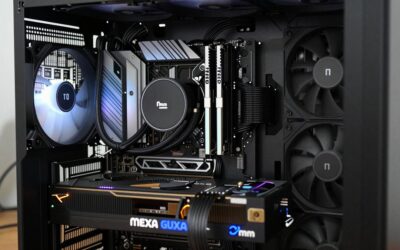
How to choose an aio cooler can get confusing because a 240mm label says little about radiator depth, pump behavior, case clearance, or socket support. The practical answer to is to verify the platform first, then compare radiator hardware, fan behavior, mounting space, and useful extras against the CPU and case.

How to Choose An AIO Cooler
An AIO should match the CPU, motherboard, case, and workload rather than radiator size alone. This guide explains how to choose an aio cooler through four practical filters, then compares four 240mm models: ARCTIC for thermal hardware, Thermalright for value, Corsair for airflow simplicity, and NZXT for an integrated display.
Radiator Size And Thickness
Radiator dimensions determine how much space the cooler occupies and how much surface area is available for heat transfer. Thickness also changes the radiator-and-fan stack, which can affect top-mounted clearance. The ARCTIC Liquid Freezer III 240 A-RGB uses a 38mm radiator, while Corsair and NZXT use slimmer 27mm radiator designs.
For gaming desktops, 240mm is a useful middle ground because it needs less chassis room than 360mm while offering more radiator area than 120mm. Case mounting points remain decisive. The Thermalright Frozen Notte 240 BLACK ARGB V2 keeps the familiar 240mm format, making it straightforward when case support is confirmed first.
Pump And Fan Performance
Pump speed, fan speed, airflow, and static pressure describe different cooling functions, so maximum RPM is not a complete performance score. ARCTIC lists an 800–2800 RPM pump, while Thermalright lists 5300 RPM maximum. Read those figures with radiator design, fan specifications, and control behavior for daily desktop use.
A useful pump-and-fan setup should keep the CPU controlled without forcing high fan speeds continuously. Corsair’s Nautilus 240 RS ARGB uses two RS120 fans rated up to 2100 RPM, 72.8 CFM airflow, and 4.15 mm-H2O static pressure. That combination makes it a practical pick when radiator airflow and fan control are central.
Socket And Mounting Support
Socket support is a hard requirement because the pump block needs correct mounting hardware and positioning. ARCTIC supports LGA1851, LGA1700, AM5, and AM4, while the Frozen Notte 240 BLACK ARGB V2 supports those sockets plus several older Intel and AMD platforms for broader system coverage for mainstream desktop builds.
Check the exact cooler revision and supplied brackets before buying, especially when upgrading an older system. Thermalright’s broader socket range helps mixed-platform households, while the ARCTIC Liquid Freezer III 240 A-RGB focuses on mainstream Intel and AMD sockets. Verify compatibility before comparing cooling performance.
Clearance, Controls, And Extras
Case fit includes radiator length, depth, fan thickness, tube routing, and room around the CPU block. Controls also matter because PWM simplifies motherboard management, while displays and lighting add hardware or software requirements. NZXT’s Kraken Plus 240 RGB combines a 281mm radiator with a 1.54-inch TFT display.
Physical clearance comes before cosmetic features, then controls can be judged by usefulness. Corsair lets its RS fans share one PWM header through daisy-chaining, while NZXT adds an LCD for system visuals. These differences separate the coolers when basic thermal capacity is not the only buying priority for a practical build.
Top Picks
These four 240mm AIOs target different needs rather than duplicating the same design. ARCTIC combines a thick radiator with a dedicated VRM fan, Thermalright emphasizes aggressive specifications, Corsair focuses on airflow and simpler fan wiring, and NZXT adds an LCD interface. That makes how to choose an aio cooler easier to apply.
| Product | Best For | Key Spec | Watch Out For |
|---|---|---|---|
| ARCTIC Liquid Freezer III 240 A-RGB | Best Overall | 240mm, 38mm radiator, 800–2800 RPM pump | Thick radiator needs more case clearance |
| Thermalright Frozen Notte 240 BLACK ARGB V2 | Best Value | 5300 RPM pump, 2000 RPM fans, 72.37 CFM | Verify case and mounting clearance |
| Corsair Nautilus 240 RS ARGB | Best For Airflow And Cable Simplicity | 276×120×27mm radiator, 2100 RPM fans | RGB adds a lighting connection |
| NZXT Kraken Plus 240 RGB | Best For Display-Focused Builds | 1.54-inch 240×240 TFT, 1200–2800 RPM pump | LCD/software adds complexity |
ARCTIC Liquid Freezer III 240 A-RGB — Best Overall
ARCTIC Liquid Freezer III 240 A-RGB is Best Overall for buyers who want substantial thermal hardware in a 240mm format. Its 277×120×38mm aluminum radiator, 800–2800 RPM pump, 450mm tubing, and two P12 PWM PST A-RGB fans rated to 2000 RPM form a robust package, plus a dedicated VRM fan and clearer guidance on how to choose an aio cooler.
The compromise is radiator depth. ARCTIC’s 38mm radiator creates a deeper radiator-and-fan stack than 27mm alternatives, so top mounting needs careful measurement. The cooler supports AM4, AM5, LGA1700, and LGA1851, with a six-year warranty. It suits buyers who value cooling hardware more than the thinnest installation profile.
Thermalright Frozen Notte 240 BLACK ARGB V2 — Best Value
Thermalright Frozen Notte 240 BLACK ARGB V2 is Best Value for buyers comparing specifications and learning how to choose an aio cooler for value. Its pump reaches 5300 RPM, while two 120×25mm fans reach 2000 RPM, 72.37 CFM airflow, and 2.87 mm-H2O air pressure. The aluminum radiator and five-year warranty keep it uncomplicated.
The trade-off is that maximum RPM does not guarantee lower temperatures or quieter operation, and Thermalright rates the pump at 28 dBA maximum. Case and memory clearance still need checking before installation. This cooler suits buyers who value strong specifications and a five-year warranty more than an LCD or software ecosystem during everyday operation.
Corsair Nautilus 240 RS ARGB — Best For Airflow And Cable Simplicity
Corsair Nautilus 240 RS ARGB is Best For Airflow And Cable Simplicity. For how to choose an aio cooler, its 276×120×27mm aluminum radiator and two RS120 ARGB fans rated up to 2100 RPM, 72.8 CFM airflow, and 4.15 mm-H2O static pressure make it a practical current-platform option today with a copper cold plate and 400mm tubing.
The main advantage is simpler fan wiring because the RS fans can be daisy-chained to one four-pin PWM header. The drawback is that RGB lighting still needs an addressable connection, while the cooler needs normal radiator clearance. Corsair lists a 10–36 dBA noise range and five-year cooling warranty, keeping the focus on airflow control.
NZXT Kraken Plus 240 RGB — Best For Display-Focused Builds
NZXT Kraken Plus 240 RGB is Best For Display-Focused Builds, and how to choose an aio cooler can include the pump screen when the system’s visual interface matters. It uses a 281×120×27mm aluminum radiator, a 1200–2800 RPM Turbine pump, and two F120P fans rated to 2000 RPM, with 73.47 CFM airflow and 4.50 mm-H2O static pressure.
The compromise is added software and hardware complexity compared with an AIO that only needs PWM control. Its 1.54-inch TFT display runs at 240×240 resolution and 30Hz, while NZXT lists a six-year warranty plus AM4, AM5, LGA1700, and LGA1851 support. Choose it when the LCD has a real purpose in the build.
Frequently Asked Questions
Most AIO questions become easier when thermal capacity is separated from installation and convenience. A larger radiator can provide more cooling area but needs more room; faster fans can move more air but may add noise; displays add functionality without increasing radiator area. That is how to choose an aio cooler in practical terms.
Is A 240mm AIO Enough For A Gaming PC?
A 240mm AIO is enough for many gaming PCs when the case supports it and the CPU is matched sensibly. Two 120mm fans give the radiator more cooling area than a 120mm unit while using less space than many 360mm layouts. Results still depend on CPU power limits, airflow, mounting, and ambient temperature with normal case airflow.
Heavy rendering, long-duration compilation, or other high-power workloads can justify a larger radiator, while a 240mm model may be easier to position in a compact chassis. The case remains critical. A well-mounted 240mm cooler can make more sense than a larger unit that conflicts with motherboard, memory, or front-panel space.
Is A Thicker Radiator Always Better?
No. A thicker radiator is not automatically better because cooling depends on fin design, airflow, fan pressure, liquid circulation, and the entire system. The ARCTIC model uses a 38mm radiator, while Corsair and NZXT use 27mm radiators. Thickness can help, but it also increases installation depth and may narrow case compatibility.
A thicker radiator is most useful when the chassis has room and the CPU can benefit from additional cooling hardware. In tight builds, a slimmer radiator can simplify placement. Measure the radiator and fan stack together, not separately. Corsair Nautilus 240 RS ARGB and NZXT Kraken Plus 240 RGB both use 27mm radiators for this reason.
Do AIO Coolers Need Software?
No. An AIO does not inherently require software for basic cooling. Motherboard PWM headers can regulate compatible pumps and fans, while software matters more for displays, advanced lighting, or monitoring. Corsair’s Nautilus 240 RS ARGB supports PWM control and daisy-chained fans, whereas NZXT adds an LCD interface to its feature set.
Software becomes useful when the owner wants those extra functions. A simpler PWM setup can reduce cable and application overhead, while a display-focused cooler earns added complexity through visible system information. Decide this before buying rather than paying for a software ecosystem that may remain unused after installation before purchase.
How Much Case Clearance Does An AIO Need?
You need enough space for the radiator, fans, tubes, and nearby motherboard components at the chosen mounting position. The full installation envelope matters. ARCTIC specifies a 38mm radiator and 25mm P12 fans, creating a roughly 63mm radiator-and-fan stack before surrounding mounting space is considered inside the case.
Compare cooler dimensions with the case’s supported radiator positions before assembly, especially for top mounting near memory and VRM heatsinks. Tube length can influence routing: ARCTIC lists 450mm, while Corsair lists 400mm. The right choice is the one that fits the complete path without awkward bends or component interference before final assembly.
Final Thoughts
Knowing how to choose an aio cooler means checking four things in order: socket and case compatibility, radiator and fan hardware, clearance and control requirements, and the value of extras. ARCTIC, Thermalright, Corsair, and NZXT each emphasize a different trade-off, so match the cooler to your CPU, case, noise goals, and priorities.