Best aio cooler for beginners should solve a practical problem: keeping a processor cool without turning the first build into a wiring puzzle. A radiator that clashes with memory or requires unexpected brackets can delay everything. Prioritize confirmed compatibility, and install the sealed cooler with power disconnected, following its manual.
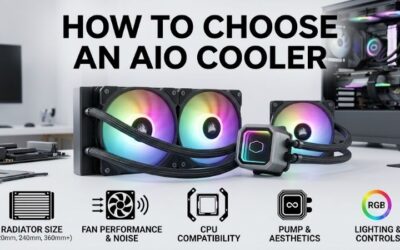
How to Choose an AIO Cooler
This guide identifies the best aio cooler for beginners through four 240mm recommendations, examining clearance, mounting demands, controls, and ownership value. Each selection highlights installation advantages alongside compromises. The comparisons use verified manufacturer specifications rather than claiming testing or universal results.
Radiator Size and Available Space
Advertised 240mm radiator support does not establish clearance for every assembly. End tanks extend beyond fan mounting positions, and motherboard heatsinks can obstruct a top-mounted installation. Check permitted radiator depth, included fan thickness, and tubing access before assuming compatibility from the mounting specification alone.
Cooler Master MasterLiquid 240L Core ARGB combines a 27.2mm radiator with 25mm fans, producing roughly 52.2mm of stack thickness before mounting allowances. ARCTIC Liquid Freezer III 240 requires additional clearance for its 38mm radiator. Choose Cooler Master for restricted spaces, or ARCTIC when measurements confirm unobstructed installation.
Socket Hardware and Installation Demands
For the best aio cooler for beginners, socket compatibility means having the correct bracket, backplate, and fasteners in the purchased box. Check the processor socket designation rather than its brand alone. Older Intel systems need different hardware from current platforms, while used coolers may arrive without essential mounting pieces.
The ARCTIC model uses a supplied contact frame for supported Intel installations, requiring replacement of the stock retention mechanism. That adds work beyond conventional cooler attachment. Choose Corsair NAUTILUS 240 RS for supported AM4, AM5, LGA1700, or LGA1851 builds when familiar bracket installation better suits your confidence.
Connections and Everyday Control
Identify power and control requirements before purchasing. Motherboard PWM headers, lighting connections, and software interfaces perform separate functions despite similar-looking cables. Follow the manufacturer’s wiring diagram, particularly for pump configuration; case-fan presets may not provide the continuous operation the pump requires.
Simple controls can reduce setup friction, while a display requires additional configuration. Corsair NAUTILUS 240 RS operates through motherboard connections without a separate controller. Choose it when you want fewer components to organize, or NZXT Kraken Plus 240 when its CAM-customized display provides a feature you will actually use.
Workload, Noise, and Purchase Value
Evaluate sustained processor power and case ventilation rather than unsupported cooler wattage claims. Gaming and continuous rendering impose different thermal demands. Independent comparisons at equivalent power and noise levels reveal more than maximum fan RPM, since faster rotation cannot establish superior efficiency across different designs.
Buying the best aio cooler for beginners should preserve funds for components supporting your workload. Screens and lighting remain optional; warranty and return terms influence ownership. Choose Cooler Master MasterLiquid 240L Core ARGB for discounted illuminated builds, or Corsair NAUTILUS 240 RS when simpler controls justify the expense.
Top Picks
These recommendations approach the best aio cooler for beginners through distinct priorities. Corsair emphasizes simple controls, Cooler Master becomes appealing at competitive prices, ARCTIC benefits spacious compatible layouts, and NZXT provides display customization. Verify compatibility before treating any selection as a universal solution.
| Product | Best For | Key Spec | Watch Out For |
|---|---|---|---|
| Corsair NAUTILUS 240 RS | Best Overall | 240mm radiator; two RS120 fans; five-year warranty | No listed LGA1200 or 115X compatibility |
| Cooler Master MasterLiquid 240L Core ARGB | Best Value | 277 x 119.6 x 27.2mm radiator; two ARGB fans | Three-year warranty; extra lighting connections |
| ARCTIC Liquid Freezer III 240 | Roomy cases and additional socket airflow | 38mm radiator; integrated VRM fan | Thick assembly; Intel contact-frame procedure |
| NZXT Kraken Plus 240 | LCD customization | 1.54-inch LCD; two non-RGB F120P fans | CAM configuration; display adds no radiator area |
Corsair NAUTILUS 240 RS: Best Overall
Corsair NAUTILUS 240 RS suits first builds using supported modern sockets. Its 240mm radiator includes two RS120 fans rated to 2,100 RPM. Daisy-chained connections reduce cable clutter, while motherboard-based controls eliminate a separate proprietary hub. This arrangement simplifies organizing connections without adding lighting applications.
Its limitation is older Intel compatibility: listed support covers LGA1700 and LGA1851 alongside AMD AM4 and AM5, excluding LGA1200 and 115X platforms. There is no LCD for display customization. Choose it when motherboard control and pre-applied paste outweigh decorative features; Corsair lists five-year coverage rather than an unlimited lifespan.
Cooler Master MasterLiquid 240L Core ARGB: Best Value
Cooler Master MasterLiquid 240L Core ARGB provides a conventional 240mm layout with two illuminated 120mm PWM fans. Its 277 x 119.6 x 27.2mm radiator offers standard-thickness installation, and listed support includes older Intel sockets. Consider it for compatible upgrade projects where broad mounting support helps preserve an existing platform.
Its three-year warranty is shorter than Corsair’s five-year coverage, while lighting introduces additional connections. The best aio cooler for beginners does not require RGB, so compare delivered pricing against simpler alternatives. Choose it when mounting accessories are complete and meaningful savings compensate for the shorter support period.
ARCTIC Liquid Freezer III 240: Best for Roomy Cases
ARCTIC Liquid Freezer III 240 combines a 277 x 120 x 38mm radiator with integrated airflow around motherboard voltage regulators. Supplied cables permit combined operation or independent adjustment of the pump, radiator fans, and VRM fan. Choose it for spacious compatible layouts where socket airflow and control flexibility have practical value.
Its compromise is installation complexity: radiator thickness can obstruct memory, while supported Intel mounting requires the contact frame. ARCTIC also identifies incompatibility with oversized M.2 heatsinks. Verify the motherboard and installation procedure before purchasing; convenient cable routing cannot overcome a physical obstruction.
NZXT Kraken Plus 240: Best for LCD Customization
NZXT Kraken Plus 240 pairs a 1.54-inch LCD with a 281 x 120 x 27mm radiator and two F120P fans. Its 240 x 240 display supports temperatures, images, and animations through NZXT CAM. Non-RGB fans keep radiator lighting out of the configuration, making this version useful when pump customization matters more than illuminating the cooling assembly.
The drawback is software configuration for decoration that cannot increase radiator capacity or guarantee improved temperatures. Verify connections and mounting accessories before selecting it. Choose it for CAM customization and the listed six-year warranty, understanding that the display provides personalization rather than greater cooling area.
Frequently Asked Questions
Questions about the best aio cooler for beginners concern necessity, radiator placement, and maintenance after installation. These answers address ownership rather than brand preference. Compatibility remains the initial filter: favorable reviews cannot overcome inappropriate mounting space, missing socket hardware, or obstructed tube routing.
Is an AIO Better Than an Air Cooler for Beginners?
Not automatically; a suitable air cooler can be the easier purchase for a modest-power processor. It avoids pump connections and radiator installation, while offering fewer components that can fail. An AIO becomes useful when radiator placement, appearance, or sustained cooling demands justify the additional equipment and assembly work.
Lower-power gaming systems may benefit little from replacing capable air cooling. Conversely, unrestricted high-power processors can warrant larger solutions than this shortlist provides. Examine relevant workload tests before buying; storage or graphics upgrades may deliver greater improvement when existing temperatures remain acceptable.
Is a 240mm AIO Enough for a Gaming PC?
Often, yes, provided the processor’s power settings, ambient temperature, and case airflow stay within a manageable range. Two 120mm fans give a 240mm radiator more surface area than typical 120mm AIO designs. However, the label alone cannot establish acceptable temperatures for every CPU, especially during sustained unrestricted workloads.
For the best aio cooler for beginners, match cooling capacity to workload rather than purchasing the largest radiator. Larger assemblies may permit slower fan operation under equivalent loads, but demand installation space. Examine graphics-card clearance when planning front intake, since radiator thickness can reduce usable interior length.
Should the Radiator Go Above the Pump?
Yes, the radiator’s highest point should sit above the pump for these CPU-mounted pump designs. This placement collects air away from the pump. Top mounting works when clearance permits; front mounting with downward-facing tube connections is preferable when the available tubing length and case geometry accommodate that orientation without strain.
Front intake supplies the radiator with outside air but releases that heat inside the case, whereas top exhaust removes radiator heat directly. Those choices can affect processor and graphics temperatures differently. Avoid a bottom-mounted radiator that leaves the pump highest in the loop, and route tubing without sharp bends or strained fittings.
Do AIO Coolers Need Refilling or Frequent Maintenance?
No, these sealed models require no routine refilling. Factory-assembled AIO circuits differ from custom loops designed for coolant servicing. Opening the circuit introduces damage risks and warranty complications. Maintenance focuses on clearing dust from radiator fins and fans, with power disconnected during cleaning or hardware inspection.
Investigate unexplained temperature increases and persistent new pump noise rather than experimenting with replacement coolant. Stop operating the computer if moisture or leakage appears, and contact support. Keep purchase records and mounting accessories: warranty requests need records, while socket changes may require easily misplaced hardware.
Final Thoughts
The best aio cooler for beginners combines fit with manageable controls. Choose NAUTILUS 240 RS for straightforward wiring, MasterLiquid 240L Core ARGB for discounted lighting, Liquid Freezer III 240 for spacious compatible builds, or Kraken Plus 240 for LCD customization. Confirm mounting hardware, clearance, and seller support before purchasing.