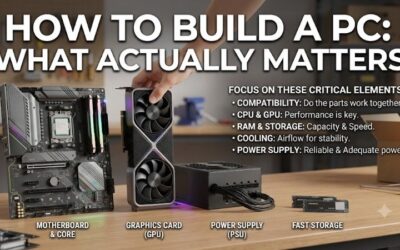
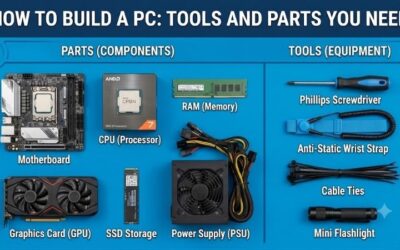
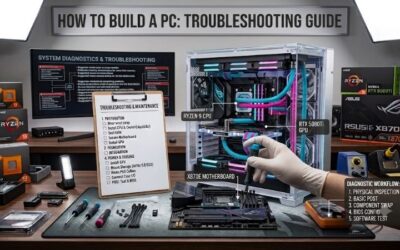
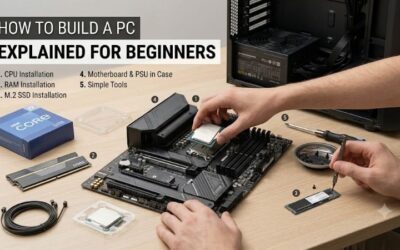
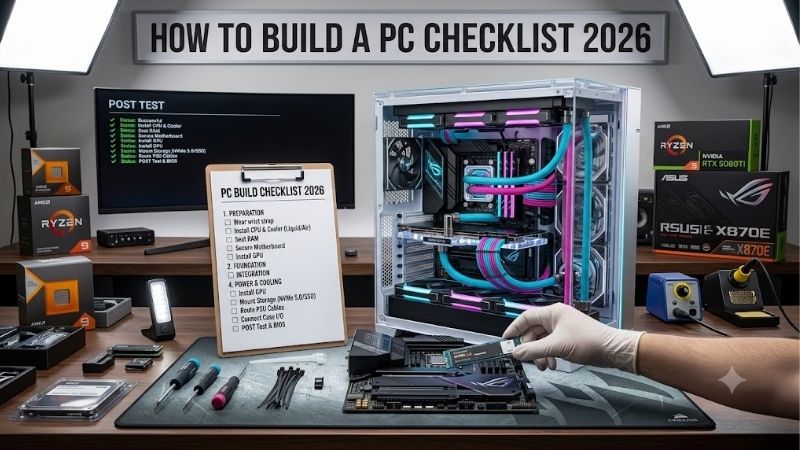
How to build a pc checklist 2026 works when compatibility comes before buying. Start with the CPU platform, match the motherboard and RAM, size the GPU and PSU, then confirm case clearance. This order catches socket, memory, power, and fit problems before they cause returns or force a rebuild. Compatibility matters before checkout.
Quick answer: Our top pick in 2026 is the AMD Ryzen 5 9600X — our #1 rated choice. See the full ranked comparison, alternatives and buying advice below.
How to Choose Your PC Build
A complete checklist covers CPU, motherboard, RAM, GPU, SSD, PSU, case, cooling, operating system, and peripherals. For assembly, work from board-level parts to the case: seat CPU and RAM, install SSD and cooler, mount the board, connect power and front-panel cables, then install the GPU and boot-test methodically first.
CPU Platform Compatibility
Platform choice means matching CPU socket, chipset, and memory generation. Ryzen 5 9600X uses AMD AM5 and DDR5, so the motherboard and memory must support that platform. A wrong socket or RAM type cannot be fixed later. For modern gaming, the 9600X gives a starting point with upgrades. Compatibility comes first consistently.
Choose the desktop processor first when gaming performance priorities and future upgrades matter. Ryzen 5 9600X has 6 cores, 12 threads, up to 5.4 GHz boost, 32MB L3 cache, and a 65W default TDP. It matches cleanly with MSI MAG B850 TOMAHAWK MAX WIFI, while cooling remains a separate cooling component purchase.
Memory Capacity And Speed
Memory capacity is the amount of RAM installed; speed and timings matter after capacity is sufficient. For a new gaming PC, 32GB is a practical baseline for games, browsers, launchers, and apps. G.SKILL Flare X5 supplies 32GB as 2x16GB, uses DDR5, and supports rated speeds up to 6000 MT/s on supported platforms for current builds.
Do not assume memory speed is automatic. G.SKILL says its 6000 MT/s profile needs BIOS adjustment or overclocking and depends on the CPU and motherboard. A compatible 2x16GB EXPO kit is easier for a first build than extreme-speed memory, making Flare X5 a useful reference for platform validation verified.
PSU Capacity And Connectors
Power sizing matches PSU output to the whole system, not just CPU wattage. Check the GPU maker’s recommended PSU rating, then leave sensible headroom for transient loads and upgrades. Corsair RM750e provides 750W, uses ATX 3.1, and includes a native 12V-2×6 cable, giving beginners a current ATX standard to evaluate safely.
Higher wattage is not automatically better if it steals budget from required parts. RM750e is fully modular and 140mm long, improving cable management. It suits mainstream systems, while demanding GPUs may need more. That makes Corsair RM750e a strong choice when 750W matches your GPU recommendation for this class.
Form Factor And Connectivity
Form factor and connectivity decide whether a build has expansion flexibility and device connectivity. MSI MAG B850 TOMAHAWK MAX WIFI is ATX, has four DDR5 slots up to 256GB, 5Gb Ethernet, Wi-Fi 7, and USB connectivity. Check that the chassis supports ATX before buying, or board features cannot be used at all during assembly.
Choose a feature-rich ATX board when you expect more drives, memory, USB devices, or future CPU upgrades. The trade-off is price and size versus simpler boards. MSI MAG B850 TOMAHAWK MAX WIFI suits expansion-focused systems, while Corsair RM750e supports modern GPU cabling in a compatible case.
Top Picks
How to build a pc checklist 2026 becomes easier when real hardware tests each decision. These four reference picks are not one fixed build; they illustrate CPU, memory, motherboard, and PSU choices that commonly create beginner mistakes. The checklist still covers graphics, storage, cooling, case, software, and peripherals.
| Product | Best For | Key Spec | Watch Out For |
|---|---|---|---|
| AMD Ryzen 5 9600X | Best Overall | 6 cores/12 threads, up to 5.4 GHz, 65W, AM5 | Cooler not included |
| G.SKILL Flare X5 32GB | Best Value | 32GB (2x16GB), DDR5-6000, CL30, AMD EXPO | 6000 MT/s profile needs configuration |
| MSI MAG B850 TOMAHAWK MAX WIFI | Best For Upgrade-Ready Builds | 4 DDR5 slots/256GB, PCIe 5.0 x16, 5Gb LAN, Wi-Fi 7 | ATX size and feature set can be overkill |
| Corsair RM750e 750W | Best For Modern GPU Power | 750W, ATX 3.1, PCIe 5.1, 12V-2×6, fully modular | Not enough for every high-end GPU |
AMD Ryzen 5 9600X: Best Overall
A practical how to build a pc checklist 2026 needs an unambiguous processor starting point. AMD Ryzen 5 9600X is the Best Overall benchmark reference, featuring AM5, 6 cores, 12 threads, 3.9 GHz base clock, up to 5.4 GHz boost, 32MB L3 cache, 65W default TDP, and AMD EXPO support for memory tuning for current-generation gaming platforms.
Ryzen 5 9600X’s main benefit is a current-gen AM5 platform with balanced gaming capability and low thermal design power. Its main drawback is the missing stock cooler, so cooling must be budgeted separately. That added component can disappear in CPU price comparisons, especially for first-time builders counting the complete system cost.
G.SKILL Flare X5 32GB: Best Value
A complete how to build a pc checklist 2026 should treat RAM as a separate choice. G.SKILL Flare X5 32GB (2x16GB) is the Best Value reference for AMD AM5 gaming, using DDR5, dual-channel memory, AMD EXPO, and a DDR5-6000 profile at CL30-38-38-96 and 1.35V. Its low-profile design leaves extra room near the CPU socket.
The practical advantage is 32GB across two modules, leaving two DIMM slots free. The limitation is that 6000 MT/s is a profile setting rather than default JEDEC speed, so BIOS support and motherboard compatibility still matter. For beginners, checking the QVL before purchase is more valuable than selecting a higher memory frequency.
MSI MAG B850 TOMAHAWK MAX WIFI: Best For Upgrade-Ready Builds
For how to build a pc checklist 2026, MSI MAG B850 TOMAHAWK MAX WIFI is the Best For Upgrade-Ready Motherboard reference. It supports Ryzen 7000, 8000, and 9000 on AM5, with four DDR5 slots up to 256GB, PCIe 5.0 x16, 5Gb Ethernet, Wi-Fi 7, and Flash BIOS. That mix leaves useful room for later component changes.
Its drawback is that the feature set can exceed a basic gaming system’s needs, so a simpler board may offer better overall value. It makes most sense for strong networking, USB connectivity, four memory slots, and expansion. Check the case for ATX support because this is a full-size ATX motherboard for future expansion.
Corsair RM750e 750W: Best For Modern GPU Power
For how to build a pc checklist 2026, Corsair RM750e 750W is the Best For Modern GPU Power reference. It is fully modular, ATX 3.1 certified, PCIe 5.1 compatible, and includes a native 12V-2×6 cable. Its dimensions are 140 x 150 x 86mm, and Corsair lists a seven-year warranty. Its cabling is designed for graphics card connections.
The advantage: cleaner cable management because leads can stay outside the case. The limitation is 750W power capacity, which is not ideal for high-end graphics cards. AMD lists 650W for RX 9070 and 750W for RX 9070 XT, showing why the graphics card should be chosen before final PSU sizing during planning.
Frequently Asked Questions
how to build a pc checklist 2026 should also catch small omissions that stop systems from booting. Common misses include a separate CPU cooler, adequate SSD space, correct power connectors, compatible memory, and a display cable. Treat these as checklist items before ordering, not details to solve after every box arrives.
How Much Should A First-Time Builder Budget?
How much should a first-time builder budget? There is no fixed amount because the GPU and monitor targets drive totals. Set the resolution and frame-rate goal first, then balance CPU and GPU spending. Budget for 32GB memory and a suitable SSD, quality power and cooling, and a case with sensible airflow in realistic terms.
A lighter esports or school-focused PC can spend less on graphics power and more on storage or peripherals. It still needs CPU, motherboard, RAM, storage, PSU, case, cooling, operating system, and display connection. But missing power, cooling, or compatibility requirements can stop the system from working before purchase.
Do I Need A Graphics Card?
Do I need a graphics card if the CPU has integrated graphics? No, not for every PC. Integrated graphics can handle desktops and lighter games on supported processors, but demanding gaming favors a discrete GPU. Ryzen 5 9600X is mainly a CPU choice for systems using a separate graphics card for gaming before purchase directly.
Integrated graphics can help during troubleshooting or temporary setup. Before buying, verify the processor includes usable graphics and that the motherboard display outputs support them. Never assume every HDMI or DisplayPort connector works without CPU graphics; board documentation states which outputs depend on integrated graphics.
How Much SSD Storage Should A New Build Have?
How much SSD storage should a new build have? A 1TB NVMe SSD is a sensible starting point when practical because modern games can use large amounts of space. Match the drive interface to the motherboard’s supported M.2 slots, and leave some free capacity rather than filling the drive immediately after installation.
A productivity build with large media files or a large game library may justify a larger NVMe drive. Also check the motherboard manual for M.2 slot sharing because some slots can disable or share lanes with other ports. That compatibility check belongs on the checklist before buying multiple drives or planning expansion.
What Should I Check After Assembly?
What should I check immediately after assembly? Confirm the CPU cooler is connected, RAM is fully seated, required motherboard and GPU power leads are attached, and the display cable uses the intended output. Enter UEFI, confirm CPU, memory, and storage are detected, check temperatures, then enable the memory profile after stability is established.
After the first boot, install the operating system and drivers before utilities. A brief stability test can reveal cooling or memory problems that POST will not. Keep the motherboard documentation nearby because its debug LEDs, header labels, and slot diagrams are a practical reference when something behaves badly.
Final Thoughts
Final Thoughts: how to build a pc checklist 2026 should end with a compatibility pass, not just a shopping list. Verify CPU socket, RAM type, GPU power needs, case clearances, cooler support, storage slots, and required cables before ordering. That final check prevents more delays and returns than any advanced assembly trick.
Ready to decide? Our #1 pick for 2026 is the AMD Ryzen 5 9600X.
Live price & availability on Amazon.