
- Top Pick: TCL 55" T7 4K QLED Google TV with 144Hz Gaming (55T7)
- Best Value: Hisense 43" E6 Cinema Series Hi-QLED 4K UHD Smart Fire TV (43E6QF) – AI Light Sensor, Dolby Vision · Atmos, Voice Remote with Alexa, Motion Rate 120, HDR 10+ Adaptive, Game Mode Plus
- Premium Choice: TCL 55 Inch Class QM6K Series | Mini LED QLED 4K HDR | 55QM6K, Latest Model | 120HZ-144HZ High Brightness Smart Google TV Dolby Atmos Onkyo Audio | Voice Remote Alexa Gaming Streaming Television
A proper gaming TV turns the living room into big-screen territory, with the PS5, Xbox Series X, and a capable PC all pushing 4K at 120Hz. The standout 2026 sets pair HDMI 2.1, VRR, and low input lag with gorgeous OLED or Mini-LED panels. These are the gaming TVs worth building a setup around, along with the key specs to check so you don’t overpay for features you won’t use — or miss the one setting that makes console gaming feel razor sharp.
🛒 Best Price Today on Amazon
Prime members get fast, free shipping on everything above, plus member-only deals. New members get a 30-day free trial — cancel anytime.
As an Amazon Associate we earn from qualifying purchases.






Best Gaming TVs of 2026
Gaming TV Comparison Table
| TV | Panel | Refresh | HDMI 2.1 | Price |
|---|---|---|---|---|
| LG C4 OLED | OLED | 120Hz+ | 4 ports | ~$1,399 |
| Samsung S90 OLED | QD-OLED | 144Hz | 4 ports | ~$1,599 |
| Hisense U8 Mini-LED | Mini-LED | 144Hz | 2 ports | ~$999 |
| Sony Bravia X90 | LED | 120Hz | 2 ports | ~$1,099 |
Best Overall: LG C4 OLED
The LG C4 OLED is the one to beat: perfect blacks, four HDMI 2.1 ports, 120Hz-plus refresh, VRR, and the famously low input lag. Its Game Optimizer mode and standout OLED picture make everything look and feel terrific. For most gamers, it lands the best balance of features, picture, and price. Crucially, it is one of the few TVs with four full-bandwidth HDMI 2.1 ports, so you can connect a PS5, an Xbox Series X, and a gaming PC all at 4K120 without swapping cables. The Game Bar overlay lets you tweak VRR, black levels, and aspect ratio on the fly, and NVIDIA G-SYNC plus AMD FreeSync compatibility keep PC gaming tear-free.
Best Picture: Samsung S90 QD-OLED
The Samsung S90 leans on QD-OLED for serious brightness and color volume layered over OLED’s perfect blacks. With 144Hz support, several HDMI 2.1 ports, and a deep gaming feature set, it serves up the most vivid big-screen gaming going — the pick when you simply want the best picture on the wall. QD-OLED’s quantum-dot layer produces punchier, more saturated colors than conventional OLED, and the higher peak brightness makes HDR highlights genuinely dazzling. The 144Hz panel also suits PC gamers chasing frame rates above the console 120Hz ceiling.
Best Value: Hisense U8 Mini-LED
The Hisense U8 brings huge brightness and contrast via Mini-LED for far less than OLED money, with 144Hz gaming support and HDMI 2.1 along for the ride. That sky-high peak brightness makes HDR genuinely pop, which makes it a cracking value play for bright rooms and budget-minded gamers. Because it uses an LCD panel with thousands of local dimming zones, it can’t quite match OLED’s perfect blacks, but it trades that for far higher sustained brightness and zero risk of burn-in — ideal if your gaming room gets a lot of daylight or you leave static HUDs on screen for hours.

Dark Spark Decals Space, Star Mushroom Trio 9 inch Copper Indoor Outdoor Vinyl Decal


As an Amazon Associate we earn from qualifying purchases. Product prices and availability are accurate as of the date/time indicated.
What to Look for in a Gaming TV
- HDMI 2.1: Required for 4K120 — more ports is better for multiple consoles
- VRR: Eliminates tearing and stutter in variable-framerate games
- Low input lag: Look for a Game Mode under 15ms
- Panel type: OLED for perfect blacks, Mini-LED for brightness and value
- ALLM: Auto Low Latency Mode switches to Game Mode the moment a console starts
For desk gaming, compare with our PS5 gaming monitor guide.
What Size Gaming TV Should You Buy?
Screen size should match your viewing distance. For a typical living-room seating distance of 7–9 feet, a 55–65 inch set hits the sweet spot for 4K immersion without forcing you to move your head to track the action. If you sit closer, say 5–6 feet, 48–55 inches keeps the whole picture in your field of view. Bigger is not always better for competitive gaming — a 77-inch panel looks cinematic for single-player epics but can make fast-paced shooters harder to read from up close. Always confirm the model you want offers HDMI 2.1 at your chosen size, since some brands cut features on smaller panels.
OLED vs Mini-LED for Gaming
OLED TVs like the LG C4 give you perfect blacks, infinite contrast, and instant pixel response for the cleanest motion — ideal for dark rooms and cinematic sessions. Mini-LED TVs like the Hisense U8 hit much higher peak brightness and shrug off burn-in, so they suit bright rooms and long static-HUD marathons, often for less cash. Both are excellent — let your room lighting and budget make the call. Modern OLEDs include pixel-shifting and logo-dimming features that make burn-in a non-issue for varied gaming, so unless you leave a single static image on screen for many hours a day, either technology will serve you well for years.
Frequently Asked Questions
Do I need a 120Hz TV for PS5 and Xbox Series X?
Current consoles support up to 120fps in many games, and a 120Hz TV with HDMI 2.1 lets you enjoy that smoothness. At 4K resolution, 120Hz requires HDMI 2.1 bandwidth. If you play competitive or fast-paced titles, a 120Hz panel makes a visible difference. For slower single-player games at 60fps, a good 60Hz TV is still fully capable.
What is HDMI 2.1 and why does it matter for gaming?
HDMI 2.1 is a connection standard that provides the bandwidth for 4K at 120Hz, plus gaming features like Variable Refresh Rate and Auto Low Latency Mode. Older HDMI 2.0 ports cap 4K at 60Hz. To future-proof for high-frame-rate console gaming, ensure the TV has at least one, ideally two, full-bandwidth HDMI 2.1 ports rather than 2.0.
What is VRR and does it reduce screen tearing?
VRR, or Variable Refresh Rate, syncs the TV’s refresh to the console’s frame rate in real time, eliminating screen tearing and stutter when frame rates fluctuate. Both PS5 and Xbox Series support VRR, often via FreeSync or HDMI Forum VRR. It is a major gaming feature that keeps motion clean, so look for VRR support on any gaming TV.
Is OLED or QLED better for gaming?
OLED delivers perfect blacks, per-pixel contrast, and near-instant response times, making it stunning for gaming, though brightness is lower and there is a small burn-in risk from static HUDs. QLED and Mini-LED get brighter and have no burn-in concern, better for bright rooms. Both are excellent; OLED wins on image quality, QLED on brightness and peace of mind.
What is input lag and how low should it be?
Input lag is the delay between pressing a button and seeing the result on screen; lower is better for responsive gaming. A good gaming TV in Game Mode achieves under 15 milliseconds, and the best hit around 5 to 10 milliseconds. Always enable Game Mode and check reviewed input lag figures, since some TVs look great but feel sluggish without it.
Ready to decide? Our #1 pick for 2026 is the LG C4 OLED.
Live price & availability on Amazon.
Top picks from this guide
Dark Spark DecalsDark Spark Decals Space, Star Mushroom Trio 9 inch Copper…$10 \xc2\xb7 98/100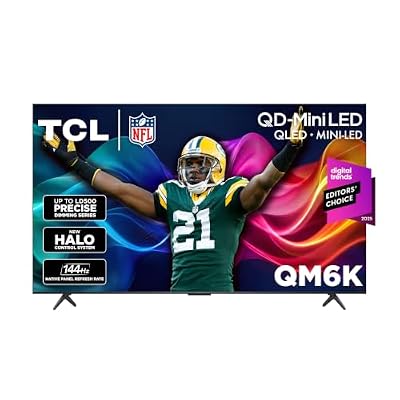 TCLTCL 55 Inch QM6K Series QLED Mini LED 4K HDR…$548 \xc2\xb7 97/100
 VIZIOVIZIO 50-inch Quantum Pro 4K 120Hz QLED HDR10+ Smart TV…$721 \xc2\xb7 97/100
 TCLTCL 55 Inch T7 Series 4K 120Hz QLED Smart Google…$400 \xc2\xb7 96/100








