Disclosure: As an Amazon Associate, we earn from qualifying purchases made through links in this article, at no additional cost to you.
A specialty store does not win on speed alone. It wins because staff know the range, can explain why one model suits a customer better than another, and can find, order, or reserve the exact variant that is not on the shelf. The best windows pos terminals for specialty stores therefore need to do more than ring up a barcode. They need a full Windows environment for specialist inventory software, enough screen to show product detail properly, and a counter presence that matches a curated shop rather than a discount warehouse.
All four picks here are Windows all-in-one touchscreen terminals verified from their listings — Windows 11 Professional and Windows 10 models, with no Android system presented as Windows. They are chosen for catalogue depth, special orders, guided selling, and the kind of considered checkout a specialty customer expects.
Quick Picks
- Best for curated shop interiors: Volcora POS Terminal (White, Windows 11 Pro) — a bright finish with an open Windows platform for specialist software.
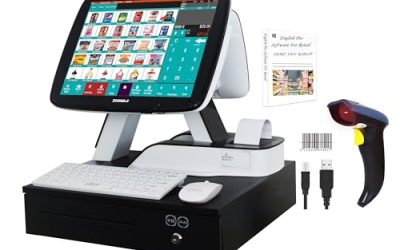
- Best for deep catalogues: ZHONGJI Touch POS System SET03 — Core i5 and 8GB of memory for larger product files.
- Best for a second or darker-fitted counter: Volcora POS Terminal (Black, Windows 11 Pro) — the same Windows 11 Pro platform in black.
- Best for guided selling: ASSUR POS Terminal (Dual Screen, Windows 10 Pro) — a customer screen for building a considered purchase together.
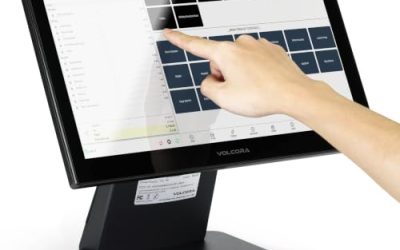
Volcora Retail and Restaurant POS Terminal — Windows 11 Pro, 15.6-Inch, White

Specialty retail — wine, vaping alternatives aside, think musical instruments, model and hobby goods, premium pet supplies, jewellery, and curated homeware — lives on product knowledge and a considered counter experience. The white Volcora terminal, running Windows 11 Professional with a 15.6-inch capacitive touchscreen, fits a bright, curated shop floor where the till should not look like warehouse equipment. Its value here is the open Windows platform: specialist inventory programs, supplier catalogues in a browser, and a detailed product lookup can share one screen. Staff can move from a stock enquiry to a sale without swapping devices, which is exactly how specialty advice turns into a transaction.
Specs
- Display: 15.6-inch capacitive touchscreen; Operating system: Windows 11 Professional; Processor: Intel Core i5; Memory: 4GB RAM; Storage: 128GB; Form factor: All-in-one, hardware only; Model number: 530023
- ASIN: B0CG8QWTDW
- Link: https://www.amazon.com/dp/B0CG8QWTDW
Pros:
– Windows 11 Professional supports specialist Windows inventory and POS programs
– Clean white finish suits curated, design-conscious shop interiors
– 15.6-inch screen leaves room for detailed product and stock information
Cons:
– Hardware only, so scanner, printer, drawer, and software are chosen separately
– 4GB RAM means specialist programs should be checked for their memory needs first
ZHONGJI Touch POS System SET03 (ZJ-A7DP-RES) — Windows 10

A specialty store often carries fewer, more complex products rather than thousands of fast lines — serial numbers, variants, special orders, and deposits are normal. The ZHONGJI SET03 is documented with Windows 10, an Intel Core i5, 8GB of memory, and a 128GB SSD in a 15-inch touch system, a configuration that suits a heavier Windows inventory application with a large local product file. That headroom matters when a catalogue includes photos, compatibility notes, or repair histories attached to individual items. It is a counter terminal for a shop where looking something up correctly matters more than scanning it quickly.
Specs
- Display: 15-inch touchscreen; Operating system: Windows 10; Processor: Intel Core i5; Memory: 8GB RAM; Storage: 128GB SSD; Model number: ZJ-A7DP-RES (SET03)
- ASIN: B08DTHBHZ9
- Link: https://www.amazon.com/dp/B08DTHBHZ9
Pros:
– Core i5 and 8GB RAM suit larger specialist catalogues and inventory programs
– Windows 10 base keeps established retail software in scope
– 128GB SSD stores local product data for special-order work
Cons:
– Verify the exact set contents on the listing, as similar ZHONGJI sets vary
– No customer display is highlighted for this configuration, so totals are operator-side
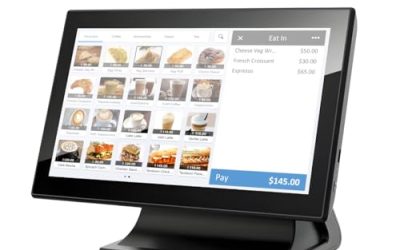
Volcora Retail and Restaurant POS Terminal — Windows 11 Pro, 15.6-Inch, Black

The black Volcora configuration is the same Windows 11 Professional platform — Intel Core i5, 15.6-inch capacitive touchscreen, 4GB of memory, 128GB of storage — in a finish that suits record stores, bike shops, camera stores, and other specialty formats with darker fittings. Treat the colour choice as part of a system choice: both Volcora units are hardware-only all-in-ones, so a specialty retailer can keep a trusted Windows POS program, add a scanner matched to its barcodes, and connect a label or receipt printer that fits its packaging. Consistency matters if a second counter or a second location is planned later.
Specs
- Display: 15.6-inch capacitive touchscreen; Operating system: Windows 11 Professional; Processor: Intel Core i5; Memory: 4GB RAM; Storage: 128GB; Form factor: All-in-one, hardware only; Model number: 530022
- ASIN: B0CG8M8G7D
- Link: https://www.amazon.com/dp/B0CG8M8G7D
Pros:
– Windows 11 Professional all-in-one keeps software choice open for niche retail programs
– Black finish suits darker, equipment-led specialty interiors
– Single-screen layout is straightforward to replicate at a second counter
Cons:
– Hardware only, so the full counter build is assembled from separate parts
– Confirm specialist peripherals, such as label printers, have Windows drivers before buying
ASSUR POS Cash Register Terminal — 15.6-Inch With 11.6-Inch Customer Screen, Windows 10 Pro

The ASSUR dual-screen terminal earns its place in specialty retail at the moment of explanation: a customer deciding on a high-consideration purchase can watch options, add-ons, and the total build on the 11.6-inch customer screen while staff work on the 15.6-inch main display. It runs Windows 10 Pro on a J6412 processor with WiFi, so it can sit on a consultation counter rather than only at a fixed till point. That placement is useful in bike, audio, and home-improvement specialty formats where the sale is built at a desk, not at an exit queue. The listing notes POS software is not included, so plan to install the retail program you have selected.
Specs
- Display: 15.6-inch touchscreen with 11.6-inch customer screen; Operating system: Windows 10 Pro; Processor: Intel Celeron J6412, 4-core; Memory: 4GB RAM; Storage: 128GB SSD; Connectivity: WiFi module; Note: POS software is not included per listing
- ASIN: B0CL5RH7CH
- Link: https://www.amazon.com/dp/B0CL5RH7CH
Pros:
– Customer screen supports guided, high-consideration selling
– WiFi and Windows 10 Pro allow a consultation-desk placement
– Dual-screen setup helps present add-ons and totals transparently
Cons:
– POS software is not included
– J6412 configuration is for POS and catalogue work, not heavy back-office processing
How to Choose
Begin with your catalogue, not your queue. If your Windows retail program holds tens of thousands of variants, serial numbers, or special-order records, favour memory and processor headroom and check the program’s own requirements first. If your selling is consultative, favour the screen arrangement: a customer-facing display turns a terminal into a shared decision tool, while a single large touchscreen is better for staff-led lookup.
Then map the specialty workflows a general register handles badly. Deposits and layaway-style part payments, repairs and servicing attached to a product, gift wrapping and message records, supplier reorders, and label printing each depend on software and peripherals, not on the terminal alone. Confirm Windows driver support for your scanner, label printer, and receipt printer, and test how your program handles a special order end to end. Finally, think about consistency: the same Windows platform at a consultation desk and at the till reduces training and makes cover shifts simpler.
FAQs
Can these terminals run niche or specialist retail software?
That is the main reason to choose a Windows terminal. If the program is a Windows application, check its supported Windows edition and memory requirements against the terminal’s listing, and confirm any dongle, database, or printer driver needs.
Why would a specialty store want a customer-facing screen?
For considered purchases, transparency sells. A customer screen lets a shopper follow options, accessories, and the running total while staff build the sale, which suits audio, cycling, jewellery, and similar formats.
Should a specialty store choose 4GB or 8GB of memory?
Follow your software maker’s guidance. A lightweight till program may run comfortably on a 4GB configuration, while a large local catalogue or a fuller inventory system is a better match for an 8GB configuration such as the ZHONGJI set listed here.
Can I print product labels from a Windows POS terminal?
Usually yes, through the retail software and a compatible label printer connected as a peripheral. Confirm the label printer has Windows support for your Windows edition before ordering the full setup.
Conclusion
Choose the white Volcora if the counter is part of the shop’s look and your specialist software is comfortable on its configuration, and the ZHONGJI SET03 if catalogue depth and memory are the priority. Add the ASSUR dual-screen terminal where selling is a conversation. In specialty retail the right Windows terminal is the one that helps staff explain, find, and order the right product — the sale itself is only the last step.