Disclosure: As an Amazon Associate, we earn from qualifying purchases made through links in this article, at no additional cost to you.
A pop-up shop has no settling-in period. The counter is built in the morning, the network is borrowed, the pitch may last a weekend, and every cable that can be forgotten will test you. The best windows pos terminals for pop-up shops are therefore not the largest lane systems a store can buy. They are Windows all-in-ones that set up fast, look credible to a customer meeting the brand for the first time, connect over WiFi when a wired till point does not exist, and pack down without a tangle of separate components.
All of the picks here run Windows according to their listings — Windows 11 Professional, Windows 10 Pro, or Windows 10 — and none is an Android terminal presented as Windows. The differences that matter for a pop-up are portability, how much is built into the unit, and how the counter presents at a market, event, or short-lease space.
Quick Picks
- Best for a complete-looking temporary counter: ASSUR POS Terminal (Dual Screen, Windows 10 Pro) — an integrated customer screen and WiFi.
- Best for simplest setup and pack-down: Volcora POS Terminal (Black, Windows 11 Pro) — one all-in-one unit, no separate tower.
- Best for print-heavy pop-ups: MEETSUN POS Cash Register SET02 — a built-in thermal printer in the bundle.
- Best for brand-led spaces: Volcora POS Terminal (White, Windows 11 Pro) — the same Windows platform in a bright finish.
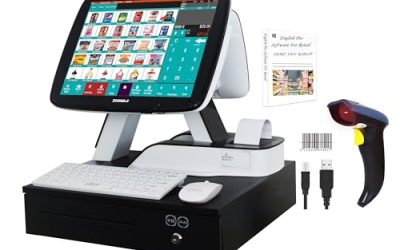
ASSUR POS Cash Register Terminal — 15.6-Inch With 11.6-Inch Customer Screen, Windows 10 Pro

A pop-up lives or dies on setup time: arrive, place the counter, power up, and trade. The ASSUR dual-screen terminal helps because the customer screen is already part of the unit — a 15.6-inch main touchscreen with an 11.6-inch customer display — so a market stall, sample sale, or short-lease unit can look established without assembling a separate customer monitor. It runs Windows 10 Pro on a J6412 processor with WiFi, which suits a venue where running a network cable is not an option and the till needs to join the venue or hotspot network. The listing states POS software is not included, so install and test your Windows program at base, not on opening morning.
Specs
- Display: 15.6-inch touchscreen with 11.6-inch customer screen; Operating system: Windows 10 Pro; Processor: Intel Celeron J6412, 4-core; Memory: 4GB RAM; Storage: 128GB SSD; Connectivity: WiFi module; Note: POS software is not included per listing
- ASIN: B0CL5RH7CH
- Link: https://www.amazon.com/dp/B0CL5RH7CH
Pros:
– Integrated customer screen makes a temporary counter look complete and trustworthy
– WiFi and Windows 10 Pro suit venues without a wired till point
– Dual-screen format supports card-era checkout conversations at a stall or stand
Cons:
– POS software is not included, so full setup must happen before the event
– Dual-screen unit is bulkier to transport than a single-screen terminal, so plan a case or original packaging
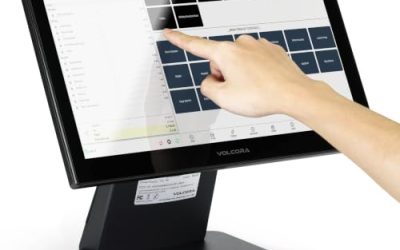
Volcora Retail and Restaurant POS Terminal — Windows 11 Pro, 15.6-Inch, Black

The black Volcora is the pop-up pick for simplicity: one Windows 11 Professional all-in-one, a 15.6-inch capacitive touchscreen, Intel Core i5, 4GB of memory, and 128GB of storage, with no separate PC tower to cable together under a temporary counter. For a brand testing a location, a seasonal shop, or a ticketed retail event, that single-unit logic matters — fewer boxes, fewer cables, and a familiar Windows desktop for the program, spreadsheet, and browser work behind the stall. As a hardware-only unit it also returns to base cleanly after the run and can be reconfigured for the next site.
Specs
- Display: 15.6-inch capacitive touchscreen; Operating system: Windows 11 Professional; Processor: Intel Core i5; Memory: 4GB RAM; Storage: 128GB; Form factor: All-in-one, hardware only; Model number: 530022
- ASIN: B0CG8M8G7D
- Link: https://www.amazon.com/dp/B0CG8M8G7D
Pros:
– Single all-in-one unit keeps transport and counter setup simple
– Windows 11 Professional supports current Windows POS and stock programs
– No separate tower means fewer cables on a temporary counter
Cons:
– Hardware only, so printer, reader, and software travel as separate items to checklist
– 4GB RAM is best matched to a focused till workload during the event
MEETSUN POS Cash Register SET02 — 15-Inch Windows Touchscreen With Built-In Thermal Printer

Some pop-ups print constantly — order-ahead collection points, food-adjacent retail, personalised goods, and event merchandise all generate tickets and receipts in bursts. MEETSUN’s SET02, a 15-inch Windows touchscreen system with an 11.6-inch customer display and a built-in 58mm thermal printer, keeps that printing inside the terminal bundle instead of adding a printer to the packing list. Listings describe 8GB of memory, a 128GB SSD, and multiple USB ports plus LAN, so a scanner and drawer can be added for a fuller weekend counter. It is the heaviest style of setup here, so it suits a pop-up with a vehicle and a fixed pitch rather than a carry-on stall.
Specs
- Display: 15-inch flat touchscreen with 11.6-inch customer display; Operating system: Windows 10 (Windows system per listing); Memory: 8GB RAM; Storage: 128GB SSD; Printer: Built-in 58mm (2 1/4-inch) thermal receipt printer; Ports listed: 6 USB, HDMI, VGA, LAN
- ASIN: B098SHM4KV
- Link: https://www.amazon.com/dp/B098SHM4KV
Pros:
– Built-in printer removes one separate peripheral from the packing list
– Customer display helps at busy collection and merchandise counters
– Port range supports a scanner and drawer for a fuller temporary lane
Cons:
– Bundled format is less portable than a terminal-only unit
– Check receipt format against your ticket or order-slip layout before the event
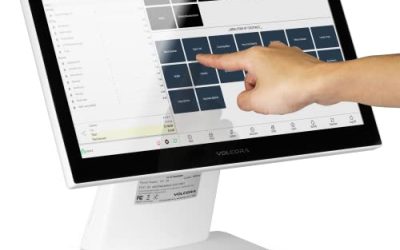
Volcora Retail and Restaurant POS Terminal — Windows 11 Pro, 15.6-Inch, White

Presentation is the product at many pop-ups — a launch, a collaboration, or a premium sample sale is photographed as much as it is shopped. The white Volcora configuration offers the same Windows 11 Professional platform as the black model, with a 15.6-inch capacitive touchscreen, Intel Core i5, 4GB of memory, and 128GB of storage, in a finish that matches bright, temporary, brand-led spaces. Functionally it remains a straightforward hardware-only Windows all-in-one, so the same unit can trade at the event and then handle stock and follow-up work back at base without learning a second system.
Specs
- Display: 15.6-inch capacitive touchscreen; Operating system: Windows 11 Professional; Processor: Intel Core i5; Memory: 4GB RAM; Storage: 128GB; Form factor: All-in-one, hardware only; Model number: 530023
- ASIN: B0CG8QWTDW
- Link: https://www.amazon.com/dp/B0CG8QWTDW
Pros:
– White finish suits bright, brand-led and photographed pop-up spaces
– Windows 11 Professional all-in-one is simple to set up and pack down
– Consistent platform with the black Volcora simplifies using both across sites
Cons:
– Hardware only, so the event checklist must cover software and peripherals separately
– Single screen, so there is no integrated customer display in this configuration
How to Choose
Pack for the venue you actually have. Confirm power first — how many sockets, where they are, and whether an extension lead is allowed — then confirm connectivity. A WiFi terminal gives placement freedom at a market or gallery, but download and install your Windows POS program, updates, and product file before you travel, and test the whole till offline at base. A pop-up that can trade through a venue network failure is a pop-up that keeps its queue.
Then count the boxes. A single-screen all-in-one is the lightest complete till; a dual-screen unit adds customer confidence but needs more transport care; a bundle with a built-in printer saves a separate printer but adds bulk. Build a one-page checklist from your choice: terminal, power supply, card reader, any printer and rolls, cash drawer if you take cash, and the hotspot or router you rely on. Finally, rehearse pack-down. Photograph the working counter before you dismantle it, label the cables, and the second event will take half the setup time of the first.
FAQs
Can a pop-up shop run a full Windows POS terminal on venue WiFi?
Yes, and several picks here list WiFi. Install and test the software before the event, keep a hotspot as a backup, and make sure your program can handle a temporary loss of connection in the way your business requires.
What is the easiest terminal type to transport?
A single-screen all-in-one, such as the Volcora configurations, is usually the simplest because there is no separate PC tower. Keep the original packaging or a padded case for the screen, whichever terminal you choose.
Do pop-ups need a customer-facing screen?
It is optional, but it builds trust at a temporary counter where customers do not know the brand. An integrated customer display, such as on the ASSUR and MEETSUN models, avoids carrying a separate monitor.
Should I take cash at a pop-up?
That is a business decision the terminal should follow, not lead. If you do, add a cash drawer to the checklist and confirm it connects to your chosen terminal and software; if you are card-only, a terminal-only setup packs lighter.
Conclusion
For most pop-ups, the ASSUR dual-screen terminal gives a temporary counter instant credibility, while a single Volcora all-in-one is the simplest unit to move from venue to venue. Choose the MEETSUN bundle only when printing is central and transport space allows. Prepare the Windows software at base, test offline, pack from a checklist — and the technology will disappear into the event, which is exactly what a pop-up needs.