Docked gaming turns a handheld into a small console. The best Windows gaming handhelds for docked gaming connect cleanly to a TV or a monitor, charge while they play, stay cool under sustained load, and switch back to handheld mode without a long setup process. When the dock works well, the same device can be a portable handheld on the move and a living-room PC in the evening.


The connection is the first thing to check. A USB-C port with DisplayPort video output can drive an external display, and a Thunderbolt 4 port can do the same while also supporting faster data transfer and more demanding accessories. A handheld with two USB-C ports is especially useful when docked, because one port can carry the video signal while the other charges the device or connects a peripheral.
Cooling matters more when docked than when held in the hands. A handheld on a desk or in a dock has less airflow around it than one held in the air, and a demanding game can push the processor hard for hours. A handheld with a capable cooling system, a high-power mode for docked use, and vents that are not blocked by the dock will hold its performance better over a long session.
The three handhelds below all work well with a dock or a USB-C hub, and each one brings a different strength: two Thunderbolt 4 ports, a large screen with detachable controllers, or a light and simple design that is easy to drop into a dock.
How to Choose the Best Windows Gaming Handhelds for Docked Gaming
Start with the video output. Check that the handheld’s USB-C port supports DisplayPort Alt Mode or Thunderbolt, because a USB-C port that only charges will not drive a monitor. Thunderbolt 4 is the most capable option, because it supports high-resolution displays, fast external storage, and a wide range of docks through one port.
Think about the dock itself. Some handhelds have a first-party dock or a charger dock that is designed for that model, while others work best with a general USB-C hub. A good dock should provide power delivery, at least one HDMI or DisplayPort output, and USB-A ports for a keyboard, a mouse, and a controller receiver. An Ethernet port is useful for stable online play. Check that the dock can supply enough power to charge the handheld while it plays, otherwise the battery will drain slowly even while docked.
Cooling and power modes are the next consideration. A handheld that can run at a higher power limit when plugged in will perform better on a large screen, where higher resolutions and frame rates are more noticeable. Look for a performance mode that is designed for docked use, and make sure the dock or stand does not cover the intake or exhaust vents.
Finally, think about the switch between docked and handheld play. A handheld that wakes quickly, reconnects to a wireless controller without fuss, and remembers the display settings for the dock will be used in docked mode more often. Detachable controllers and a kickstand are useful here, because they let the handheld act as a small screen beside the TV.
The Best Windows Gaming Handhelds for Docked Gaming
MSI Claw 8 AI+ 1TB
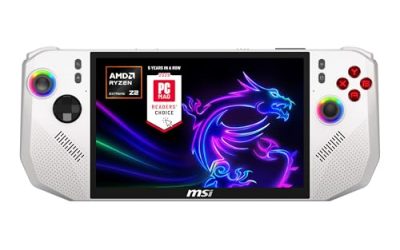
The MSI Claw 8 AI+ is the strongest docked pick in this guide, because it has two Thunderbolt 4 ports, an Intel Core Ultra 7 258V processor, 32GB of LPDDR5x memory, a 1TB NVMe solid-state drive, and an 80Wh battery. Two Thunderbolt 4 ports mean the handheld can output video to a monitor through one port while charging or connecting a fast external drive through the other. That flexibility makes it easy to build a docked setup that feels like a desktop PC, with a monitor, a keyboard, a mouse, and external storage all connected at once.
The 8-inch 1920 by 1200 touchscreen at 120Hz is sharp enough for handheld play, and the 32GB of memory gives demanding games and multitasking plenty of headroom when the handheld is connected to a large display. The microSD card reader adds storage, and the Hall Effect joysticks and triggers are designed to resist drift over long use.
This handheld suits a player who wants the handheld to be the centre of a desk or living-room setup. It is a good fit for someone who connects to a monitor every evening, who uses a keyboard and a mouse for some games, and who wants fast external storage for a large library.
View the MSI Claw 8 AI+ on Amazon
Lenovo Legion Go 1TB
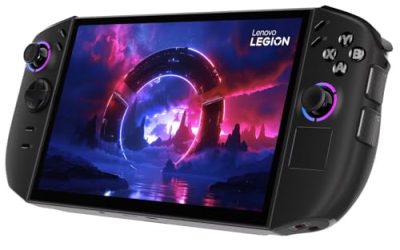
The Lenovo Legion Go is a strong docked pick because of its 8.8-inch WQXGA touchscreen, its detachable controllers, and its two USB-C ports. The screen runs at 2560 by 1600 and up to 144Hz, which makes it sharp for handheld play, and the AMD Ryzen Z1 Extreme processor, 16GB of LPDDR5X memory, and 1TB solid-state drive give it enough power for demanding games on a large display. The microSD card reader adds room for more games, and the built-in kickstand lets the screen stand on a desk while the controllers are used wirelessly.
The detachable controllers are especially useful when docked. They can be used as wireless controllers while the handheld sits in a dock or on a stand, and the right controller can be used in FPS mode as a vertical mouse for aiming in shooters. Two USB-C ports make it easy to connect a display and charge at the same time.
This handheld suits a player who wants a flexible docked setup with a large screen and wireless controllers. It is a good fit for someone who plays on a TV with the controllers detached, who likes to use the handheld as a second screen beside a monitor, or who wants a device that can switch between docked and handheld play without changing accessories.
View the Lenovo Legion Go on Amazon
ASUS ROG Xbox Ally
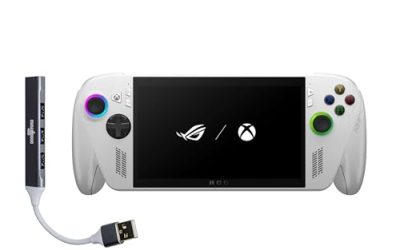
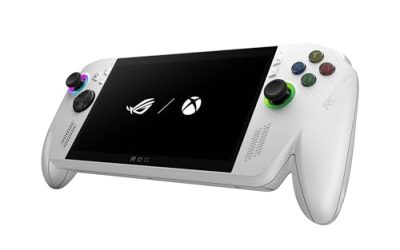
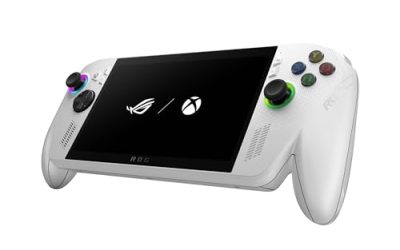
The ASUS ROG Xbox Ally is the simplest docked pick in this guide, with a 7-inch 1920 by 1080 touchscreen at 120Hz, an AMD Ryzen Z2 A processor, 16GB of LPDDR5 memory, a 512GB solid-state drive, and a 60Wh battery. Its USB-C port supports video output and charging, and ASUS makes a charger dock for this handheld family that connects it to a monitor or a TV for multiplayer play. The Xbox Full Screen Experience makes it easy to launch games with a controller, which suits a living-room setup where a keyboard and a mouse are not always nearby.
At 670 grams, the Xbox Ally is light and easy to lift in and out of a dock, and its contoured grips make it comfortable for handheld sessions between docked play. The microSD card reader adds storage, and Wi-Fi 6E keeps wireless controllers and headphones connected reliably.
This handheld suits a player who wants docked gaming without a complex setup. It is a good fit for someone who docks the handheld in the evening for TV play, undocks it for a quick session in another room, and wants a controller-first interface that is easy to use from a couch. It also suits a player who already uses an Xbox controller and Game Pass, and who wants the handheld to feel like an extension of that setup.
View the ASUS ROG Xbox Ally on Amazon
Comparison Table
| Product | Key Spec | Best For |
|---|---|---|
| MSI Claw 8 AI+ | 8-inch 120Hz screen, Intel Core Ultra 7 258V, 32GB RAM, 1TB SSD, 2x Thunderbolt 4 | A full desk setup with monitor and accessories |
| Lenovo Legion Go | 8.8-inch 2560 by 1600 144Hz screen, Ryzen Z1 Extreme, 16GB RAM, 1TB SSD, 2x USB-C | Detachable controllers and TV play |
| ASUS ROG Xbox Ally | 7-inch 1080p 120Hz screen, Ryzen Z2 A, 16GB RAM, 512GB SSD, 670g | Simple docking and couch play |
Frequently Asked Questions
Do I need a special dock for a Windows handheld?
Not always. Many Windows handhelds work with a general USB-C hub that provides power delivery, HDMI output, and USB-A ports. A first-party dock is often simpler, because it is designed for that handheld’s ports and power needs, but a good general hub will work as long as it can supply enough power.
Can a handheld charge while it is docked?
Yes, if the dock or hub supports USB-C Power Delivery and can supply enough wattage for the handheld. A dock that supplies too little power may keep the handheld running but let the battery drain slowly during demanding games. Check the handheld’s power requirements and choose a dock that meets or exceeds them.
Will games run better when a handheld is docked?
They can, because a docked handheld is plugged into power and can run at a higher power limit without worrying about battery life. The cooling system still matters, because a handheld in a dock can heat up if the vents are blocked. Use a dock or stand that keeps the vents clear.
Can I use a keyboard, mouse, and controller while docked?
Yes. A USB-C hub or dock with USB-A ports can connect a keyboard, a mouse, and a controller receiver at the same time, and Bluetooth can connect wireless controllers and headphones. Windows 11 handles all of these inputs natively, so the handheld works like a small desktop PC when it is docked.
Conclusion
The best Windows gaming handhelds for docked gaming make the switch between handheld and TV play feel natural. The MSI Claw 8 AI+ is the pick for a full desk setup, with two Thunderbolt 4 ports, 32GB of memory, a 1TB drive, and an 80Wh battery. The Lenovo Legion Go is the pick for flexible TV play, with an 8.8-inch screen, detachable controllers, a kickstand, and two USB-C ports. The ASUS ROG Xbox Ally is the pick for simple docking, with a light body, a controller-first Xbox interface, and a charger dock that connects it to a monitor or a TV.
Before you buy, check the handheld’s video output, the power delivery of the dock you plan to use, and whether the vents stay clear when the device is docked.
Disclosure: As an Amazon Associate, we may earn from qualifying purchases.