Best ultrawide monitor for a high end build demands more than a huge panel. A premium GPU can drive ultrawide resolutions, but the wrong monitor can waste that headroom through limited refresh, poor connectivity, or a size that overwhelms your desk. This guide focuses on four real high-end choices with distinct strengths.
How to Choose Ultrawide Monitors
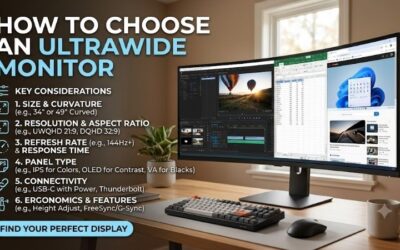
best ultrawide monitor for a high end build is easiest to judge by four real buying factors: resolution, refresh rate, screen format, and connectivity. Those traits separate the four picks without reducing the decision to one headline number. Your GPU, desk depth, and preferred games should determine the final match.
Resolution And Pixel Density
best ultrawide monitor for a high end build is easiest to choose by checking resolution, refresh rate, panel format, and connectivity in that order. These factors distinguish the four picks without reducing the decision to one headline specification. Your GPU, desk depth, and preferred games should determine the final match.
Start with pixel density and resolution. LG’s 45GX950A uses 5120×2160 across a 44.5-inch OLED panel, giving it a clear advantage for text-heavy work. By comparison, the 49-inch Samsung G95SD uses 5120×1440, spreading its pixels across a much wider 32:9 canvas. That difference is visible beyond games. It also matters in workdays.
Refresh Rate
For a high-end build, resolution should match the graphics hardware rather than simply maximize pixel count. The LG is demanding but rewarding for detail-focused work, while the Samsung and MSI 49-inch models emphasize lateral workspace. Choose LG for dense imagery and the 49-inch formats when width matters more. It is a workload test.
Refresh rate determines how much motion headroom your display can show. ASUS PG39WCDM and Samsung G95SD both reach 240Hz, while LG 45GX950A reaches 165Hz at 5120×2160. MSI’s 491CQPX also reaches 240Hz, making it a strong fit for competitive gaming and powerful GPUs. That is a useful ceiling for high-end hardware.
Aspect Ratio And Size
Do not pay for 240Hz unless your hardware and games can use it. A 165Hz 5K2K display can be the better choice for cinematic games and productivity, while 240Hz makes more sense for shooters, racing, and other fast titles. That makes ASUS, Samsung, and MSI the better refresh-focused picks when frame rates stay high for gaming.
Panel format affects immersion as much as raw specifications. The Samsung G95SD and MSI 491CQPX use 49-inch 32:9 layouts, essentially replacing two traditional displays with one curved canvas. ASUS uses a 39-inch 21:9 OLED, while LG uses 44.5 inches at 21:9 with higher vertical resolution. That changes placement and viewing distance.
A 32:9 screen is excellent for spreadsheets, simulations, racing games, and side-by-side windows, but it needs wide desk space. A 21:9 screen is easier to place and behaves more like a conventional ultrawide. Choose Samsung or MSI when horizontal workspace is the priority; choose ASUS or LG for a more familiar shape. Measure the space first.
Connectivity
Connectivity matters on a premium workstation because the display may become the central hub for a desktop, laptop, and accessories. LG includes DisplayPort 2.1 and USB-C with 90W power delivery. MSI adds USB-C with 98W power delivery, HDMI 2.1, and KVM, giving it unusually broad device flexibility. Ports can simplify the whole desk.
Top Picks
For a premium build, the Top Picks need to earn their space on the desk. LG 45GX950A is the Best Overall for detailed mixed use, Samsung G95SD is Best For Super-Ultrawide Gaming, ASUS PG39WCDM is the Best Value for high-refresh gaming, and MSI 491CQPX is Best For multi-device setups. Each role reflects a different hardware priority.
| Product | Best For | Key Spec | Watch Out For |
|---|---|---|---|
| LG UltraGear 45GX950A | Best Overall | 5120×2160, 165Hz, 44.5-inch OLED | High GPU demand |
| Samsung Odyssey OLED G9 G95SD | Best For Super-Ultrawide Gaming | 5120×1440, 240Hz, 49-inch OLED | Very wide footprint |
| ASUS ROG Swift OLED PG39WCDM | Best Value | 3440×1440, 240Hz, 39-inch WOLED | Lower resolution than LG |
| MSI MPG 491CQPX QD-OLED | Best For Multi-Device Setups | 5120×1440, 240Hz, USB-C 98W | Large 32:9 footprint |
LG UltraGear 45GX950A
For shoppers seeking the best ultrawide monitor for a high end build, LG UltraGear 45GX950A is the Best Overall for detailed mixed gaming and productivity. Its 44.5-inch OLED panel runs at 5120×2160 and 165Hz, with 0.03ms response, 800R curvature, and USB-C with 90W power delivery. It is exceptionally sharp.
The LG’s biggest advantage is its 5K2K resolution, which gives a 21:9 screen far more vertical detail than typical 3440×1440 ultrawides. The trade-off is obvious: driving 5120×2160 at high-settings is substantially performance-demanding than 3440×1440. Buyers with powerful GPUs should see that demand as the price of extra clarity.
Samsung Odyssey OLED G9 G95SD
For shoppers seeking the best ultrawide monitor for a high end build, Samsung Odyssey OLED G9 G95SD is the Best For Super-Ultrawide Gaming. The 49-inch OLED panel runs at 5120×1440, 240Hz, and 0.03ms, with a 1800R curve, 32:9 aspect ratio, and 110 PPI. It is built around width for immersive games.
The G95SD’s advantage is the ability to show a huge continuous field-of-view for racing, simulation, strategy, and multitasking. Its drawback is the broad desk requirement and 5120×1440 vertical resolution, which gives less image height than LG’s 5120×2160 design. Buyers should measure their desk before treating its size as a benefit.
ASUS ROG Swift OLED PG39WCDM
For shoppers seeking the best ultrawide monitor for a high end build, ASUS ROG Swift OLED PG39WCDM is the Best Value choice for high-refresh gaming. Its 39-inch WOLED panel runs at 3440×1440 and 240Hz, with 0.03ms response, 800R curvature, 99% DCI-P3 coverage, and a 1,300-nit HDR peak specification. It favors speed over pixel count.
The ASUS has a useful middle ground: it is dramatically easier to drive than 5K2K while preserving a large 21:9 canvas and 240Hz refresh. Its drawback is the lower 3440×1440 resolution, which makes text and fine desktop detail less dense than LG. It is the better performance-first choice for high-frame-rate gaming in demanding titles.
MSI MPG 491CQPX QD-OLED
For shoppers seeking the best ultrawide monitor for a high end build, MSI MPG 491CQPX QD-OLED is the Best For Versatile High-End Setups. This 49-inch 32:9 QD-OLED runs at 5120×1440 and 240Hz, with 0.03ms response, HDMI 2.1, DisplayPort 1.4a, and USB-C up to 98W. Its KVM broadens the setup for premium gaming systems today.
MSI’s strongest advantage is combining premium functions in one monitor. The downside is typical of 49-inch 32:9 monitors: it is physically wide and still uses 1440 pixels vertically. Buyers wanting maximum clarity for detailed creative work should favor LG, while MSI makes more sense for multi-device gaming and work.
Frequently Asked Questions
best ultrawide monitor for a high end build should use your graphics hardware efficiently, but resolution is only one factor. The four picks cover distinct priorities: LG maximizes detail, Samsung maximizes width, ASUS prioritizes 240Hz 21:9 gaming, and MSI combines super-ultrawide gaming with strong connectivity. Let the workload decide.
Do Ultrawide Monitors Need A High-End GPU?
Do ultrawide monitors need a high-end GPU? Yes, especially when a panel reaches 5120×2160 or pushes 240Hz across a wide format. LG’s 5K2K output is particularly demanding, while 3440×1440 is easier to drive. The GPU matters most when display resolution and refresh-rate demands match high-end titles for premium gaming systems.
The exception is productivity. If your main workload is documents, coding, editing, or large spreadsheets, a high-end graphics card is less important than the monitor’s workspace and connectivity. That is where LG’s 5K2K sharpness or MSI’s USB-C and KVM features can matter more than pushing every game to maximum frame rates. Workloads change the priority.
Is 49 Inches Better Than 34 Or 39 Inches?
Is 49 inches better than 34 or 39 inches? Not automatically. A 49-inch 32:9 display gives dramatically more horizontal workspace, but it also consumes more desk width and provides less vertical space than LG’s 5120×2160 21:9 panel. ASUS’s 39-inch format is easier to place while still delivering a large gaming canvas. Size is about shape.
For simulation or multitasking, 49 inches can be transformational because windows stay side-by-side without a center bezel. For mixed-creative work, a taller 21:9 panel can feel more natural. Measure viewing distance and desk depth before choosing Samsung or MSI simply because the diagonal number looks larger. Scale affects comfort.
Is OLED Worth It For A Premium Ultrawide?
Is OLED worth it for a premium ultrawide? Yes when deep blacks, rapid pixel response, and HDR impact are priorities. All four picks use OLED technology, with Samsung using QD-OLED, MSI using QD-OLED, and ASUS and LG using OLED variants. OLED also makes panel-care features more relevant for long-term ownership decisions.
The exception is a workspace dominated by static content. OLED can be a monitor, but buyers should understand image-retention and burn-in considerations and use built-in protection features. MSI includes OLED Care and a three-year OLED warranty with burn-in coverage, while Samsung provides OLED protection features. Check warranty-terms.
Should I Choose 240Hz Over 5K2K?
Should I choose 240Hz over 5K2K? Choose 240Hz when fast-competitive gaming is the main goal; choose 5K2K when sharpness and productivity are equally important. ASUS PG39WCDM and the 49-inch Samsung and MSI displays emphasize 240Hz, while LG 45GX950A trades some refresh for a much denser 5120×2160 image. Match that trade-off to games.
The deciding factor is your GPU and game library. If the system can rarely sustain high frame rates, 240Hz may add less practical value than higher resolution. Conversely, esports players can benefit more from 240Hz responsiveness than from extra pixels. Choose according to the workload you will actually run most often.
Final Thoughts
best ultrawide monitor for a high end build is the one that fits the GPU, desk, and workload together. LG 45GX950A is the strongest all-around choice for high-resolution mixed-use, Samsung G95SD is ideal for 32:9 immersion, ASUS PG39WCDM favors 240Hz gaming, and MSI 491CQPX excels as a versatile hub. Choose the workload-first compromise.