Shopping for a prebuilt gaming PC in 2026 means wading through a flood of listings that all promise “ultimate performance” while burying the specs that actually matter, like which GPU generation you’re getting, whether the PSU can handle upgrades, and if the cooling setup will keep things quiet under load. It’s easy to overpay for marketing hype or underbuy and hit a wall the moment a new AAA title drops.
- Top Prebuild Gaming PCs at a Glance
- How We Chose These Prebuilt Gaming PCs
- Watch: Best Prebuild Gaming PC — Video Review
- Best Prebuilt Gaming PC by Budget Tier
- How to Choose a Prebuild Gaming PC (2026)
- Best Prebuild Gaming PCs (2026) Reviewed
- Related Guides
- Frequently Asked Questions
- More Prebuilt Gaming PC Questions
- Final Thoughts
- More Prebuilt Gaming PCs Worth Considering
- What to Check Before Buying a Prebuilt Gaming PC
- Prebuilt vs Building Your Own: Which Is Cheaper in 2026?
- Which Prebuilt Gaming PC Should You Buy? Decision Guide
- GPU, CPU and RAM: What Matters Most in a Prebuilt
- Cooling, PSU and Case: The Parts Sellers Hide
- Warning Signs in Prebuilt Gaming PC Listings
- How Long Will a Prebuilt Gaming PC Last?
- Related Articles
This guide cuts through that noise. We compared the published specifications, warranty terms and recurring buyer feedback for each prebuilt below, from entry-level 1080p rigs to high-refresh 1440p and light 4K systems, so you can match a system to your budget and the games you actually play.

Best Seller
Updated October 2026 – specs and picks below were rechecked against listing titles and manufacturer documentation this month.
Quick answer: the best prebuild gaming PC for most people in 2026 is an RTX 5070 or RTX 5070 Ti system with a Ryzen 7 9700X or similar CPU, 32GB of DDR5 and a 1TB NVMe SSD. That tier handles 1440p at high settings. If you only play at 1080p, an RTX 5060 or RTX 5060 Ti desktop is cheaper and enough. Our top three are the KOTIN RTX 5070 Ryzen 7 9700X, the ZOTAC MEK RTX 5070 Ti and the CyberPowerPC Gamer Master RTX 5060 Ti.
Top Prebuild Gaming PCs at a Glance
| System | GPU | CPU | RAM | Best for |
|---|---|---|---|---|
| KOTIN RTX 5070 Ryzen 7 9700X | RTX 5070 12GB | Ryzen 7 9700X | 32GB DDR5 | 1440p all-rounder |
| ZOTAC MEK RTX 5070 Ti | RTX 5070 Ti 16GB | Ryzen 7 9700X | 32GB DDR5 | High-refresh 1440p |
| Skytech Ryzen 7 9800X3D RTX 5070 Ti | RTX 5070 Ti | Ryzen 7 9800X3D | 32GB DDR5 | Fastest gaming CPU |
| iBUYPOWER Element RTX 5070 | RTX 5070 12GB | Ryzen 7 9800X3D | 32GB DDR5 | Value 1440p |
| CyberPowerPC Gamer Master | RTX 5060 Ti 8GB | Ryzen 7 8700F | 16GB DDR5 | 1080p and light 1440p |
| Skytech Storm | RTX 5060 Ti 8GB | Ryzen 5 5500 | 16GB DDR4 | Entry-level 1080p |
How We Chose These Prebuilt Gaming PCs
This list is built from research, not our own benchmarking. We compared each system’s listed GPU, CPU, RAM, storage and power supply against current manufacturer specifications, checked warranty terms where the seller publishes them, and read recurring themes in buyer feedback. We excluded office PCs sold as gaming machines, systems built on very old graphics cards, and listings that are out of stock.
CLX Set Gaming PC – Intel Core i9 14900KF 3.2GHz, RTX 5080, 2TB NVMe M.2 SSD, 4TB HDD, 64GB DDR5 Memory, 360mm AIO, WiFi, Windows 11 Home, Black
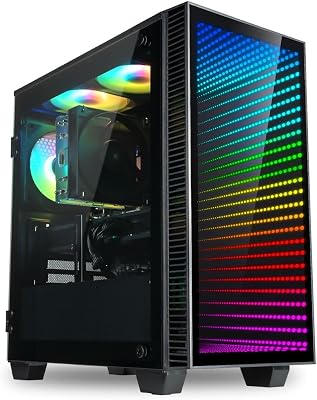


KOTIN Prebuilt Gaming PC RTX 5070 12GB, Ryzen 7 9700X, 32GB DDR5, 1TB SSD | 11.3in Smart Display, 850W 80+ Gold PSU, 360mm Liquid Cooler, WiFi 7, 1440p 4K ARGB Windows 11 Gaming Desktop Computer
Included for '14 Best Prebuild Gaming PCs' because the listing specifies Ryzen 7 9700X and 32GB DDR5, details this guide uses to compare options.
View on Amazon
ZOTAC MEK Gaming PC Desktop, Ryzen 7 9700X, NVIDIA GeForce RTX 5070 Ti 16GB | 32GB DDR5, 1TB NVMe SSD, 750W 80+ Gold PSU, WiFi 6E, Bluetooth 5.3, Windows 11 Pro, GDDR7, up to 5.5GHz
Included for '14 Best Prebuild Gaming PCs' because the listing specifies Ryzen 7 9700X and NVIDIA GeForce RTX 5070 Ti 16GB, details this guide uses to compare options.
View on Amazon
YAWYORE Gaming PC, AMD Ryzen 7 5700X, GeForce RTX 5060 Desktop Computer | 32GB DDR4 RAM, 1TB M.2 NVMe SSD,, ARGB Fans, WiFi+BT
Included for '14 Best Prebuild Gaming PCs' because the listing specifies AMD Ryzen 7 5700X and GeForce RTX 5060 Desktop Computer, details this guide uses to compare options.
View on Amazon
Skytech Gaming PC Storm, Ryzen 5, RTX 5060 Ti 8GB, 16GB RAM, 1TB SSD | Windows 11, AMD 5500, NVIDIA 5060 Ti 8G, NVMe SSD, DDR4 3200, 650W GOLD PSU, Wi-Fi 5, Desktop
Included for '14 Best Prebuild Gaming PCs' because the listing specifies Ryzen 5 and RTX 5060 Ti 8GB, details this guide uses to compare options.
View on Amazon
KOTIN Prebuilt Gaming PC, Ryzen 5 9600X, 16GB DDR5, RTX 5060 8GB, 1TB SSD | Ryzen 5 Gaming Desktop, Digital Display CPU Cooler, 650W 80+ Gold PSU, WiFi 7, Assembled in USA, Windows 11 ARGB Tower
Included for '14 Best Prebuild Gaming PCs' because the listing specifies Ryzen 5 9600X and 16GB DDR5, details this guide uses to compare options.
View on Amazon
STGAubron Gaming PC Desktop,Core I5,RX 550 4G,16G RAM,512G SSD | Gaming Computer Tower for Streaming,Video Editing,Home,School,I5 up to 3.6G,ARGB Fan,WiFi 6,BT 5.0,4K DP,HDMI,Win11 Home
Included for '14 Best Prebuild Gaming PCs' because the listing specifies Core I5 and RX 550 4G, details this guide uses to compare options.
View on Amazon
WIWB Prebuilt Gaming PC – Ryzen 5 4500, GeForce RTX 3050 Desktop | 16GB DDR4 RAM, 512GB NVMe SSD, WiFi 6 – Desktop for Gaming, Streaming, School, Home Office & Everyday Use
Included for '14 Best Prebuild Gaming PCs' because the listing specifies Ryzen 5 4500 and GeForce RTX 3050 Desktop, details this guide uses to compare options.
View on Amazon🎮 Get More From Your Setup — Free
Prime Gaming gives you free PC games every month, in-game loot, and a free Twitch channel sub — plus fast free shipping on all the gear above. New members get a 30-day free trial.
Watch: Best Prebuild Gaming PC — Video Review
Best Prebuilt Gaming PC by Budget Tier
Best Prebuilt Gaming PC for 1080p
For 1080p, the Skytech Storm and the CyberPowerPC Gamer Master are the picks. Both use an RTX 5060 Ti 8GB, which is more than enough for 1080p at high settings and handles many games at 1440p with DLSS.
- Skytech Storm · Ryzen 5 5500 · RTX 5060 Ti 8GB · 16GB DDR4 · 1TB NVMe SSD · 650W Gold PSU
- CyberPowerPC Gamer Master · Ryzen 7 8700F · RTX 5060 Ti 8GB · 16GB DDR5 · 1TB PCIe 4.0 SSD
Best Prebuilt Gaming PC for 1440p
For 1440p, aim at an RTX 5070 or higher. The KOTIN RTX 5070 Ryzen 7 9700X and the iBUYPOWER Element RTX 5070 both give 12GB of VRAM; the ZOTAC MEK RTX 5070 Ti steps up to 16GB for newer, texture-heavy games.
- KOTIN RTX 5070 Ryzen 7 9700X · RTX 5070 12GB · 32GB DDR5 · 1TB SSD
- iBUYPOWER Element · Ryzen 7 9800X3D · RTX 5070 12GB · 32GB DDR5 · 2TB SSD
- ZOTAC MEK · Ryzen 7 9700X · RTX 5070 Ti 16GB · 32GB DDR5
Best Prebuilt Gaming PC for 4K
For 4K, look at an RTX 5070 Ti at minimum and ideally an RTX 5080. The CLX Set with an i9-14900KF and RTX 5080, and the Panorama XL RTX 5080, are the two top-tier options here; both pair 64GB of DDR5 with 360mm liquid cooling.
How to Choose a Prebuild Gaming PC (2026)
- GPU tier vs. target resolution: Match the graphics card to your monitor. An RTX 5060 is fine for 1080p high-refresh gaming, while 1440p or ultrawide setups benefit from an RTX 5070 or 5070 Ti.
- CPU generation: A Ryzen 7 9700X or similar current-gen chip avoids bottlenecking a strong GPU, while older chips like the Ryzen 5 5500 are better suited to budget builds paired with mid-range graphics.
- RAM capacity and speed: 16GB DDR5 is the practical minimum for modern titles; 32GB or more helps with streaming, modding, and background multitasking.
- Storage type and size: Prioritize NVMe SSDs for fast load times. A 1TB SSD is a comfortable baseline; dual-drive setups add cheap HDD overflow for media and older games.
- Cooling and PSU headroom: Liquid cooling and a Gold-rated PSU with spare wattage matter more once you plan to overclock or add a GPU upgrade down the line.
Best Prebuild Gaming PCs (2026) Reviewed
KOTIN RTX 5070 Ryzen 7 9700X
This build pairs a current-gen Ryzen 7 9700X with a 12GB RTX 5070 and 32GB of DDR5, making it a strong all-rounder for 1440p gaming with plenty of headroom for multitasking and content creation on the side.
ZOTAC MEK RTX 5070 Ti
The MEK steps up to a 16GB RTX 5070 Ti alongside the same Ryzen 7 9700X, giving it the most graphics horsepower in this lineup and making it the pick for high-refresh 1440p or entry-level 4K gaming.
YAWYORE Ryzen 7 RTX 5060
Pairing an older Ryzen 7 5700X with a newer RTX 5060 creates a slightly GPU-forward build that’s well suited to smooth 1080p performance at a more accessible price point.
Skytech Storm RTX 5060 Ti
With a Ryzen 5 5500, 16GB of DDR4, and an 8GB RTX 5060 Ti backed by a 650W Gold PSU, the Storm is a value-focused build that handles 1080p and light 1440p gaming without unnecessary extras.
CyberPowerPC Gamer Master RTX 5060 Ti
The CyberPowerPC Gamer Master pairs a Ryzen 7 8700F with an 8GB RTX 5060 Ti, 16GB of DDR5 and a 1TB PCIe 4.0 SSD, a straightforward pick for 1080p and 1440p gaming from a long-established system builder.
Related Guides
- Bluetooth Adapter For A PC (2026)
- Budget CPU For Gaming (2026)
- Best Desktop Gaming Computer (2026)
- ASUS ROG Strix G16 (2026) Builder Review: The Smart Choice for Ga
- Best Wired Gaming Controller in 2026: Complete Buyer's Guide
Frequently Asked Questions
Is a prebuilt gaming PC worth it compared to building your own?
For most buyers, yes. Prebuilts save time, come with warranty support, and often bundle components at competitive pricing, though enthusiasts who enjoy the build process may still save a bit by sourcing parts individually.
How much RAM do I actually need for gaming in 2026?
16GB is the current baseline for smooth gameplay, but 32GB is increasingly recommended if you stream, run background apps, or want your system to stay relevant for several more years.
Should I prioritize the CPU or GPU when budgets are tight?
The GPU matters more for raw frame rates at higher resolutions, but an underpowered CPU can create bottlenecks, so look for a balanced pairing rather than overspending on one component alone.
Are liquid-cooled prebuilts necessary for gaming?
Liquid cooling isn’t strictly necessary for moderate builds, but it helps maintain lower temperatures and quieter operation under sustained load, which matters more as you move into higher-end CPU and GPU combinations.
More Prebuilt Gaming PC Questions
What is the best prebuild gaming PC for 1440p?
An RTX 5070 or RTX 5070 Ti system with a Ryzen 7 CPU and 32GB of DDR5 is the best fit for 1440p. The ZOTAC MEK RTX 5070 Ti and KOTIN RTX 5070 are the two picks on this page.
Is an RTX 5060 Ti enough for gaming?
Yes, for 1080p and many 1440p games. Choose the 16GB version if you want longer life for new, texture-heavy games.
How much storage does a gaming PC need?
1TB is the minimum comfortable size today. Many current games take 100GB or more, so 2TB is better if you keep several installed.
Can I upgrade a prebuilt gaming PC?
Usually yes: RAM, storage and the GPU are easy to swap. Check the PSU wattage and case clearance first; some mainstream-brand desktops use proprietary parts.
Are AMD or Intel prebuilts better for gaming?
AMD Ryzen X3D processors lead in gaming right now, but a Core i7 or i9 system like the CLX Set is still a strong choice, especially for mixed gaming and production work.
Final Thoughts
For most gamers chasing strong 1440p performance, the ZOTAC MEK RTX 5070 Ti and KOTIN RTX 5070 builds offer the best balance of power and value, while the Skytech Storm remains the smartest pick for anyone prioritizing a lower price without sacrificing solid 1080p performance.
More Prebuilt Gaming PCs Worth Considering
These additional systems fill gaps in the list above: a faster CPU, a different brand, or a mainstream brand with a clear support path.
Skytech Gaming Ryzen 7 9800X3D RTX 5070 Ti – Best for Fastest Gaming CPU

Skytech Gaming PC Desktop, Ryzen 7 9800X3D, RTX 5070 Ti, 32GB RAM, 2TB SSD | Windows 11, Gen4 NVMe SSD, DDR5 6000, 850W GOLD ATX 3 PSU, 360 ARGB AIO , Wi-Fi 5, King 95 Series
Included for '14 Best Prebuild Gaming PCs' because the listing specifies Ryzen 7 9800X3D and RTX 5070 Ti, details this guide uses to compare options.
View on AmazonThe Skytech Gaming Ryzen 7 9800X3D RTX 5070 Ti is for players who want the strongest gaming processor paired with a 16GB graphics card, mainly for high-refresh 1440p and capable 4K with DLSS.
- AMD Ryzen 7 9800X3D
- NVIDIA RTX 5070 Ti
- 32GB DDR5-6000, 2TB Gen4 NVMe SSD
- 850W Gold ATX 3 power supply, 360mm ARGB liquid cooler
Pros: top-tier gaming CPU; roomy PSU for upgrades; fast 2TB drive; liquid cooling. Cons: Wi-Fi 5 only; priced well above the 5070 systems. Skip it if you play at 1080p, where a cheaper system gives the same frame rates.
iBUYPOWER Element Ryzen 7 9800X3D RTX 5070 – Best for Value 1440p

iBUYPOWER Element Gaming PC Desktop, AMD Ryzen 7 9800X3D, NVIDIA GeForce RTX 5070 12GB, 32GB DDR5 RAM, 2TB SSD, RGB Wired Keyboard and Mouse, WiFi, Windows 11 Home
Included for '14 Best Prebuild Gaming PCs' because the listing specifies AMD Ryzen 7 9800X3D and NVIDIA GeForce RTX 5070 12GB, details this guide uses to compare options.
View on AmazonThe iBUYPOWER Element RTX 5070 puts a 9800X3D into a mainstream-priced box, a good match for 1440p 144Hz monitors.
- AMD Ryzen 7 9800X3D
- NVIDIA GeForce RTX 5070 12GB
- 32GB DDR5, 2TB SSD
- Wi-Fi, wired RGB keyboard and mouse, Windows 11 Home
Pros: fast CPU for the price tier; 2TB storage; peripherals included. Cons: 12GB VRAM is tight for the heaviest ray-traced games at 4K. Skip it if you plan to move to 4K soon.
Lenovo Legion Tower 5 RTX 5070 – Best Mainstream Brand

Lenovo Legion Tower 5-2026 - Gaming Desktop - NVIDIA GeForce RTX 5070 - Ryzen 7 7800X3D - 32GB Memory - 1TB Storage - Windows 11 Home - Eclipse Black - Free 3 Months PC Game Pass
Included for '14 Best Prebuild Gaming PCs' because the listing specifies Gaming Desktop and NVIDIA GeForce RTX 5070, details this guide uses to compare options.
View on AmazonThe Lenovo Legion Tower 5 suits buyers who want a large manufacturer support network and a clean, understated case.
- AMD Ryzen 7 7800X3D
- NVIDIA GeForce RTX 5070
- 32GB memory, 1TB storage
- Windows 11 Home, 3 months of PC Game Pass included
Pros: strong gaming CPU; brand-backed support; tidy design. Cons: 1TB storage fills fast; proprietary parts can limit upgrades. Skip it if you want to swap the PSU or motherboard later.
Acer Nitro 60 RTX 5070 Ti – Best for Multitasking
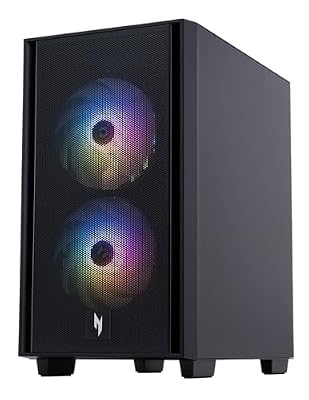
Acer Nitro 60 N60-181-UR26 Gaming Desktop | AMD Ryzen 9 7900 12 Core Processor | NVIDIA GeForce RTX 5070 Ti Graphics (1406 AI TOPS) | 32GB DDR5 | 2TB PCIe 4.0 SSD | Wi-Fi 6 802.11ax | Gigabit Ethernet
Included for '14 Best Prebuild Gaming PCs' because the listing specifies AMD Ryzen 9 7900 12 Core Processor and NVIDIA GeForce RTX 5070 Ti Graphics (1406 AI TOPS), details this guide uses to compare options.
View on AmazonThe Acer Nitro 60 pairs a 12-core processor with an RTX 5070 Ti, suiting people who game and also edit video or run background tools.
- AMD Ryzen 9 7900, 12 cores
- NVIDIA GeForce RTX 5070 Ti
- 32GB DDR5, 2TB PCIe 4.0 SSD
- Wi-Fi 6, Gigabit Ethernet
Pros: 12 cores for creative work; 2TB SSD; 16GB-class GPU. Cons: a non-X3D CPU trails the 9800X3D in some games. Skip it if pure gaming frame rate is your only goal.
ZOTAC MEK Ryzen 7 9700X RTX 5060 Ti 16GB – Best 16GB Value

ZOTAC MEK Gaming PC Desktop, Ryzen 7 9700X, NVIDIA GeForce RTX 5060 Ti 16GB | 32GB DDR5, 1TB NVMe SSD, 850W 80+ Gold PSU, WiFi 6E, Windows 11 Home, GDDR7, up to 5.5GHz
Included for '14 Best Prebuild Gaming PCs' because the listing specifies Ryzen 7 9700X and NVIDIA GeForce RTX 5060 Ti 16GB, details this guide uses to compare options.
View on AmazonThe ZOTAC MEK with an RTX 5060 Ti 16GB suits players who want extra VRAM headroom without paying for an RTX 5070 Ti.
- AMD Ryzen 7 9700X
- NVIDIA GeForce RTX 5060 Ti 16GB GDDR7
- 32GB DDR5, 1TB NVMe SSD
- 850W 80+ Gold PSU, Wi-Fi 6E
Pros: 16GB of VRAM; oversized 850W PSU leaves upgrade room; modern platform. Cons: 1TB of storage is the minimum comfortable size. Skip it if you want a faster GPU than the RTX 5070.
What to Check Before Buying a Prebuilt Gaming PC
- Look for a real gaming GPU. Avoid listings that rely on integrated graphics (such as Vega 8) or very old cards like the RX 560; they are office computers, not gaming PCs.
- VRAM thresholds: 8GB is the floor for 1080p, 12GB suits 1440p, 16GB or more suits 4K and heavy textures.
- Power supply: a 650W Gold unit suits an RTX 5060 Ti class card; choose 750W to 850W for an RTX 5070 Ti or better.
- Storage: 1TB is the baseline; 2TB avoids deleting games.
- Warranty: systems with a published multi-year warranty, such as the 3-year terms listed on some builder systems, are easier to support than no-name boxes.
- Memory: 32GB of DDR5 is a safer buy than 16GB for new games and multitasking.
Prebuilt vs Building Your Own: Which Is Cheaper in 2026?
A prebuilt costs somewhat more than the parts alone, but gives you a warranty, assembly and a validated configuration in one box. Building your own saves money when you already own a case, drive or power supply and enjoy assembly.
Which Prebuilt Gaming PC Should You Buy? Decision Guide
| If you want… | Choose | Why |
|---|---|---|
| The cheapest sensible 1080p system | Skytech Storm | RTX 5060 Ti 8GB with a 650W Gold PSU |
| Best balance for 1440p | KOTIN RTX 5070 Ryzen 7 9700X | 12GB RTX 5070, 32GB DDR5, current-gen CPU |
| More VRAM without a big jump | ZOTAC MEK RTX 5060 Ti 16GB | 16GB GDDR7 and an 850W PSU |
| Highest frame rates at 1440p | Skytech Ryzen 7 9800X3D RTX 5070 Ti | X3D gaming CPU and RTX 5070 Ti |
| Gaming plus video editing | Acer Nitro 60 RTX 5070 Ti | 12-core Ryzen 9 and 2TB SSD |
| A big-brand support path | Lenovo Legion Tower 5 RTX 5070 | Manufacturer support network |
| Native 4K | CLX Set RTX 5080 or Panorama XL RTX 5080 | 16GB RTX 5080 with 64GB DDR5 and 360mm cooling |
GPU, CPU and RAM: What Matters Most in a Prebuilt
The graphics card sets your frame rate; everything else supports it. An RTX 5060 Ti class card is a sound 1080p choice, an RTX 5070 suits 1440p, and an RTX 5070 Ti or RTX 5080 is where 4K becomes realistic with upscaling. The CPU only decides the ceiling: a Ryzen 5 5500 is fine behind an RTX 5060 Ti, but it would hold back an RTX 5070 Ti, so match the two.
For memory, DDR5 platforms such as the Ryzen 7 9700X and Ryzen 7 9800X3D give you a better upgrade path than DDR4 systems like the Skytech Storm or the Continuum Micro. If you buy a DDR4 system, accept that a future CPU upgrade will also mean new memory.
Cooling, PSU and Case: The Parts Sellers Hide
Many listings list the GPU and CPU but not the power supply brand. Look for a stated wattage and an 80+ Gold rating; a 650W Gold unit is acceptable for an RTX 5060 Ti, while an RTX 5070 Ti or RTX 5080 system should list 750W to 850W or more. Liquid cooling, like the 360mm unit on the CLX Set, helps with a hot Core i9 but is not required for a Ryzen 7 9700X, which runs well on a good air cooler.
Warning Signs in Prebuilt Gaming PC Listings
- Integrated-graphics PCs described as gaming computers.
- Old graphics cards (such as the GTX 1660 Super or RX 560 generation) sold with a 2026 label.
- No stated PSU wattage, brand, or warranty length.
- 8GB of RAM or a 256GB drive in a system pitched for modern games.
- Single-channel memory (one stick) which can cut gaming performance on integrated and mid-range systems.
How Long Will a Prebuilt Gaming PC Last?
A system with an RTX 5070 or better and 32GB of DDR5 should stay comfortable for 1440p gaming for several years, with a GPU swap extending that life. A budget DDR4 system with an 8GB graphics card will need earlier upgrades, usually of the GPU first and RAM or storage next.