“Monitor stand” covers two very different products: a flat riser that lifts the screen a few inches off the desk, and a clamp-on arm that lets you pull the display wherever you want it. Priced under 75 dollars, you can buy either, and the right choice depends on whether your neck, your desk space, or your cable mess is the thing you are trying to fix. Pick wrong and you end up with a riser that cannot raise a monitor high enough, or an arm your desk edge cannot hold.
This guide sorts ten options into risers, free-standing mounts, and dual-screen arms, and ties each to a stated spec such as weight limit, supported screen size, or VESA pattern. It is written for anyone sorting out a home office in 2026 who wants the top bezel near eye level without a drill, a lecture on ergonomics, or guesswork about fit.
Quick Picks
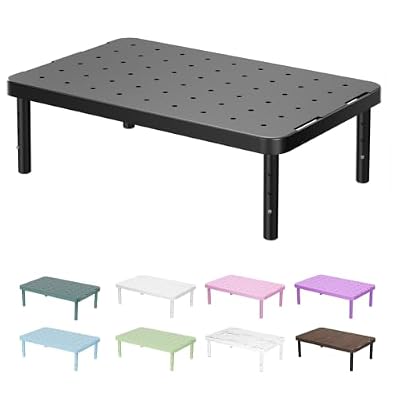
WALI Computer Monitor Stand for Desk, Adjustable Laptop Riser, up to 44 lbs | Monitor Riser Under-Desk Storage, Fits Monitors, Laptops, Printers, for Home, Office, School Supply (PTT001-B), 1 Pack, Black


As an Amazon Associate we earn from qualifying purchases. Product prices and availability are accurate as of the date/time indicated.

Single LCD Computer Monitor Free-Standing Desk Stand Mount Riser for 13 inch to 32 inch screen with Swivel, Height Adjustable, Rotation, Vesa Base Stand Holds One (1) Screen up to 77Lbs(HT05B-001))


As an Amazon Associate we earn from qualifying purchases. Product prices and availability are accurate as of the date/time indicated.
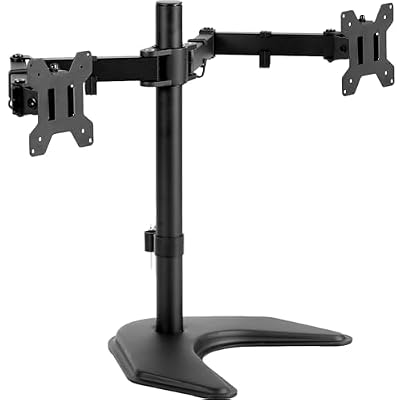
VIVO Dual LED LCD Monitor Mount, Up to 27" Screens | Freestanding Desk Stand for 2 Screens up to 22 lbs, Heavy-Duty Fully Adjustable Arms, Max VESA 100x100mm, Black, STAND-V002F


As an Amazon Associate we earn from qualifying purchases. Product prices and availability are accurate as of the date/time indicated.

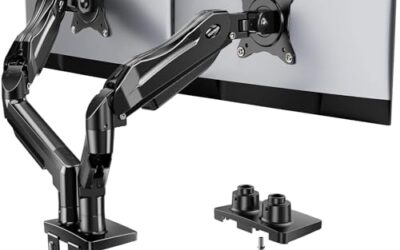
HUANUO FlowLift™ Dual Monitor Stand, Fully Adjustable Gaming Monitor Desk Mount for 13–32″ Computer Screens, Full Motion VESA 75x75/100x100 with C-Clamp & Grommet Base, Each Arm Holds 4.4 to 19.8 lbs


As an Amazon Associate we earn from qualifying purchases. Product prices and availability are accurate as of the date/time indicated.

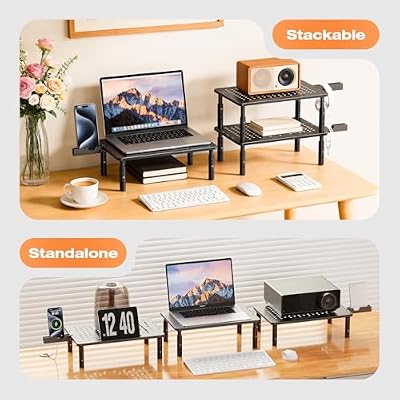
Canyora Computer Monitor Stand Riser For Desk, 3 Height Adjustable, 2 Pack | Laptop Riser with 14.6" x 9.3" Metal Shelf, Holds up to 44 lbs, Fits Monitor, PC, Laptop, TV, Ideal for Home, Office Desk Use



As an Amazon Associate we earn from qualifying purchases. Product prices and availability are accurate as of the date/time indicated.

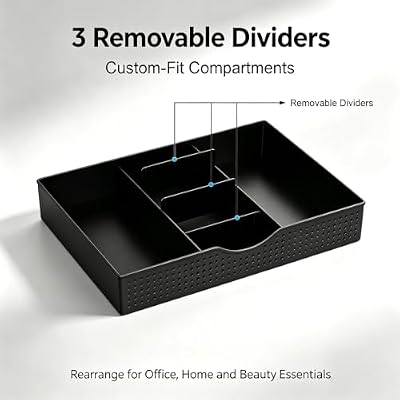
Dual Monitor Stand Riser With Drawer and 2 Pen Holders | Desk Organizer and Accessories Computer Monitor Stand, Desk Shelf for Top of Desk (Black)




As an Amazon Associate we earn from qualifying purchases. Product prices and availability are accurate as of the date/time indicated.

ErGear Dual Monitor Arm, Full Adjustable Monitor Mount for 13–32″ Screens, Fast Install Computer Monitor Stand with Tool-Free VESA Mount, Load Range from 4.84 to 19.8 lbs, Max VESA 100x100mm


As an Amazon Associate we earn from qualifying purchases. Product prices and availability are accurate as of the date/time indicated.

VIVO Dual Monitor Desk Mount, for 13" to 30" Screens, Holds 22 lbs Each | Articulating, Adjustable Arm, Grommet or C-Clamp Mounting, Computer Stand for 2 Monitors, Black, STAND-V002


As an Amazon Associate we earn from qualifying purchases. Product prices and availability are accurate as of the date/time indicated.

ErGear Dual Monitor Stand, Heavy Duty Adjustable Monitor Desk Mount for 2 Screens up to 32 Inches, Fully Adjustable Height, Tilt, Swivel, Rotate, Supports 17.6 lbs per Monitor Arm, Easy Installation


As an Amazon Associate we earn from qualifying purchases. Product prices and availability are accurate as of the date/time indicated.

HUANUO Monitor Stand, Monitor Stand Riser 3 Height Adjustable, Monitor Riser with Airflow Vents, Laptop Stand for Desk, Laptop Riser, Desk Organizer for Monitor, Laptop, PC, Printer


As an Amazon Associate we earn from qualifying purchases. Product prices and availability are accurate as of the date/time indicated.
| Product | Best for | Key spec from the title |
|---|---|---|
| WALI Monitor Stand Riser | One screen plus hidden storage | Holds up to 44 lbs, under-desk storage |
| Single-Screen Free-Standing Stand | A clamp-free single arm | 13 to 32 inch screens, swivel and rotation |
| VIVO STAND-V002F | Two 27-inch screens, no clamp | Free-standing, VESA 100×100 |
| HUANUO FlowLift Dual Stand | Full-motion dual setup | 13 to 32 inch, VESA 75×75 and 100×100 |
| Canyora Riser 2-Pack | Two desks or two risers | 3 heights, 14.6 x 9.3 inch shelf, 44 lbs |
| gianotter Dual Riser with Drawer | Desk organization | Drawer and two pen holders |
| ErGear Dual Monitor Arm | Fast installation | 13 to 32 inch, tool-free VESA mount |
| VIVO Dual Desk Mount | Heavier panels | Up to 30 inches, 22 lbs each, steel |
| ErGear Dual Monitor Stand | Two 32-inch displays | Height, tilt, swivel, rotate |
| HUANUO Riser with Vents | Warm laptops or consoles | 3 heights, airflow vents |
How to Choose
Riser or arm: decide what you are fixing
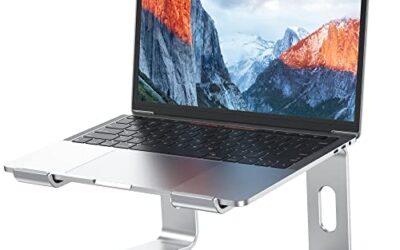
A riser raises the screen by a fixed few inches and keeps it in one place. It needs no clamp, no tools, and no desk-edge clearance, which makes it the easy answer for a rented desk. An arm clamps to the edge or through a grommet hole and lets you change height, tilt, and distance. If your monitor already has a height-adjustable base, you probably want an arm for the extra reach, not a riser.
Verify VESA and weight before anything else
Arms attach through four screw holes on the monitor back, normally spaced 75×75 or 100×100 millimeters. Several listings here state both patterns. A monitor without those holes needs an adapter, or a riser instead. Then check the weight limit: the VIVO dual mount states 22 lbs per screen, while the risers state 44 lbs in total. Large 32-inch panels can approach those numbers.
Check your desk edge and thickness
C-clamps need a solid desk top, and many are rated for a limited thickness. Hollow-core or glass desks, thin laminate, and desks with a lip underneath can reject a clamp. A grommet mount threads through a pre-drilled hole instead. If you cannot clamp, a free-standing base or riser avoids the problem entirely.
Where budget stands cut corners
Expect thinner steel on long arm segments, which can sag with a heavy screen, and loose pivot joints that need periodic tightening. Risers cut corners in shelf depth and rubber feet. If you type hard or have a bouncy desk, favor the heavier steel designs.
The 10 Best Options
WALI Monitor Stand Riser
A desk riser with under-desk storage and a stated 44 lb limit, sold for monitors, laptops, and printers. It lifts a single screen while giving you a shelf below for a keyboard or notebooks.
- The 44 lb rating covers most single 27-inch monitors.
- Storage space underneath tidies cables and small accessories.
- Trade-off: height is fixed, so it will not fine-tune eye level.
It suits a shared desk, a dorm, or a leased office where drilling and clamping are not an option, and where the space under the screen would otherwise collect loose papers. The multi-device wording also means it can carry a laptop if you swap setups. Skip it if you need a screen that moves forward and backward during the day or if you use two monitors side by side.
Single-Screen Free-Standing Desk Stand
This one holds one screen from 13 to 32 inches on a free-standing VESA base, with swivel, rotation, and height adjustment all listed. It gives arm-like movement without a clamp.
- Swivel and rotation allow portrait mode for code or documents.
- No clamp means it works on glass or thin desks.
- Trade-off: the base occupies desk space that a clamped arm would free up.
It fits renters and apartment dwellers who want movement without altering furniture, and people who like to rotate a screen into portrait for reading long documents or code. The listed size range also covers older 13-inch panels as well as modern 32-inch ones. Skip it if your monitor lacks VESA holes or your desk is shallow and every inch matters.
VIVO STAND-V002F Dual Monitor Stand
The V002F carries two screens up to 27 inches each on a free-standing base, with heavy-duty fully adjustable arms and a maximum VESA of 100×100 millimeters.
- Two screens are supported without clamping to the desk.
- Fully adjustable arms let you angle both panels toward you.
- Trade-off: the 27-inch limit rules out the large 30-inch and 32-inch displays that other stands handle.
It is a sensible fit for a desk with a delicate edge, such as thin laminate or glass, where a clamp would risk cracking the surface. Traders, editors, and anyone running a side-by-side pair of 24-inch monitors fall into its comfort zone. Skip it if either of your monitors exceeds 27 inches or uses a wider VESA pattern.
HUANUO FlowLift Dual Monitor Stand
A full-motion dual desk mount for 13 to 32 inch screens with VESA 75×75 and 100×100 support and a C-clamp install. It is aimed at gaming and work desks that need flexible positioning.
- The size range includes small secondary monitors and large 32-inch panels.
- Full-motion arms let you pull screens in or push them back.
- Trade-off: a clamp install needs a desk edge that can hold it.
It suits someone who wants the widest compatibility of the arm group, especially a builder who may swap a small secondary monitor for a big one later and wants one mount to survive the change. Supporting both common VESA patterns removes the most frequent fit surprise. Skip it if your desk edge is awkward or you want zero tools.
Canyora Computer Monitor Stand Riser, 2 Pack
Two risers in a single order, each with three height settings and a 14.6 by 9.3 inch metal shelf, holding up to 44 lbs. Two units cover two screens or two work areas.
- Three heights let you pick the angle that suits your seating.
- The metal shelf provides stable support for a monitor or laptop.
- Trade-off: the shelf is modest in width, so a wide monitor base may overhang.
It fits dual setups where you only need a few inches of lift to get the top bezel closer to eye level, or a home office plus a second workstation that each need one riser. Buying a pair in one order also keeps both desks visually matched. Skip it if you want a stand that tilts or swivels.
gianotter Dual Monitor Stand Riser with Drawer
This riser is built wide enough for dual monitors, with a drawer and two pen holders for desk clutter. It works as a stand and an organizer in one piece.
- The drawer hides small items such as chargers and sticky notes.
- Pen holders keep the desk surface clear.
- Trade-off: the title gives no weight limit, so check the specs before loading two big panels.
It is a good match for students and writers who need storage as much as height, and for anyone whose desk surface is buried in loose pens, cables, and notes. The wider footprint also spreads the load across two screens at once. Skip it if you want ergonomic adjustability beyond a fixed lift.
ErGear Dual Monitor Arm
A fully adjustable dual arm for 13 to 32 inch screens with a tool-free VESA mount that promises a fast install. The load range is part of the listing.
- Tool-free VESA attachment cuts assembly time.
- Arms move in several directions for exact positioning.
- Trade-off: you still need a desk edge that fits the clamp.
It suits anyone who dreads assembly, a common complaint with multi-joint mounts that arrive with a bag of loose hardware. A fast install matters if you are moving into a new place or rearranging a desk on a weeknight. Pair it with a measuring tape for the clamp edge, and you are mostly done. Skip it if your monitor lacks VESA holes or your panels exceed the stated load range.
VIVO Dual Monitor Desk Mount
A heavy-duty steel stand for two screens up to 30 inches, with 22 lbs per screen, a C-clamp, and a grommet option.
- Steel construction suits sturdier monitors.
- Both clamp and grommet mounting give more installation choices.
- Trade-off: the 22 lb limit per screen can be tight for large heavy panels.
It fits desks where the same stand may need to survive a future monitor change, and buyers who prefer the reassurance of a steel build over an anonymous alloy. The grommet option helps if the desk edge is too thick or too awkward for a clamp. Skip it if your displays are a full 32 inches, or if each one is heavier than the stated per-screen limit.
ErGear Dual Monitor Stand
This heavy-duty desk mount holds two screens up to 32 inches and adjusts in height, tilt, swivel, and rotation.
- Up to 32 inches per screen covers most mainstream displays.
- Four listed adjustments let you fit portrait or landscape setups.
- Trade-off: it overlaps with the other ErGear arm, so the choice comes down to install style.
It suits a desk where both screens must sit at identical heights, such as a trading or editing station where a mismatched edge is distracting. Because it is rated for 32-inch screens, it also leaves headroom if you upgrade panels later and do not want to rebuy the mount. Skip it if you only own one monitor, since a single-screen mount costs less and takes less desk edge.
HUANUO Monitor Stand Riser
A three-height riser with airflow vents, intended for monitors and laptops alike. It doubles as a desk organizer.
- Vents allow airflow beneath a warm device.
- Three heights adapt to different eye levels.
- Trade-off: the riser offers no tilt or swivel.
It fits a lightweight setup with one screen and a laptop, such as a hybrid worker who docks a notebook next to a desktop display. The vents are the standout feature, because stacked electronics tend to trap heat that a bare riser would not help with. The raised deck also gives you room to slide a keyboard underneath when the desk is cramped. Skip it if you need to move the monitor around during the day, because a riser holds one position and nothing else.
Which One Fits Your Situation
You rent and cannot drill or clamp
Go for the WALI riser with its storage, or the free-standing single-screen stand if you want movement.
You run two 27-inch screens on a thick desk
The HUANUO FlowLift handles clamp mounting and broad size support, while the VIVO V002F skips clamps entirely.
You need desk organization more than height
The gianotter dual riser with its drawer and pen holders matches that need.
You want the quickest setup
The ErGear Dual Monitor Arm lists a tool-free VESA mount, which is the closest this group gets to unbox-and-go.
Common Mistakes
- Buying an arm without confirming the monitor has VESA mounting holes.
- Ignoring the per-screen weight limit when sizing for a 30-inch panel.
- Choosing a riser and expecting it to tilt or swivel.
- Clamping an arm to a hollow or glass desk top.
- Setting the screen so the top edge sits above eye level, which strains the neck.
Related guides
- Usb C Kvm Switch For Two Laptops And Two Monitors
- Vertical Laptop Stand For Dual Laptop Desk Setup
- Nvme Enclosure With Active Cooling For Mac Mini
Frequently Asked Questions
Do I need a stand if my monitor already adjusts?
Not always. If the built-in base reaches eye level, a stand mainly frees desk space or adds a second screen.
What is VESA?
It is the pattern of four screw holes on a monitor back, usually 75×75 or 100×100 millimeters. Arms bolt through them.
Can a dual stand hold ultrawides?
The listings here state screen sizes up to 32 inches, so check width and weight before pairing one with an ultrawide.
Are risers sturdy enough for typing?
Risers with metal shelves and rubber feet are stable for most users, but a wobbly desk can still shake any stand.