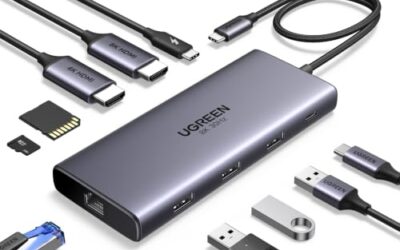
A dock under 200 dollars has one job: collapse a tangle of cables into a single plug. The catch is that three questions decide whether it works, and none of them is the port count printed on the box. How many monitors does your laptop actually allow, how much power does it need to keep charging, and which kind of USB-C port sits on its side?
This guide is for people running a laptop at a desk in 2026 who want one or two external screens, wired internet, and a charger that stays hidden. It covers eight docks, from simple dual-HDMI models to triple-display units, and sorts them by the situations buyers actually face.
Quick Picks

Anker Laptop Docking Station Dual Monitor, 8-in-1 USB C Hub with 4K HDMI | Dual HDMI USB C Dock, 1Gbps Ethernet, 85W Max PD, SD/TF Card Reader, for USB C Laptops, XPS and More (Charger Not Included)





As an Amazon Associate we earn from qualifying purchases. Product prices and availability are accurate as of the date/time indicated.
Dell Pro Laptop Docking Station WD25, USB-C, 100W, DisplayPort, HDMI | Universal Dock, Ethernet, USB-A Ports, USB-C Ports, Power Delivery Charging, Quad Display, Plug and Play, Office Ready, WD25


As an Amazon Associate we earn from qualifying purchases. Product prices and availability are accurate as of the date/time indicated.
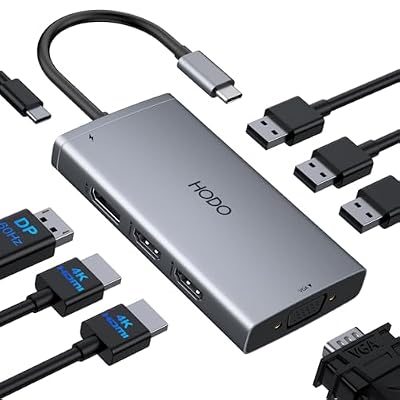
USB C Docking Station Dual Monitor for HP,Laptop Docking Station 3 Monitors | USB C Hub Quad Display USB C Adapter to 4K HDMI+DP+VGA,3USB 2.0,PD,USB C Dock Dongle 8 in 1 Computer Docking Station for Dell


As an Amazon Associate we earn from qualifying purchases. Product prices and availability are accurate as of the date/time indicated.

Plugable USB 3.0 Universal Laptop Docking Station, Dual HDMI Monitor | for Windows and Mac (Driver Required), USB 3.0 or USB-C, 2x HDMI, Gigabit Ethernet, Audio, 6 USB Ports UD-3900


As an Amazon Associate we earn from qualifying purchases. Product prices and availability are accurate as of the date/time indicated.

Anker Nano Laptop Docking Station, 13in1 Dock with Detachable 6in1 USBC Hub | 3 Display USB C Dock (2 HDMI+1 DP), 10 Gbps USBC, 3 USBA, Audio, SD/TF, Ethernet, 100W Max PD for Dell/Lenovo/HP Home Office


As an Amazon Associate we earn from qualifying purchases. Product prices and availability are accurate as of the date/time indicated.

Acer USB-C Docking Station Dual Monitor, 9-in-1 Laptop Dock with 2 HDMI | Laptop Docking Station with 4K@60Hz HDMI, USB A&C 3.0, SD/Micro SD, 100W PD Compatible with Acer/Dell XPS/HP/Mac (0.65FT)


As an Amazon Associate we earn from qualifying purchases. Product prices and availability are accurate as of the date/time indicated.

MOKiN Laptop Docking Station Dual Monitor 4K HDMI USB C Hub for Dell/HP/Mac | 14-in-1, 2 HDMI 2 DP,Triple 4K, 87W PD, Ethernet, SD/TF Card Reader, Turn off Screen Button, USB C Dock for Laptop, MacBook


As an Amazon Associate we earn from qualifying purchases. Product prices and availability are accurate as of the date/time indicated.
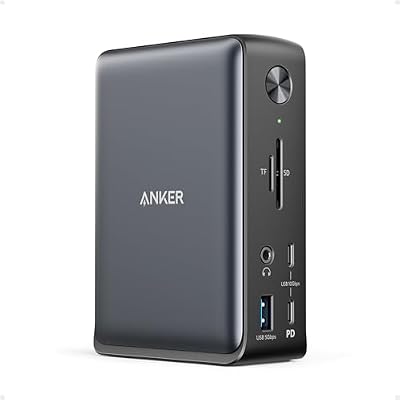
Anker Laptop Docking Station, 13-in-1 USB C Docking Station, Triple Display | 2 HDMI and 1 DP, 10Gbps USB-C and 5Gbps USB-A Data Ports, Ethernet, Audio, SD/TF, 85W Charging for Dell, HP, Lenovo and More




As an Amazon Associate we earn from qualifying purchases. Product prices and availability are accurate as of the date/time indicated.
| Product | Best for | Key spec from the title |
|---|---|---|
| Anker 8-in-1 Dual HDMI Dock | Simple two-monitor desks | 85W max power delivery, 1Gbps Ethernet |
| Dell Pro Dock WD25 | Dell-heavy offices | 100W power delivery, DisplayPort plus HDMI |
| Quad-display USB-C Dock (HP-compatible) | Mixed old and new monitors | 4K HDMI plus DP plus VGA |
| Plugable USB 3.0 Universal Dock | Older laptops without video over USB-C | Dual HDMI, driver required |
| Anker Nano 13-in-1 Dock | Desk-to-bag flexibility | Detachable 6-in-1 hub, 2 HDMI plus 1 DP |
| Acer 9-in-1 Dual HDMI Dock | Straightforward 4K60 setups | 4K@60Hz HDMI, 100W power delivery |
| MOKiN 14-in-1 Dock | Maximum display outputs | 2 HDMI plus 2 DP, 87W power delivery |
| Anker 13-in-1 Triple Display Dock | Fast storage and three screens | 10Gbps USB-C, 5Gbps USB-A, 2 HDMI plus 1 DP |
How to Choose
Match the Display Outputs to Your Laptop’s Limits
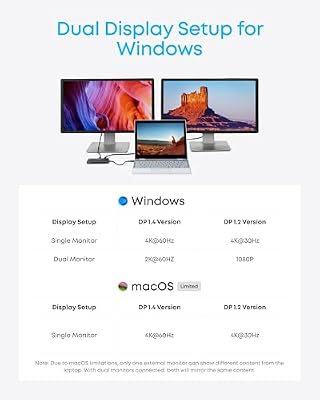
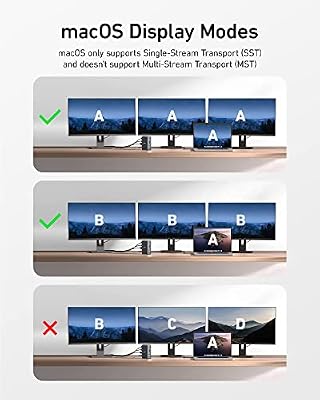
A dock can list three video ports and still drive only one or two, because the laptop sets the ceiling. Check whether your USB-C port supports DisplayPort Alt Mode or Thunderbolt. Many base-model Apple Silicon laptops support just one external display over a standard dock, which is why docks that rely on a driver exist. For 4K at 60Hz, look for HDMI 2.0 or DisplayPort 1.2 and above; plain HDMI 1.4 caps 4K at 30Hz.
Size the Power Delivery to the Laptop
Pass-through charging is lower than the headline wattage, since the dock keeps some for itself. A thin ultrabook that ships with a 65W charger is fine with an 85W dock. A gaming or workstation laptop with a 100W-plus adapter will drain slowly under load on anything weaker. Match the dock’s rating to your original charger, then add headroom.
Check the Data Side
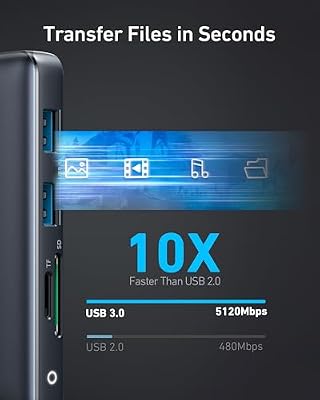
Ethernet speed matters less than USB speed. A 1Gbps port is normal and enough for most offices. A USB 2.0 port, as listed on one dock here, is fine for a keyboard and mouse but poor for an external drive. If you move large files, prioritize 5Gbps or 10Gbps ports and an SD slot that does not share bandwidth with everything else.
Know Where Budget Docks Cut Corners
Cheaper units share one video stream across several outputs, so a triple-display dock may mirror rather than extend on some operating systems. Fans and heat are another cut: all-in-one hubs can run warm. Ignore the “in-1” number as a quality signal, because counting a card reader as two ports inflates it. Read the output list instead.
The 8 Best Options
Anker 8-in-1 Dual HDMI Dock
This is the plain, no-surprises pick for a two-monitor desk. The listing promises dual HDMI with 4K support, Gigabit Ethernet, an SD/TF card reader, and up to 85W power delivery.
- Strength: two HDMI outputs cover the most common dual-monitor layout.
- Strength: 85W power delivery suits most thin-and-light laptops.
- Trade-off: the title mentions no DisplayPort output, so DP-only monitors need an adapter.
It makes the most sense for a student, freelancer, or remote worker whose laptop ships with a modest charger and who wants to plug in once and start working. Skip it if you plan to add a third display later or own a laptop that needs more than 85W.
Dell Pro Dock WD25
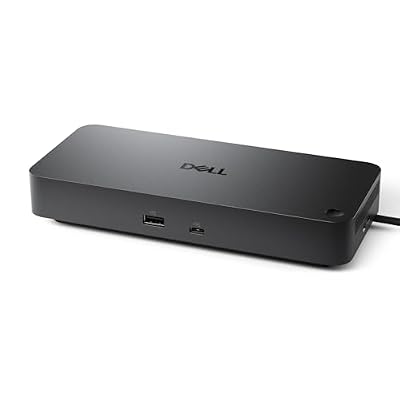
Dell positions the WD25 as a universal dock, with 100W power delivery, DisplayPort, HDMI, Ethernet, and a mix of USB-A and USB-C ports. It suits an office that standardizes on Dell laptops and wants one dock model across every desk.
- Strength: 100W power delivery handles larger business laptops.
- Strength: DisplayPort plus HDMI matches how many office monitors are wired.
- Trade-off: the title lists only one of each video output, so two monitors is the realistic plan.
IT managers tend to like this kind of dock because one model can be swapped between desks without hunting for matching adapters. Skip it if you want triple displays, a non-Dell laptop with unusual charging needs, or a dock sold mainly on port quantity.
Quad-display USB-C Dock (HP-compatible)
This unbranded dock markets three monitors and quad display through 4K HDMI, DisplayPort, and VGA outputs, with USB 2.0 ports and power delivery. The VGA output is its unusual selling point, letting an old office monitor stay in service.
- Strength: VGA, HDMI, and DP outputs accept almost any monitor in a spare-parts pile.
- Strength: it advertises more display outputs than most docks in this range.
- Trade-off: USB 2.0 ports are slow for external drives or webcams.
It is a practical rescue for a spare-room office built from leftover monitors, where the goal is more screens rather than sharper ones. Skip it if you need fast USB data, brand-name support, or expect every screen to run at 4K60.
Plugable USB 3.0 Universal Dock
Plugable takes a different route: it works over USB 3.0 or USB-C and uses a driver, so it suits laptops without video over USB-C. The title lists dual HDMI and Gigabit Ethernet, and covers Windows and Mac.
- Strength: driver-based video works on laptops that lack DisplayPort over USB-C.
- Strength: dual HDMI and Ethernet in a familiar docking layout.
- Trade-off: the title says a driver is required, so locked-down work laptops may block installation.
Buyers with an older Windows ultrabook or a base-model Mac that cannot extend to two screens natively are the target audience. Skip it if your laptop already supports native video output and you want true plug-and-play without installing anything.
Anker Nano 13-in-1 Dock
The distinguishing feature here is the detachable 6-in-1 hub. The title lists a 3-display design with two HDMI and one DisplayPort, 10Gbps USB-C, three USB-A ports, audio, and an SD/TF reader. Pull the hub off and it travels.
- Strength: the detachable hub serves both a desk and a laptop bag.
- Strength: 10Gbps USB-C is fast enough for external SSDs.
- Trade-off: more parts means more to lose when the hub stays in a bag.
Hybrid workers who split the week between home and a shared office will get the most from that split design. Skip it if the setup never leaves one desk and you would rather have a single fixed unit with fewer pieces to keep track of.
Acer 9-in-1 Dual HDMI Dock
Acer keeps the layout tidy: two HDMI outputs, 4K@60Hz on HDMI, USB-A and USB-C 3.0, an SD/MicroSD slot, and 100W power delivery. It fits a dual-monitor desk where one screen is 4K.
- Strength: the title states 4K@60Hz, a spec many cheap docks leave vague.
- Strength: 100W power delivery gives headroom over smaller adapters.
- Trade-off: both video ports are HDMI, with no DisplayPort or VGA.
It fits a writer, analyst, or designer who keeps one sharp 4K panel beside a secondary screen and wants charging that keeps pace. Skip it if your monitors use DisplayPort inputs only, or if you want a third screen without adding an adapter.
MOKiN 14-in-1 Dock
MOKiN is the output-heavy choice: two HDMI and two DisplayPort ports, triple 4K claims, 87W power delivery, Ethernet, and an SD/TF reader. It targets Dell, HP, and Mac users who want room to grow.
- Strength: four video outputs give flexible monitor pairings.
- Strength: 87W power delivery sits above the common 65W-class chargers.
- Trade-off: four outputs do not mean four independent screens, since the laptop sets the real limit.
Traders, editors, and anyone who rearranges monitors often will appreciate having spare outputs rather than juggling adapters. Skip it if you only use one external display and would pay for ports you never touch, or if your laptop cannot feed more than two screens.
Anker 13-in-1 Triple Display Dock
This sibling of the Nano is a fixed unit built around three displays, with two HDMI and one DP, 10Gbps USB-C, and 5Gbps USB-A data ports, plus Ethernet and audio.
- Strength: 5Gbps USB-A and 10Gbps USB-C ports speed up file transfers.
- Strength: three display outputs cover a larger workstation.
- Trade-off: the listed power delivery is not shown in the visible title, so confirm it against your charger.
Developers and video editors who copy project files to external SSDs all day will value the faster data ports alongside the third display. Skip it if you want the detachable hub of the Nano or only need two screens and a simpler, cheaper dock.
Which One Fits Your Situation
You Work From Home on a Dell Laptop
The Dell Pro Dock WD25 keeps cabling simple and offers 100W charging, which is useful if the company laptop is power-hungry. One cable to the laptop, one to the wall, and the desk stays clear for video calls.
You Move Between Office and Couch
The Anker Nano 13-in-1 lets you detach the hub and leave the desk cables behind, which is easier than unplugging everything. The base keeps the monitors connected while the small hub rides along for presentations.
You Have Mismatched Monitors
The quad-display unbranded dock accepts HDMI, DisplayPort, and VGA, so a dusty second screen can stay in use. It is a sensible way to stretch a budget when the monitors are already paid for. If a fast drive is also part of the plan, consider the MOKiN or the Anker triple-display unit instead.
You Run a Mac or Locked-Down Laptop With Limited Video
The Plugable dock uses a driver to add outputs where USB-C video is limited, provided your device allows software installation. Check with your IT department first if the laptop belongs to an employer, since driver installs are often restricted there.
Common Mistakes
- Buying on the “in-1” count rather than the list of video outputs.
- Assuming every USB-C port carries video; some only charge and move data.
- Pairing a 100W laptop with a low-wattage dock and wondering why the battery drains.
- Expecting 4K at 60Hz from a port that only supports 30Hz.
- Putting a webcam, mouse, and external drive on a USB 2.0 port and then blaming the dock for lag.
Related guides
- Usb C Kvm Switch For Two Laptops And Two Monitors
- Vertical Laptop Stand For Dual Laptop Desk Setup
- Nvme Enclosure With Active Cooling For Mac Mini
Frequently Asked Questions
Will one dock drive three monitors on any laptop?
No. The laptop’s graphics and USB-C implementation set the limit. Some chips support only one or two external displays regardless of the ports on the dock.
Is a driver-based dock worse than a native one?
Not always. It is useful when the laptop lacks DisplayPort over USB-C, but it needs software installed and can add small delays in video playback.
How much power delivery do I need?
Match your original charger, then add a little. Thin laptops often use 65W, while gaming and workstation models may use 100W or more.
Do I need a dock if I only use one monitor?
Not necessarily. A small hub may do, but a dock still helps by adding Ethernet and charging through the same cable.