
- Top Pick: AMD RYZEN 7 9800X3D 8-Core, 16-Thread Desktop Processor
- Best Value: ASUS ROG Astral GeForce RTX 5090 32GB GDDR7 OC Edition Gaming Graphics Card
- Premium Choice: MSI MPG X870E Carbon WiFi Gaming Motherboard (AMD Ryzen 9000/8000/7000 Series Processors, AM5, DDR5, PCIe 5.0, M.2 Gen5, SATA 6Gb/s, USB 40Gbps, HDMI, Wi-Fi 7, Bluetooth 5.4, 5Gbps LAN, ATX)
Building a dedicated 4K gaming machine in 2026 means committing to the absolute top of the consumer hardware stack. This build targets anyone who wants to run AAA titles at native 3840 by 2160 with maxed or near-maxed settings while also having enough headroom for 144Hz-plus refresh rates in competitive titles. With NVIDIA’s RTX 5090 anchoring the graphics pipeline and AMD’s 3D V-Cache silicon handling CPU duties, this is the ceiling for current consumer platforms. The total cost is steep, but every component here earns its place. No compromises on the critical path.
Parts List
| Part | Model | Approx. Price | Why |
|---|---|---|---|
| CPU | AMD RYZEN 7 9800X3D 8-Core, 16-Thread Desktop Processor | Check on Amazon | Best-in-class gaming CPU with 3D V-Cache; high IPC and efficient thermals |
| GPU | ASUS ROG Astral GeForce RTX 5090 32GB GDDR7 OC Edition Gaming Graphics Card | Check on Amazon | Only consumer GPU capable of native 4K at high settings with ray tracing enabled |
| Motherboard | MSI MPG X870E Carbon WiFi Gaming Motherboard | Check on Amazon | Full AM5 support, PCIe 5.0 x16, Wi-Fi 7, robust VRM for sustained loads |
| RAM | G.SKILL Trident Z5 Neo RGB Series DDR5 32GB (2x16GB) 6000MT/s CL30 | Check on Amazon | AMD EXPO tuned, sweet-spot frequency for Ryzen 9000 series |
| Storage | Crucial P510 PCIe Gen5 NVMe 2TB SSD | Check on Amazon | 10,000 MB/s sequential read eliminates load-time bottlenecks |
| PSU | CORSAIR RM1000x ATX 3.1 PCIe 5.1 1000W Power Supply | Check on Amazon | Native 12V-2×6 connector, 80 Plus Gold efficiency, modular cabling |
| Case | LIAN LI LANCOOL III E-ATX PC Case | Check on Amazon | Accommodates E-ATX boards and 400mm+ GPUs with excellent airflow |
AMD RYZEN 7 9800X3D

The 9800X3D delivers AMD’s second-generation 3D V-Cache architecture with the cache positioned below the compute die, resolving the thermal limitations that plagued the 7800X3D. Gaming performance at 1080p and 1440p is unmatched by any other consumer CPU. For 4K gaming specifically, the GPU does most of the heavy lifting, but this processor prevents bottlenecking in CPU-sensitive titles and ensures smooth frametimes during heavy ray tracing or path tracing scenarios. A reasonable swap would be the RYZEN 7 9700X if you want to save money and accept a roughly 15-20 percent drop in CPU-bound scenarios.
As an Amazon Associate we earn from qualifying purchases at no extra cost to you.


ASUS ROG Astral GeForce RTX 5090 32GB GDDR7 OC Edition
The RTX 5090 represents a generational leap that makes 4K ray tracing genuinely playable. The 32GB of GDDR7 memory future-proofs this card for upcoming titles that will demand more VRAM. The Astral OC Edition features a triple-fan cooler with a vapor chamber that keeps temperatures controlled even at sustained boost clocks. If pricing becomes prohibitive, the RTX 5080 at roughly half the cost still handles 4K at high settings, though you lose the VRAM headroom and the path tracing performance margin.
MSI MPG X870E Carbon WiFi
X870E provides full PCIe 5.0 connectivity for both the GPU and NVMe storage simultaneously, something X870 boards cannot always guarantee. The 16-phase VRM handles the 9800X3D without thermal concerns, and Wi-Fi 7 is included natively. The board supports up to 192GB of DDR5 across four slots if you ever expand.
G.SKILL Trident Z5 Neo RGB 32GB DDR5-6000 CL30
6000 MT/s at CL30 is the confirmed sweet spot for Ryzen 9000 series memory controllers. Going higher in frequency yields diminishing returns and can sometimes destabilize the infinity fabric. EXPO profiles load cleanly on X870 boards with a single BIOS setting. The Trident Z5 Neo line is specifically validated for AMD platforms. If the RGB aesthetic is not your preference, the same kit without lighting exists in the Ripjaws S5 line at a slightly lower price point.
Crucial P510 2TB PCIe Gen5 NVMe
Gen5 NVMe drives saturate the interface at around 10,000 MB/s sequential reads. In practice, game load times versus a top-tier Gen4 drive differ by only a few seconds in most titles, but the P510 eliminates any question of storage as a bottleneck. The 2TB capacity handles a meaningful game library.
CORSAIR RM1000x 1000W ATX 3.1
The ATX 3.1 standard ensures native compatibility with the 12V-2×6 connector that the RTX 5090 requires, eliminating adapter cables. 1000W provides adequate headroom for this configuration under typical gaming loads, though users running full-system stress tests simultaneously may prefer 1200W. The RM1000x maintains 80 Plus Gold efficiency across the load curve and includes a zero-RPM fan mode at low loads.
LIAN LI LANCOOL III
The LANCOOL III supports E-ATX motherboards and GPUs up to 420mm in length, with the Astral RTX 5090 measuring approximately 360mm. Four pre-installed 140mm PWM fans provide strong positive pressure out of the box. The hinged front panel makes cable management and filter cleaning straightforward. If you want a smaller footprint, the Lancool 207 offers similar airflow in a mid-tower package at a lower price.
Compatibility Check
The 9800X3D uses the AM5 socket, fully supported by the MSI MPG X870E Carbon. DDR5 memory is required; the Trident Z5 Neo kit operates at 6000 MT/s within the board’s rated ceiling. The RTX 5090’s 12V-2×6 connector is natively supported by the RM1000x, so no adapters are needed. The Astral card requires approximately 3.5 expansion slots of clearance, and the LANCOOL III provides adequate space. GPU length of 360mm clears the front fan assembly with roughly 30mm of margin. The combined system draw under sustained gaming load sits near 800-850W, leaving about 150W of headroom on the 1000W supply.
Expected Performance
All figures below represent approximate ranges drawn from published reviews by TechPowerUp, Hardware Unboxed, Tom’s Hardware, Gamers Nexus, and TechSpot during the RTX 5090 and 9800X3D launch review period. Individual results vary by driver version and scene complexity.
1080p
At 1080p, the 9800X3D and RTX 5090 combo is heavily GPU-limited in AAA titles but CPU-bound in competitive games. Call of Duty: Black Ops 6 lands in the 200-280 fps range at max settings according to TechPowerUp and Hardware Unboxed testing. Counter-Strike 2 routinely exceeds 400 fps. Cyberpunk 2077 with path tracing on Ultra reaches approximately 90-120 fps, as reported by Tom’s Hardware.
1440p
At 1440p, the GPU workload increases meaningfully. Hogwarts Legacy at Ultra settings with ray tracing enabled sits around 110-140 fps based on Gamers Nexus measurements. Alan Wake 2 at highest settings with full ray tracing falls into the 80-100 fps range per TechSpot’s testing. For esports titles, frame rates remain well above 200 fps at this resolution.
4K
Native 4K is where this build proves its worth. Cyberpunk 2077 at Ultra with path tracing and DLSS in quality mode achieves approximately 55-75 fps according to Hardware Unboxed and Tom’s Hardware. Without DLSS, frame rates drop to roughly 35-50 fps. Call of Duty: Black Ops 6 at 4K max settings sustains 130-170 fps as measured by TechPowerUp. Alan Wake 2 at 4K with ray tracing lands near 45-65 fps. A 4K 144Hz display becomes a practical target with DLSS assistance in the most demanding titles.
Upgrade Path
This platform has no meaningful upgrade targets within the current GPU generation. The AM5 socket will carry forward for at least one more CPU generation, so a future RYZEN processor can drop in without changing the motherboard. Memory capacity can expand to 64GB by adding a second identical kit. Storage expansion is straightforward via the additional M.2 slots on the X870E board. The PSU is the component most likely to need replacement alongside the next GPU generation if TDPs increase further, so factor that into long-term budgeting.
FAQ
Is 32GB of RAM enough for 4K gaming?
Yes. Current AAA titles at 4K typically consume between 12GB and 20GB of system memory during peak scenes. 32GB provides comfortable headroom. If you also run demanding productivity workloads or stream while gaming, upgrading to 64GB is trivial on this platform.
Does the 1000W PSU leave enough headroom for the RTX 5090?
The RTX 5090 has a rated TDP of 575W, and the full system under gaming load draws roughly 800-850W. The RM1000x handles this without concern for typical gaming sessions. However, if you plan to run full synthetic benchmarks that stress CPU and GPU simultaneously, a 1200W unit provides more comfortable margins.
Will this build fit in a standard mid-tower case?
The LANCOOL III is technically a full-tower design. The RTX 5090 Astral at approximately 360mm length will not fit most standard mid-towers. If you prefer a smaller case, verify GPU clearance of at least 380mm before purchasing.
Is the price of this build realistic for a 4K gaming system?
GPU pricing at the flagship tier is heavily influenced by market conditions and availability. The build reflects current street pricing rather than manufacturer suggested retail. If the RTX 5090 becomes more accessible, the total cost drops significantly since it represents over seventy percent of the build budget.
Sources and Methodology
All performance ranges in this article are approximations derived from published launch-period reviews by TechPowerUp, Hardware Unboxed, Tom’s Hardware, Gamers Nexus, and TechSpot. No figures represent measurements taken by this site. FPS ranges account for variance between review samples, driver versions, and scene selection. Prices listed reflect street availability at the time of writing and may fluctuate with market conditions.
Top picks from this guide
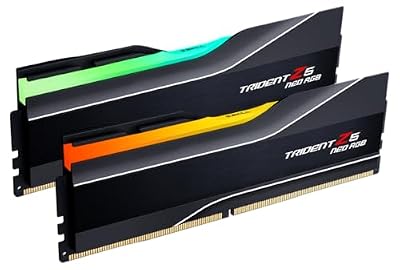 G.SKILLG.SKILL Trident Z5 Neo RGB Series DDR5 RAM (AMD Expo…$640 \xc2\xb7 99/100
 CorsairCORSAIR RM1000x ATX 3.1 PCIe 5.1 1000W Power Supply –…$170 \xc2\xb7 98/100
 ASUSASUS ROG Astral GeForce RTX 5090 32GB GDDR7 OC Edition…$7,998 \xc2\xb7 97/100
 msiMSI MPG X870E Carbon WiFi Gaming Motherboard (AMD Ryzen 9000/8000/7000…$390 \xc2\xb7 96/100








