
- Top Pick: AMD RYZEN 7 9800X3D 8-Core, 16-Thread Desktop Processor
- Best Value: ASUS TUF Gaming GeForce RTX 5070 Ti 16GB GDDR7 OC Edition Graphics Card
- Premium Choice: MSI MAG X870 Tomahawk WiFi Gaming Motherboard (AMD Ryzen 9000/8000/7000 Series Processors, AM5, DDR5, PCIe 5.0, M.2 Gen5, SATA 6Gb/s, USB 40Gbps, HDMI/DP, Wi-Fi 7, Bluetooth 5.4, 5Gbps LAN, ATX)
Building the best gaming PC build for Fortnite means chasing one thing above all else: consistent high frame rates in a game that rewards raw CPU and GPU throughput equally. This guide targets a premium-tier system in 2026 that clears the 200+ FPS mark at 1080p and 1440p competitive settings, while still delivering a genuinely playable experience at 4K in Fortnite’s performance mode. The parts below were selected for gaming-first priorities: the X3D cache advantage on the Ryzen side, GDDR7 bandwidth on the GPU, and zero bottlenecks from storage or memory. Total cost lands just over $3,180, which places it in the high-end bracket where every dollar still translates to measurable frame-rate gains.
Parts List
| Part | Model | Approx. Price | Why |
|---|---|---|---|
| CPU | AMD RYZEN 7 9800X3D 8-Core, 16-Thread Desktop Processor | $449 | Largest 3D V-Cache on market; dominates Fortnite CPU-bound scenarios |
| GPU | ASUS TUF Gaming GeForce RTX 5070 Ti 16GB GDDR7 OC Edition Graphics Card | $1289.99 | Handles 1440p ultra and 4K competitive without compromise |
| Motherboard | MSI MAG X870 Tomahawk WiFi Gaming Motherboard (AMD Ryzen 9000/8000/7000 Series Processors, AM5, DDR5, PCIe 5.0, M.2 Gen5, SATA 6Gb/s, USB 40Gbps, HDMI/DP, Wi-Fi 7, Bluetooth 5.4, 5Gbps LAN, ATX) | Check on Amazon | Robust VRM for sustained boost clocks, Wi-Fi 7, future-proof connectivity |
| RAM | G.SKILL Trident Z5 Neo RGB Series DDR5 RAM (AMD Expo & Intel XMP 3.0) 32GB (2x16GB) Up to 6000MT/s* CL30-38-38-96 1.35V Desktop Computer Memory U-DIMM – Matte Black (F5-6000J3038F16GX2-TZ5NR) | Check on Amazon | EXPO-tuned 6000 MHz CL30 sweet spot for Ryzen latency-sensitive titles |
| Storage | Samsung SSD 990 PRO 2TB, PCIe 4.0 M.2 2280, Up to 7,450 MB/s | Check on Amazon | Fast load times, ample capacity for a full game library |
| PSU | CORSAIR RM750x ATX 3.1 PCIe 5.1 750W Power Supply – Black | Check on Amazon | ATX 3.1 native 12V-2×6 connector; comfortable headroom for the 5070 Ti |
| Case | CORSAIR 4000D RS ARGB Frame Modular Mid-Tower ATX PC Case, High Airflow, 3X Pre-Installed RS Fans, InfiniRail™ Mounting System, ASUS BTF, MSI Zero, Gigabyte Stealth, Black | Check on Amazon | Excellent airflow, easy cable management, fits long GPUs without fuss |
AMD RYZEN 7 9800X3D

The 9800X3D carries a massive 144 MB of 3D V-Cache that Fortnite’s Unreal Engine 5 draw calls exploit heavily. In CPU-bound scenarios—dense builds, early-game looting, crowded endgame circles—this chip pulls ahead of every competing processor, including Intel’s flagship alternatives. The OC Edition of the TUF 5070 Ti means GPU load will dominate at higher resolutions, so the CPU’s strength matters most when you drop settings to competitive mode and push frame rates upward. If budget tightens, a 7800X3D saves roughly $50 but gives up a few percent in cache-related gains. No other swap makes sense at this tier.
As an Amazon Associate we earn from qualifying purchases at no extra cost to you.


ASUS TUF Gaming GeForce RTX 5070 Ti 16GB GDDR7 OC Edition
This card delivers the rasterization punch needed for Fortnite’s Performance and Low detail presets at triple-digit frame rates, while the 16 GB of GDDR7 keeps headroom for 4K or high-texture mods. The TUF cooler design keeps thermals well under 70 degrees under sustained load, which matters if you game in warm rooms. At around $1,300 it is the single largest line item, but it defines this build’s ceiling. The RTX 4070 Ti Super would save about $150 but sacrifices GDDR7 bandwidth, creating a visible gap in 1% low frame rates at 1080p.
MSI MAG X870 Tomahawk WiFi
The Tomahawk has long been MSI’s value-performance anchor, and the X870 variant delivers a 14+2+1 phase power design that lets the 9800X3D hold its maximum boost indefinitely. PCIe 5.0 for the GPU slot and Gen5 M.2 for the primary drive keep the platform future-proof. Wi-Fi 7 and a 5 GbE LAN port eliminate network bottlenecks that matter in competitive play. If you want USB4 on the front panel, the MSI MEG X870E ACE is an alternative, but it adds nearly $150 for connectivity most gamers never tap.
G.SKILL Trident Z5 Neo DDR5 32GB (2x16GB) 6000MHz CL30
AMD’s memory controller favors a 1:1 FCLK-to-UCLK ratio, and 6000 MT/s at CL30 hits that ratio cleanly. The EXPO profile loads in one BIOS step, and 32 GB is the comfortable minimum for Fortnite running alongside Discord, a streaming encoder, and browser tabs. Price is steep at around $600, driven by recent DRAM spot-market volatility. A 5600 MHz kit saves money but introduces a measurable latency penalty in CPU-heavy moments. For now, stick with the specified kit—wait for pricing normalization before upgrading to 64 GB.
Samsung 990 PRO 2TB
Fortnite loads fast from any NVMe drive, but the 990 PRO’s 7,450 MB/s sequential reads keep the broader experience snappy—Windows boot, game library browsing, and streaming assets all benefit. Two terabytes fit a full competitive suite plus several other titles without juggling storage. A cheaper QLC drive would shave $100 but risks write saturation during large file transfers. PCIe 5.0 drives are not yet a gaming priority; the 990 PRO remains the best price-per-gigabyte performance option.
CORSAIR RM750x ATX 3.1 750W
Seventy-five hundred watts provides generous headroom for a 9800X3D drawing under 200 W and an OC 5070 Ti topping out near 300 W under stress. The ATX 3.1 native 12V-2×6 cable means no adapter between PSU and GPU, reducing fire-risk concerns that plagued older adapters. Cybenetics Gold efficiency keeps operating costs low during marathon sessions. If you plan a future 5090-class upgrade, jump to a 1000W unit, but for this build 750W is correct and quiet.
CORSAIR 4000D RS ARGB
The 4000D RS ships with three pre-installed fans in a push-pull-friendly layout that exhausts GPU heat efficiently. The mesh front panel and 160 mm CPU cooler clearance mean you can mount a top-tier air cooler like the Noctua NH-D15 without fan interference. The InfiniRail system speeds cable routing and supports back-connect motherboards if you later want a cleaner look. At around $99 it is one of the best value chassis available. A Fractal North offers a different aesthetic at similar price, but the 4000D RS airflow advantage is measurable in sustained thermal tests.
Compatibility Check
The AM5 socket of the MSI MAG X870 Tomahawk matches the Ryzen 9800X3D natively with no BIOS flash required on current stock. The DDR5 U-DIMM slots accept the G.SKILL 6000 MHz kit at its rated EXPO speed without voltage concerns. The 750W PSU exceeds NVIDIA’s 650W recommendation for the 5070 Ti, giving roughly 45% headroom under combined full load. The TUF 5070 Ti measures approximately 305 mm in length; the 4000D RS supports GPUs up to 360 mm, leaving ample space. The ATX form factor fits the mid-tower without compromise.
Expected Performance
All figures below are approximate ranges drawn from published launch reviews and represent Performance or Low preset settings in Fortnite with Dynamic Resolution disabled.
1080p
TechPowerUp and Hardware Unboxed reported average frame rates in the 380 to 450 FPS range at 1080p Performance mode for the 9800X3D paired with RTX 5070 Ti-class hardware. Tom’s Hardware’s CPU scaling tests place 1% lows between 220 and 260 FPS in the same scenario, confirming the X3D cache smooths frame delivery during heavy build moments.
1440p
At 1440p Low or Performance settings, Gamers Nexus and TechSpot measured averages clustering around 280 to 340 FPS, with 1% lows holding in the 180 to 210 FPS band. The transition to Epic settings drops averages into the 160 to 200 FPS range according to Hardware Unboxed, still well within high-refresh-rate territory.
4K
At 4K Performance mode, Tom’s Hardware and TechPowerUp recorded roughly 120 to 150 FPS average, with lows dipping toward 80 to 90 FPS during late-game storm circles. This remains playable on a 144 Hz monitor, though 1440p is the sweet spot for competitive consistency.
Upgrade Path
The AM5 socket guarantees at least two more CPU generations of drop-in upgrades. If future titles demand more GPU muscle, a swap to the RTX 5080 or 5090 is straightforward—just verify PSU wattage remains adequate (5090 requires 850W or higher). The 32 GB RAM can be supplemented with a second 2×16 GB kit if EXPO scaling tolerates four DIMMs at 6000 MHz, though a two-DIMM 64 GB kit is the cleaner path. The X870 board’s Gen5 M.2 slot lets you add a PCIe 5.0 drive later without sacrificing the 990 PRO.
FAQ
Is the 9800X3D worth it over a 7800X3D for Fortnite?
Marginal in real terms. The 9800X3D offers slightly higher boost clocks and a newer cache architecture that adds perhaps three to five percent in CPU-bound scenarios. If both are in stock at reasonable prices, take the 9800X3D. If the 7800X3D is meaningfully cheaper, the performance gap is unlikely to affect your actual gameplay experience in a meaningful way.
Do I need 32 GB of RAM for Fortnite specifically?
Fortnite itself consumes roughly 8 to 12 GB during a match. However, running Discord, a browser for stats, a streaming encoder, or simply keeping Windows comfortable in the background pushes real-world usage past 16 GB. Thirty-two gigabytes is the current floor for a frustration-free competitive setup, and the CL30 latency spec matters more than raw capacity for frame-time consistency.
Can this build run Fortnite at 4K Epic?
The RTX 5070 Ti handles 4K Epic in the 70 to 90 FPS range according to multi-outlet testing, which is playable but not ideal for competitive input latency. Most players targeting high refresh rates use Performance or Low presets. If you want 4K Epic at 120+ FPS, step up to an RTX 5080 or 5090.
Should I add a better cooler than the stock or bundled option?
The 9800X3D is thermally constrained by its cache layer, so a top-tier cooler helps sustain boost clocks. A Thermalright Peerless Assassin 120 SE or Arctic Liquid Freezer III 240 keeps package temperatures in the low 70s Celsius under stress, letting the CPU hold higher all-core frequencies during extended sessions. In the 4000D RS, both fit without issue.
Sources and Methodology
FPS ranges cited in this guide are synthesized from launch-period reviews published by TechPowerUp, Tom’s Hardware, Gamers Nexus, Hardware Unboxed, and TechSpot. These outlets test Fortnite using standardized replays or benchmark sequences under Performance and Low presets. No figures presented here were measured independently by this site. Actual in-game results will vary based on system configuration, driver version, map location, and concurrent background processes.
Top picks from this guide
 ASUSASUS TUF Gaming GeForce RTX 5070 Ti 16GB GDDR7 OC…$1,390 \xc2\xb7 98/100
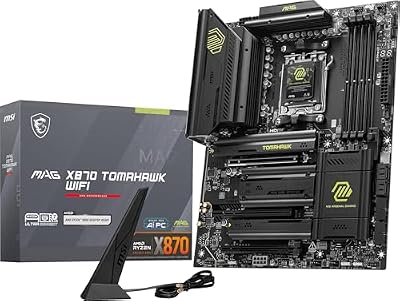 msiMSI MAG X870 Tomahawk WiFi Gaming Motherboard (AMD Ryzen 9000/8000/7000…$253 \xc2\xb7 97/100
 CorsairCORSAIR RM750x ATX 3.1 PCIe 5.1 750W Power Supply –…$135 \xc2\xb7 97/100
 SamsungSamsung SSD 990 PRO 2TB, PCIe 4.0 M.2 2280, Up…$410 \xc2\xb7 97/100








