The best desktop thermal-transfer printers for fulfillment workflows keep orders moving from pick to pack to ship without label errors slowing the line. Fulfillment work involves many label types in one shift: picking labels, packing slips, carton labels, compliance labels, and carrier labels. Thermal-transfer printing uses heat and a ribbon to bond the image to the label, so barcodes stay scannable and text stays readable through handling, storage, and transit.


A fulfillment workflow also needs printers that fit the system around them. Printers connect to warehouse management software, sit at packing stations, and run through long batches during peak periods. The models below focus on those needs: 203 dpi and 300 dpi resolution for clear barcodes, print speeds of 6 inches per second, 4-inch label widths for standard formats, and connectivity that covers USB, Ethernet, serial, and wireless options. Each one is a compact desktop unit that fits a packing bench.
How to Choose the Best Desktop Thermal-Transfer Printers for Fulfillment Workflows
Choosing among the best desktop thermal-transfer printers for fulfillment workflows begins with the labels the workflow produces. Picking and packing labels need clear barcodes that scan first time, every time, while compliance and asset labels need fine text that stays legible. A resolution of 203 dpi suits standard shipping and carton labels, while 300 dpi helps with small barcodes, small fonts, and dense compliance information. Choose the resolution that matches the smallest barcode and text the workflow uses.
Print speed and duty cycle come next. Look for a speed of 6 inches per second, so a 4-by-6-inch label prints in about a second and a batch of labels moves quickly. A printer for fulfillment should handle continuous runs during peak periods without frequent pauses, and a simple media path makes ribbon and label changes fast between batches. A tear bar, peeler, or cutter option should match how labels are applied at the packing station.
Connectivity should fit the fulfillment system. Ethernet allows a printer to be shared across stations and managed centrally, which suits a warehouse where several packers use one printer. USB suits a single station, while serial and wireless options help with older systems and mobile setup. Check that the printer supports the warehouse software and label formats already in use, including common programming languages such as ZPL and EPL.
Media and ribbon handling round out the decision. A 4-inch maximum print width covers standard fulfillment labels, and support for 74-metre and 300-metre ribbons affects how often ribbon needs changing. A clear media window, simple loading, and a display that shows status help staff keep the line moving, especially when a new operator joins a station.
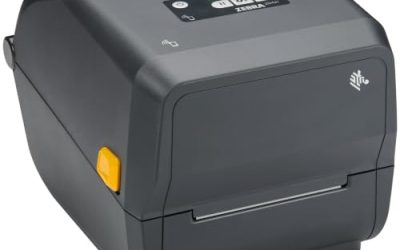
Zebra ZD621T 300 dpi Thermal-Transfer Printer
Zebra ZD621T with 300 dpi, 6 ips, and Full Connectivity
The Zebra ZD621T 300 dpi model prints at 300 dpi with a maximum speed of 6 inches per second and a maximum print width of 4.27 inches. The higher resolution gives sharper small barcodes and finer text, which suits compliance labels, asset labels, and packing labels that carry dense information. It uses thermal-transfer printing with a ribbon, and it can also run direct thermal media when a shorter-lived label is sufficient.
Connectivity is broad, with USB, USB Host, Bluetooth, serial, and Ethernet, so the ZD621T can join a wired network, serve several stations, and connect to warehouse systems. A tear bar is fitted as standard, and the printer supports a peeler and cutter as field-installable options. Its 512 MB flash and 256 MB SDRAM memory handle complex label formats with logos, barcodes, and variable data.
This model suits a fulfillment workflow that needs fine detail and reliable networked printing. It is a good fit for compliance labeling, asset tracking, and packing stations where small barcodes must scan correctly on the first attempt.
View the Zebra ZD621T 300 dpi Printer on Amazon
Zebra ZD421 Thermal-Transfer Printer
Zebra ZD421 with 203 dpi, 6 ips, and USB Connectivity
The Zebra ZD421 thermal-transfer model, part number ZD4A042-301M00EZ, prints at 203 dpi with a maximum speed of 6 inches per second and a maximum print width of 4.09 inches. That combination suits standard 4-by-6-inch shipping labels, carton labels, and barcode labels, with clear text and scannable codes. It uses a ribbon roll for thermal-transfer printing and can also run direct thermal media when a shorter-lived label is sufficient.
The ZD421 is compact for a bench, with a clear media window, simple ribbon loading, and a tear bar fitted as standard. USB connectivity suits a single packing station, and a modular connectivity slot allows Ethernet or wireless options to be added later. Bluetooth Low Energy helps with setup from a phone or tablet, and Zebra Print DNA software supports remote management and configuration.
This model suits a fulfillment workflow that needs a dependable, compact thermal-transfer printer for a single station. It is a good fit for daily carrier labels, carton identification, and barcode labels that must remain readable through handling and transit.
View the Zebra ZD421 Thermal-Transfer Printer on Amazon
Brother TD-4420TN Thermal-Transfer Printer
Brother TD-4420TN with 203 dpi, 6 ips, and Ethernet
The Brother TD-4420TN is a desktop thermal-transfer printer that prints at 203 dpi with a maximum speed of 6 inches per second and a maximum print width of 4 inches. It supports both thermal-transfer and direct thermal printing, so a fulfillment team can use ribbon-based labels for durable output and ribbon-free media for short-lived labels from the same machine. It prints barcodes, QR codes, text, and logos for shipping, product, and inventory labels.
Connectivity includes USB and wired Ethernet, so the TD-4420TN can serve a single station or join a network for shared use. It accepts ribbon rolls up to 300 metres, which reduces how often ribbon needs changing during long batches, and its slim design fits a packing bench without taking over the workspace. The printer works with common label software and supports a wide range of barcode formats used in fulfillment.
This model suits a fulfillment workflow that needs a network-capable printer with long ribbon runs and flexible media handling. It is a good fit for a packing station that prints a mix of shipping, product, and inventory labels through the working day.
View the Brother TD-4420TN on Amazon
Comparison Table
| Product | Key Spec | Best For |
|---|---|---|
| Zebra ZD621T 300 dpi | 300 dpi, 6 ips, 4.27-inch width, Ethernet | Fine-detail compliance and asset labels |
| Zebra ZD421 | 203 dpi, 6 ips, 4.09-inch width, USB | Dependable single-station fulfillment labels |
| Brother TD-4420TN | 203 dpi, 6 ips, 4-inch width, Ethernet | Mixed label types with long ribbon runs |
Frequently Asked Questions
Why does fulfillment need thermal-transfer printing?
Thermal-transfer printing uses a ribbon to bond the image to the label, so the print resists smudging, moisture, and abrasion better than a ribbon-free print. That durability keeps barcodes scannable and text readable through picking, packing, sorting, and transit, which reduces mis-scans and reprints in a fulfillment workflow.
Should I choose 203 dpi or 300 dpi for fulfillment labels?
Choose 203 dpi for standard shipping and carton labels, where barcodes and text are large enough to print clearly at that resolution. Choose 300 dpi when labels carry small barcodes, small fonts, or dense compliance information, because the finer resolution keeps small details sharp and scannable.
How fast should a fulfillment printer be?
Look for a speed of at least 6 inches per second, so a 4-by-6-inch label prints in about a second. That speed keeps a packing station moving during normal work and helps during peak periods when batches are larger. Reliability and easy media changes matter as much as raw speed in a fulfillment workflow.
Should a fulfillment printer use USB or Ethernet?
USB suits a single packing station where one computer drives one printer. Ethernet suits a shared printer that several stations use, or a printer managed from a central warehouse system. Many fulfillment operations use USB for individual benches and Ethernet for central printers, so a model with both options gives more flexibility.
Conclusion
The best desktop thermal-transfer printers for fulfillment workflows balance resolution, speed, and connectivity. The Zebra ZD621T 300 dpi model is the pick for fine-detail work, with sharper small barcodes and full network connectivity for compliance and asset labels. The Zebra ZD421 covers dependable single-station printing with clear 203 dpi output and simple ribbon loading. The Brother TD-4420TN adds network capability, long ribbon runs, and flexible media handling for mixed label types.
Choose the ZD621T when small barcodes and compliance labels need the finest detail. Choose the ZD421 for a reliable bench printer at a single station. Choose the TD-4420TN when a networked printer must handle a mix of shipping, product, and inventory labels. Any of the three gives a fulfillment workflow durable, scannable labels that keep orders moving.
Disclosure: As an Amazon Associate, we may earn from qualifying purchases.