
- Top Pick: ARCTIC Liquid Freezer III Pro 360 A-RGB – AIO CPU Cooler, Water Cooling
- Best Value: ARCTIC Liquid Freezer III Pro 360 – AIO CPU Cooler,3 x 120 mm Water Cooling
- Premium Choice: Thermalright Peerless Assassin 120 SE CPU Cooler, 6 Heat Pipes AGHP Technology, Dual 120mm PWM Fans, 1550RPM Speed, for AMD:AM4 AM5/Intel LGA 1700/1150/1151/1200/1851,PC Cooler
A good CPU cooler keeps your processor cool, quiet, and running at full tilt. Whether you go high-end air or an AIO liquid cooler, proper cooling heads off thermal throttling and adds years to your hardware. By 2026 both camps cool brilliantly — here are the best picks for any build.
- Watch: Best CPU Cooler 2026 — Top Air and Liquid Coolers Reviewed — Video Review
- Best CPU Coolers of 2026
- CPU Cooler Comparison Table
- Best Overall: Arctic Liquid Freezer III 360
- Best Air Cooler: Noctua NH-D15
- Best Budget: Thermalright Peerless Assassin 120
- Air vs Liquid Cooling: Which Is Right for You?
- Cooler Sizing and Case Compatibility
- Frequently Asked Questions
- Related Articles
- Related Guides
⚡ Save on Your Next PC — Amazon Prime
Prime members get fast free shipping on the systems above, plus early access to Prime Day & Black Friday PC deals. New members get a 30-day free trial.
As an Amazon Associate we earn from qualifying purchases at no extra cost to you.







Watch: Best CPU Cooler 2026 — Top Air and Liquid Coolers Reviewed — Video Review
Best CPU Coolers of 2026


CPU Cooler Comparison Table
| Cooler | Type | TDP Rating | Noise | Price |
|---|---|---|---|---|
| Arctic Liquid Freezer III 360 | 360mm AIO | 300W+ | Very Quiet | ~$140 |
| Noctua NH-D15 | Dual-tower Air | 250W | Quiet | ~$110 |
| Thermalright Peerless Assassin 120 | Dual-tower Air | 220W | Quiet | ~$40 |
| NZXT Kraken 360 | 360mm AIO | 300W+ | Quiet | ~$200 |
| Noctua NH-U12S | Single-tower Air | 180W | Very Quiet | ~$70 |
Best Overall: Arctic Liquid Freezer III 360
The Arctic Liquid Freezer III 360 owns the AIO space with outstanding cooling, near-silent running, and a price nobody else matches. The 360mm radiator tames even the hottest chips (overclocked flagships included) without making a racket, and the bundled VRM fan helps your motherboard too. For high-end builds, it’s the best-value liquid cooler you can buy.
Best Air Cooler: Noctua NH-D15
The legendary Noctua NH-D15 is still the benchmark for air cooling. Its huge dual-tower body and two premium fans go blow-for-blow with 280mm AIOs while delivering the longevity only air can — no pump to ever fail. When reliability and quiet running top your list, it’s the pick.
Best Budget: Thermalright Peerless Assassin 120
The Thermalright Peerless Assassin 120 is a budget miracle. For around $40 it serves dual-tower cooling that shadows coolers costing three times more. It handles mid-range and even some high-end CPUs with ease, runs quietly, and is the obvious move for value-focused builds.
Air vs Liquid Cooling: Which Is Right for You?
- Air coolers: More reliable (no pump), lower maintenance, often quieter, great value. Can be bulky and may conflict with tall RAM.
- AIO liquid coolers: Better cooling for high-TDP CPUs, cleaner aesthetics, frees up space around the socket. Slightly higher failure risk (pump), higher cost.
For most gaming rigs, a quality air cooler like the Peerless Assassin or NH-D15 is plenty. For overclocked flagships or show-off builds, a 360mm AIO is the way to go.
Cooler Sizing and Case Compatibility
Before buying, check compatibility:
- Air cooler height: Verify clearance against your case’s maximum CPU cooler height
- AIO radiator size: Confirm your case supports 240mm, 280mm, or 360mm radiators
- RAM clearance: Large air coolers may overhang RAM slots
- Socket support: Ensure the cooler includes mounting for AM5 or LGA1851
Frequently Asked Questions
Should I get an air cooler or liquid AIO cooler?
Air coolers are reliable, quiet, and maintenance-free, and top models rival liquid cooling for many CPUs. All-in-one liquid coolers move heat to a radiator, handling very hot high-core CPUs and offering a cleaner look, but add pump noise and a small leak risk. For most builds, a good air cooler suffices; choose an AIO for high-end CPUs or compact cases with clearance limits.
How do I know if a cooler fits my case and CPU?
Check two clearances: the cooler’s socket compatibility with your CPU, and its physical size against your case. Air coolers list a maximum height that must fit under your case’s side panel, and tall RAM can conflict. AIO coolers need radiator mount support, such as 240mm or 360mm, in your case. Verify socket, height, and radiator support before buying to avoid fitment surprises.
What radiator size do I need for an AIO?
Larger radiators dissipate more heat: 240mm handles mainstream CPUs, while 280mm and 360mm suit high-end or overclocked chips and keep noise lower. Your case limits the maximum radiator, so check supported sizes. Bigger is generally better for temperatures and quieter operation, but a 240mm or 280mm is plenty for most gaming CPUs; reserve 360mm for the hottest flagship processors.
Does the stock cooler work or should I upgrade?
Some CPUs include a stock cooler adequate for stock speeds and light loads, but they are often loud and limit sustained performance. Many high-end CPUs ship without any cooler. Upgrading to a quality aftermarket cooler lowers temperatures, reduces noise, and unlocks better sustained boost clocks. If you game seriously or your CPU runs hot, a better cooler is a worthwhile, quiet upgrade.
How often do liquid coolers need maintenance or replacement?
Sealed AIO liquid coolers are maintenance-free but have a finite lifespan, typically five to seven years, as the pump wears and coolant slowly permeates. Air coolers last far longer with only occasional dust cleaning. If longevity and zero fuss matter, air cooling wins; AIOs trade some long-term durability for peak cooling and aesthetics. Custom loops require regular maintenance and are for enthusiasts only.
Ready to decide? Our #1 pick for 2026 is the Arctic Liquid Freezer III 360.
Live price & availability on Amazon.
Top picks from this guide
 ARCTICARCTIC Liquid Freezer III Pro 360 A-RGB - AIO CPU…$80 \xc2\xb7 99/100
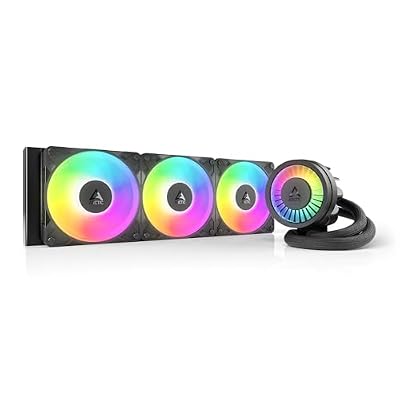 ARCTICARCTIC Liquid Freezer III Pro 360 A-RGB - AIO CPU…$77 \xc2\xb7 99/100
 ThermalrightThermalright Peerless Assassin 120 Vision MAX ARGB White CPU Air…$58 \xc2\xb7 99/100
 CorsairCORSAIR Nautilus 360 RS ARGB Low-Noise Liquid CPU Cooler –…$87 \xc2\xb7 98/100








