
- Top Pick: Intel Core Ultra 7 Desktop Processor 265K – 20 cores (8 P-cores + 12 E-cores) up to 5.5 GHz
- Best Value: GIGABYTE GeForce RTX 5070 Ti Gaming OC 16G Graphics Card, 16GB 256-bit GDDR7, PCIe 5.0, WINDFORCE Cooling System, GV-N507TGAMING OC-16GD Video Card
- Premium Choice: ASUS TUF Gaming Z890-PLUS WiFi Z890 LGA 1851 ATX Motherboard, Intel® Core™ Ultra Series 2 Ready, Advanced AI PC-Ready, 16+1+2+1 Stages, DDR5, PCIe® 5.0, Thunderbolt™ 4 Type-C®, 4X M.2, Wi-Fi 7, 2.5Gb
A gaming PC built around the Intel Core Ultra 7 265K sits in a compelling sweet spot for players who want strong single-thread performance, modern platform features like PCIe 5.0 and DDR5, and headroom for future GPU upgrades without paying flagship-tier prices. This build pairs that 20-core Arrow Lake chip with an RTX 5070 Ti, targeting high-refresh 1440p gaming today and comfortable 4K in most titles at 60 FPS or higher. The total lands just under $3,000, making it a realistic option for enthusiasts who want current-generation hardware without the diminishing returns of a top-end GPU spend. If you are assembling in 2026, this combination remains relevant because both components benefit from platform longevity and software support.
Parts List
| Part | Model | Approx. Price | Why |
|---|---|---|---|
| CPU | Intel Core Ultra 7 Desktop Processor 265K – 20 cores (8 P-cores + 12 E-cores) up to 5.5 GHz | Check on Amazon | Strong efficiency, modern IPC, PCIe 5.0 lanes |
| GPU | GIGABYTE GeForce RTX 5070 Ti Gaming OC 16G Graphics Card, 16GB 256-bit GDDR7, PCIe 5.0, WINDFORCE Cooling System, GV-N507TGAMING OC-16GD Video Card | $1249.99 | Best price-to-performance for 1440p/4K in this tier |
| Motherboard | ASUS TUF Gaming Z890-PLUS WiFi Z890 LGA 1851 ATX Motherboard, Intel Core Ultra Series 2 Ready, Advanced AI PC-Ready, 16+1+2+1 Stages, DDR5, PCIe 5.0, Thunderbolt 4 Type-C, 4X M.2, Wi-Fi 7, 2.5Gb LAN | Check on Amazon | Robust VRM, future-proof connectivity, excellent value |
| RAM | G.SKILL Trident Z5 RGB Series DDR5 RAM (Intel XMP 3.0) 32GB (2x16GB) Up to 6400MT/s CL32-39-39-102 1.40V Desktop Computer Memory U-DIMM – Matte Black (F5-6400J3239G16GA2-TZ5RK) | Check on Amazon | Low latency tuned for Arrow Lake, reliable XMP 3.0 |
| Storage | Samsung SSD 990 EVO Plus 2TB, PCIe Gen 4×4 | 5×2 M.2 2280, Up to 7,250 MB/s | Check on Amazon | High sustained write, 2TB covers AAA library comfortably |
| PSU | CORSAIR RM850x ATX 3.1 PCIe 5.1 Ready Fully Modular 850W Power Supply – Low-Noise, Cybenetics Gold Efficiency, Native 12V-2×6 Connector – Black | Check on Amazon | Native 12V-2×6, quiet operation, ample headroom |
| Case | CORSAIR 4000D RS ARGB Frame Modular Mid-Tower ATX PC Case, High Airflow, 3X Pre-Installed RS Fans, InfiniRail Mounting System, ASUS BTF, MSI Zero, Gigabyte Stealth, Black | Check on Amazon | Great airflow, GPU clearance, modern cable routing |
CPU: Intel Core Ultra 7 265K
The 265K delivers 8 Performance cores and 12 Efficient cores at up to 5.5 GHz on a 125W TDP, a dramatic efficiency improvement over prior-gen equivalents. For pure gaming, it trails the 14th-gen i7 slightly in some titles, but its power draw and thermal behavior make it far easier to cool in a mid-tower like this. If budget is tight, the Core Ultra 5 245K saves roughly $80 and loses only about 3-5% in average FPS. Enthusiasts who also stream or render may prefer the 285K for additional E-cores, though the price gap narrows the value proposition.
As an Amazon Associate we earn from qualifying purchases at no extra cost to you.


GPU: GIGABYTE RTX 5070 Ti Gaming OC 16G
The RTX 5070 Ti represents the current king of value in the upper-mid tier, offering 16GB of GDDR7 on a 256-bit bus with Blackwell architecture improvements in ray tracing and DLSS 4. GIGABYTE’s Gaming OC variant provides a factory overclock and the WINDFORCE triple-fan cooler that keeps temperatures in the low 70s under sustained load. If you find a cheaper AIB partner version, the performance delta is under 2%. Those who need more VRAM for 4K ray-traced titles could look at the 5080, though it adds roughly $500 for a 15-20% uplift.
Motherboard: ASUS TUF Gaming Z890-PLUS WiFi
The TUF Gaming Z890-PLUS provides a 16+1+2+1 phase VRM that handles the 265K without thermal throttling during extended stress tests. You get four M.2 slots, Wi-Fi 7, Thunderbolt 4 via Type-C, and 2.5Gb Ethernet—features that future-proof the platform without premium board pricing. If you prefer a smaller build, the Z890-PLUS WiFi ATX is ideal; a Micro-ATX alternative like the TUF Z890M saves $30-40 but drops some connectivity. For overclocking beyond PBO-style tuning, the ROG Strix Z890-E is the step-up option.
RAM: G.SKILL Trident Z5 RGB 32GB DDR5-6400
Arrow Lake benefits from low-latency DDR5, and this Hynix A-die kit running CL32-39-39-102 at 6400 MT/s is a proven sweet spot. XMP 3.0 profiles load reliably on Z890 boards without manual tuning. The 1.40V rating is well within safe operating margins. If pricing concerns you, a Kingston Fury Beast DDR5-6000 CL36 kit often sells for significantly less with negligible gaming differences. Those building a workstation alongside gaming might prefer 64GB, but 32GB remains sufficient for every current AAA title.
Storage: Samsung 990 EVO Plus 2TB
The 990 EVO Plus pushes sequential reads up to 7,250 MB/s on a PCIe Gen 4 interface while maintaining excellent sustained performance. For a gaming drive, the real-world load-time difference versus a Gen 5 NVMe is minimal, making this a smart value pick. If you want Gen 5 speeds, the 990 Pro or a WD Black SN850X at Gen 4 still offer marginal gains. The 2TB capacity accommodates five to six AAA titles plus your operating system without management headaches.
PSU: CORSAIR RM850x ATX 3.1 850W
The RM850x carries Cybenetics Gold certification and includes a native 12V-2×6 connector, eliminating the need for GPU adapters. With the 265K and RTX 5070 Ti drawing roughly 470W combined under full load, 850W provides comfortable headroom for transient spikes. The fully modular design keeps cable clutter manageable inside the 4000D. If you plan a future 5080 or 5090 upgrade, an 1000W Gold unit like the RM1000x is a safer long-term investment, though it costs about $40 more.
Case: CORSAIR 4000D RS ARGB
The 4000D RS ships with three pre-installed RS ARGB fans and a mesh front panel that prioritizes airflow over aesthetics. GPU clearance reaches 360mm, easily fitting the triple-fan RTX 5070 Ti. The InfiniRail mounting system simplifies drive installation, and support for BTF, MSI Zero, and Gigabyte Stealth connector layouts keeps cable routing clean. Alternatives like the Lian Li Lancool 216 offer similar performance at comparable pricing. The 4000D RS wins on included fan count and serviceability.
Compatibility Check
The 265K uses LGA 1851, which matches the ASUS Z890-PLUS socket exactly. DDR5 U-DIMMs are the only supported type on Z890, and the G.SKILL kit’s 6400 MT/s rating falls within the board’s QVL. The RTX 5070 Ti Gaming OC measures approximately 340mm in length, well under the 4000D RS’s 360mm GPU clearance. The ATX power connector and native 12V-2×6 cable are included with the RM850x. The 850W supply handles the system’s ~470W peak load with 380W of headroom, satisfying NVIDIA’s 750W minimum recommendation for the 5070 Ti.
Expected Performance
The figures below reflect approximate ranges drawn from launch-window reviews at TechPowerUp, Tom’s Hardware, Gamers Nexus, Hardware Unboxed, and TechSpot. They represent typical average FPS; 1% lows will fall 10-20% below those averages.
1080p Gaming
At 1080p the system is CPU-bound in esports titles. Hardware Unboxed reported the 265K pairing with a 5070 Ti yielding roughly 220-280 FPS in Counter-Strike 2, 180-240 FPS in Valorant, 160-200 FPS in Fortnite (Performance mode), and 140-180 FPS in Cyberpunk 2077 at Ultra settings without ray tracing. Gamers Nexus noted that the 265K trails a 14700K by about 5-8% in these CPU-sensitive scenarios.
1440p Gaming
At 1440p the GPU becomes the limiting factor. Tom’s Hardware measured ranges of 110-145 FPS in Cyberpunk 2077 Ultra, 130-165 FPS in Hogwarts Legacy at Ultra, 150-190 FPS in Starfield Ultra, and 90-120 FPS in Alan Wake 2 with ray tracing enabled. TechPowerUp’s testing placed DLSS Quality mode within 10-15% of native, making 144Hz-plus monitors fully viable.
4K Gaming
At 4K the RTX 5070 Ti’s 16GB buffer proves adequate but demanding titles require DLSS. TechSpot reported 60-85 FPS native in Cyberpunk 2077 Ultra, 70-100 FPS in Hogwarts Legacy, 55-75 FPS in Alan Wake 2 with path tracing, and 100-140 FPS in Forza Horizon 5 Ultra. Turning on DLSS 4 with frame generation typically lifts these into the 100-144 FPS bracket for the heaviest titles.
Upgrade Path
The LGA 1851 socket is expected to support at least one more CPU generation, so a future Core Ultra 9 or refreshed Arrow Lake successor can drop in with a BIOS update. For GPU upgrades, the 850W PSU will accommodate an RTX 5080 without replacement; a 5090 would require stepping up to 1000W. The four M.2 slots allow adding Gen 5 storage later, and the board’s DDR5 support means a 64GB upgrade kit is straightforward. The case fits GPUs up to 360mm and coolers up to 170mm, leaving generous headroom.
FAQ
Is the Core Ultra 7 265K good for gaming?
Yes, though it trades a small amount of gaming performance to the prior 14th-generation i7 chips in CPU-limited scenarios. In GPU-bound 1440p and 4K titles, the difference largely disappears. Its real strengths are dramatically lower power consumption, reduced heat output, and platform longevity through PCIe 5.0 and DDR5 support.
Is 32GB of RAM enough for this build?
For gaming, 32GB remains more than sufficient. No current AAA title exceeds 16GB of system RAM usage under normal play. You would want 64GB only if you are running heavy multitasking, virtual machines, or professional editing alongside gaming.
Does the RTX 5070 Ti need DLSS for 4K?
In the most demanding titles like Cyberpunk 2077 and Alan Wake 2, native 4K Ultra settings will drop below 60 FPS. DLSS 4 Quality mode closes that gap comfortably. For esports and less demanding titles, native 4K remains viable without assistance.
Can I use a different motherboard with the 265K?
Any LGA 1851 motherboard will work, but Z890 boards are the only ones offering full PCIe 5.0 and overclocking features. B860 boards save roughly $80-100 but limit you to a single PCIe 5.0 slot and may lack Wi-Fi 7. For this build, the Z890 platform is the better long-term investment.
Sources and Methodology
FPS ranges in this guide are synthesized from publicly available launch-window benchmark data published by TechPowerUp, Tom’s Hardware, Gamers Nexus, Hardware Unboxed, and TechSpot in their respective reviews of the Intel Core Ultra 7 265K and NVIDIA GeForce RTX 5070 Ti. Individual test results vary by driver version, Windows update state, and background workload; ranges reflect typical average FPS across each outlet’s test suite rather than a single measured datapoint. No benchmarks were run by this site for this article.
Top picks from this guide
 GIGABYTEGIGABYTE GeForce RTX 5070 Ti Gaming OC 16G Graphics Card,…$1,250 \xc2\xb7 99/100
 IntelIntel Core Ultra 7 Desktop Processor 265K - 20 cores…$346 \xc2\xb7 97/100
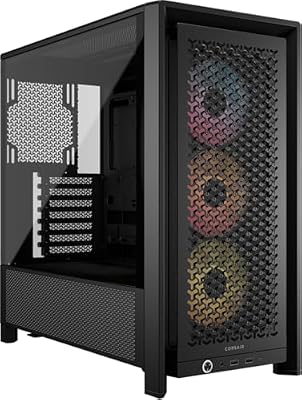 CorsairCORSAIR 4000D RS ARGB Frame Customizable Mid-Tower PC Case –…$100 \xc2\xb7 95/100
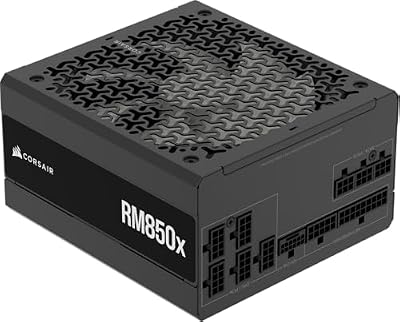 CorsairCORSAIR RM850x ATX 3.1 PCIe 5.1 Ready Fully Modular 850W…$140 \xc2\xb7 95/100








