Simulation is the use case that exposes weak optics fastest. In a flight, racing, or space cockpit you are not looking at one object in the center of the lens. Your eyes sweep constantly across a panel: airspeed and altitude tapes at the edges, engine instruments low in the view, a radio stack or MFD off to one side. With older Fresnel lenses, that sweep means leaving the small clear sweet spot again and again, so gauges blur exactly where a simulator needs them readable. Pancake lenses change that experience because clarity holds much further toward the edge of the image, letting you read instruments with eye movement instead of turning your whole head for every check.
This guide is strict about two criteria: every pick is a true standalone headset, and every pick uses pancake optics confirmed by its maker. That combination is rare — several well-known standalone headsets use Fresnel lenses and were excluded, and some pancake models have no verifiable Amazon US listing — so this shortlist has three headsets rather than a padded longer list. Each also offers a route into PC simulation through streaming, which matters because the deepest flight and racing simulators still live on PC.
Disclosure: As an Amazon Associate, we earn from qualifying purchases made through links in this article.
Quick Picks
- Best overall for simulation: Meta Quest 3 — the sharpest mainstream pancake image in this group, a fast modern processor, and flexible PC streaming for major simulators.
- Best for eye and face tracking in the cockpit: Meta Quest Pro — pancake lenses plus eye tracking that supports foveated rendering in compatible applications.
- Best lightweight option for a compact sim rig: HTC VIVE XR Elite — slim pancake optics and a convertible design that keeps a small cockpit feeling uncluttered.
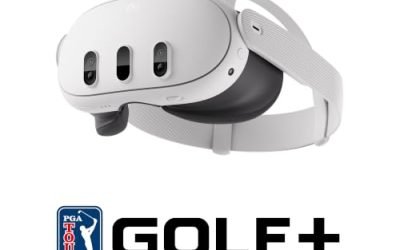
Meta Quest 3

The Quest 3 is the simulation default for a reason. Its pancake lenses deliver a wide, consistently clear image, so virtual cockpits stay legible from the primary flight display out to the side consoles, and its higher resolution compared with the previous Quest generation makes small text on MFD pages and chart displays noticeably easier to use. The Snapdragon XR2 Gen 2 also gives standalone simulation and training applications real headroom, while Quest Link and Air Link open the door to PC simulators when you want a full desktop flight or racing title.
In a seated rig, add a better strap than the stock soft strap for long sessions, set a stationary boundary once, and route the Link cable so it cannot catch on a yoke, wheel, or HOTAS. For most simmers buying one standalone headset, this is the one.
Specs
- Type: Standalone VR and mixed reality headset, PC streaming supported
- Processor: Qualcomm Snapdragon XR2 Gen 2
- Optics: Pancake lenses, full-color passthrough
- Storage: 512 GB on this listing
- Tracking: Inside-out 6DoF, Touch Plus controllers, hand tracking
- ASIN: B0CD1JTBSC
- Amazon: https://www.amazon.com/dp/B0CD1JTBSC
Pros:
– Edge-to-edge pancake clarity keeps cockpit instruments readable
– Strong standalone processor plus wired and wireless PC simulator routes
– Large ecosystem of simulation accessories, straps, and cockpit add-ons
Cons:
– Stock soft strap is not ideal for long seated sessions
– Wireless PC streaming quality depends heavily on your router setup
– No built-in eye tracking for foveated rendering
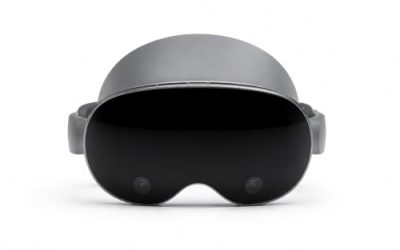
Meta Quest Pro
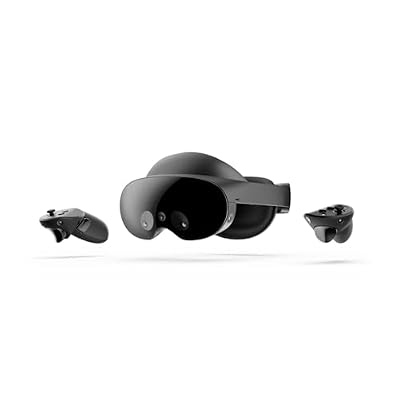
The Quest Pro earns its simulation place through tracking rather than raw resolution. Its pancake lenses share the same clarity advantage as the Quest 3, and its eye tracking can be used by compatible PC VR applications for foveated rendering, concentrating rendering detail where your eyes are actually looking. In a cockpit, where your gaze moves constantly between the horizon and the panel, that is a natural fit, and applications that support it can use the saved performance for higher settings or steadier frame rates.
The Pro is an older platform discontinued from production, so standalone processing trails the Quest 3. Its open design lets in peripheral light, which some simmers like for seeing real controls and others dislike; a light blocker is available as an accessory. Choose it for eye tracking, not as a general Quest 3 upgrade.
Specs
- Type: Standalone VR and mixed reality headset, PC streaming supported
- Processor: Qualcomm Snapdragon XR2 Plus
- Optics: Pancake lenses, full-color passthrough
- Storage: 256 GB
- Tracking: Inside-out 6DoF, eye tracking, face tracking, hand tracking
- ASIN: B09Z7KGTVW
- Amazon: https://www.amazon.com/dp/B09Z7KGTVW
Pros:
– Eye tracking supports foveated rendering in compatible simulators
– Pancake clarity across the panel, with a balanced, open fit for seeing real controls
– Self-tracking controllers hold position well around cockpit hardware
Cons:
– Older processor than the Quest 3 for standalone applications
– Platform is discontinued from production, so check listing condition and seller carefully
– Open design admits light unless you add a light blocker
HTC VIVE XR Elite

The XR Elite suits simmers whose rig shares space with the rest of the room. Its pancake optics sit in a notably slim front visor, and the convertible design lets you run it as a conventional headset with its battery cradle or in a lighter glasses-style arrangement with a separate power source. In a compact cockpit built around a desk chair, that smaller front profile and reduced front weight make head checks feel less cumbersome, and the headset still runs standalone applications without any PC at all.
For PC simulation it streams through VIVE Streaming to SteamVR titles. Its library is smaller than Meta’s and its XR2 processor is older, so buy it for the form factor and HTC ecosystem rather than native app depth.
Specs
- Type: Standalone VR and mixed reality headset, convertible form factor
- Processor: Qualcomm Snapdragon XR2
- Optics: Pancake lenses, full-color passthrough cameras
- Storage: 128 GB on the original listing configuration
- Tracking: Inside-out 6DoF with four tracking cameras, hand tracking
- ASIN: B0D6D5Q5M2
- Amazon: https://www.amazon.com/dp/B0D6D5Q5M2
Pros:
– Slim pancake visor and convertible design suit compact, shared-space rigs
– Standalone operation plus VIVE Streaming for PC simulators
– Adjustable IPD and diopter dials help dial in a sharp cockpit image
Cons:
– Older processor limits standalone simulation performance
– Smaller native app library than the Quest platform
– Battery arrangement favors portability over marathon sessions
How to Choose
Optics come first: readable gauges at the edge of the view reduce head movement and fatigue, and IPD adjustment must cover your eyes or even a pancake stack looks soft. Second, decide how you will run your simulators — flagship flight and racing titles are PC applications, so the quality of the Link, Air Link, or VIVE Streaming connection decides the real experience, and a wired link is most consistent seated. Third, fit the headset to the rig: a balanced strap, a cable route clear of your controls, and a stationary boundary matter more than room-scale features. If your pipeline supports eye-tracked foveated rendering, the Quest Pro’s tracking becomes a real performance feature.
FAQs
Why do pancake lenses matter so much for simulation?
Because simulation requires reading instruments across the whole field of view. Pancake lenses keep the image clear much further from the center, so you can check gauges and displays with your eyes instead of constant head turns.
Can a standalone headset run PC flight and racing simulators?
Yes, through PC VR streaming. The Quest headsets use Link or Air Link and the XR Elite uses VIVE Streaming, sending the PC-rendered simulator to the standalone headset while it handles tracking.
Is eye tracking worth it for simulation?
Only if your applications support it. Where foveated rendering is implemented, eye tracking can concentrate detail at your gaze point and ease the rendering load. Without application support, it adds little to a simulation session.
Should I use a wired or wireless connection in a cockpit?
Wired is usually better for seated simulation: it is consistent, avoids router variables, and keeps the headset charged. Wireless is more comfortable for standing use, which matters less in a fixed rig.
Conclusion
For VR simulation, pancake optics are not a luxury; they are what makes a virtual cockpit readable. The Meta Quest 3 is the strongest all-round choice, combining clarity, modern processing, and flexible simulator connections. The Meta Quest Pro adds eye tracking for compatible foveated rendering, and the HTC VIVE XR Elite offers the slimmest, most portable form for compact rigs. Choose based on how you connect to your simulator and how long your sessions run, and any of these three will serve a cockpit better than a Fresnel-lens headset.