Micro-OLED has become the display technology to beat in virtual reality. Compared with the LCD panels found in most mainstream headsets, micro-OLED delivers deeper blacks, higher contrast and far more pixels per degree, which makes distant objects, cockpit instruments and small text readable in a way that changes how room-scale VR feels. Add eye tracking, and the headset can render the spot you are looking at in full detail while easing the load elsewhere, a technique that keeps high-resolution scenes running smoothly.
The best micro-oled vr headsets with eye tracking for room-scale vr are not mainstream all-in-one devices. They are enthusiast headsets built for players with a capable gaming PC and a clear play space, where walking, turning and reaching are part of the experience. The three headsets below all pair micro-OLED panels with integrated eye tracking, and each takes a different route to room-scale freedom: one uses inside-out tracking, one gives you a choice between base stations and camera-based tracking, and one is a standalone headset that streams PC VR wirelessly.
How to Choose the Best Micro-OLED VR Headsets With Eye Tracking for Room-Scale VR
Start with resolution per eye, because it decides how sharp the virtual world looks. Micro-OLED headsets in this class list resolutions around 3840 by 3552 pixels per eye, far above mainstream headsets, and that density is what makes fine detail hold up when you lean in close. Check the pixels-per-degree figure too, since it combines resolution with field of view into a single measure of clarity.
Field of view is the second major decision. A wider field of view fills more of your peripheral vision and makes room-scale movement feel more natural, especially when you turn your head to track an object or scan a room. Values around 110 to 116 degrees horizontal are typical in this class, and the difference between them is noticeable when you compare headsets side by side.
Eye tracking quality matters as much as the display. Look for a stated tracking rate, typically around 120Hz, and confirm the headset uses it for dynamic foveated rendering, which concentrates rendering detail where your gaze falls. That feature is what lets a high-resolution headset stay smooth on a mid-range graphics card, so it is worth confirming rather than assuming.
Then consider how the headset tracks your movement around a room. Inside-out tracking uses cameras on the headset and needs no extra hardware, which keeps setup simple and the play space flexible. Base-station tracking uses external sensors mounted in the room and can be more precise, but it means installing hardware and keeping it powered. Some headsets give you both options, which helps if your room changes or you move between spaces.
Finally, weigh weight and connection type. Room-scale play means moving your whole body, so a lighter headset reduces neck fatigue over long sessions. A wired DisplayPort connection gives you uncompressed video from your PC, while wireless streaming gives you freedom from cables at the cost of some compression. Decide which trade-off fits your room and your PC before you buy.
Pimax Crystal Super With Micro-OLED

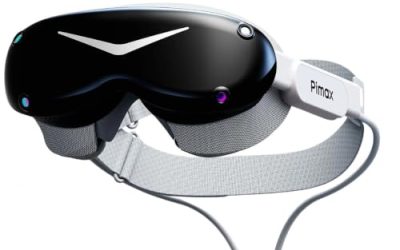
The Pimax Crystal Super with micro-OLED panels is the sharpest headset in this guide. Its Sony micro-OLED displays deliver 3840 by 3552 pixels per eye at 53 pixels per degree, with a 116-degree horizontal field of view that keeps peripheral scenery in frame as you turn. Integrated eye tracking drives dynamic foveated rendering, so the headset concentrates detail where you are looking and keeps demanding scenes running smoothly.
For room-scale play, the Crystal Super uses inside-out tracking, so there are no base stations to mount and no extra hardware to place around the room. You define a play boundary, put the headset on and move freely. The DisplayPort connection to your PC carries uncompressed video, which matters when the whole point of the headset is image quality. The wide field of view and high pixel density make it a natural fit for flight and racing simulators as well as room-scale exploration games.
The Crystal Super suits enthusiasts who want the highest image clarity available in a micro-OLED headset and are willing to pair it with a strong gaming PC. If your priority is reading fine detail at a distance and seeing deep blacks in dark scenes, this is the headset to start with.
Pimax Dream Air Lighthouse Edition

The Pimax Dream Air takes the opposite approach to comfort: it is one of the lightest high-resolution headsets available, weighing under 170 grams for the headset alone. Its Sony micro-OLED panels also deliver 3840 by 3552 pixels per eye, with a 110-degree horizontal field of view and pancake lenses that keep the headset slim. Eye tracking runs at 120Hz and powers dynamic foveated rendering, so the image stays sharp where your gaze falls.
The Dream Air comes in two editions, and the choice between them is the key decision for room-scale play. The Lighthouse Edition tracks through SteamVR base stations, which you place around the room for precise positional tracking. The SLAM Edition instead uses four onboard cameras for inside-out tracking, with two controllers included and no external hardware to install. Both editions share the same displays and eye tracking, so you are choosing a tracking style rather than a different image.
The Dream Air suits players who find heavier headsets fatiguing and want micro-OLED clarity in a package that almost disappears on the head. Choose the SLAM Edition if you want to set up room-scale play in minutes with no mounted hardware, or the Lighthouse Edition if you already own base stations and want their precision.
Samsung Galaxy XR

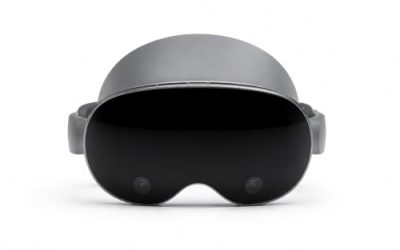
The Samsung Galaxy XR is the most versatile headset here, because it is a standalone device that also works as a high-resolution PC VR headset. Its micro-OLED panels deliver 3552 by 3840 pixels per eye, and its eye tracking supports gaze-based navigation alongside hand and voice input. Inside-out cameras track your head and hands in six degrees of freedom, so room-scale movement needs no external sensors at all.
Because the Galaxy XR runs on its own processor, you can use it without a PC for standalone apps and media, then stream PC VR content wirelessly when you want the full power of your desktop. The adjustable head strap and soft facial cushion are designed for longer sessions, and the built-in spatial audio keeps the experience immersive without separate headphones. For room-scale play, the camera-based tracking maps your space and lets you walk, turn and reach naturally.
The Galaxy XR suits players who want one headset for both standalone use and PC VR, with micro-OLED clarity and eye tracking in a single package. It is the most flexible pick here, and the best fit if your room-scale sessions mix PC games with standalone apps and media.
Comparison Table
| Product | Key Spec | Best For |
|---|---|---|
| Pimax Crystal Super (Micro-OLED) | 3840×3552 per eye, 116-degree field of view, eye tracking, inside-out tracking | Maximum image clarity for room-scale and simulator play |
| Pimax Dream Air Lighthouse Edition | 3840×3552 per eye, 110-degree field of view, 120Hz eye tracking, under 170 g | Lightweight comfort with a choice of tracking styles |
| Samsung Galaxy XR | 3552×3840 per eye, eye tracking, inside-out 6DoF tracking, standalone plus PC VR | Flexible standalone and PC VR room-scale play |
Frequently Asked Questions
Why does micro-OLED look better than LCD in VR?
Micro-OLED panels place the light-emitting layer directly on a silicon backplane, which allows far more pixels in a small area and true per-pixel blacks. In practice that means sharper text, deeper contrast in dark scenes and no visible backlight glow, all of which matter when a virtual room surrounds you.
What does eye tracking actually do during room-scale play?
Eye tracking measures where you are looking many times per second. The headset uses that information for dynamic foveated rendering, drawing the area around your gaze at full detail while reducing detail in your peripheral vision. It also enables gaze-based menus and interaction, so you can select objects by looking at them.
Do I need base stations for room-scale VR?
Not necessarily. Headsets with inside-out tracking use onboard cameras to follow your movement, so you can set up room-scale play without mounting anything. Base stations can add precision for competitive play, but they require installation and a fixed room layout. Several headsets now give you both options.
How much room do I need for room-scale VR?
A clear area of about two by two metres is a practical minimum for standing and reaching, and more space is better if you plan to walk around. Clear the floor of obstacles, keep the boundary visible in the headset, and make sure there is nothing fragile within arm’s reach before you start.
Conclusion
The best micro-oled vr headsets with eye tracking for room-scale vr all deliver the same core promise: micro-OLED clarity, eye tracking that focuses rendering where you look, and tracking that lets you move through a virtual room naturally. The Pimax Crystal Super leads on pure image quality, with the highest pixel density and widest field of view in this guide. The Pimax Dream Air leads on comfort, pairing the same class of display with a featherweight frame and a choice of tracking styles. The Samsung Galaxy XR leads on flexibility, working standalone and as a PC VR headset with no external sensors.
Choose based on your room and your PC. If image quality is the priority and you have a strong graphics card, start with the Crystal Super. If you play for long sessions and want the lightest headset possible, the Dream Air is the natural fit. If you want one headset that handles standalone apps and PC VR alike, the Galaxy XR covers both. Whichever you choose, clear your play space, set a boundary, and let the eye tracking and micro-OLED panels do the rest.
Disclosure: As an Amazon Associate, we may earn from qualifying purchases.