Every PC build reaches a moment when fingers are too big for the job. A front-panel connector needs seating on a header buried under a GPU. A tiny M.2 screw drops between the motherboard tray and the case floor. A jumper needs moving on a board that is already mounted, and the gap between the RAM slots and the CPU cooler leaves no room for a fingertip. That is when a good pair of precision tweezers earns its place in the toolkit.
Precision tweezers for PC building are not the tweezers from a bathroom drawer. The ones worth buying are made for electronics work: fine, aligned tips that meet cleanly, stainless steel that resists corrosion, and an anti-static design that keeps a stray discharge away from the components you are handling. They come as single tools or as sets with several tip shapes.
We picked five options that cover the range: a compact three-piece set from a well-known repair brand, a single professional-grade tweezer for people who want one tool done right, and three multi-piece sets that put a different tip shape in your hand for every job. Every pick below is ESD-safe and built for electronics work.
As an Amazon Associate, we earn from qualifying purchases.
How to Choose Precision Tweezers for PC Building
Start with ESD safety. A static discharge you cannot feel can still damage a motherboard, a stick of RAM, or a GPU. Tweezers meant for electronics work are either made from a static-dissipative alloy or coated so charge bleeds away slowly instead of jumping to the part. Look for an explicit ESD-safe or anti-static rating from the maker, and treat uncoated bargain tweezers as a risk near open boards. One caution: an ESD-safe label does not make a tweezer insulated. Never use metal tweezers on a powered board or near a live power supply.
Match the tip to the task. Fine pointed tips pick up M.2 screws, jumpers, and front-panel connectors, and they reach into tight gaps. Curved or angled tips work around obstructions, such as a header sitting under a heatsink, and keep your hand out of your line of sight. Flat or blunt tips grip larger parts such as thermal pads, cable clips, and standoffs without denting them. A spade tip, the rounded flat tip found in several ESD sets, lifts chips and flat parts without scratching them.
Check the material and the magnet question. Stainless steel is the standard: it holds an edge, resists rust, and cleans easily. Anti-magnetic steel matters when you work near hard drives, speakers, or magnetic parts trays, because a magnetized tweezer can pick up a screw you meant to leave alone.
Feel the tension. Good tweezers close with light, even pressure and spring back cleanly. Too stiff, and your hand tires during a long session of cable work; too loose, and the tips wander and drop screws. Most electronics tweezers run about 4.7 to 5.9 inches, and the longer ones reach deeper into a case without your knuckles hitting the side panel.
Think about storage. Fine tips bend if they rattle around in a drawer, and a bent tip is a useless tip. Sets that include a pouch, a case, or individual tip covers last far longer than loose tools. If you buy a single premium tweezer, keep it in its sleeve or a small case between builds.
1. iFixit Precision Tweezers Set

The iFixit Precision Tweezers Set is the simplest way to cover the three tip shapes a PC builder actually uses: an extra-fine pointed tweezer for jumpers and tiny screws, an angled tweezer for reaching around obstructions, and a blunt flat tweezer for heavier lifting such as seating cable clips or moving thermal pads. All three are stainless steel with a protective coating that guards against static discharge, and they arrive in a nylon storage pouch with separate channels so the tips do not knock against each other.
Each tweezer is just under 5 inches long, a comfortable size for working inside a mid-tower case. The pointed pair is genuinely sharp, so it picks up an M.2 screw from a motherboard tray on the first try, and the angled pair keeps your hand clear when you are seating front-panel connectors under a GPU. The blunt pair has a textured grip on the underside of its tips, which helps it hold smooth parts such as standoffs without slipping. iFixit backs the set with a lifetime guarantee, which is unusual at this end of the tool market and a good sign for a tool you will use for years.
- Specs:
- Pieces: 3 (extra fine, angled, blunt)
- Material: Stainless steel with ESD-safe coating
- Length: About 4.9 in per tweezer
- Weight: About 0.5 oz per tweezer
- Storage: Nylon pouch with 3 channels
- Model: EU145060-3
- Warranty: Lifetime guarantee
2. Wiha 44501 Professional ESD Precision Tweezer

If you would rather own one excellent tweezer than a drawer full of average ones, the Wiha 44501 is the tool. This is a single fine-point tweezer from Wiha’s Professional ESD line, made from Vommaloy, a special stainless steel that is anti-magnetic and acid resistant. It is static dissipative and ESD-safe, with a hypo-allergenic coating and a textured gripping surface that keeps small parts steady.
The 44501 is the AA pattern, a universal fine point with a straight, tapered tip that meets cleanly along its full length. At 130 mm, about 5.12 inches, it is long enough to reach past a CPU cooler to a front-panel header, and the balance is the kind you notice only when you switch back to a cheaper tool: light, even tension with no wobble at the tips.
The trade-off is obvious: one tip shape means one job at a time. You will still want a flat or curved tweezer for heavier parts and awkward angles, and many builders pair this with a multi-piece set. But as the primary fine-point tool in a kit, it is hard to beat.
- Specs:
- Pieces: 1 (AA fine point, straight)
- Material: Vommaloy stainless steel, anti-magnetic and acid resistant
- Length: 130 mm (5.12 in)
- ESD: Static dissipative, ESD-safe, hypo-allergenic coating
- Grip: Textured gripping surface
- Model: 44501
3. XOOL 9 PCS ESD Tweezers Set
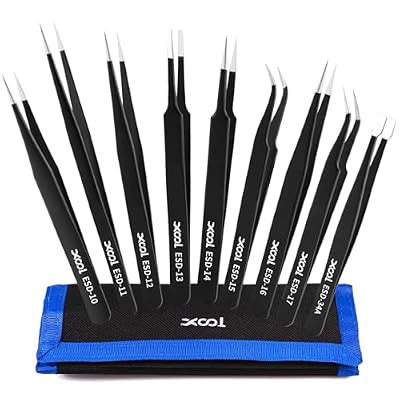
The XOOL 9-piece set is the all-rounder of this list: nine stainless steel tweezers covering the standard ESD tip codes from ESD-10 through ESD-17 plus the heavy-duty ESD-34A square-head tip. That spread means fine straight points in several lengths, a curved 45-degree tip for tight corners, a rounded spade tip for lifting chips, and a square-head tip for clamping pins and heavier parts. Every tool has a resistive ESD coating, and the set is non-magnetic.
The tweezers are heat-treated and hardened, which keeps the tips aligned and resists corrosion over years of bench use. Lengths run from about 10 cm for the compact square-head tool to about 15 cm for the longest fine-point pair, so you can pick a short tool for close work and a long one for reaching deep into a case. Protective tip covers come with the set, and everything stores in a compact canvas pouch that keeps the nine tools together between builds. The one thing it does not offer is replaceable tips: the tips are fixed stainless steel, so if you bend one, you replace that tweezer rather than swapping a tip. With nine in the pouch, that is rarely a problem.
- Specs:
- Pieces: 9 (ESD-10, ESD-11, ESD-12, ESD-13, ESD-14, ESD-15, ESD-16, ESD-17, ESD-34A)
- Material: Stainless steel, ESD coated, non-magnetic
- Length: About 10 to 15 cm depending on the tool
- Storage: Canvas pouch, protective tip covers included
- Part number: XL-A0918
4. kaverme 9PCS Precision Tweezers Set

The kaverme 9-piece set is another full-spread option, with straight, curved, and flat tip styles in black anti-static stainless steel. Each handle carries its ESD number, so you can tell the tools apart at a glance once you learn which code you reach for most. The set comes with a storage bag, and the black finish makes the tools easy to spot on a cluttered bench.
In practice, this set covers the same ground as the XOOL: fine points for screws and jumpers, curved tips for awkward angles, and flat tips for larger parts. At about half a pound for the set with its bag, it is light enough to toss into a tool roll for a build at a friend’s house.
One honest note: the listing’s own description text disagrees with its title about the piece count, so check the contents when the set arrives and confirm you have the full set before your first build. The title and model number describe a 9-piece set, and that is what we list here.
- Specs:
- Pieces: 9 (straight, curved, flat styles)
- Material: Stainless steel, anti-static, black finish
- Handles: ESD numbers marked on each handle
- Storage: Storage bag included
- Set weight: About 0.5 lb with bag
- Model: KA-009
5. YHYZ 6PCS Precision Tweezers Set, Version 2
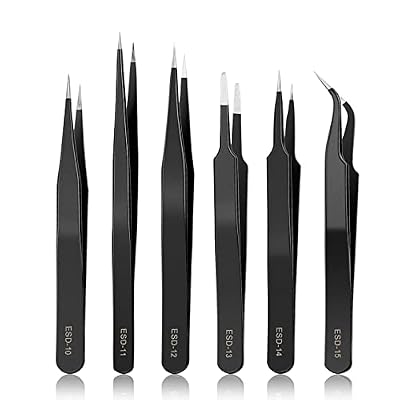
The YHYZ 6-piece Version 2 set sits between the compact iFixit trio and the nine-piece sets: six tools covering the core ESD codes ESD-10 through ESD-15, in black anti-static stainless steel. You get fine pointed tips for tiny parts, a curved needle-nose tip for narrow spaces, and a flat pointed tip for clamping larger components.
Version 2 of this set has rounded, smooth edges that YHYZ says make the tools more comfortable to hold during long sessions, and the tips are sharper than the first version. Protective tubes cover the tips between uses, which matters because these are genuinely sharp tools: the maker warns to replace the tubes after every use and to keep the set away from children. Six tools is a sensible middle ground. You get more choice than a three-piece set without the duplicates that creep into larger kits, and the ESD-10 through ESD-15 range covers jumpers, screws, connectors, and flat parts.
- Specs:
- Pieces: 6 (ESD-10, ESD-11, ESD-12, ESD-13 flat pointed, ESD-14, ESD-15 curved)
- Material: Stainless steel, anti-static coating, black finish
- Tip protection: Protective tubes included
- Version: Version 2, rounded smooth edges
- Model: TWV2-06
Comparison: Which Set Fits Your Bench?
If you want the smallest kit that still covers every common job, the iFixit set is the pick: three tips, a lifetime guarantee, and a pouch that keeps them safe. If fine work is your main task and you want the best single tool, the Wiha 44501 is the one to buy first, then add a set around it later.
For maximum coverage, the XOOL and kaverme nine-piece sets both put a full spread of tip shapes on your bench. The YHYZ six-piece set is the middle option: more shapes than the iFixit trio, fewer duplicates than the nine-piece kits. Whichever you choose, check two things before your first build: that the tips meet cleanly with no gap when you close them gently, and that the set is genuinely ESD-safe rather than just stainless steel.
FAQ
Do I need ESD-safe tweezers for PC building?
Yes, if you handle bare boards, memory, or GPUs. A static discharge too small to feel can damage sensitive components, and ESD-safe tweezers let charge dissipate slowly instead of jumping to the part. Standard metal tweezers without an ESD-safe design can carry a charge straight to a pin or a trace.
What tip shape is best for jumpers and front-panel connectors?
A fine pointed tip is the best choice for jumpers, front-panel connectors, and M.2 screws, because it grips tiny parts precisely and reaches into narrow gaps. A curved or angled tip helps when a header sits under a cooler or a GPU, since it lets you approach from the side while keeping your hand out of your line of sight.
Can I use regular beauty tweezers for PC building?
Beauty tweezers are a poor fit for PC work. Their tips are shaped for gripping hair, not hardware, so they slip on screws and connectors, and most are not ESD-safe. They also tend to be shorter than electronics tweezers, which makes reaching into a case harder.
How do I keep precision tweezers in good shape?
Store them in their pouch or case with the tip covers on, and never toss them loose into a drawer where the tips can bend. Wipe the tips clean after soldering work so flux does not corrode the steel, and check tip alignment before each build by closing the tweezers gently and looking for a gap.
Conclusion
Precision tweezers are a small purchase that pays off on every build, from the first front-panel connector to the last dropped screw. The iFixit set is the best all-round starting point, the Wiha 44501 is the finest single tool here, and the XOOL, kaverme, and YHYZ sets give you a full bench of tip shapes to choose from.