Most PC builds never need a soldering iron. You slot in the parts, plug in the cables, and close the case. But the moment you want to shorten a fan cable, swap switches on a soldered keyboard PCB, repair a torn USB port, or build a custom keyboard from a kit, a soldering iron becomes the tool that decides whether the job is clean or a mess. A cheap unregulated iron swings in temperature, lifts pads, and leaves cold joints. A good iron holds its temperature and heats up fast.
- How to Choose a Soldering Iron for PC Building
- 1. Hakko FX-888D Soldering Station Bundle — Best Overall
- 2. Hakko FX888DX-010BY Digital Soldering Station — Best Upgrade
- 3. PINECIL Smart Mini Portable Soldering Iron — Best Portable
- 4. SEQURE SI012 Portable Soldering Iron — Best Portable Value
- 5. WEP 882D 2-in-1 Soldering and Hot Air Rework Station — Best for Rework
- How the Five Compare
- FAQ
- Conclusion
This guide covers five soldering irons and stations that suit PC building work, from a full bench station to a pocket-size USB-C iron you can carry to a LAN event.
As an Amazon Associate, we earn from qualifying purchases.
How to Choose a Soldering Iron for PC Building
Wattage and thermal recovery. Wattage is about how fast the tip recovers temperature after touching a joint. A ground plane or a thick PSU wire sucks heat out of a small tip instantly. A 60-watt or stronger iron recovers in a second or two, so the joint flows before the board overheats. Irons below 40 watts struggle with anything heavier than a signal wire.
Temperature control. Look for a digital or dial control with a real temperature readout, not a fixed-wattage pencil. Working temperatures sit between 600 and 700 degrees Fahrenheit for leaded solder, a little higher for lead-free. A station that holds within a few degrees of the set point gives consistent joints and protects heat-sensitive parts. Sleep and auto-off modes matter too: a tip left hot oxidizes fast.
Tip system. Chisel tips in 1.6 to 2.4 mm cover most PC jobs, from through-hole joints to wire splices, while conical tips suit fine SMD work. The two most common ecosystems are Hakko T18 tips and the widely cloned T12 cartridge tips. Avoid irons with proprietary tips that only one seller stocks.
Bench station or portable iron. A bench station stays on your desk with a holder, a cleaner, and a stable base, and it gives the best thermal performance. A portable USB-C iron runs from a laptop charger or power bank, heats in seconds, and fits in a tool roll — ideal for keyboard meets or a small workspace.
Hot air for rework. A soldering iron handles through-hole parts and wires, but removing a surface-mount chip or a USB-C port needs hot air. A 2-in-1 station that pairs an iron with a hot air gun covers both jobs in one box and is the sensible pick if you plan to repair boards. A grounded tip and an ESD-safe handle are also worth having when you work on boards, and a solder sucker plus a spool of solder turn a bare iron into a usable kit.
1. Hakko FX-888D Soldering Station Bundle — Best Overall

The FX-888D is the station that most electronics benches are measured against, and for PC building it is hard to fault. The digital station holds its set temperature with fast recovery, so a joint on a thick ground plane flows in a couple of seconds instead of cooking the board. Five preset temperatures let you switch between leaded solder, lead-free solder, and a cooler setting for delicate work.
This bundle pairs the station with Hakko’s CHP170 flush cutter, useful for trimming component leads, cutting zip ties, and snipping wire to length. The iron uses the T18 tip family, one of the best-supported tip systems anywhere, with chisel, conical, and hoof shapes available from many sellers.
One honest note: the bundle listing showed no featured offers on a recent crawl, so check availability before ordering. The standalone FX-888D station is the same tool without the cutter.
Specs
- Power: 70-watt iron
- Temperature range: 120 to 899 degrees Fahrenheit (50 to 480 degrees Celsius)
- Tip system: Hakko T18 series
- Display: Digital LCD with 5 preset temperatures
- Footprint: 100 x 120 mm station body
- Included: Iron holder, sponge, CHP170 flush cutter
- ASIN: B00AWUFVY8
2. Hakko FX888DX-010BY Digital Soldering Station — Best Upgrade

The FX888DX is Hakko’s update to the FX-888D, and the main change is how you set the temperature. Instead of buttons, a rotary encoder knob lets you dial in a temperature and press to confirm, which is faster when your hands are full. A parameter lock prevents accidental changes when you bump the station mid-job. The iron is the same proven FX-8801 handle with a 65-watt heater, and it ships with a T18-D16 chisel tip, 1.6 mm, the right shape for most PC joints.
Thermal performance matches the older station, with the same 120 to 899 degree Fahrenheit range and the same quick recovery on heavy joints. Any T18 tips you already own fit here.
The FX888DX costs more than the FX-888D for what is mostly an interface improvement, so it is the pick for builders who change temperatures often. If you set one temperature and leave it there, the FX-888D does the same work. This is the blue-and-yellow version; Hakko also sells the same station in other housings under different listings.
Specs
- Power: 65 watts
- Temperature range: 120 to 899 degrees Fahrenheit
- Tip system: Hakko T18 series, T18-D16 chisel tip included
- Display: Digital with rotary encoder knob and parameter lock
- Iron: FX-8801 handle, 65-watt heater
- Weight: 3.8 lb
- ASIN: B0D4DJW54S
3. PINECIL Smart Mini Portable Soldering Iron — Best Portable

The PINECIL is the iron to buy if your soldering happens away from a bench. It is a 155 mm pencil, about 60 grams, that runs from any USB-C PD or Quick Charge supply, or from a DC barrel jack. Plug it into a laptop charger and it reaches working temperature in about 12 seconds. The 0.69-inch OLED screen shows the set and live tip temperatures, and two buttons adjust the setting without a separate station.
Despite the size, the PINECIL is a serious tool. It runs open-source IronOS firmware, supports motion-based sleep and wake, and takes TS-series tips, widely available in many shapes. The 100 to 400 degree Celsius range covers delicate SMD joints to heavy wire splices, and at 20 volts it draws up to 65 watts.
The trade-off is that you supply the power: a USB-C PD charger or DC supply is not included, and a weak phone charger will not drive it. You also need a separate stand.
Specs
- Power: USB-C PD/QC, 12 to 20V (up to 65W with a 20V supply); DC barrel jack 12 to 21V
- Temperature range: 100 to 400 degrees Celsius
- Tip system: TS series
- Display: 0.69-inch OLED
- Size: 155 mm long, 60 g
- Features: IronOS firmware, auto sleep, motion wake
- ASIN: B096X6SG13
4. SEQURE SI012 Portable Soldering Iron — Best Portable Value

The SI012 takes the same portable idea as the PINECIL and adds a power adapter in the box, so it works the moment you open it. The kit includes a 19-volt adapter, two tips, and the iron itself, a 172 mm pencil weighing only 33 grams. It heats to solder-melting temperature in about 8 seconds and holds within 1 percent of the set point. The 0.91-inch OLED screen is larger than most portables, and the three-mode system drops the tip temperature after three minutes idle to extend tip life.
Where the SI012 stands out is tip compatibility: it accepts both T12 cartridge tips and TS-series tips, which together cover nearly every shape a PC builder will ever need. The dual power jacks take DC5525 barrel input from 12 to 24 volts or USB-C PD 3.0, so it runs from a laptop brick, a power bank, or a bench supply.
The slim handle can feel small during long sessions, but for soldering a few switches, repairing a cable, or fixing a board at a meetup, it is fast and complete in one box.
Specs
- Power: 68 watts max
- Temperature range: 212 to 842 degrees Fahrenheit (100 to 450 degrees Celsius)
- Tip system: T12 and TS series
- Display: 0.91-inch OLED
- Size: 172 mm long, 33 g
- Included: 19V power adapter, 2 soldering tips
- Features: Auto sleep, buzzer warnings, firmware upgradable
- ASIN: B0BZ83D4D1
5. WEP 882D 2-in-1 Soldering and Hot Air Rework Station — Best for Rework

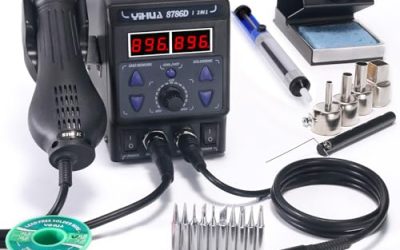
If your PC work includes removing parts, not just adding them, the WEP 882D covers both sides of the job. One compact unit holds a soldering iron and a hot air gun, each with its own PID temperature control. The iron runs from 392 to 896 degrees Fahrenheit for normal joints, while the hot air gun runs from 212 to 896 degrees Fahrenheit with airflow up to 120 liters per minute for lifting SMD chips and reflowing connectors.
The kit is unusually complete: five soldering tips, three hot air nozzles, two spools of solder wire, a brass wool cleaner, a desoldering pump, and tweezers. The iron sleeps after ten minutes idle to protect the tip, and the main unit is under 6 inches wide.
The iron is a standard ceramic-heater pencil rather than a cartridge-tip design, so thermal recovery is a step behind the Hakko stations on heavy ground-plane joints. For a rework bench that also handles everyday soldering, that is a fair trade for having both tools in one box.
Specs
- Power: 750 watts total (iron plus hot air)
- Iron temperature range: 392 to 896 degrees Fahrenheit (200 to 480 degrees Celsius)
- Hot air temperature range: 212 to 896 degrees Fahrenheit (100 to 480 degrees Celsius)
- Airflow: Up to 120 L/min, knob-controlled
- Display: LED with PID control for both tools
- Size: 5.9 x 3.54 x 2.28 inches
- Included: 5 soldering tips, 3 hot air nozzles, 2 solder spools, brass wool cleaner, desoldering pump, tweezers
- ASIN: B0BX5KXBPD
How the Five Compare
The two Hakko stations are the bench anchors. The FX-888D bundle is the best all-around choice for a home workbench, and the cutter in the box is a genuinely useful extra. The FX888DX adds the rotary encoder and a parameter lock for builders who adjust temperature often. Both use T18 tips and recover fast on heavy joints.
The portables split by what you already own. The PINECIL is the lighter, more refined iron, but it needs a USB-C PD charger you supply yourself. The SI012 includes a 19-volt adapter and accepts both T12 and TS tips, so it is the more complete kit out of the box.
The WEP 882D is the only pick with hot air, which makes it the right choice if you remove surface-mount parts or reflow connectors. If you never desolder, one of the Hakko stations or a portable will serve you better.
FAQ
What wattage soldering iron do I need for PC building?
A 60-watt iron or stronger covers nearly all PC work. Wattage drives thermal recovery: the tip reheats quickly after touching a joint, so solder flows before heat spreads into the board. Irons under 40 watts struggle with ground planes and thick wires.
Can I solder keyboard switches with a portable USB-C iron?
Yes. A USB-C iron like the PINECIL or SI012 reaches working temperature in about 10 seconds and holds it well enough for through-hole switch joints. Use a chisel tip around 1.6 to 2.4 mm and a USB-C PD charger of 45 watts or more, since a weak phone charger will not deliver enough power. For a full keyboard build of 60 or more switches, a bench station is more comfortable.
Do I need a hot air station for PC repair?
You need hot air if you remove surface-mount components, USB-C ports, or chips with many pins. A soldering iron alone cannot heat all the pins of a connector at once, so parts come off damaged or pads lift. A 2-in-1 station like the WEP 882D adds a hot air gun alongside the iron.
What temperature should I solder at?
For common leaded solder, 600 to 650 degrees Fahrenheit works well for most PC joints. Lead-free solder needs more heat, typically 650 to 700 degrees Fahrenheit. Start at the lower end and raise the temperature only if joints are slow to flow. Higher temperatures oxidize tips faster and risk lifting pads.
Conclusion
A good soldering iron turns PC modding and repair from a gamble into a routine job. The Hakko FX-888D bundle is the best bench station for most builders, with fast recovery, T18 tips, and a useful cutter in the box. The FX888DX adds a faster rotary encoder interface for builders who change temperatures often. The PINECIL and SEQURE SI012 bring real soldering performance to a pocket-size tool, and the WEP 882D adds hot air rework for anyone who removes parts as often as they install them.