A PC that refuses to boot rarely announces the cause. A power supply can spin its fan while a 12V rail sags under load, a front-panel header can sit dead while everything else lights up, and a single shorted wire can keep a build in a boot loop. A multimeter turns guessing into a number: it tells you whether a rail holds 12 volts, whether a cable has continuity, and whether a component is drawing current it should not.
- How to Choose a Multimeter for PC Building
- 1. Fluke 115 True-RMS Digital Multimeter
- 2. Klein Tools MM720 Digital Multimeter
- 3. Klein Tools MM450 Slim Digital Multimeter
- 4. AstroAI DM6000AR True-RMS Digital Multimeter
- 5. AstroAI CM600 Inrush Clamp Meter
- Comparison: Which Multimeter Fits Your Build?
- Frequently Asked Questions
- Conclusion
For PC building, the meter does not need to be an industrial instrument. It needs accurate DC voltage readings on the 3.3V, 5V, and 12V rails, a continuity beeper for cable and header checks, and enough resolution to tell 4.9V from 5.1V. A clamp format lets you measure current without breaking the circuit at all.
The five meters below cover the range a builder actually needs: a bench-grade reference, a high-voltage workhorse, a slim meter for cramped cases, a feature-packed budget option, and a clamp meter for current checks. Every one is auto-ranging and True-RMS, so you get honest readings on the switching power supplies that run every modern PC.
As an Amazon Associate, we earn from qualifying purchases.
How to Choose a Multimeter for PC Building
Count and resolution. The count rating tells you how finely a meter can resolve a reading. A 6000-count meter can display up to 5999 before switching ranges, giving 0.001V resolution on a 6V range. That matters when you check a 5V rail.
True-RMS or averaging. A True-RMS meter measures the real effective value of an AC waveform, while an averaging meter assumes a clean sine wave and can read low on distorted signals. PC power supplies produce waveforms that are anything but clean.
Voltage and current ranges. PC work lives at low voltages: 3.3V, 5V, and 12V DC, plus the 120V AC input side of the power supply. Any meter rated to 600V covers that with enormous margin. For current, 10A through the leads handles fan and lighting circuits; anything bigger belongs on a clamp meter.
CAT safety rating. The CAT rating describes how much transient voltage a meter can survive. CAT III 600V is the standard for distribution-level circuits and is more than enough for PC work. Never use a meter with no CAT rating, or one rated only CAT I, on a live power supply.
Continuity and diode testing. The continuity beeper is the most-used function on a builder’s meter. It confirms a cable is intact, finds shorts between adjacent pins, and checks that a case switch actually closes. Every meter here has a fast audible beeper, plus a diode test mode for verifying LEDs and protection diodes.
Size and display. A meter should be easy to read at arm’s length and small enough to hold in one hand while you probe with the other. A backlit display helps inside a dark case, and silicone leads stay flexible in a cold room.
1. Fluke 115 True-RMS Digital Multimeter

The Fluke 115 is the meter other meters get compared against. It is a compact field-service instrument with a 6000-count backlit display, True-RMS measurement, and a build quality that survives years of bench use. Its strengths are accuracy where it counts and a simple one-handed layout, and the Min/Max/Average function records voltage dips while a system boots or a game loads.
It measures AC and DC voltage to 600V, AC and DC current to 10A continuous (20A momentary for 30 seconds), resistance, continuity, frequency, capacitance, and diode drop. The included TL75 silicone test leads are flexible, and the holster protects the meter from bench drops. The trade-off is scope: there is no temperature input and no low-impedance mode. For pure PC diagnostics, neither is a deal-breaker.
Specs
- Count: 6000-count backlit display
- True-RMS: Yes
- Max voltage: 600V AC/DC
- Max current: 10A continuous, 20A momentary
- CAT rating: CAT III 600V
- Functions: Voltage, current, resistance, continuity, frequency, capacitance, diode test, Min/Max/Average
- Leads: TL75 silicone test leads, holster, 9V battery included
- ASIN: B000OCFFMW
2. Klein Tools MM720 Digital Multimeter
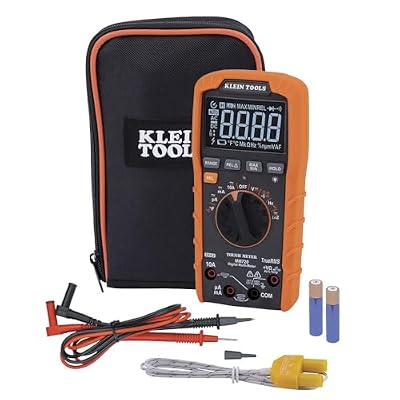
The Klein MM720 is the high-voltage pick in this guide, and the one to choose if your bench work extends past the PC case. It is an auto-ranging True-RMS meter rated to 1000V AC/DC, with a low-impedance (LoZ) mode that bleeds off ghost voltage so a dead circuit reads zero instead of a misleading phantom value. That mode is genuinely useful when you troubleshoot a wall outlet or a UPS that feeds your build.
Beyond the headline numbers, the MM720 measures up to 10A, resistance to 60 MOhms, capacitance to 6000 uF, frequency to 500 kHz, and temperature from -40 to 1832 degrees Fahrenheit with the included thermocouple. The display has an optical sensor that adjusts brightness to ambient light, and the safety rating is CAT III 1000V and CAT IV 600V, the highest in this guide. It is the largest meter here, so it is more of a bench instrument than a pocket tool, but if you want one meter that covers PC diagnostics, home wiring checks, and UPS verification, it is the most capable option on the list.
Specs
- Count: 6000-count display with optical sensor
- True-RMS: Yes
- Max voltage: 1000V AC/DC
- Max current: 10A AC/DC
- CAT rating: CAT III 1000V, CAT IV 600V
- Functions: Voltage, current, resistance, continuity, capacitance, frequency, temperature, LoZ mode, Min/Max/Relative, data hold
- Resistance range: Up to 60 MOhms
- Weight: 12.2 oz; carrying case, test leads, thermocouple included
- ASIN: B0B57PDQJC
3. Klein Tools MM450 Slim Digital Multimeter

The MM450 is the meter for builders who work inside the case. Its slim body measures just 6.5 x 3.15 x 1.09 inches and weighs 9.2 ounces, so it sits comfortably in one hand while the other hand probes a header or a SATA power connector. The reverse-contrast display stays readable in the dim light inside a chassis, and the Lead Alert feature lights an LED if you plug a lead into the wrong jack.
It is a full-featured True-RMS meter: 600V AC/DC, 10A AC/DC, resistance to 50 MOhms, capacitance to 400 uF, frequency to 50 kHz, temperature to 1832 degrees Fahrenheit, plus continuity, diode test, and duty cycle. That covers every measurement a PC builder needs. The carrying pouch, test leads, thermocouple, and batteries are included. It gives up the MM720’s 1000V ceiling and LoZ mode, but neither matters for PC work, where 600V is already far more than any rail requires.
Specs
- Count: 6000-count reverse-contrast display with optical sensor
- True-RMS: Yes
- Max voltage: 600V AC/DC
- Max current: 10A AC/DC
- CAT rating: CAT III 600V
- Functions: Voltage, current, resistance, continuity, capacitance, frequency, duty cycle, temperature, diode test
- Size: 6.5 x 3.15 x 1.09 in; weight 9.2 oz
- Extras: Lead Alert LEDs, carrying pouch, thermocouple with adapter included
- ASIN: B0B6WW5ZX8
4. AstroAI DM6000AR True-RMS Digital Multimeter

The AstroAI DM6000AR packs the most functions per dollar in this guide. It is a 6000-count True-RMS meter with auto or manual ranging, and it measures voltage to 1000V DC and 750V AC, current to 10A, resistance to 60 MOhms, capacitance to 60 mF, frequency to 60 MHz, and temperature from -40 to 1370 degrees Celsius with the included K-type thermocouple. It also tests transistors, a function none of the other meters here offer.
The display is a large backlit LCD with a kickstand, and the meter supports data hold and auto shut-off. Safety is rated CAT III 600V and CAT II 1000V, with dual ceramic fuses protecting the current inputs. Availability has varied across listings, so confirm before ordering.
Specs
- Count: 6000-count backlit LCD
- True-RMS: Yes
- Max voltage: 1000V DC, 750V AC
- Max current: 10A DC
- CAT rating: CAT III 600V, CAT II 1000V
- Functions: Voltage, current, resistance, continuity, capacitance, frequency, duty cycle, temperature, diode test, transistor test
- Size: 7.48 x 3.54 x 1.38 in
- Extras: K-type thermocouple, multi-function socket, kickstand, 9V battery included
- ASIN: B071JL6LLL
5. AstroAI CM600 Inrush Clamp Meter

The CM600 is a different kind of meter, and it earns its place by measuring current without touching a wire. Its clamp jaw closes around a single conductor and reads AC and DC current up to 1000A, so you can check how much current a PSU cable or a UPS feed is carrying while the system runs. No breaking the circuit, no inline probes, no risk of a short across a live rail.
It is still a full multimeter: 6000-count True-RMS, voltage to 1000V DC and 750V AC, resistance to 60 MOhms, capacitance to 100 mF, frequency, duty cycle, temperature, continuity, diode test, and non-contact voltage detection. The inrush mode captures the brief current spike when a PSU first starts, which helps diagnose startup failures that a normal meter would miss. At 9.45 x 3.35 x 1.85 inches and 1.41 pounds, it is the biggest tool here, and the clamp jaw needs clearance around a single wire. But for current checks, there is no substitute, and as a second meter it complements any of the four above.
Specs
- Format: Clamp meter with test-lead inputs
- Count: 6000-count display
- True-RMS: Yes
- Max current: 1000A AC/DC through the clamp jaw
- Max voltage: 1000V DC, 750V AC
- Functions: Current, voltage, resistance, continuity, capacitance, frequency, duty cycle, temperature, diode test, NCV, inrush, VFD, LoZ
- Size: 9.45 x 3.35 x 1.85 in; weight 1.41 lb
- Extras: Test leads, K-type thermocouple, storage bag, 3 AAA batteries included
- ASIN: B0BRPP58LS
Comparison: Which Multimeter Fits Your Build?
If you want one meter to trust for years, the Fluke 115 is the reference: accurate, simple, and built to last. It lacks temperature and LoZ, but for straight PC diagnostics it is the most dependable tool here.
If your work goes past the case, the Klein MM720 is the most capable meter in the guide. Its 1000V rating, LoZ mode, and CAT IV rating cover mains wiring and UPS checks the others cannot touch.
If you work inside cramped cases, the Klein MM450 is the practical choice. It is slim, light, and readable in the dark, and its Lead Alert feature guards against the most common probing mistake.
If you want the widest feature set for the least money, the AstroAI DM6000AR covers voltage, current, resistance, capacitance, frequency, temperature, and transistor testing in one meter.
If you need to measure current on a live circuit, the AstroAI CM600 clamp meter is the only format that does it safely. It is best as a second meter alongside a standard handheld.
Frequently Asked Questions
Do I need a True-RMS multimeter for PC building?
Yes, it is worth having. PC power supplies and fan controllers produce waveforms that are not clean sine waves, and an averaging meter can read low on those signals. A True-RMS meter reports the real effective value, so your 12V rail reading is honest under any load.
What voltage should a 12V PSU rail read?
A healthy 12V rail sits between 11.4V and 12.6V under the ATX specification, and most good supplies hold within a few hundredths of a volt of 12.00V. A reading outside that range points to a failing supply or an overloaded rail. Check the rail while the system is loaded, since a weak supply can look fine at idle.
Can a multimeter test a power supply without a motherboard?
Yes. With the PSU unplugged from the wall, short the green PS_ON wire to any black ground wire on the 24-pin connector using a paperclip, then plug the supply in and switch it on. The fan should spin, and you can probe the 3.3V, 5V, and 12V pins against ground. This paperclip test only confirms the supply starts and holds voltage with no load.
Is a clamp meter better than a regular multimeter for PC work?
They do different jobs. A regular multimeter probes voltage, resistance, and continuity at a point, which covers most PC diagnostics. A clamp meter measures current through a wire without breaking the circuit, which a handheld cannot do at all. For most builders, the handheld comes first, and the clamp meter is the second tool you add when you start chasing current-draw faults.
Conclusion
A multimeter is the cheapest insurance a PC builder can own. It turns a dead build from a guessing game into a ten-minute diagnosis, and it catches failing power supplies before they take a motherboard or a GPU with them. Pick the Fluke 115 for a reference you will trust for years, the Klein MM720 for the widest capability, the Klein MM450 for work inside the case, the AstroAI DM6000AR for the deepest feature set, or the AstroAI CM600 when current is the question.