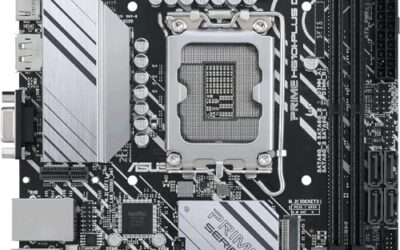
The socket decides everything. Before comparing M.2 slots or Wi-Fi generations, an Intel buyer has to answer one question: which processor is going on this board? A budget of 250 dollars covers a surprisingly wide spread, from an older LGA 1200 micro-ATX board to a brand-new LGA 1851 platform for Core Ultra chips, and a mismatch between board and CPU is the one mistake no BIOS update can fix.
This guide is for builders choosing a board under 250 dollars for a gaming rig, a workstation, or a quiet home PC, and for upgraders deciding whether to reuse DDR4 memory or move to DDR5. Each pick below is at or under the cap. The notes lean on the specs printed in each listing, such as socket, memory type, M.2 count, and networking, so use them as a shortlist and confirm the CPU support list for 2026 builds before you order.
Think of the board as the foundation: it rarely gets replaced, so a sensible match with your processor and memory saves money for years. Spend where the listing shows real differences, such as M.2 count and power delivery, and skip decoration like lighting.
Quick Picks

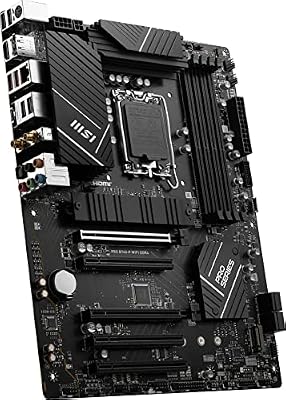
MSI PRO B760-P WiFi DDR4 ProSeries Motherboard - Supports 12th/13th/14th Gen Intel Processors, LGA 1700, DDR4, PCIe 4.0, M.2, 2.5Gbps LAN, USB 3.2 Gen2, HDMI/DP, Wi-Fi 6E, Bluetooth 5.3, ATX




As an Amazon Associate we earn from qualifying purchases. Product prices and availability are accurate as of the date/time indicated.

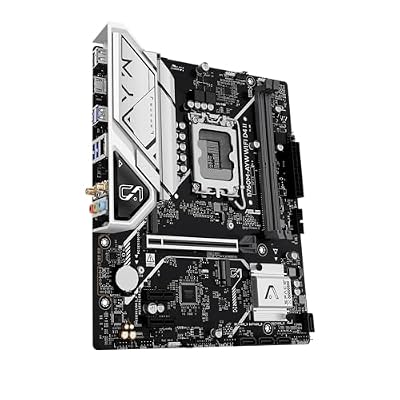
ASUS B760M-AYW WiFi D4 II Intel® B760 (LGA 1700) microATX mATX Motherboard, PCIe 5.0 x16 Support, Two M.2 Slots, DDR4, Realtek 2.5Gb Ethernet, Wi-Fi 6, HDMI, SATA 6 Gbps, Front USB 5Gbps, Aura Sync




As an Amazon Associate we earn from qualifying purchases. Product prices and availability are accurate as of the date/time indicated.

ASRock B560M-C Micro-ATX Motherboard, Supports 10th & 11th Gen Intel Core Processors (LGA1200), DDR4 4800MHz (OC), PCIe 4.0, Dual M.2, 8 SATA3, Intel Gigabit LAN, WiFi + BT 5.1


As an Amazon Associate we earn from qualifying purchases. Product prices and availability are accurate as of the date/time indicated.

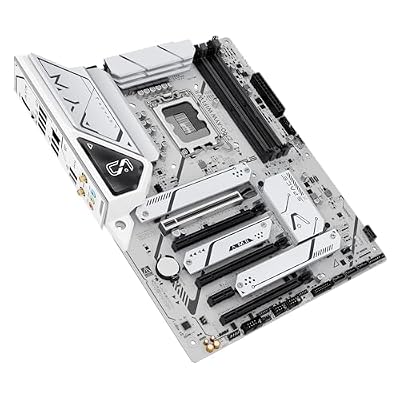
ASUS Z790-AYW WiFi W II Intel Z790 (LGA 1700) ATX Motherboard with PCIe® 5.0, 3X M.2, 12+1 DrMOS, DDR5, WiFi 6, 2.5Gb LAN, HDMI, USB 10Gbps Type-C®, USB 10Gbps Type-C®, Thunderbolt™, USB4®, Aura Sync




As an Amazon Associate we earn from qualifying purchases. Product prices and availability are accurate as of the date/time indicated.

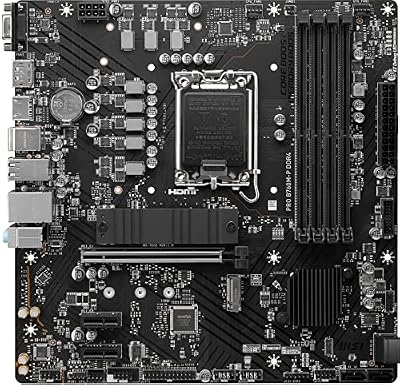
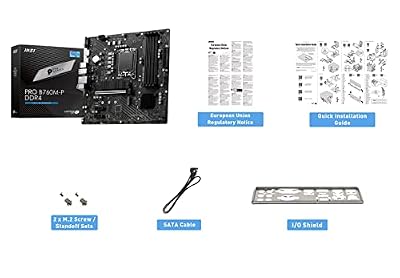
MSI PRO B760M-P DDR4 ProSeries Motherboard (Supports 12th/13th/14th Gen Intel Processors, LGA 1700, DDR4, PCIe 4.0, M.2, USB 3.2 Gen2, HDMI/DP, mATX)


As an Amazon Associate we earn from qualifying purchases. Product prices and availability are accurate as of the date/time indicated.

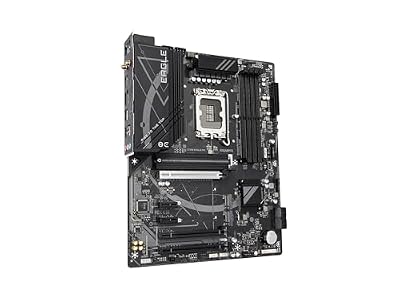
GIGABYTE Z790 Eagle AX LGA 1700 ATX Motherboard, Support Intel Core 14th/13th/12th Gen, DDR5, 12+1+1 Power Phase, 3X M.2, PCIe 5.0, USB-C 3.2, WIFI6E, 2.5GbE, Q-Flash, EZ-Latch, RGB Fusion


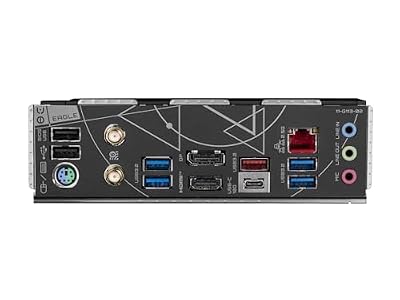

As an Amazon Associate we earn from qualifying purchases. Product prices and availability are accurate as of the date/time indicated.
| Product | Best for | Key spec from the title |
|---|---|---|
| MSI PRO B760-P WiFi DDR4 | Value ATX build with old RAM | LGA 1700, DDR4, PCIe 4.0, 2.5Gbps LAN |
| ASUS B760M-AYW WiFi D4 II | Compact build with fast GPU slot | microATX, PCIe 5.0 x16, two M.2 slots |
| ASRock B560M-C | Reviving a 10th or 11th Gen system | LGA1200, dual M.2, 8 SATA3 ports |
| ASUS Z790-AYW WiFi W II | Overclock-ready DDR5 build | Z790, 3x M.2, 12+1 DrMOS, DDR5 |
| MSI PRO B760M-P DDR4 | Lean mATX office or gaming PC | DDR4, HDMI/DP, USB 3.2 Gen2 |
| GIGABYTE Z790 Eagle AX | Storage-heavy DDR5 build | 12+1+1 power phase, 3x M.2, WIFI6E |
| MAG Z890 Tomahawk WiFi II | Newest Core Ultra platform | LGA 1851, DDR5, Series 2 support |
How to Choose
Match the Socket and the Chip Generation
LGA 1700 boards take 12th, 13th, and 14th Gen processors, LGA 1200 handles 10th and 11th Gen, and LGA 1851 is for Core Ultra Series 2. These sockets are not interchangeable. Read the supported CPU line on the listing and, for older chips, check whether a BIOS update is required to recognize the processor. Chipset letters matter less than the socket: B-series boards run most mainstream chips well, while Z-series adds CPU overclocking.
DDR4 or DDR5
Your memory type is fixed by the board, not selectable. DDR4 boards save money if you can reuse sticks from an earlier build, and DDR5 boards cost more but offer a path to higher memory speeds. Do not assume a quick swap later. A 16 GB kit is the practical minimum for gaming, with 32 GB sensible for editing or heavy multitasking. Ignore the headline overclock speed on the listing unless you have a kit rated for it.
M.2 Slots, SATA Ports, and PCIe Lanes
Count the M.2 slots, because one slot fills fast once you add a game drive and a scratch drive. Two is workable, three is comfortable. Check whether the top slot runs PCIe 4.0 and whether the graphics slot is PCIe 4.0 or 5.0; today’s graphics cards rarely saturate either, so PCIe 5.0 is more of a long-term feature than a requirement. For a bulk-storage build, the number of SATA3 ports deserves a look.
Power Delivery, Networking, and Where Budget Boards Cut Corners
Heavier chips want a robust VRM, and listings often mention phase counts. A board with 12+1 phases suits a sturdy mid-range CPU; a lean mATX board suits a locked, lower-wattage processor. Built-in 2.5Gb Ethernet and Wi-Fi 6 or 6E cover most home networks. Budget models usually trim heatsinks, rear ports, and extra fan headers, so count the USB Type-C and display outputs you need before checkout.
The 7 Best Options
MSI PRO B760-P WiFi DDR4
This ATX board supports 12th, 13th, and 14th Gen Intel chips on LGA 1700 with DDR4 memory, PCIe 4.0, M.2 storage, and 2.5Gbps LAN. It suits builders who want a full-size layout and plan to reuse DDR4 memory instead of buying a new kit.
- Strength: wide 12th to 14th Gen support makes it flexible for upgrades.
- Strength: Wi-Fi plus 2.5Gbps LAN covers wired and wireless networking.
- Trade-off: DDR4 caps the memory ceiling below what DDR5 boards allow.
Skip it if you want DDR5 or a board that supports overclocking the CPU. It also gives up some of the extras found on higher-priced Z-series models, so it works best for a straightforward build where reliability and a clear upgrade path matter more than tuning options.
ASUS B760M-AYW WiFi D4 II
A microATX B760 board with DDR4, two M.2 slots, a PCIe 5.0 x16 graphics slot, Realtek 2.5Gb Ethernet, and Wi-Fi 6. It is a good fit for a small-case gaming build where the graphics slot should be ready for newer cards. The combination of DDR4 and a modern graphics slot is a practical middle path for people upgrading in stages.
- Strength: PCIe 5.0 x16 gives the GPU slot headroom for future cards.
- Strength: two M.2 slots handle a system drive and a game drive.
- Trade-off: microATX leaves fewer expansion slots than a full ATX board.
Skip it if you plan to add several expansion cards or a third drive in M.2 format. Small-case builders should also confirm cooler clearance and the number of fan headers, since compact boards tend to offer fewer of both than their full-size siblings.
ASRock B560M-C
Built around LGA1200, this micro-ATX board supports 10th and 11th Gen Intel Core chips, DDR4 up to 4800MHz with overclocking, PCIe 4.0, dual M.2, and eight SATA3 ports. It makes sense for anyone refreshing an older Intel system without replacing the processor. Home-server builders sometimes pick this board purely for its SATA count, as extra drive ports are rare at this size.
- Strength: eight SATA3 ports suit file servers and storage-heavy builds.
- Strength: dual M.2 and PCIe 4.0 keep the platform usable.
- Trade-off: LGA1200 is an older socket with no path to the newest processors.
Skip it if you want a platform that can take 12th Gen or later chips. Anyone building from scratch today will likely prefer LGA 1700 or newer, but for a refresh of an existing machine the economics can still favor this board.
ASUS Z790-AYW WiFi W II
This is a Z790 ATX board on LGA 1700 with DDR5, PCIe 5.0, three M.2 slots, 12+1 DrMOS power stages, Wi-Fi 6, 2.5Gb LAN, HDMI, and a USB 10Gbps Type-C port. It targets builders who want overclocking support and plenty of storage. The USB 10Gbps Type-C port also helps with fast external drives, and the HDMI output supports a basic display setup for first boot.
- Strength: Z790 with 12+1 DrMOS supports stronger processors and tuning.
- Strength: three M.2 slots leave room for storage growth.
- Trade-off: DDR5 memory adds to the overall build cost.
Skip it if you plan to run a modest locked CPU and prefer to save with DDR4. Buyers who only need a mid-range processor can put that money toward a better graphics card instead of paying for features they will never use.
MSI PRO B760M-P DDR4
The simplest listing in the group: a micro-ATX board for 12th, 13th, and 14th Gen chips with DDR4, PCIe 4.0, M.2, USB 3.2 Gen2, and HDMI plus DisplayPort outputs. It is a clean base for a compact office or light gaming PC. Builders pairing it with an integrated-graphics processor can run a capable desktop before adding a separate graphics card later.
- Strength: HDMI and DisplayPort outputs support integrated graphics setups.
- Strength: DDR4 support keeps total build cost down.
- Trade-off: the title mentions no built-in Wi-Fi, so you may need an adapter.
Skip it if wireless networking must come built in or you want multiple M.2 slots. Verify the full spec sheet before ordering, because the title is short on networking and storage details compared with the other boards in this group.
GIGABYTE Z790 Eagle AX
An ATX Z790 board for 12th to 14th Gen chips with DDR5, a 12+1+1 power phase design, three M.2 slots, PCIe 5.0, USB-C 3.2, and Wi-Fi 6E. It suits an enthusiast who wants stronger power delivery and the newer wireless standard. Creators who copy large files between several drives will appreciate the extra M.2 capacity right from the start.
- Strength: Wi-Fi 6E offers access to the 6 GHz band on supported routers.
- Strength: three M.2 slots and PCIe 5.0 prepare it for future upgrades.
- Trade-off: DDR5 and Z790 together raise the cost of the full build.
Skip it if you only need a basic office machine or plan to stay on DDR4. The extra power phases and wireless upgrade matter most to builders who push their hardware, not to someone browsing and doing spreadsheets.
MAG Z890 Tomahawk WiFi II
Supports Intel Core Ultra processors (Series 2) on LGA 1851, with DDR5 memory boost rated up to 9200+ MT/s overclocked, in ATX format. It is the only forward-looking platform here, meant for buyers who want the newest Intel generation.
- Strength: LGA 1851 is the current socket for Core Ultra Series 2 chips.
- Strength: four DDR5 slots and high rated speeds give memory flexibility.
- Trade-off: it demands DDR5 and a Core Ultra processor, which costs more overall.
Skip it if you want to reuse a 12th to 14th Gen processor or DDR4 memory. Because the platform is new, expect to buy the processor, memory, and cooler together, and plan the budget so the board is not the only part you can afford.
Which One Fits Your Situation
Reusing Parts From an Older Build
If you own DDR4 and a 12th to 14th Gen chip, the MSI PRO B760-P WiFi DDR4 gives the most complete package. If the old chip is 10th or 11th Gen, the ASRock B560M-C is the only match.
A Small Case With a Strong Graphics Card
The ASUS B760M-AYW WiFi D4 II pairs a compact microATX footprint with a PCIe 5.0 x16 slot, which keeps the GPU upgrade path open.
A Fresh Build With Overclocking in Mind
Choose between the ASUS Z790-AYW WiFi W II and the GIGABYTE Z790 Eagle AX. The ASUS stresses its 12+1 power stages, while the GIGABYTE adds Wi-Fi 6E and a 12+1+1 design.
Building on the Newest Platform
The MAG Z890 Tomahawk WiFi II is the clear choice for Core Ultra Series 2, since none of the other boards share that socket.
Common Mistakes
- Pairing a CPU with the wrong socket and discovering it at the case.
- Forgetting that DDR4 and DDR5 are not interchangeable on a given board.
- Counting on built-in Wi-Fi when the listing does not mention it.
- Spending on Z-series features while running a locked processor.
- Ignoring BIOS version requirements for newer processors on older boards, which can leave a new build unable to boot until the firmware is updated.
Related guides
- Usb C Kvm Switch For Two Laptops And Two Monitors
- Vertical Laptop Stand For Dual Laptop Desk Setup
- Nvme Enclosure With Active Cooling For Mac Mini
Frequently Asked Questions
Do I need Z790 or is B760 enough?
B760 handles most gaming and productivity builds with a mid-range processor and a single graphics card. Z790 matters mainly if you want to overclock an unlocked processor or need more storage connectivity.
Can I use DDR4 on a DDR5 board?
No. The slots are physically different, and each board supports only one type. Check the listing before buying memory.
Is PCIe 5.0 necessary today?
Not for most users. PCIe 4.0 is enough for current graphics cards and SSDs, though 5.0 adds headroom for later upgrades.
Which form factor should I pick?
ATX gives more slots and headers, while micro-ATX saves space. Match the board to your case and expansion needs, and confirm that the case lists support for the size you choose. Mini cases often accept only micro-ATX.