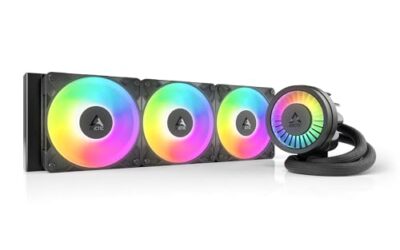
A case full of fans that all spin at whatever the motherboard decides is a common source of noise, and a dedicated controller is the cheapest way to fix it. The question behind the best fan controller under 75 dollars is not really about price, though. It is about what you want to control: a handful of case fans from a knob, ten fans from software, or a single quiet NAS fan fed from a USB port.
This guide is for builders who have run out of motherboard fan headers, owners of small servers who want to slow a loud fan, and anyone adding a hub to a case with more fans than ports. The seven picks below range from a simple USB-C powered splitter to a ten-port unit with per-port PWM control, which makes 2026 a good year to match the controller to the job instead of buying the first hub that shows up.
Quick Picks

ARCTIC Fan Controller – 10 Ports with Individual PWM Control, Windows & Linux (Kernel 7.2+) Support, 2 A per Port, 4.5 A Total, Magnetic or Adhesive mounting


As an Amazon Associate we earn from qualifying purchases. Product prices and availability are accurate as of the date/time indicated.

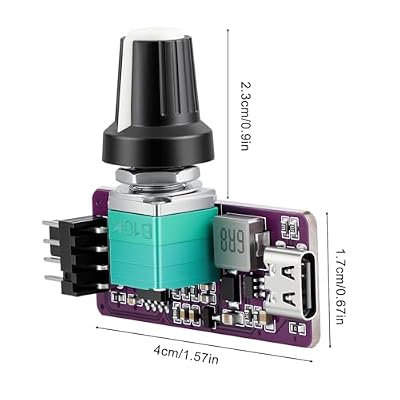
OwlTree DIY Type C 5V to 12V 4 Pin PWM Fan Speed Adapter Controller Supported PC Cooling Fan, Max 12V 8W Output


As an Amazon Associate we earn from qualifying purchases. Product prices and availability are accurate as of the date/time indicated.

4 Pin 12V PWM Fan Controller 6 Fans Supported , PC Fan Adapter Hub Powered by SATA and DC 5525, Cooling Fan Speed Knob with Max Total 60W 5A Output


As an Amazon Associate we earn from qualifying purchases. Product prices and availability are accurate as of the date/time indicated.

12V 4 Pin PWM Fan Speed Controller PC Fan Hub 6 Fans Supported, Powered by Type-C PD3.0 QC 3.0 and DC 5521 with Max Total 60W Output


As an Amazon Associate we earn from qualifying purchases. Product prices and availability are accurate as of the date/time indicated.

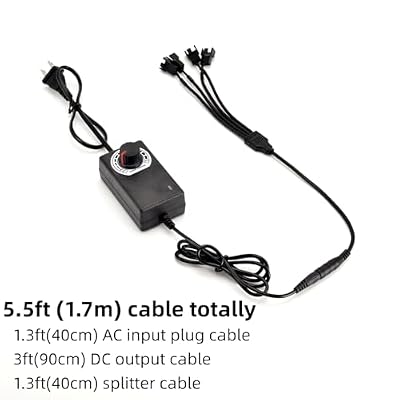
12V PC Fan Speed Controller, Fan Power Supply 100-240V AC to 3-12V DC 36W Adjustable, with Fan Splitter Cable 4X 3pin or 4pin Connector AC DC Adapter



As an Amazon Associate we earn from qualifying purchases. Product prices and availability are accurate as of the date/time indicated.

PC Fan Controller Supports 4 Pin Fans, Fan Speed Hub | with 4 Pin 1 to 3 Splitter, Powered by 5V USB C, MAX 8W for 12V Computer NAS Server Fans


As an Amazon Associate we earn from qualifying purchases. Product prices and availability are accurate as of the date/time indicated.

Thermalright ARGB and Fan HUB X12 IR Black Hub Controller Support 12 Groups of CPU Fans,3Pin PC ARGB Controller and 4Pin PWM Fan,SATA Power Cord Direct Input(12V 4pin RGB is Not Supported)


As an Amazon Associate we earn from qualifying purchases. Product prices and availability are accurate as of the date/time indicated.
| Product | Best for | Key spec from the title |
|---|---|---|
| ARCTIC 10-Port Fan Controller | Large builds with software control | 10 ports, individual PWM, 2 A per port, 4.5 A total |
| OwlTree USB-C PWM Adapter | A single 12V fan from a 5V source | Type C 5V to 12V, max 8W output |
| 6-Fan PWM Hub (SATA / DC 5525) | Knob control of a mid-size fan group | 6 fans, SATA and DC 5525 power, 60W, 5A |
| 6-Fan PWM Hub (Type-C PD) | Hub powered from a USB-C charger | 6 fans, PD3.0 and QC 3.0 or DC 5521, 60W |
| 12V AC-Powered Fan Controller | Standalone fans outside a PC | 100-240V AC to 3-12V DC, 36W, 4 connectors |
| USB-C 1-to-3 Fan Hub | NAS and server fans | 5V USB C input, 4-pin splitter, 8W |
| Thermalright ARGB and Fan HUB X12 | Lighting plus fans from one hub | 12 groups, 3-pin ARGB, 4-pin PWM, SATA power |
How to Choose
Count the fans and add up the current
Fan hubs publish a total wattage or amperage limit, and exceeding it is how cheap hubs overheat. A standard 120mm fan draws roughly 0.1 to 0.3 amps, so a six-fan hub rated for 5 amps leaves plenty of room, while an 8-watt USB-C unit is only sensible for two or three small fans. Add up the rated current on your fan labels and keep a margin of at least 30 percent. Fans with RGB lighting or high-static-pressure designs pull more than basic models, so check the label instead of assuming.
Decide between knob control and software control
A manual knob is simple and works with any operating system, but you set it and forget it. A software-driven controller can follow temperatures and adjust per port, which suits builds where a GPU or radiator needs its own curve. Check the operating systems listed, because some controllers only ship Windows tools, and confirm whether settings persist after a reboot or reset to full speed.
Match the connector and the signal
Four-pin PWM fans respond to a pulse-width signal and can drop to a very low speed, while three-pin fans are controlled by voltage and tend to stall at low settings. A hub that lists both connector types gives you flexibility. Also confirm how the hub is powered: SATA, a barrel jack, a USB-C charger, or a wall adapter each suit a different build.
Know what to ignore and where budgets cut corners
Ignore generic “silent” claims with no wattage figure. Low-cost units cut corners on connector retention, cable length, and mounting, so look for adhesive or magnetic mounts and a power-limit rating you can verify. A controller meant for AC motors or brushed tools is not designed for computer fans.
The 7 Best Options
ARCTIC 10-Port Fan Controller
This is the heavyweight of the group, with ten ports, individual PWM control for each, and support for both Windows and Linux. It is aimed at builders with a full case or a radiator-heavy loop who want every fan on its own curve without crowding the motherboard headers. Because each port can be set separately, a radiator pair can run harder than a rear exhaust, and the mounting options mean you can park the unit behind the motherboard tray out of sight.
- Strength: the 2 A per port and 4.5 A total rating gives real headroom for large fan counts.
- Strength: the magnetic or adhesive mount makes it easy to hide inside a case.
- Trade-off: software control means you depend on driver support, and the Linux support is tied to a specific kernel version.
Skip it if you only have two or three fans and a motherboard that already manages them well, since the extra ports would go unused.
OwlTree USB-C PWM Adapter
The OwlTree is a small DIY adapter that turns a 5V Type-C source into a 12V output for a four-pin PWM fan, capped at 8 watts. It targets niche jobs such as powering a quiet fan on a mini-PC stand, a router shelf, or a bench setup. The listing calls it a DIY part, so expect a bare adapter rather than a polished multi-fan hub, and plan to mount it with tape or a small enclosure of your own.
- Strength: Type-C input lets you power a fan from a charger or power bank.
- Strength: PWM support means you can control speed instead of running full tilt.
- Trade-off: the 8-watt limit rules out multiple fans or high-speed industrial models.
Skip it if you want to run several fans, need software-based speed curves, or would rather buy a finished hub with a case.
6-Fan PWM Hub (SATA / DC 5525)
This hub offers a speed knob for six four-pin fans and takes power from either SATA or a DC 5525 connector. It suits a mid-size case where you want a quick manual dial for noise instead of software, and it can run as a bench controller outside a PC. The title also notes a cooling fan speed knob and a hub layout built around a single power input, so cable management stays tidy compared with chaining splitters.
- Strength: a total of 60W and 5A comfortably covers six typical case fans.
- Strength: dual power options let you use it inside or outside a PC.
- Trade-off: a knob gives one setting for all fans, with no individual curves.
Skip it if different fans, such as a radiator and a rear exhaust, need different speeds, because every connected fan follows the same dial position.
6-Fan PWM Hub (Type-C PD)
Another six-fan hub, this one powered through Type-C PD3.0, QC 3.0, or a DC 5521 jack. It fits builders who like the idea of running fans off a USB-C charger, which keeps the hub independent of the PC power supply. That separation helps when you test a build on an open bench or when the main supply has few spare connectors, and the hub still accepts a DC 5521 jack as a fallback.
- Strength: the 60W maximum output matches the SATA-powered hub in capacity.
- Strength: PD and QC input options widen the choice of chargers.
- Trade-off: you need a charger that actually delivers the wattage, or the hub will not reach its limit.
Skip it if you prefer to draw power straight from inside the case and avoid an external brick on the desk or floor.
12V AC-Powered Fan Controller
This unit includes its own wall adapter, converting 100-240V AC to an adjustable 3-12V DC output rated at 36 watts, with a splitter for four three-pin or four-pin connectors. It is the pick for fans that live outside a computer, such as a ventilation project, a workshop exhaust, or a bench rig. The splitter cable adds four connectors, and the listed 36 watts is plenty for a cluster of small fans, though it is not meant to live inside a PC case.
- Strength: a self-contained power supply means no PC connection is needed.
- Strength: the adjustable 3-12V range lets you slow fans to near-silent levels.
- Trade-off: voltage control suits three-pin fans better than four-pin PWM ones.
Skip it if you want a controller that lives inside the case and mounts out of sight, or if you need true PWM behavior for four-pin fans.
USB-C 1-to-3 Fan Hub
A compact hub for four-pin fans, powered by a 5V USB-C input with a one-to-three splitter and an 8-watt maximum. It is written for NAS boxes, small servers, and other low-power builds with a few quiet fans. It is also the least intrusive way to add control to a build that already has a USB-C power source nearby, since there is no SATA lead or barrel jack to find.
- Strength: the splitter lets one controller drive three fans.
- Strength: USB-C power keeps wiring simple in a compact enclosure.
- Trade-off: the 8W cap limits it to small, low-current fans.
Skip it if you are building a gaming PC with several high-airflow fans, or if you want individual control of each output.
Thermalright ARGB and Fan HUB X12
This hub combines fan control and lighting, with support for 12 groups of fans, three-pin ARGB devices, four-pin PWM fans, and direct SATA power. It targets builders running several lit fans who want a single hub instead of a tangle of splitters. For a case with several lit fans, the single box reduces the number of separate cables behind the tray, and the model name’s IR tag hints at remote-style control worth confirming on the listing.
- Strength: it handles both lighting and fan speed from one box.
- Strength: SATA power draws from the PC supply with no external adapter.
- Trade-off: lighting features add complexity you may not need.
Skip it if you want a plain fan controller with no ARGB in the picture, because the lighting side adds ports and settings you would pay for without using.
Which One Fits Your Situation
You are building a large case with many fans
Start with the ARCTIC 10-Port Fan Controller. Individual ports and a total current rating that leaves headroom make it the safest option for big builds.
You want a dial and nothing else
The 6-Fan PWM Hub (SATA / DC 5525) offers a knob, a 60W limit, and straightforward power. It suits a mid-size case where one setting for all fans is fine.
You have a quiet NAS or mini server
Choose the USB-C 1-to-3 Fan Hub, or the OwlTree if only one fan needs controlling. Both fit low-power setups where the fan current is small.
You like lighting as much as airflow
The Thermalright ARGB and Fan HUB X12 is the logical match, because it manages lit fans and PWM fans from one hub.
Common Mistakes
- Plugging a hub into a fan header that cannot supply enough current for the whole group.
- Using a voltage controller with four-pin PWM fans and wondering why they stall or run unevenly.
- Choosing an 8-watt USB-C hub for a bank of high-airflow fans.
- Forgetting to leave one fan connected to the motherboard so the system can still monitor speed.
- Buying a controller built for brushed AC motors and assuming it suits computer fans.
Related guides
- Usb C Kvm Switch For Two Laptops And Two Monitors
- Vertical Laptop Stand For Dual Laptop Desk Setup
- Nvme Enclosure With Active Cooling For Mac Mini
Frequently Asked Questions
Do I need a fan controller if my motherboard has fan headers?
Not always. If you have enough headers and the BIOS curves work, a controller is optional. It becomes useful when you run out of headers or want one dial for a group of fans.
Can I mix three-pin and four-pin fans on one hub?
Many hubs accept both, but they behave differently. PWM fans change speed through a signal, while three-pin fans respond to voltage, so mixed groups may not track each other.
Is a software controller better than a knob?
Software offers curves and per-port control, which suits large builds. A knob is simpler, works with any operating system, and is enough for a basic quiet setup.
What happens if I overload a hub?
The hub can run hot, drop voltage, or fail. Add up the fan current from the labels and stay well under the hub’s stated limit.