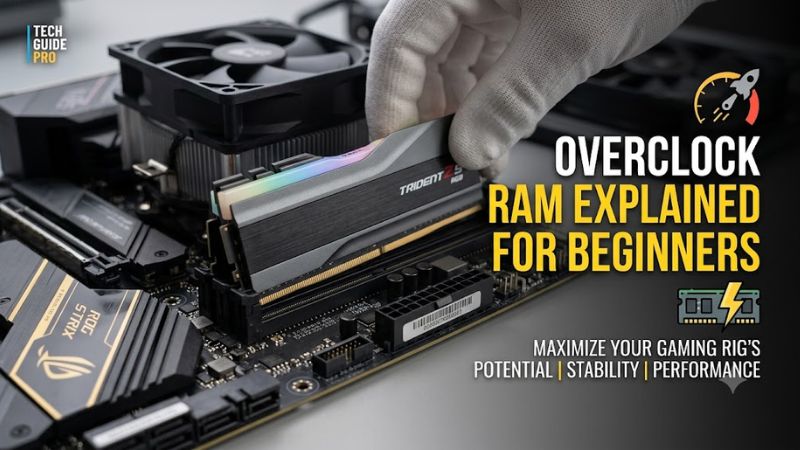
Overclock ram explained for beginners starts with a common puzzle: your new memory runs slower than its advertised specification. Overclocking changes its operating settings beyond the default baseline, often through XMP or EXPO. Start with a compatible rated profile, avoid extra manual voltage, and verify stability before everyday operation.
How to Choose RAM for Beginner Overclocking
This overclock ram explained for beginners roundup connects that explanation to four real memory kits. It explains how generation, profile support, timings, and physical clearance affect the purchase. Recommendations prioritize straightforward profile use, not record-setting manual tuning or guaranteed performance gains on every computer.
DDR4 or DDR5 Compatibility
Memory generation is the first compatibility check because DDR4 and DDR5 use different electrical designs and slot keying. They cannot replace each other within identical motherboards. Some processor families support either type through different boards, so check exact motherboard specifications rather than shopping from processor branding.
Replacing a functional motherboard just to change memory generations can undermine upgrade affordability. Existing DDR4 systems deserve a compatible upgrade without unnecessary platform replacement. Corsair Vengeance LPX DDR4-3200 is the practical choice here for retaining a supported DDR4 board while adding matched capacity and profile support.
XMP and EXPO Profile Support
Profiles store a tested combination of data rate, timings, and voltage, simplifying initial firmware configuration. Intel XMP and AMD EXPO are different profile standards, and firmware support varies. For overclock ram explained for beginners, the useful shortcut is matching the kit’s advertised profile to your motherboard’s capabilities.
An AMD-focused kit is convenient for a compatible AM5 build, while dual-profile memory offers more flexibility between platforms. Neither approach bypasses processor memory-controller limitations. Crucial Pro Overclocking DDR5-6000 provides both XMP and EXPO, making it useful when flexibility matters more than the tightest advertised timings.
Capacity, Data Rate, and Timings
Data rate describes transfers per second, while CAS latency expresses one access-timing interval in clock cycles. The smaller CL number is meaningful only alongside data rate: DDR5-6000 CL30 has roughly 10 ns of theoretical CAS delay. That figure is not total system latency and cannot independently predict gaming performance.
Capacity comes before marginal timing improvements when applications already exhaust available memory. After capacity is sufficient, compare timing and speed within compatible kits, instead of maximizing specifications. G.Skill Flare X5 DDR5-6000 CL30 offers a balanced target for supported AM5 builds without requiring ambitious frequency tuning.
Module Height and Matched Kits
Module height matters beneath overhanging tower-cooler fans. Tall decorative heatspreaders can force a fan upward, potentially conflicting with the case panel. Measure available cooler clearance before purchasing components; a compact memory module solves a physical installation problem, not an electrical stability problem.
Buy one matched two-module kit in the required capacity instead of combining similarly labeled packages. Extra modules increase the memory controller’s workload and may reduce achievable speed. G.Skill Ripjaws S5 DDR5-6000 combines a low-profile design with an Intel XMP profile, making it useful beneath large coolers on supported boards.
Top Picks
For overclock ram explained for beginners, these selections illustrate four sensible starting points rather than a universal ranking across incompatible systems. All are 32GB kits containing two 16GB modules. Select the matching generation first, then compare the exact part number, profile support, current price, and motherboard compatibility list.
| Product | Best For | Key Spec | Watch Out For |
|---|---|---|---|
| G.Skill Flare X5 DDR5-6000 CL30 | Best Overall for compatible AM5 builds | F5-6000J3038F16GX2-FX5; 32GB; EXPO; 30-38-38-96 at 1.35V | Rated profile speed depends on motherboard and CPU capability. |
| Corsair Vengeance LPX DDR4-3200 CL16 | Best Value for existing DDR4 systems | CMK32GX4M2E3200C16; 32GB; XMP 2.0; 16-20-20-38 at 1.35V | Cannot fit DDR5 boards; prebuilt firmware may restrict profiles. |
| G.Skill Ripjaws S5 DDR5-6000 CL30 | Intel builds with large air coolers | F5-6000J3040F16GX2-RS5K; 32GB; XMP 3.0; 30-40-40-96 at 1.35V | Selected SKU advertises XMP rather than EXPO. |
| Crucial Pro Overclocking DDR5-6000 CL36 | Dual-profile flexibility | CP2K16G60C36U5B; 32GB; XMP and EXPO; 36-38-38-80 at 1.35V | Looser CAS timing than the DDR5-6000 CL30 alternatives. |
G.Skill Flare X5 DDR5-6000 CL30: Best Overall
G.Skill Flare X5 DDR5-6000 CL30 is best overall for beginners assembling a compatible AMD AM5 system. The selected F5-6000J3038F16GX2-FX5 kit offers 32GB, an EXPO profile, and 30-38-38-96 timings at 1.35V. Its advantage is a clearly specified profile that pairs a practical data rate with relatively tight primary timings.
The limitation is platform dependence: this EXPO-focused recommendation does not establish universal Intel compatibility. Even supported AMD hardware may require a lower data rate if its controller cannot sustain the profile. For overclock ram explained for beginners, stable everyday operation outweighs maintaining advertised peak specifications.
Corsair Vengeance LPX DDR4-3200 CL16: Best Value
Corsair Vengeance LPX DDR4-3200 CL16 is best value for a supported DDR4 upgrade at a competitive purchase price. Part CMK32GX4M2E3200C16 supplies 32GB through two modules, with XMP 2.0 and 16-20-20-38 timings at 1.35V. Retaining a functional DDR4 motherboard avoids unnecessary processor and platform-replacement expenses.
Its clear drawback is the DDR4-only design, which cannot migrate into a DDR5 motherboard. The listed default SPD speed is 2133, so a first boot below 3200 need not indicate faulty hardware. Confirm firmware support before purchasing, especially for branded prebuilt systems that may restrict controls despite electrical compatibility.
G.Skill Ripjaws S5 DDR5-6000 CL30: Best for Intel Builds
G.Skill Ripjaws S5 DDR5-6000 CL30 is best for Intel builds using large air coolers. Part F5-6000J3040F16GX2-RS5K provides 32GB with XMP 3.0, rated 30-40-40-96 timings, and 1.35V profile voltage. Its approximately 33 mm module height makes physical clearance easier than with taller decorative memory, depending on cooler dimensions.
The tradeoff is that the selected SKU advertises Intel XMP rather than an AMD EXPO profile, restricting its profile-based appeal for AMD buyers. Its 6000 rating also requires compatible hardware. Judge value against other qualified Intel kits at current prices, since a low heatspreader alone cannot justify substantial premiums.
Crucial Pro Overclocking DDR5-6000 CL36: Best for Dual Profiles
Crucial Pro Overclocking DDR5-6000 CL36 is best for buyers wanting both platform profile standards. The CP2K16G60C36U5B kit combines 32GB with Intel XMP 3.0 and AMD EXPO support, using 36-38-38-80 timings at 1.35V. Its practical strength is profile flexibility when choosing between compatible AMD and Intel desktop builds.
For overclock ram explained for beginners, its drawback is CL36 rather than CL30 at 6000 MT/s: theoretical CAS delay is 12 ns versus 10 ns. This difference alone cannot predict gaming performance. Compare current prices and confirm the Overclocking variant, because other Crucial Pro kits can have different timings and profiles.
Frequently Asked Questions
Readers seeking overclock ram explained for beginners need configuration guidance, stability checks, and realistic expectations more than detailed timing tables. These answers cover the first configuration and common failures. Keep important files backed up, because unstable memory can cause incorrect calculations as well as visible crashes.
How Do I Enable XMP or EXPO for the First Time?
Enable the supported memory profile in motherboard firmware to apply its stored settings. Confirm stable defaults, then enter BIOS or UEFI, select the XMP or EXPO option, save, and restart. Use the board’s manual for menu names and slot placement, since labels and recommended two-module positions vary between manufacturers.
Leave extra performance presets and manual voltage adjustments untouched during this first attempt. Changing several settings together makes failures harder to diagnose. An initial DDR5 restart may include memory training and take longer than usual; allow the manufacturer-described process without repeated power interruptions.
How Can I Tell Whether My RAM Overclock Is Stable?
No, a successful startup does not prove stable memory operation. Run a bootable memory test such as MemTest86, then exercise your normal applications and repeat cold starts and sleep cycles. Any reported memory error is a reason to investigate, despite apparently normal gameplay; intermittent faults can emerge only with certain workloads.
Passing one test reduces uncertainty but cannot guarantee every workload will remain error-free. Record test duration and settings for future comparisons. If errors appear only after enabling the profile, return to defaults and retest before diagnosing hardware failure. Compare repeatable results rather than treating uneventful gameplay as proof.
What Should I Do If My PC Will Not Boot?
Restore default memory settings if the machine fails after enabling its profile. If firmware is inaccessible, follow the motherboard manual’s CMOS-reset procedure with specified power precautions. In overclock ram explained for beginners, recovery begins with a known working baseline instead of escalating voltage to force startup.
Once defaults work, check the installed slots, exact kit compatibility, and relevant stable BIOS updates before another attempt. A lower supported data rate may be necessary for your processor. Avoid flashing firmware from an unstable setup; use the board maker’s documented update method and retain a record of changes for troubleshooting.
Will Overclocking RAM Improve Gaming Performance?
RAM overclocking can improve memory-sensitive workloads, but it cannot guarantee a noticeable gaming upgrade. GPU-limited games may respond little, while processor-limited workloads respond differently. Profiles exceeding component specifications can affect warranty coverage, so review the applicable processor and system terms before configuration.
Measure the same task beforehand and afterward using consistent settings, then compare repeat runs instead of one unusually good result. If the gain is small or stability requires repeated troubleshooting, defaults remain reasonable. A dependable computer for work, backups, and games outweighs faster settings producing unexplained failures.
Final Thoughts
Overclock ram explained for beginners comes down to hardware compatibility, supported profiles, and verified stability. Choose Flare X5 for AM5, LPX for DDR4 value, Ripjaws S5 for Intel cooler clearance, or Crucial Pro Overclocking for dual profiles. Keep default settings as a recovery baseline and buy capacity before chasing minor timing gains.