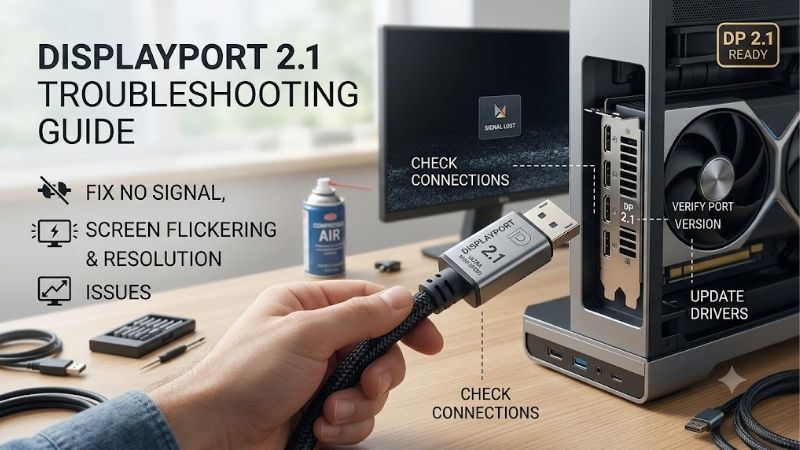
DisplayPort 2.1 troubleshooting guide helps when a high-refresh monitor flickers, loses its rated refresh rate, or briefly goes black. A cable can cause those symptoms, but so can the GPU, firmware, settings, or link mode. This review compares four real DP80 cables and explains what to test before replacing hardware.
How to Choose DisplayPort 2.1 Cables
This displayport 2.1 troubleshooting guide starts with the display target, then checks bandwidth, certification, length, connector retention, and construction. DisplayPort 2.1b is the current standard, while VESA defines UHBR20 at up to 80Gbps across four lanes. The complete source-to-display chain matters more than a version label alone.
Display Target And Bandwidth
First record the exact resolution, refresh rate, HDR state, and color depth you expect. A 4K 240Hz OLED puts much more demand on the link than a 1440p 165Hz panel. Testing against the real target avoids a false diagnosis, and the Cable Matters DP80 model gives a useful reference for this class.
Bandwidth should match the job, not simply be maximized. VESA says DP80 cables support UHBR20, while lower tiers can serve less demanding displays. For high-end 4K 240Hz use, DP80 gives useful headroom. For simpler panels, a lower tier may be enough, making Cable Matters the stronger baseline when maximum bandwidth is required.
VESA Certification
VESA certification is valuable because it means the cable passed a defined compliance program instead of relying only on a seller’s speed claim. Cable Matters, Silkland, and Club 3D identify their selected cables as DP80-certified, while UGREEN DP131 lists 80Gbps and a VESA certification code. That reduces uncertainty during troubleshooting.
Use certification as the first filter, then compare length and construction. Silkland’s certified DP80 cable combines the UHBR20 class with shielding and a 24-month warranty. That makes it a practical choice when you want a clearly identified 2m high-bandwidth cable instead of an unverified long lead. The certified option should be the reference.
Cable Length
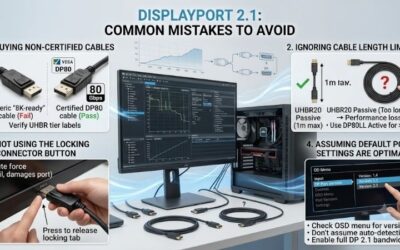
Length is another real variable. Passive high-bandwidth cables have less margin as runs become longer, which is why VESA introduced DP80LL active cables for UHBR20 links up to three meters. For normal desks, use only enough cable to reach comfortably. Silkland’s 2m and Club 3D’s 1.6m options fit different layouts.
Do not coil excess cable tightly behind the monitor simply to hide it. A clean route with gentle bends reduces strain and makes later testing easier. Club 3D CAC-1092 works well for a compact 1.6m path, while UGREEN DP131 offers a 2m option when the display sits farther away. Layout should drive length.
Connector And Construction
Connector retention matters when a cable may be bumped or moved. Locking plugs resist accidental movement, while non-locking plugs are quicker to remove. Cable Matters and Club 3D use locking DisplayPort connectors, whereas UGREEN DP131 does not. Choose the style that fits the physical layout rather than assuming one design is always better.
Construction matters after bandwidth, certification, and length. Silkland lists 28AWG tinned copper and triple-layer shielding, while Club 3D specifies a 24AWG cable with an UltraFlex jacket. Those details can help durability and routing, but they should remain secondary to a suitable link tier and correct length. Silkland and Club 3D fit heavier handling.
Performance + Pros and Cons
Performance + Pros and Cons in this displayport 2.1 troubleshooting guide compares four cables by the failure points they can realistically remove. Cable Matters is Best Overall, UGREEN DP131 is Best Value, Silkland is Best For 2m high-bandwidth setups, and Club 3D CAC-1092 is Best For secure connections. The roles are deliberately different.
| Product | Best For | Key Spec | Watch Out For |
|---|---|---|---|
| Cable Matters VESA Certified DisplayPort 2.1 DP80 Cable | Best Overall | 80Gbps, DP80, up to 16K 60Hz or 8K 240Hz | Shorter runs are preferred at maximum bandwidth |
| UGREEN DP131 | Best Value | 80Gbps, 16K 60Hz, 8K 120Hz, 4K 240Hz | Non-locking connectors |
| Silkland VESA Certified DP80 DisplayPort 2.1 Cable | Best For 2m High-Bandwidth Setups | 80Gbps, UHBR20, 4K 240Hz, VESA-certified | Certification varies by length |
| Club 3D CAC-1092 | Best For Secure Connections | 80Gbps, 1.6m, DP80, UHBR20 | Fixed 1.6m length |
Cable Matters DP80
The Cable Matters VESA Certified DisplayPort 2.1 DP80 Cable is the Best Overall choice in this displayport 2.1 troubleshooting guide. It is rated for 80Gbps, carries DP80 certification, supports up to 16K 60Hz or 8K 240Hz, and uses a locking connector. It is a strong baseline for high-refresh stability.
Its main strength is the clear UHBR20 target combined with formal certification and backward compatibility. The drawback is length sensitivity at maximum bandwidth, since Cable Matters recommends shorter runs when checking flicker or blackouts. For a normal gaming desk, the certified 2m version is more practical than a needlessly long cable.
Silkland DP80 Cable
The Silkland VESA Certified DP80 DisplayPort 2.1 Cable is Best For 2m high-bandwidth setups in this displayport 2.1 troubleshooting guide. It lists 80Gbps, UHBR20, 4K 240Hz support, VESA certification, triple-layer shielding, and a 24-month warranty. That combination works well when a monitor arm or side-mounted tower needs extra reach.
The catch is that Silkland sells longer variants that are not all presented with the same VESA certification status. Buyers should select the certified length when maximum bandwidth matters. During troubleshooting, that avoids adding an uncertain cable to an already demanding signal path. The certified 2m model is the safer choice for this use case.
UGREEN DP131
UGREEN DP131 is the Best Value pick in this displayport 2.1 troubleshooting guide for buyers who want an 80Gbps cable with broad feature support. UGREEN lists DisplayPort 2.1, 16K 60Hz, 8K 120Hz, 4K 240Hz, DSC, FEC, HDR10+, G-Sync, FreeSync, and 0.5m, 1m, and 2m lengths.
Its advantage is flexibility across common desktop lengths, plus a braided exterior and aluminum-alloy plug housings. The tradeoff is the non-locking connector, which offers less resistance to accidental pull-out than the latching Cable Matters and Club 3D designs. For a stationary PC, that is usually a reasonable compromise when value matters more than retention.
Club 3D CAC-1092
Club 3D CAC-1092 is Best For secure connections in this displayport 2.1 troubleshooting guide. The cable is VESA DP80-certified, rated at 80Gbps, and measures 1.6m. Club 3D lists UHBR10, UHBR13.5, UHBR20, DSC 1.2, FEC, 32 audio channels, a 24AWG build, and locking connectors.
The advantage is firm connector retention without giving up the full DP80 target. The downside is the fixed 1.6m length, which may be too short for a distant PC tower. On a compact desk, that length can be easier to route and leaves less slack around the monitor arm. The right length depends on where the hardware sits.
Frequently Asked Questions
Frequently Asked Questions in this displayport 2.1 troubleshooting guide focus on flicker, missing refresh modes, backward compatibility, and long cable runs. The safest method is to change one variable at a time. A certified cable should be part of the test, but it cannot fix unsupported GPU output, outdated firmware, or a monitor setting.
Why Does DisplayPort 2.1 Keep Flickering?
Why does DisplayPort 2.1 keep flickering? Start by checking the GPU and monitor’s supported link rates, then update the graphics driver and monitor firmware. If the issue remains, test a shorter certified DP80 cable. Cable Matters specifically recommends shorter runs when troubleshooting flicker or stutter at high refresh rates.
If flicker stops when you lower refresh rate or disable one feature, that is useful evidence. HDR, DSC, adaptive sync, and color depth can change the negotiated mode. Re-enable them one at a time instead of replacing several parts together. A controlled test makes it easier to identify whether the limit is bandwidth or another setting.
Why Am I Not Getting 4K 240Hz?
Why am I not getting 4K 240Hz over DisplayPort 2.1? A DP80 cable can provide the UHBR20 bandwidth class, but both the GPU and monitor must support the required mode. Check the source specification, then the monitor menu, driver, and cable. VESA identifies DP80 as the 80Gbps UHBR20 tier.
Also check whether the advertised mode depends on DSC or a specific color format. A monitor may list 4K 240Hz while requiring compression or certain settings. If reducing one setting unlocks the expected refresh rate, that is evidence of a negotiated bandwidth limit rather than proof that the cable is defective. Test before replacing.
Can DP 2.1 Work With DP 1.4?
Can a DisplayPort 2.1 cable work with a DisplayPort 1.4 GPU? Yes. DP 2.1b remains backward compatible with earlier DisplayPort generations, so a DP80 cable can connect to an older source and operate at its supported rate. It can add headroom for a later GPU upgrade, but cannot raise the current GPU’s capability.
The exception is another connector path. USB-C uses DisplayPort Alt Mode, and docks or adapters may impose their own limits. VESA confirms that DP 2.1b features can be carried through DisplayPort Alt Mode, but the host implementation still controls what is available. Check the laptop or dock specification before replacing a cable.
Does Cable Length Affect Stability?
Does cable length affect DisplayPort 2.1 stability? Yes, especially at UHBR20. VESA’s DP80LL update supports active UHBR20 cables up to three meters, while conventional passive DP80 cables have generally favored shorter runs. A long setup should use the correct cable technology, not simply the thickest passive cable available.
For a normal desk, choose enough length to avoid tension but not so much that a large coil sits behind the panel. Club 3D’s 1.6m cable and Silkland’s certified 2m model cover two common layouts. If the PC is several meters away, look for a suitable active DP80LL cable instead. That removes a major variable.
Final Thoughts
Final Thoughts: This displayport 2.1 troubleshooting guide works best when the cable is treated as one part of the signal chain. Cable Matters is the safest overall pick, UGREEN DP131 offers strong value, Silkland fits certified 2m setups, and Club 3D CAC-1092 is ideal when connector security matters most. Diagnose first, then replace selectively.