Best ultrawide monitor for a first time buyer shopping is not about the biggest screen. New owners must carefully balance size, resolution, panel type, refresh rate, ports, and stand design. The wrong mix can waste available GPU power, overwhelm a shallow desk, or leave useful features unused during daily work and gaming.
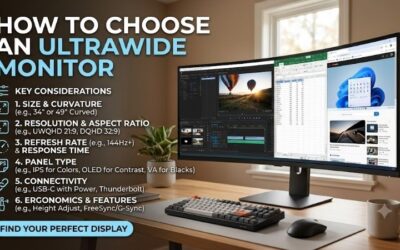
How to Choose an Ultrawide Monitor
How to choose an ultrawide monitor starts with fit, panel behavior, refresh rate, and connectivity. The best ultrawide monitor for a first time buyer should match your desk and PC, not simply advertise the fastest available panel. These checks remove poor purchase matches before price becomes the deciding factor for your setup.
Screen Size And Resolution
Screen size and resolution are the first physical checks because an ultrawide can dominate a shallow desk. Most picks use a 34-inch 21:9 panel at 3440×1440, adding horizontal space with good pixel density. Measure desk depth and viewing distance, and consider curve strength before choosing a wide display for long sessions.
Resolution should be judged with size and GPU power together. At 3440×1440, windows have more room, but games demand more rendering power than 2560×1440. LG 34GP83A-B and AOC CU34G2XP/BK make the resolution attractive, while Dell S3422DWG delivers it at 144Hz. Its 1800R curve also feels less aggressive than 1500R options.
Panel Type
Panel type shapes the image differently. IPS generally delivers wide viewing angles and clean color behavior, while VA can produce deeper contrast but may show more dark-scene smearing. The choice matters most when one screen must handle games, movies, and office work, because each panel favors a different key strength.
LG 34GP83A-B uses Nano IPS with 98% DCI-P3 coverage and DisplayHDR 400, making it the color-focused option. Dell S3422DWG and AOC CU34G2XP/BK use VA panels, while ASUS uses VA with a 4000:1 contrast specification. These designs suit different priorities, so align panel behavior with your main workload and viewing habits.
Refresh Rate
Refresh rate matters most when your graphics card can produce high frame rates. Dell S3422DWG reaches 144Hz, LG 34GP83A-B reaches 160Hz with overclocking, ASUS VG34VQL1B reaches 165Hz, and AOC CU34G2XP/BK reaches 180Hz. Higher refresh helps motion, but paying for 180Hz makes less sense when your GPU cannot feed it consistently.
For a gaming ultrawide, choose refresh rate for your hardware. ASUS VG34VQL1B adds Adaptive-Sync and ELMB Sync, AOC CU34G2XP/BK pairs 180Hz with FreeSync Premium, while Dell S3422DWG offers FreeSync Premium Pro and LG provides G-SYNC compatibility plus FreeSync Premium. Dell suits 144Hz; LG, ASUS, and AOC suit faster gaming.
Ports And Ergonomics
Ports and ergonomics matter after the monitor reaches your physical desk. Dell S3422DWG includes a USB 3.2 Gen 1 hub, ASUS offers two DisplayPort 1.4 and two HDMI 2.0 inputs, and AOC provides HDMI plus DisplayPort. Check your cables, consoles, peripherals, and available mounting space before choosing a suitable screen.
Stand flexibility can determine whether a panel feels comfortable for eight hours. LG offers height and tilt adjustment, ASUS adds height adjustment, AOC provides 130mm of height adjustment plus swivel, and Dell adds height, tilt, swivel, and pivot. For desk flexibility, Dell and AOC offer the most adjustable stand options.
Top Picks
Top Picks turns those criteria into four distinct buying roles. The best ultrawide monitor for a first time buyer should offer a sensible mix of image quality, gaming speed, and ergonomics, while Best Value controls spending. The two Best For choices target specific gaming priorities without making every buyer pay for them.
| Product | Best For | Key Spec | Watch Out For |
|---|---|---|---|
| LG 34GP83A-B | Best Overall | 34″, 3440×1440, Nano IPS, 144Hz/160Hz O.C. | Older model, limited HDR impact |
| Dell S3422DWG | Best Value | 34″, 3440×1440, VA, 144Hz | Lower refresh ceiling |
| ASUS TUF Gaming VG34VQL1B | Best For Gaming Features | 34″, 3440×1440, VA, 165Hz | More settings to tune |
| AOC CU34G2XP/BK | Best For High Refresh Gaming | 34″, 3440×1440, Fast VA, 180Hz | HDMI cannot run full 180Hz |
LG 34GP83A-B — Best Overall
LG 34GP83A-B earns Best Overall for a first-time buyer wanting gaming speed and strong image quality. It uses a 34-inch 3440×1440 Nano IPS panel, supports 144Hz natively and 160Hz overclocked, and covers 98% DCI-P3. The drawback is its older overall monitor design and limited HDR impact versus newer premium modern displays.
LG combines IPS response, G-SYNC compatibility, FreeSync Premium, and DisplayHDR 400 in one familiar 21:9 format. For best ultrawide monitor for a first time buyer shoppers, it is the easiest all-around choice for mixed gaming and desktop work. Its 1900R curve is gentle, but the older model lacks some newer display features overall.
Dell S3422DWG — Best Value
Dell S3422DWG is Best Value for buyers wanting a 34-inch 3440×1440 ultrawide with strong gaming fundamentals. It uses a VA panel, 1800R curvature, 144Hz refresh, FreeSync Premium Pro, and a USB hub. The compromise is a lower overall refresh ceiling and VA motion behavior that some users may notice in darker game scenes.
Dell remains a value choice when desk space and gaming matter. For best ultrawide monitor for a first time buyer, the S3422DWG offers 34-inch 3440×1440, VA contrast, 144Hz, FreeSync Premium Pro, and a USB hub. Its lower refresh ceiling is the main compromise for faster gaming systems, especially at higher frame rates.
ASUS TUF Gaming VG34VQL1B — Best For Gaming Features
ASUS TUF Gaming VG34VQL1B is Best For Gaming Features, especially for users wanting a 165Hz VA screen with deeper gaming controls. It uses a 34-inch 3440×1440 1500R panel, HDR10, DisplayHDR 400, Adaptive-Sync, ELMB Sync, PIP/PBP, and 2W stereo speakers. The drawback is its older VA panel platform and broader feature set.
ASUS gives first-time owners more gaming controls without hardware. For best ultrawide monitor for a first time buyer, its 165Hz VA panel adds Adaptive-Sync, ELMB Sync, Variable Overdrive, HDR10, and PIP/PBP. The benefit is flexibility; the drawback is that advanced settings take more time to learn and tune across different games.
AOC CU34G2XP/BK — Best For High Refresh Gaming
AOC CU34G2XP/BK is Best For High Refresh Gaming because its 34-inch Fast VA panel combines 3440×1440 with a maximum 180Hz refresh rate and 1ms GtG response specification. It also offers DisplayHDR 400, FreeSync Premium, 1500R curvature, and height adjustment. The main limitation is that HDMI cannot deliver full 180Hz mode.
AOC targets high-refresh gaming with a 34-inch Fast VA panel, 3440×1440 resolution, 180Hz, and 1ms GtG. For best ultrawide monitor for a first time buyer shoppers focused on motion, it has the most refresh headroom here. Use DisplayPort for 180Hz, and remember that Fast VA can still show dark-scene smearing during some games.
Frequently Asked Questions
Most first-time buyers ask whether an ultrawide improves gaming and work, not whether its specification sheet looks impressive. The best ultrawide monitor for a first time buyer depends on desk space, GPU capacity, software support, and daily use. Start there before comparing minor feature differences or chasing headline specifications.
Is An Ultrawide Monitor Good For A First-Time Buyer?
Is an ultrawide monitor good for a first-time buyer? Yes, especially when a 34-inch 3440×1440 model matches your desk and PC. The 21:9 layout can replace a two-screen setup for some workflows while keeping one desktop surface. The bigger question is whether your games and applications handle the wider aspect ratio cleanly.
The main exception is software with weak ultrawide support or a desk that lacks enough depth for comfortable viewing. Games may add side content, crop the image, or use a centered presentation at 21:9. Check the programs you use most and allow enough viewing distance for the wider screen before committing to the format.
Is 3440×1440 Too Demanding For A Gaming PC?
Is 3440×1440 too demanding for a gaming PC? Not necessarily, but it is more demanding than standard 2560×1440 because the GPU renders more pixels in total. A midrange or stronger graphics card can use 144Hz well, while 165Hz and 180Hz targets become harder at higher settings. Match your expectations to your gaming GPU.
Upscaling can make 3440×1440 easier to drive, but it does not remove the underlying workload. A first-time buyer can save money by choosing 144Hz when the GPU cannot sustain higher frame rates. Dell’s 144Hz model is easier to pair with modest hardware, while AOC’s 180Hz ceiling suits a stronger gaming system comfortably.
Do Ultrawide Monitors Work For Office Work?
Do ultrawide monitors work for office work? Yes, and the extra horizontal space can help with documents, timelines, spreadsheets, and browser windows. A 34-inch 3440×1440 panel gives substantially more width than a conventional 16:9 1440p display. The benefit is strongest when your software supports side-by-side window layouts.
An ultrawide is less compelling if you share the screen with someone far off-axis or need a very tall workspace for long documents. IPS models such as the LG 34GP83A-B can be attractive for mixed office use, while VA models favor stronger contrast. A monitor arm can also help manage the extra screen width on a shallow desk.
Do I Need 144Hz Or Higher On My First Ultrawide?
Do I need 144Hz or higher on my first ultrawide? No. 144Hz is already a major step above common 60Hz displays and works well for general gaming. Higher refresh becomes more useful for competitive games when the GPU sustains higher frame rates. For slower workloads or office-heavy use, resolution and ergonomics deserve priority.
Refresh rate is a ceiling, not a guarantee. A 180Hz panel will not make a game run at 180 frames per second, and a 165Hz display can feel just as smooth at similar frame rates. A first-time buyer should prioritize resolution, panel behavior, and ergonomics before paying extra for refresh the system cannot consistently use.
Final Thoughts
How to choose an ultrawide monitor means matching the screen to your desk, GPU, and workload. The best ultrawide monitor for a first time buyer is not universal: LG is balanced, Dell is value-focused, ASUS adds gaming controls, and AOC offers the highest refresh headroom. Choose the role that matches your system best today.