Best ultrawide monitor for beginners shopping introduces unfamiliar resolutions, refresh rates, and USB-C specifications. Your first purchase should simplify desk use without costly, unexpected hardware upgrades. These four choices prioritize useful features, manageable 34-inch sizing, and clearly explained compromises.
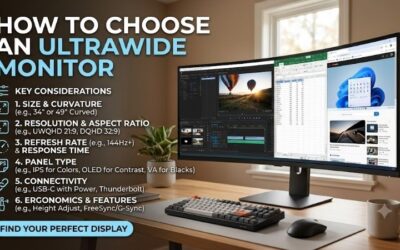
How to Choose an Ultrawide Monitor
This guide to the best ultrawide monitor for beginners compares 3440 x 1440 displays through panel design, refresh rate, connectivity, and purchase value. Each serves a different starting point, including everyday computing, gaming, and laptop work. Recommendations reflect documented features rather than unsupported performance rankings.
Panel Design and Desk Fit
Panel technology and shape describe distinct characteristics: an IPS screen can be curved, and curvature does not establish gaming suitability. Contrast specifications help explain darker-scene priorities, while a curve changes the geometry across your desk. Compare these features separately instead of treating curvature as a quality score.
34-inch displays require sufficient workspace and viewing distance, especially when the supplied stand occupies substantial depth. Check physical dimensions before choosing a curve merely for immersion. For everyday use prioritizing curvature and a listed 3000:1 contrast ratio, choose the Dell S3425DW if its dimensions suit your workspace.
Refresh Rate and Gaming Needs
Refresh rate describes how frequently a display updates, not your computer’s achievable frame rate. Faster refresh benefits scrolling and supported games, but does not erase slow pixel transitions. Compare motion measurements separately, and match the monitor’s refresh target to your hardware rather than prioritizing headline specifications.
When selecting the best ultrawide monitor for beginners for PC gaming, consider the refresh ceiling. A 144Hz display offers additional refresh headroom over these 100Hz alternatives, although attainable frame rates remain hardware-dependent. Choose the GIGABYTE M34WQ when its IPS panel and gaming-focused specification fit your plans.
USB-C and Laptop Compatibility
USB-C specifications deserve careful reading because connector shape cannot guarantee video or charging compatibility. Check your computer’s support for DisplayPort Alternate Mode and the monitor’s upstream power delivery. A hub can consolidate peripherals, but it cannot add missing video capabilities to incompatible laptop ports.
Charging capacity matters when one-cable connectivity supports daily laptop work. Some powerful notebooks may require additional power under sustained workloads, requiring their original adapter. Choose the Dell P3425WE when its up-to-90W USB-C delivery and Ethernet connectivity match your verified laptop requirements.
Stand Features and Total Cost
Purchase value includes the stand, connection options, and positioning accessories. An inexpensive screen can become less economical with additional mounting or docking purchases. Compare complete setup costs for your actual workspace, and check adjustment specifications instead of assuming every 34-inch stand moves the same way.
Height adjustment is useful when fitting a wide display around an existing desk, chair, and laptop arrangement. Faster refresh contributes less for workloads emphasizing spreadsheets and browsing. Choose the LG 34WR55QC-B when its height-adjustable stand, 100Hz refresh, and 65W USB-C delivery meet your requirements at a competitive price.
Top Picks
The best ultrawide monitor for beginners depends on workload rather than headline specifications. Dell S3425DW balances everyday features, LG 34WR55QC-B targets practical value, GIGABYTE M34WQ emphasizes gaming, and Dell P3425WE supports connected laptop work. Compare pricing and seller terms before assuming permanent value leadership.
| Product | Best For | Key Spec | Watch Out For |
|---|---|---|---|
| Dell S3425DW | Best Overall | 3440 × 1440; 120Hz; USB-C up to 65W | Charging may not meet demanding laptop requirements |
| LG 34WR55QC-B | Best Value | 3440 × 1440; 100Hz; USB-C up to 65W | Lower refresh ceiling than the gaming pick |
| GIGABYTE M34WQ | PC Gaming | 34-inch IPS; 144Hz; built-in KVM | Listed 1000:1 contrast; flat-screen design |
| Dell P3425WE | Laptop Work | 34.1-inch IPS; 100Hz; USB-C up to 90W; Ethernet | Extra hub features may be unnecessary for desktop-only use |
Dell S3425DW: Best Overall
The Dell S3425DW earns Best Overall for newcomers combining everyday work, entertainment, and occasional gaming. Its 3440 x 1440 display runs at up to 120Hz, while USB-C provides up to 65W power delivery. Dell specifies a VA panel with 3000:1 contrast, creating a useful feature balance without separate task-specific displays.
The limitation is charging capacity: 65W may undersupply laptops requiring higher-power adapters. Its refresh ceiling also trails the M34WQ’s 144Hz specification. Choose S3425DW for balanced functionality, after verifying laptop power needs; its curved VA design should suit your preferences instead of assuming universal superiority.
LG 34WR55QC-B: Best Value
The LG 34WR55QC-B earns Best Value when pricing undercuts better-equipped alternatives. Its 34-inch curved 3440 x 1440 display combines 100Hz refresh, USB-C delivery up to 65W, and a height-adjustable stand. That combination suits beginners who want useful desktop space and simple laptop connectivity without prioritizing gaming specifications.
Its compromise is the 100Hz refresh ceiling, providing less headroom than the gaming selection. The 65W charging limit also needs checking against your laptop’s requirements. For the best ultrawide monitor for beginners with disciplined spending, choose this LG when those limits are acceptable and checkout pricing provides worthwhile savings.
GIGABYTE M34WQ: Best For PC Gaming
The GIGABYTE M34WQ earns Best For PC Gaming with a 34-inch IPS panel, 3440 x 1440 resolution, and maximum 144Hz refresh. Its built-in KVM supports peripheral sharing between compatible systems. The faster listed refresh specification supports its gaming recommendation without claiming measured response-time superiority.
Its contrast tradeoff is concrete: GIGABYTE lists 1000:1, compared with Dell S3425DW’s 3000:1 specification. That matters when darker-scene contrast outweighs other features. For the best ultrawide monitor for beginners focused on gaming, choose M34WQ when its refresh and KVM capabilities justify its contrast tradeoff and you prefer a flat screen.
Dell P3425WE: Best For Laptop Work
The Dell P3425WE earns Best For Laptop Work through USB-C delivery up to 90W, RJ45 Ethernet, and an adjustable stand. Its 34.1-inch IPS display provides 3440 x 1440 at 100Hz. Those features suit beginners confidently building a connected everyday workspace prioritizing docking and peripheral access over maximum gaming refresh.
The drawback is paying for potentially unused desktop hub functions. Its 100Hz ceiling is also lower than the dedicated gaming pick. Buy P3425WE when Ethernet, higher USB-C charging capacity, and workstation adjustments solve actual needs; compare against the simpler alternatives before paying extra for unnecessary connectivity.
Frequently Asked Questions
Questions about the best ultrawide monitor for beginners often involve graphics requirements, curved panels, laptop connections, and first-use settings. These choices can affect the purchase more than a marketing response-time claim. The answers below explain where compatibility matters and setup priorities before ordering.
Do You Need a Powerful GPU for Ultrawide?
No, ordinary browsing and office work on a 3440 x 1440 monitor do not inherently require high-end graphics hardware. Your computer must support the desired output resolution and refresh through the selected connection. Gaming is different: 3440 x 1440 contains about 34% more pixels than standard 2560 x 1440, increasing the rendering workload.
Check game results at ultrawide resolution instead of assuming standard 1440p benchmarks transfer unchanged. Settings and processor limits still affect attainable frame rates. Knowing your hardware helps identify the best ultrawide monitor for beginners without unnecessary upgrades or expecting the display’s maximum refresh in every demanding game.
Is a Curved Ultrawide Better for Beginners?
No, a curve is not essential for enjoying an ultrawide monitor. It changes screen geometry and may suit a close, centered viewing position, while flat displays suit straight desktop presentation. Choose according to workspace preferences rather than assuming curvature improves resolution, color accuracy, or pixel response.
For shared viewing from different positions, consider panel behavior and physical placement alongside shape. A curve does not substitute for suitable viewing angles. Measure the complete desk footprint before ordering and leave the ventilation and mounting clearance specified by the manufacturer, particularly near walls or shelves.
Can One USB-C Cable Connect and Charge a Laptop?
Only if the laptop and monitor support the required functions. A compatible USB-C video connection can carry the display signal while an upstream power-delivery port supplies charging. Check the notebook’s video support and power requirement first; a USB-C connector cannot independently establish either capability across all ports.
When charging demand exceeds the monitor’s available delivery, retain the manufacturer-specified laptop power adapter. Also verify the cable supports the intended video and power functions. For these recommendations, compare the 65W charging options with P3425WE’s 90W specification rather than assuming identical USB-C capabilities.
What Should You Set Up First?
Start by selecting the monitor’s native 3440 x 1440 resolution and your intended supported refresh rate in the operating system. New displays do not always default to maximum refresh automatically. Confirm that the cable and output port support the chosen mode, then adjust text scaling and brightness for your workspace.
Arrange frequently used windows for purposeful multitasking, such as keeping a document beside reference material. Test your usual games for 21:9 support; unsupported titles or video content may show side bars. Avoid judging the purchase through stretched images, since stretching changes proportions without revealing additional content.
Final Thoughts
My best ultrawide monitor for beginners pick is Dell S3425DW for balanced features. Choose LG 34WR55QC-B for verified savings, GIGABYTE M34WQ for PC gaming, or Dell P3425WE for connected laptop work. Confirm desk space, video compatibility, and charging requirements before purchase; prioritize useful connections over unused features.