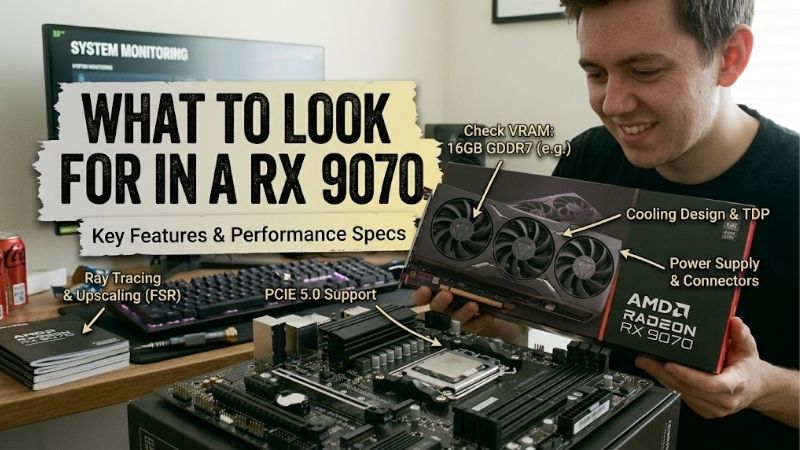
What to look for in a RX 9070 requires separating the shared GPU specifications from partner-board differences. Identical 16GB capacities can accompany different clearance requirements or PSU recommendations. Focus first on compatibility, useful controls, and purchase cost; premium cooler branding cannot independently determine suitability.
How to Choose RX 9070 Graphics Cards
This guide explains what to look for in a rx 9070 through four genuine non-XT recommendations and four purchasing criteria. Comparisons show how dimensions, BIOS options, factory settings, and build requirements distinguish these cards. The selections use manufacturer specifications, with value depending on actual retail prices.
Case Clearance
GPU clearance has three dimensions: length, height, and thickness. Advertised GPU length compatibility cannot resolve side-panel cable constraints or a cooler covering expansion slots. Measure with your intended radiator and fans installed, because their positioning can compromise the manufacturer’s advertised clearance.
PowerColor’s measurements distinguish board dimensions from bracket-inclusive dimensions, important around tight mounting openings. Reduced thickness helps when lower expansion slots or nearby intakes require clearance, without guaranteeing better temperatures. Choose the PowerColor Reaper RX 9070 when a two-slot cooler suits your layout.
BIOS Flexibility
Factory BIOS options provide different operating presets through a physical switch. Their advantage is convenience: you can select the manufacturer’s preferred balance without building a custom tuning profile. However, a Silent label cannot establish acoustic leadership without comparable acoustic measurements supporting that conclusion.
When evaluating what to look for in a rx 9070, BIOS flexibility is worth considering before a small clock increase. Presets suit owners who prefer a hardware choice over repeated software adjustments, but contribute little without regular use. Choose the PowerColor Hellhound RX 9070 when its OC and Silent modes address your actual preferences.
Factory Clocks and Value
Listed boost clocks describe maximum achievable frequencies under ideal conditions, not a fixed frame-rate improvement in every game. Compare purchase premium versus relevant performance evidence. Larger frequency numbers are insufficient without considering workload, power settings, and similarly priced higher-performance graphics alternatives.
Each recommendation provides 16GB of GDDR6, so buying a more elaborate cooler does not increase memory capacity. Disciplined purchasing preserves budget for display upgrades or additional storage. When premium features are unnecessary and checkout pricing is lower, choose the Sapphire PULSE RX 9070 rather than paying for unused refinements.
Power Requirements and Styling
Power requirements apply to the specific graphics board and the complete system, incorporating processor requirements. Cooler styling also affects whether the finished build matches your plan. Check both before purchase: a white card that requires a different enclosure or PSU introduces additional expenses beyond the advertised purchase price.
Use the PSU manufacturer’s approved cables, fully seated connectors, and the board maker’s system-power guidance. Factory-overclocked white designs warrant additional compatibility planning when appearance matters. Choose the Sapphire PURE RX 9070 OC for a visible white build that accommodates its three-slot cooler and listed power requirements.
Top Picks
Knowing what to look for in a rx 9070 prioritizes practically useful differences. Hellhound offers useful BIOS choices, PULSE emphasizes straightforward specifications, Reaper reduces cooler thickness, and PURE serves white builds. My value recommendation remains conditional: compare checkout totals before trusting manufacturer positioning.
| Product | Best For | Key Spec | Watch Out For |
|---|---|---|---|
| PowerColor Hellhound RX 9070 | Best Overall | Dual BIOS; up to 2590MHz OC boost | 327mm board length; 700W minimum system PSU |
| Sapphire PULSE RX 9070 | Best Value | 280mm length; 220W typical board power | 2.5-slot thickness; value depends on pricing |
| PowerColor Reaper RX 9070 | Slim Layouts | Two slots; 289 × 111 × 41mm board | No dual BIOS selection |
| Sapphire PURE RX 9070 OC | White Builds | Up to 2700MHz boost; 245W typical board power | 320mm length; 61.6mm thickness |
PowerColor Hellhound RX 9070: Best Overall
The PowerColor Hellhound RX 9070 earns Best Overall for buyers prioritizing selectable factory profiles. Its dual BIOS provides listed boost clocks reaching 2590MHz in OC mode and 2520MHz in Silent mode, alongside 16GB GDDR6. That flexibility gives it a concrete advantage over standard-profile choices without manual overclocking.
Its drawback is installation length: PowerColor lists a 327mm board and 340mm with the bracket included. Front radiators can make those dimensions inconvenient. The manufacturer recommends a minimum 700W system PSU. Buy it when BIOS flexibility justifies the premium, rather than assuming the OC label guarantees meaningful performance improvements.
Sapphire PULSE RX 9070: Best Value
The Sapphire PULSE RX 9070 earns Best Value when checkout pricing undercuts more elaborate alternatives. It offers 16GB GDDR6, a boost clock reaching 2520MHz, and 220W typical board power. A 280mm cooler length is useful around clearance-restricting front-mounted radiators, making its straightforward configuration attractive for practical builds.
Its 2.5-slot thickness is the main fit compromise, particularly with expansion hardware beneath the GPU. Its listed factory boost also trails PURE’s specification. Understanding what to look for in a rx 9070 means checking real savings: PULSE loses its value advantage when a better-equipped alternative has comparable pricing.
PowerColor Reaper RX 9070: Best For Slim Layouts
The PowerColor Reaper RX 9070 earns Best For Slim Layouts with a listed 289 x 111 x 41mm board and two-slot construction. It combines 16GB GDDR6 with a boost clock reaching 2520MHz. The reduced thickness provides measurable installation flexibility where oversized coolers interfere with neighboring hardware or planned enclosure configurations.
The tradeoff is losing Hellhound’s dual BIOS selection while retaining standard advertised clock settings. That matters for buyers prioritizing convenient factory-profile switching. Select Reaper for its dimensions rather than an assumed acoustic advantage, and account for the larger bracket-inclusive measurement before finalizing your case choice.
Sapphire PURE RX 9070 OC: Best For White Builds
The Sapphire PURE RX 9070 OC earns Best For White Builds through coordinated aesthetics, a triple-fan cooler, and a boost clock reaching 2700MHz. Its 16GB GDDR6 capacity matches the other recommendations. Sapphire lists 245W typical board power, so its higher factory specification increases power requirements compared with PULSE’s listed 220W.
Its substantial cooler measures 320mm long and 61.6mm thick, creating a real expansion-clearance tradeoff. White styling also offers limited usefulness inside opaque enclosures. For buyers evaluating what to look for in a rx 9070 for a coordinated build, PURE fits the brief when aesthetics justify its clearance requirements and purchase premium.
Frequently Asked Questions
Questions about what to look for in a rx 9070 require distinguishing meaningful specifications from unsupported assumptions. Memory capacity is shared across these picks, clock labels are not benchmark results, and system PSU recommendations differ. The answers below separate specifications from assumptions before selecting particular hardware.
Which Specifications Should You Check First?
Prioritize case compatibility, manufacturer power guidance, and final price before comparing factory-clock differences. Those checks immediately eliminate incompatible hardware, while boost specifications cannot explain the ownership experience. Afterward, assess whether BIOS options or coordinated styling meaningfully improve the planned build.
If two cards offer comparable compatibility and pricing, compare useful extras and independent measurements under matched conditions. Cooler size alone cannot establish lower noise, and a retailer’s generic description may combine several variants. Verify the exact non-XT model before trusting specifications within marketplace descriptions.
Does a Premium RX 9070 Have More VRAM?
No, memory capacity does not differentiate these four RX 9070 cards: each includes 16GB GDDR6. Paying for a premium partner model therefore cannot increase available texture memory. Choose between them using board features and compatibility, rather than expecting premium construction to expand graphics memory or eliminate processing limitations.
Applications and games still determine capacity suitability. Check relevant workloads rather than treating memory size as a complete performance score. Knowing what to look for in a rx 9070 means separating shared chip specifications from board refinements, especially where similar listings describe different graphics variants.
Do Higher Boost Clocks Guarantee Better Performance?
No, a higher advertised boost clock cannot guarantee meaningful gaming improvements. Clock behavior varies with workload, cooling conditions, and power settings, while game performance depends on more than frequency. Use matched benchmarks to evaluate meaningful gains instead of translating a percentage clock increase directly into frame rates.
A higher-clocked card can remain worthwhile for another benefit, including preferred aesthetics or suitable dimensions. Assign value to those features separately from performance expectations. If a premium non-XT model approaches a faster GPU tier’s price, investigate that alternative before prioritizing overclocking or elaborate cooling hardware.
How Much PSU Capacity Does RX 9070 Require?
Use the minimum PSU recommendation for the exact board as your starting point, then evaluate complete-system requirements. PowerColor specifies 650W for Reaper and 700W for Hellhound. Those figures describe system guidance, while Sapphire’s typical board-power ratings specify graphics consumption rather than complete-system requirements.
An existing PSU requires checking condition, available PCIe connectors, and manufacturer-approved cable compatibility. A wattage label cannot settle those questions, and modular cables are not interchangeable despite matching connectors. If your upgrade requires a replacement PSU, include that expense when comparing the cards’ purchase costs.
Final Thoughts
My answer to what to look for in a rx 9070 prioritizes fit, complete-system cost, and useful board features. Choose Hellhound for BIOS flexibility, PULSE for verified savings, Reaper for slimmer installation, or PURE for a white theme. Compare final pricing with faster GPU options before paying unnecessary premiums for irrelevant refinements.