Best gaming monitor for a budget build shopping involves balancing GPU performance against display quality within your hardware allowance. A low-cost screen can introduce frustrating limitations, including restricted adjustment or unsuitable resolution. These selections highlight useful specs, meaningful compromises, and buying priorities.
Quick answer: For most people in 2026, the best gaming monitor for a budget build is the AOC 24G4 — our #1 rated choice. See the full ranked comparison, alternatives and buying advice below.
How to Choose Gaming Monitors
This guide identifies the best gaming monitor for a budget build through four practical options covering adjustable ergonomics, essential performance, higher resolution, and built-in speakers. Each pick emphasizes compatibility with your GPU, workspace, and spending allowance rather than expensive features you cannot use.
Match Resolution to Your Graphics Card
Resolution determines visual detail while influencing GPU load. Full HD maintains manageable rendering demands for low-cost hardware, whereas 1440p produces about 78% more pixels per frame. Higher resolution requires stronger GPU performance with demanding settings. Benchmark your games before buying the sharper Dell G2724D.
For the best gaming monitor for a budget build, favor current performance over future upgrades. Competitive players targeting steady 1080p frame rates should consider the AOC 24G4. Buyers prioritizing finer scene detail and expanded desktop workspace should consider the Dell G2724D, provided their GPU supports steady 1440p performance.
Balance Refresh Rate With Real Frame Rates
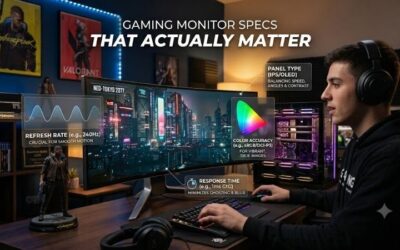
Refresh rate describes display updates rather than GPU output. Higher refresh ceilings benefit competitive titles with sufficient frame rates, but demanding games remain hardware-limited. Adaptive sync reduces tearing during supported frame-rate fluctuations. The MSI G244F E2 combines manageable 1080p resolution with 180Hz support.
Advertised response times require separate interpretation: a rated 1ms pixel transition does not establish system latency or consistent pixel performance. Avoid treating similar marketing specs as equivalent measurements. For competitive hardware, favor appropriate resolution and refresh support; the MSI G244F E2 delivers that combination.
Check Stand Adjustment and Desk Fit
Stand flexibility determines screen placement without extra accessories. Height adjustment supports varied seating, while swivel and pivot support shared workspaces or portrait tasks. Fixed-height designs work when their placement matches your desk. Account for mounting expenses before comparing the AOC against cheaper options.
The best gaming monitor for a budget build should accommodate your desk setup without unexpected accessory purchases. The AOC 24G4 provides height, swivel, and pivot adjustment; the Dell G2724D offers comparable stand flexibility. MSI and ASUS use tilt-only stands. For changing seating setups or shared workspaces, favor the adjustable AOC 24G4.
Pay for Connections You Will Actually Use
Connectivity matters when combining desktop gaming with another device. Multiple inputs simplify connections, while built-in speakers eliminate separate audio hardware for basic entertainment. These conveniences matter only when relevant to your setup. For simple sound and connectivity, consider the ASUS TUF Gaming VG249Q3A’s two HDMI inputs.
Built-in audio saves space rather than replacing gaming headphones. The ASUS TUF Gaming VG249Q3A includes two 2W speakers and DisplayPort alongside its HDMI connections. However, its stand lacks height adjustment, potentially adding mounting costs. Choose this ASUS when simple audio matters and the supplied stand suits your desk.
Top Picks
Choosing the best gaming monitor for a budget build requires comparing complete purchases rather than isolated screen prices. These picks assign distinct roles based on verified specs and practical compromises. Discounts, accessory needs, seller reliability, and inventory determine which option delivers strong value for your setup.
| Product | Best For | Key Spec | Watch Out For |
|---|---|---|---|
| AOC 24G4 | Best Overall | 23.8-inch IPS, 1080p, 180Hz | Limited desktop space at 1080p |
| MSI G244F E2 | Best Value | 23.8-inch Rapid IPS, 1080p, 180Hz | Tilt-only stand |
| Dell G2724D | Best For 1440p Gaming | 27-inch Fast IPS, 1440p, 165Hz via DisplayPort | Limited stock; 144Hz via HDMI |
| ASUS TUF Gaming VG249Q3A | Best For Built-In Audio | 23.8-inch IPS, 1080p, 180Hz, two 2W speakers | No height adjustment |
AOC 24G4: Best Overall
The AOC 24G4 earns the overall pick through its balanced combination of gaming specs and adjustable ergonomics. Its 23.8-inch IPS display provides 1920 x 1080 resolution and 180Hz support. Height adjustment, swivel, and pivot accommodate different desk arrangements without requiring a separate monitor arm, simplifying your purchase.
Its meaningful limitation is workspace: 1080p provides less desktop capacity and finer-detail reproduction than the Dell’s 1440p panel. Buyers combining documents or exploring expansive worlds should consider that compromise. However, the best gaming monitor for a budget build centered on practical 1080p performance starts with the AOC.
MSI G244F E2: Best Value
The MSI G244F E2 becomes the value pick when discounted below the AOC and positioned comfortably without extra mounting hardware. Its 23.8-inch Rapid IPS display combines 1920 x 1080 resolution with 180Hz support through HDMI or DisplayPort. Those specs suit competitive gaming without directing extra spending toward elaborate stand adjustment.
Its tilt-only stand limits desk setups requiring height correction. Adding an aftermarket arm can erase the initial saving, while MSI’s standard 75 x 75mm VESA pattern requires compatible mounting hardware. Choose this model when desk geometry suits its fixed height and the complete purchase remains cheaper than the AOC.
Dell G2724D: Best for 1440p Gaming
The Dell G2724D targets buyers whose GPU supports sharper gaming alongside expanded desktop workspace. Its 27-inch Fast IPS display provides 2560 x 1440 resolution, reaching 165Hz through DisplayPort or 144Hz through HDMI. Height, swivel, tilt, and pivot adjustment accommodate varied working setups without extra mounting accessories.
Availability complicates this pick: Dell now marks the G2724D unavailable through its US store. Remaining inventory deserves careful price and seller comparison before purchasing. Higher rendering demands and absent built-in speakers require planning. Purchase this Dell only when reputable remaining stock offers competitive value.
ASUS TUF Gaming VG249Q3A: Best for Built-In Audio
The ASUS TUF Gaming VG249Q3A targets compact desk setups requiring simple built-in audio. Its 23.8-inch IPS display combines 1920 x 1080 resolution and maximum 180Hz refresh support with two 2W speakers. Dual HDMI inputs plus DisplayPort accommodate multiple connected devices, making it convenient for entertainment alongside gaming.
Its limitations matter: built-in speakers cannot replace dedicated headphones for demanding positional audio, and the tilt-only stand restricts placement. ASUS specifies 250-nit typical brightness, making strong ambient glare another practical concern. Choose this model when modest audio needs and suitable desk geometry justify these compromises.
Frequently Asked Questions
Selecting the best gaming monitor for a budget build raises questions about spending, resolution, refresh rates, and marketplace purchases. These answers distinguish worthwhile improvements from unneeded expenses with relevant exceptions. Your current hardware and everyday tasks should determine buying priorities before possible future upgrades.
How Much Should I Spend on a Budget Gaming Monitor?
Spend according to required specs within your hardware allowance rather than a fixed universal figure. Promotions change relative value, making exact-model comparisons more useful than assumed price rankings. Include mounting accessories and audio equipment before deciding. Keep enough funding for GPU performance and essential peripherals.
An existing display changes that calculation. GPU upgrades may improve performance more in demanding games, whereas replacing a 60Hz screen becomes attractive when hardware generates high frame rates. Establish your spending ceiling before comparing accessories; repeated minor upgrades can otherwise consume too much of the build budget.
Is 1080p or 1440p Better for a Budget Build?
1080p usually suits low-cost hardware prioritizing frame rates, while 1440p benefits stronger GPU systems and detail-focused tasks. Choosing the best gaming monitor for a budget build requires benchmarks at your intended resolution. Prefer steady performance at comfortable settings over extra sharpness that forces compromises in favorite games.
Productivity creates an exception: expanded workspace may justify 1440p even when demanding games require reduced settings. The Dell addresses that need, while the smaller options favor manageable 1080p gaming. Base buying decisions on available hardware unless an upgrade already has funding; unplanned purchases rarely justify overspending.
Is a 180Hz Monitor Worth It Over a 144Hz Monitor?
180Hz makes sense when the extra cost remains modest and existing hardware produces very high frame rates. Its advantage over 144Hz remains smaller than the transition from 60Hz to 144Hz. Therefore, large extra costs need more justification than refresh specs. Stand flexibility and gaming needs also matter when comparing these screens.
After installation, select the intended refresh rate in your operating system’s display settings. Check in-game frame limits against your performance target. Aggressive overdrive can introduce bright trails around moving objects; reducing overdrive intensity can improve motion clarity despite slower advertised response times.
What Should I Check Before Buying a Monitor on Amazon?
Verify the exact model, seller identity, product condition, and return terms. Similar names can conceal different stands or refresh features, while open-box inventory differs from factory-new stock. Confirm warranty support and return responsibility. Clear buyer protections can justify paying slightly more than an unclear offer.
Keep packaging while checking for stuck pixels, uneven lighting, and connection problems within the return period. Evaluate the display using your intended resolution and refresh settings rather than desktop use alone. Marketplace titles are incomplete; compare detailed specs against your chosen model and retain order records for support requests.
Final Thoughts
The best gaming monitor for a budget build balances GPU support, desk setup needs, and complete purchase cost. Choose AOC 24G4 for adjustable ergonomics, MSI G244F E2 for conditional savings, Dell G2724D for competitively priced 1440p stock, or ASUS TUF Gaming VG249Q3A for built-in audio. Favor present needs over future upgrades.
Ready to decide? Our #1 pick for 2026 is the AOC 24G4.
Live price & availability on Amazon.