What to look for in an aio cooler starts with details missing from photographs: radiator clearance, mounting hardware, and motherboard connections. An attractive design can still be incompatible with your computer. Confirm compatibility before purchasing, then install the sealed unit with power disconnected, following its manual.
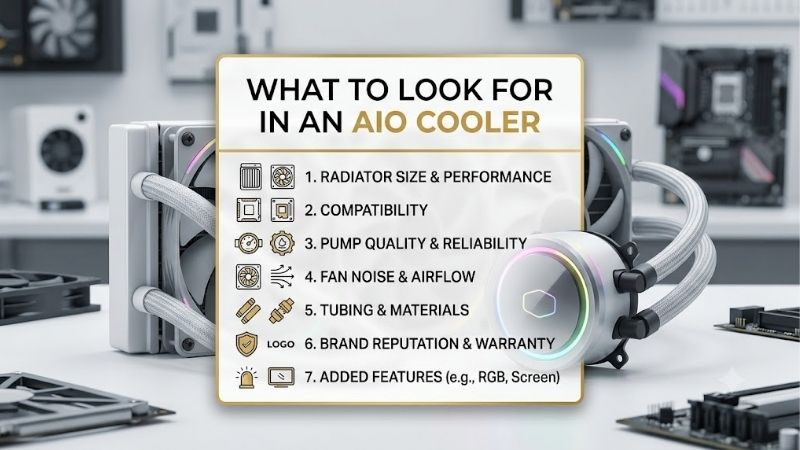
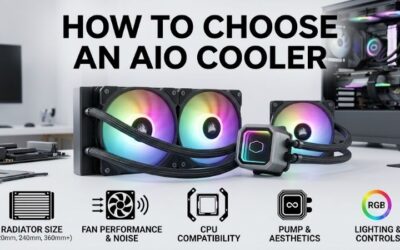
How to Choose an AIO Cooler
This guide explains what to look for in an aio cooler through four decisions: physical fit, workload and noise, socket installation, and controls. Four 240mm models illustrate those trade-offs, connecting specifications with practical buying situations. Compare straightforward wiring, thicker radiators, lighting, and LCD customization.
Radiator Clearance and Tube Reach
Radiator labels describe fan layout rather than complete dimensions. A 240mm unit typically accommodates two 120mm fans, but end tanks require additional length. Top installations need clearance above memory and motherboard heatsinks; front mounts require space between the radiator assembly and graphics hardware, plus tubing access.
Cooler Master MasterLiquid 240L Core ARGB measures 277 x 119.6 x 27.2mm, whereas ARCTIC Liquid Freezer III 240 uses a thicker 38mm radiator. Include fan depth and mounting allowances when measuring clearance. Choose Cooler Master for restricted spaces, or ARCTIC when the complete assembly fits comfortably without obstructing installed components.
Processor Workload and Acceptable Noise
Deciding what to look for in an aio cooler requires examining sustained processor power rather than advertised thermal ratings. Intermittent gaming differs from continuous rendering. Compare independent measurements at equivalent power and noise: lower temperatures achieved through maximum fan speed may come with increased operating noise.
Maximum RPM and published noise ratings cannot establish rankings when measurement conditions differ. Look for controllable fans and enough cooling capacity at speeds you tolerate. Choose Corsair NAUTILUS 240 RS for motherboard-based PWM control, or ARCTIC Liquid Freezer III 240 when separate pump, radiator, and VRM adjustment matters.
Socket Support and Mounting Procedure
Check the exact processor socket and mounting accessories before ordering. Intel and AMD branding alone cannot establish compatibility, and older sockets may require hardware missing from newer models. Examine the installation manual as well as the socket table: a supported cooler can still introduce procedures you would rather avoid.
ARCTIC’s supported Intel installation replaces the stock retention mechanism with its contact frame, requiring additional care. Choose Corsair NAUTILUS 240 RS for conventional mounting on compatible modern sockets, or Cooler Master MasterLiquid 240L Core ARGB when its listed older-socket coverage provides the hardware your platform requires.
Controls, Optional Features, and Coverage
Understanding what to look for in an aio cooler means separating necessary controls from decoration. Power, fan regulation, lighting, and display connections perform different functions. Count available headers and examine warranty terms; a screen cannot compensate for unsupported connections or missing mounting hardware during installation.
Corsair NAUTILUS 240 RS connects directly to motherboard controls without a separate controller, simplifying configuration. NZXT Kraken Plus 240 uses CAM for customizable display content and lists six-year coverage. Choose Corsair for a straightforward control arrangement, or NZXT when you specifically want an LCD and accept software configuration.
Top Picks
These recommendations translate what to look for in an aio cooler into distinct priorities. Best Overall favors practical controls; Best Value remains conditional on delivered pricing. Specialist options serve spacious AMD builds or display customization. All four are sealed 240mm models; larger cooling requirements warrant a separate comparison.
| Product | Best For | Key Spec | Watch Out For |
|---|---|---|---|
| Corsair NAUTILUS 240 RS | Best Overall | 240mm; two RS120 fans; motherboard control | No listed LGA1200 or 115X support |
| Cooler Master MasterLiquid 240L Core ARGB | Best Value | 277 x 119.6 x 27.2mm radiator; two 120mm ARGB fans | Three-year warranty; lighting adds connections |
| ARCTIC Liquid Freezer III 240 | AMD builds with extra clearance | 38mm radiator; integrated VRM fan; AMD offset mounting | Thick assembly; check motherboard clearance |
| NZXT Kraken Plus 240 | LCD customization | 1.54-inch LCD; 281 x 120 x 27mm radiator | CAM setup; display adds no cooling surface |
Corsair NAUTILUS 240 RS: Best Overall
Corsair NAUTILUS 240 RS suits builders wanting liquid cooling without a display or proprietary controller. Its 240mm radiator includes two RS120 fans capable of 2,100 RPM. Daisy-chained connections reduce wiring clutter, while pre-applied thermal paste removes one preparation step. These features simplify organizing a conventional supported build.
Its limitation is socket coverage: Corsair lists AM4, AM5, LGA1700, and LGA1851 instead of older Intel LGA1200 or 115X platforms. LCD customization is unavailable. Choose it when motherboard control suits your preferences and supported hardware; five-year warranty coverage adds a support period without guaranteeing a particular service life.
Cooler Master MasterLiquid 240L Core ARGB: Best Value
Cooler Master MasterLiquid 240L Core ARGB provides lighting and broad listed socket support. Its 277 x 119.6 x 27.2mm radiator combines with two 25mm-thick 120mm PWM fans. Approximately 52.2mm of assembled depth, before installation allowances, makes it useful where verified clearance excludes thicker options above motherboard components.
Its three-year warranty is shorter than Corsair’s five-year coverage, and lighting adds connections. Value depends on the actual purchase total rather than guaranteed lowest pricing. Choose it when supplied brackets match your platform and meaningful savings compensate for reduced coverage; illumination cannot justify an unsuitable purchase.
ARCTIC Liquid Freezer III 240: Best for Roomy AMD Builds
ARCTIC Liquid Freezer III 240 suits compatible AM4 or AM5 systems accommodating a 277 x 120 x 38mm radiator plus fans. AMD offset mounting shifts the cold plate toward the processor’s heat-producing area. An integrated VRM fan supplies socket airflow, and included cables permit combined operation or independent adjustment of cooling components.
Its thicker assembly requires careful clearance checks, while oversized motherboard M.2 heatsinks can create compatibility issues. Intel users also face contact-frame installation. If what to look for in an aio cooler includes socket airflow and adjustable controls, this model deserves consideration once its requirements match your configuration.
NZXT Kraken Plus 240: Best for LCD Customization
NZXT Kraken Plus 240 targets buyers wanting pump-mounted information or personalized graphics. Its 1.54-inch LCD offers 240 x 240 resolution, paired with a 281 x 120 x 27mm radiator and two non-RGB F120P fans. CAM supports temperature displays, images, and animations, distinguishing this model through customization rather than radiator lighting.
The drawback is software configuration for customization that cannot expand radiator surface or guarantee lower temperatures. Compare pricing with screen-free alternatives before assigning value to the LCD. Choose it when CAM customization appeals and required connections suit your motherboard; NZXT lists six-year warranty coverage for this model.
Frequently Asked Questions
The final step in what to look for in an aio cooler concerns sizing and ownership. These answers address radiator capacity, orientation, maintenance, and warranty requirements after installation. Specifications help narrow your shortlist, but case documentation and mounting instructions determine whether the assembly works in your configuration.
Should You Buy a 240mm or 360mm AIO?
Choose according to processor power, workload, tolerable noise, and mounting space. A 360mm radiator provides more surface area than a comparable 240mm design, potentially permitting slower fans under equivalent loads. That advantage cannot establish necessity for every gaming processor or guarantee equivalent performance between unrelated models.
A larger radiator can conflict with drive cages, memory clearance, or graphics-card length. Some modest-power processors remain well served by air cooling, making either AIO an optional purchase. Check comparable thermal tests before purchasing, and prioritize a unit that fits comfortably over one requiring an awkward case arrangement.
Does the Radiator Need to Sit Above the Pump?
Yes, the radiator’s highest point should remain above the pump for these CPU-mounted designs. This position collects air away from the pump. Top mounting provides a straightforward arrangement; front placement with downward-facing tube connections is preferable when tubing length and available space accommodate that orientation.
Top exhaust removes radiator heat, while front intake supplies outside air to the radiator but releases its heat inside the case. Processor and graphics temperatures can therefore respond differently. Avoid placing the entire radiator below the pump, and confirm tubes reach without sharp bends or tension at the fittings.
Do You Need to Refill an AIO Cooler?
No, these sealed models require no routine refilling. Factory-filled circuits differ from custom loops intended for coolant replacement. Opening the assembly risks damage and warranty complications. Routine maintenance concentrates on clearing dust from radiator fins and fans, keeping power disconnected throughout cleaning and inspection.
When considering what to look for in an aio cooler, prioritize maintenance rather than assuming service-free ownership. Persistent new pump noise or unexplained temperature increases warrant investigation. If moisture or leakage appears, discontinue operation and contact support rather than running the computer throughout troubleshooting.
How Important Is the Warranty on an AIO?
Warranty matters because sealed liquid coolers contain a pump and coolant circuit alongside replaceable fans. Coverage establishes a support period rather than guaranteed longevity. Examine product-specific duration, regional terms, and purchasing requirements; brand recognition cannot establish whether your seller or ownership status qualifies.
Retain purchase records and examine return terms before choosing discounted or used inventory. Missing brackets, uncertain operating history, and nontransferable coverage can erase apparent savings. After changing processors, reassess cooling requirements before blaming higher temperatures on age; the new workload may explain the change.
Final Thoughts
Knowing what to look for in an aio cooler means matching fit, controls, and support with your workload. Choose NAUTILUS 240 RS for simplicity, MasterLiquid 240L Core ARGB for competitively priced lighting, Liquid Freezer III 240 for spacious compatible AMD builds, or Kraken Plus 240 for an LCD. Verify hardware and clearance before purchasing.